
PS-4 - Kitchen scale Cardinal Detecto - Free user manual and instructions
Find the device manual for free PS-4 Cardinal Detecto in PDF.


| Brand | Cardinal Detecto |
| Model | PS-4 |
| Product Type | Digital Kitchen Scale |
| Capacity | 4 lb x 0.1 oz / 2000 g x 1 g |
| Display | LCD, 5 digits, 0.8" high |
| Dimensions (W x D x H) | 6.69" x 5.91" x 1.5" (170 mm x 150 mm x 38 mm) |
| Platform Size | 5.87" x 4.75" (149.1 mm x 120.65 mm) |
| Platform Material | Stainless steel, removable for cleaning |
| Power Source | 9 VDC 100 mA adapter (included) or 9V alkaline battery (not included) |
| AC Adapter Input | 115 VAC 50/60 Hz or 230 VAC 50/60 Hz (depending on model) |
| Keys | ON/OFF, ZERO (tare), UNITS (lb/oz or g) |
| Operating Temperature | 50°F to 95°F (10°C to 35°C) |
| Zero Function | Auto-zero on power-up, manual zero up to 100% capacity |
| Units | Pounds & ounces or grams |
| Stability Indicator | "O" annunciator lights when display is stable |
| Calibration | Accessible by holding UNITS key for 3 seconds |
| Care Instructions | Clean with damp soft cloth and mild detergent; do not submerge or use solvents |
| Overload Protection | Avoid exceeding capacity to prevent load cell damage |
| FCC Compliance | Class A digital device, may cause interference in residential areas |
| Warranty Note | Damaged keyboard from pointed objects not covered |
Frequently Asked Questions - PS-4 Cardinal Detecto
User questions about PS-4 Cardinal Detecto
0 question about this device. Answer the ones you know or ask your own.
Ask a new question about this device
Download the instructions for your Kitchen scale in PDF format for free! Find your manual PS-4 - Cardinal Detecto and take your electronic device back in hand. On this page are published all the documents necessary for the use of your device. PS-4 by Cardinal Detecto.
USER MANUAL PS-4 Cardinal Detecto
Thank you for purchasing our Detecto Model PS-4 Digital Portion Scale. The PS-4 is equipped with a Stainless Steel platform that is easily removed for cleaning. With the included 9V DC adapter, the scale can be used in a fixed location or with a 9V alkaline battery (not included) as a portable scale.
This manual will guide you through installation, and operation of your scale. Please read it thoroughly before attempting to operate this scale and keep it handy for future reference.
FCC COMPLIANCE STATEMENT
This equipment generates, uses and can radiate radio frequency, and if not installed and used in accordance with the instruction manual, may cause interference to radio communications. It has been designed within the limits for a Class A computing device pursuant to Subpart J of Part 15 of FCC rules to provide reasonable protection against such interference when operated in a commercial environment. Operation of this equipment in a residential area may cause interference in which case the user will be responsible to take whatever measures necessary to correct the interference.
COPYRIGHT
All rights reserved. Reproduction or use, without expressed written permission, of editorial or pictorial content, in any manner, is prohibited. No patent liability is assumed with respect to the use of the information contained herein.
DISCLAIMER
While every precaution has been taken in the preparation of this manual, the Seller assumes no responsibility for errors or omissions. Neither is any liability assumed for damages resulting from use of the information contained herein. All instructions and diagrams have been checked for accuracy and ease of application; however, success and safety in working with tools depend to a great extent upon the individual accuracy, skill and caution. For this reason the Seller is not able to guarantee the result of any procedure contained herein. Nor can they assume responsibility for any damage to property or injury to persons occasioned from the procedures. Persons engaging the procedures do so entirely at their own risk.
Serial Number
Date of Purchase
Purchased Form
RETAIN THIS INFORMATION FOR FUTURE USE
TABLE OF CONTENTS
Installation 1
Unpacking 1
Power Supply 1
Batteries 1
Display Annunciators 2
Key Functions 2
Operation 3
Display Messages 4
Care and Maintenance 4
SPECIFICATIONS
| Capacity/Division | 4 lb x 0.1 oz2000 g x 1 g |
| Display LCD, 5 D | Digit, 0.8" High |
| Dimensions: | 6.69" W x 5.91" D x 1.5" H(170mm x 150mm x 38mm) |
| Platform Size 5.8 | 7" W x 4.75" D(149.1mm x 120.65mm) |
| Zero Established | on power uproutine and maintained byauto-zero circuitry. |
| Power | 115 VAC 50/60Hz or 230 VAC50/60 Hz powering a 9 VDC100 mA wall plug-in UL/CSA listed power supply or one (1)9 VDC Alkaline battery(Battery not included). |
| Temperature | 50 to 95 °F (10 to 35 °C) |
| Keys | ON/OFF, ZERO, UNITS |
PRECAUTIONS
Before using this scale, read this manual and pay special attention to all "WARNING" symbols:

IMPORTANT

INSTALLATION
UNPACKING
Before beginning installation of your scale, make certain the instrument has been received in good condition. When removing the scale from its packing, inspect it for signs of damage, such as exterior dents and scratches. Keep the carton and packing material for return shipment if it should become necessary. It is the responsibility of the purchaser to file all claims for any damages or loss incurred during transit.
-
Remove the scale from the shipping carton and inspect it for any signs of damage.
-
Plug-in the 9 VDC adapter or install the battery. Refer to the POWER SUPPLY or BATTERY sections of this manual for more instruction.
-
Place the scale on a flat level surface, such as a table or bench.
-
The scale is now ready for use.
POWER SUPPLY
To apply power to the scale using the supplied 9 VDC, 100 mA power supply, insert the plug from the power supply cable into the power jack on the back of the scale and then plug power supply into the proper electrical outlet. The scale is now ready for operation.

DO NOT connect the plug-in power supply to the scale with a battery installed in the scale.

BATTERY
The scale can use a "9V" size Alkaline battery (not included). If you wish to operate the scale from a battery, you must first obtain and install the battery. The battery is contained in a cavity inside the scale. Access is via a removable cover on the bottom of the scale.
INSTALLING THE BATTERY
- Turn the scale over so that the display is facing down and place it upside down on a flat level surface, such as a table or bench.

-
Locate the battery cover on the bottom of the scale.
-
Remove the cover by pushing in on the tab and pulling up exposing the battery connector.
-
Connect the snap connector to a 9 volt battery and place the battery in the cavity.

natural_image
Close-up of a battery pack with visible internal components and mounting holes (no text or symbols)-
Replace the battery cover (it will click when locked in place) and return the scale to the upright position.
-
Check the scale for proper operation.
DISPLAY ANNUNCIATORS

The annunciators are turned on to indicate that the scale display is in the mode corresponding to the annunciator label or that the status indicated by the label is active.
0
The O annunciator is turned on when the weight display is stable.
lb oz
Both the lb and oz annunciators are turned on to indicate that the displayed weight is in pounds and ounces.
g
The g annunciator is turned on to indicate that the displayed weight is in grams.
KEY FUNCTIONS
UNITS
- Press to change the weighing units to the alternate units of measurement.
- Press for 3 seconds to enter calibration mode.
ZERO
- Press to reset the display to zero up to 100% of the scale capacity.
ON/OFF
- Press and release to turn on scale.
- Press and release to turn the scale off.
OPERATION
TURN THE SCALE ON
Press the ON/OFF key to turn the scale on.
The scale will display

then change to the selected weighing units.
SELECT THE WEIGHING UNIT
Press the UNIT key to alternate between the selected weighing units.
WEIGH
Place the item to be weighed on the scale tray. Wait a moment for the scale display to stabilize, then read the weight.
To re-ZERO (tare) the weight display, press the ZERO key and continue. The scale will re-ZERO (tare) until the full capacity is reached.

The membrane keyboard is not to be operated with pointed objects (pencils, pens, fingernails, etc). Damage to keyboard resulting from this practice will NOT be covered under warranty.
DISPLAY MESSAGES
| DISPLAY | MEANING |
| Low | |
| ErrE | E^2 prom Error |
| ErrL | Zero count under 128 |
| ---- | Over capacity (upper dashes) |
| ---- | Under capacity (lower dashes) |
| ErrH | Zero count over 65,000 |
| SPnH | Calibration span too high |
| 00000 | Power-on zero count under calibration zero (-10%) |
| 00000 | Power-on zero count over calibration zero (+10%) |
battery
CARE AND MAINTENANCE
The heart of the PS-4 Digital Portion Scale is a precision load cell located in the center of the scale base. It will provide accurate operation indefinitely if protected against overload of scale capacity, dropping items on scale, or other extreme shock.
• DO NOT submerge the scale in water, pour or spray water directly on it.
• DO NOT use acetone, thinner or other volatile solvents for cleaning.
• DO NOT expose scale to direct sunlight or temperature extremes.
• DO NOT place scale in front of heating/cooling vents.
• DO clean the scale with a damp soft cloth and mild non-abrasive detergent.
• DO remove power before cleaning with a damp cloth.
• DO provide clean AC power and adequate protection against lightning damage.
• DO keep the surroundings clear to provide clean and adequate air circulation.

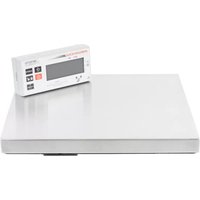
Brand : Cardinal Detecto
Model : PS-4
Category : Kitchen scale