
F676 - Receiver Fredenstein - Free user manual and instructions
Find the device manual for free F676 Fredenstein in PDF.


| Product Type | Stereo Receiver |
| Brand | Fredenstein |
| Model | F676 |
| Dimensions (W x H x D) | 430 x 90 x 310 mm |
| Weight | 7.5 kg |
| Power Supply | AC 100-240 V, 50/60 Hz |
| Power Consumption | 30 W |
| Audio Inputs | 4 x RCA, 1 x Optical, 1 x Coaxial |
| Audio Outputs | Speaker terminals (2 ch), Pre-out, Subwoofer |
| Radio Tuner | AM/FM with RDS |
| Bluetooth | Version 5.0 |
| USB Port | For media playback (USB Type-A) |
| Remote Control | Included, IR |
| Equalizer | 5-band graphic EQ |
| Max Power Output | 100 W per channel (8 Ω) |
| Frequency Response | 20 Hz - 20 kHz ±1 dB |
| Protection Features | Overload, short circuit, and thermal protection |
| Cleaning Instructions | Use a dry, soft cloth; avoid liquids and abrasive cleaners |
| Safety Precautions | Do not expose to moisture or rain; unplug during lightning storms |
| Spare Parts & Repairability | Available from authorized service centers; consult manual for details |
| Warranty | 2 years (see manual for terms) |
Frequently Asked Questions - F676 Fredenstein
User questions about F676 Fredenstein
0 question about this device. Answer the ones you know or ask your own.
Ask a new question about this device
Download the instructions for your Receiver in PDF format for free! Find your manual F676 - Fredenstein and take your electronic device back in hand. On this page are published all the documents necessary for the use of your device. F676 by Fredenstein.
USER MANUAL F676 Fredenstein
natural_image
Black silhouette of a human ear with the letter F inside, no text or symbols present.Fredenstein
Professional Audio
F676
Microphone
Preamplifier
Operating Manual
Overview:
The Fredenstein F676 Microphone Preamplifier is a valve (tube) based preamp with a fully balanced signal path throughout. The design incorporates high quality input and output transformers and features a zero Negative Feedback architecture. The F676 uses a Digital Signal Processor (DSP) to control the operating points of the tubes, guarantying perfect working conditions all the time. The final result is a preamp with a very pleasant sonic footprint, lush smooth highs without being harsh and very detailed mids and lows. The F676 will make a difference in any studio. The name F676 is a homage on the famous V76 microphone preamplifier designed by the German Broadcast System (NWDR) in the early 1950's and manufactured by several German companies.
Installation:
Located on the front panel, there are the LCD display, the LCD contrast regulator, the rotary control button, and the TRS direct (DI) input.
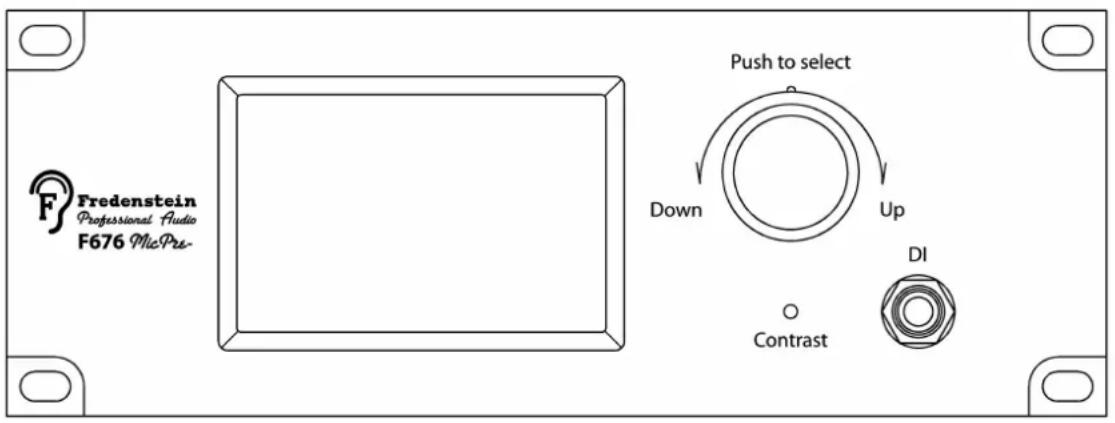
Fig. 1 F676 Front Panel
On the rear panel, is the position of the connectors for Microphone INPUT and Line OUTPUT, as well as the IEC MAINS POWER connector, MAINS SWITCH, and most importantly the MAINS VOLTAGE SELECTOR.
Please select your local mains voltage first before connecting the power!

Fig. 2 F676 Rear Panel
Operations:
After turning on the MAINS SWITCH on the rear panel, the unit performs a self test and after successful completion you will see the following screen:
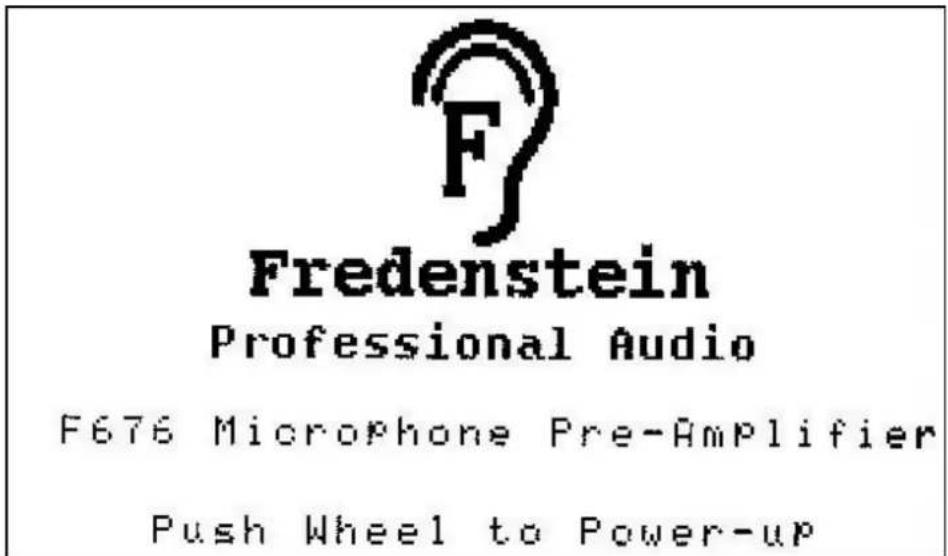
At this point the unit is in stand-by mode and the audio circuitry and the tubes are still powered-off.
To turn the F676 on, please push the rotary control. The F676 will power up and go through a tube calibration cycle. During this cycle you will see the anode currents in both halves of the push-pull Class A amplifier.
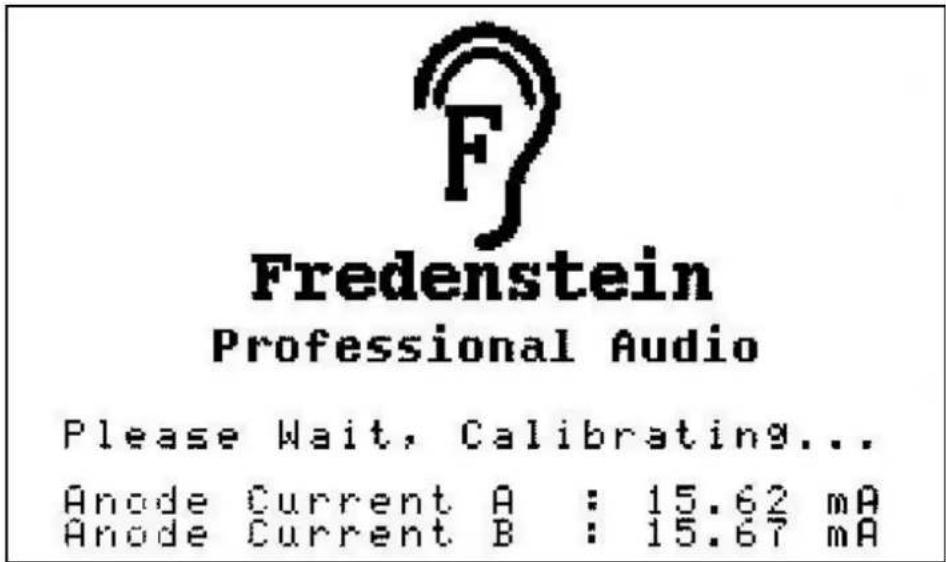
After the currents settled, the unit is fully operational and the user will be forwarded to the main menu.
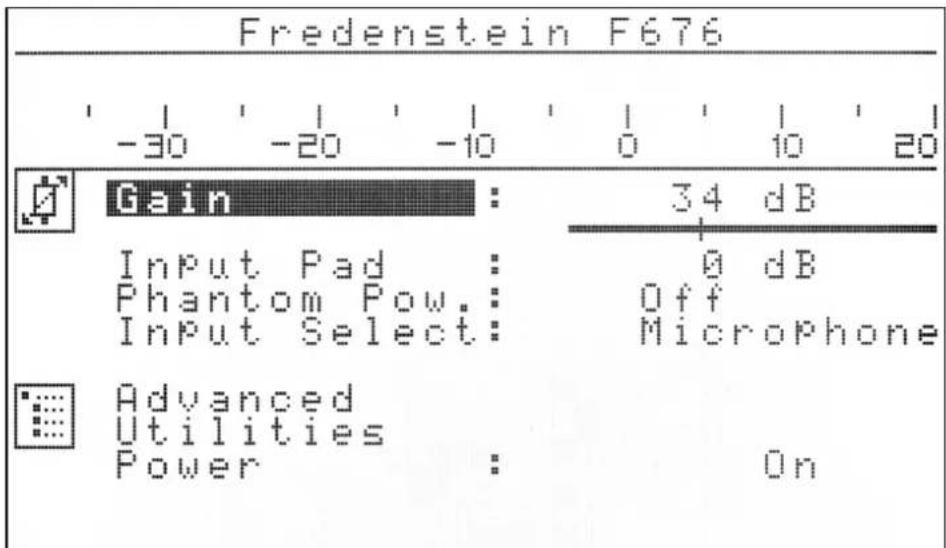
The top of the main menu pages displays the peak output level meter
The Main Menu allows to modify the following parameters:
Amplifier Gain:
The gain of the F676 can be adjusted in 1 dB steps in the range of 0 db and +76 dB. To adjust the gain move the cursor with the rotary control to the gain field and then press the rotary control.
The cursor will move from the left to the right and the rotary control becomes the gain “pot”. The change is applied immediately, therefore the engineer can hear the changes right away. When satisfied with the gain, push the rotary control again and the cursor will move back to the gain field and can be moved down to select different items. This procedure applies to all parameter adjustments
Input Pad:
An additional -20 dB input pad (attenuator) can be applied when dealing with very large input signals.
Phantom Power P48:
Industry standard 48V Phantom Power (P48) can be turned on for microphones requiring such a power source. Please be sure the connected microphone is made for P48 before turning it on. Most FET based condenser microphones use P48, while almost all tube based condenser, dynamic and ribbon microphones do not, some of them can be severely damaged if supplied with P48.
Input Selection:
the choices are “Microphone”, which uses the female XLR input connector located on the back panel, or “Direct” (DI), the instrument TRS input located on the front panel. The DI accepts both balanced (TRS) or unbalanced (TS) connections. The input impedance of the DI input is much higher (470 KOhms) to avoid loading of instrument pickups. There is no P48 on the DI input.
Sub-Menus:
There are two sub menus available to adjust the following parameters:
Advanced: Manipulation of advanced audio parameters
Utilities: Safe/Recall Parameters, Calibration etc.
Power:
The F676 can be turned off into stand-by mode. All current settings will be automatically stored at this point and will be applied after the next turn on.
Advanced Audio Sub Menu:
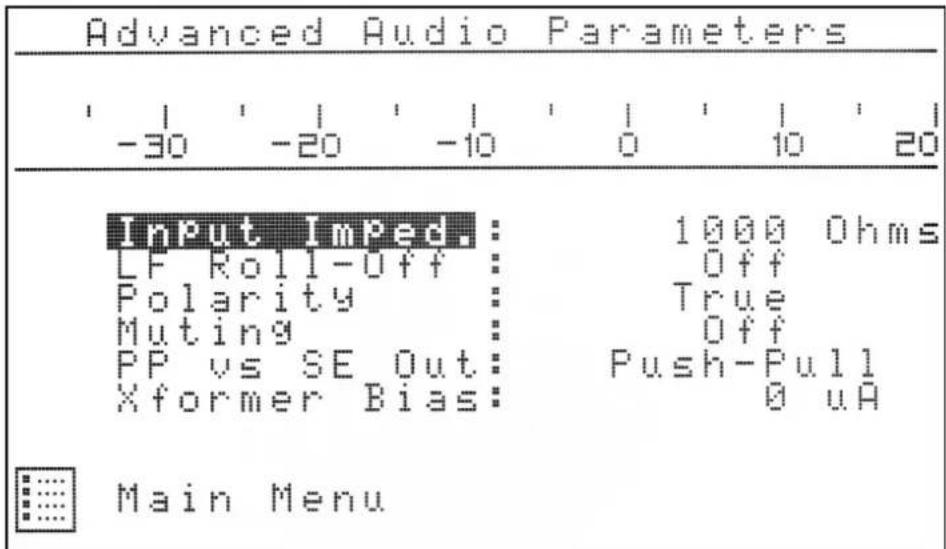
Input Impedance:
In general the 1000 Ohms setting will work the best with most microphones. Some dynamic and ribbon microphones however require a lower termination to exhibit their optimum frequency response. In this case, please select the 200 Ohms option.
Low Frequency Roll-Off:
To avoid recording unwanted low frequencies (rumble), a high-pass filter can be inserted. The three settings are:
OFF: no high-pass filter (full frequency response)
30Hz : all frequencies above 30Hz are amplified
60Hz : all frequencies above 60Hz are amplified
Polarity:
Due to placement of microphones sometimes the polarity (phase) needs to be changed. (An example would be a bottom microphone on a snare drum). In this case, select the reverse polarity.
Muting:
The amplifier can be muted to avoid unwanted signals to come through.
Push-Pull versus Single-Ended Output Configuration:
The output stage can be changed from normal push-pull to single-ended mode. This will change the sound characteristics. Values in between can also be achieved. Please note that the output level in single-ended mode is 6 dB lower.
Output Transformer DC Bias:
Another way to influence the sonic characteristics of the F676.
A constant DC current can the chosen in the output transformer. Its characteristics are hereby altered, the frequency response becomes narrower and the amp produces more 2nd harmonic distortion.
Utilities Sub Menu:

Store Configurations:
The F676 allows to store 99 complete setups. Please select the storage location by turning the rotary control. If the location was previously used, it is indicated, but you can overwrite it.
Recall Configuration:
You can recall the store configurations. Only previously stored configurations will be displayed and allowed to recall.
Factory Default:
The F660 can be reset to factory defaults. First select Factory default and then turn the rotary control to enable, then press the control to perform the reset to the factory defaults.
Main Menu:
Push main menu to get back to the main menu.
In addition the Utilities Menu displays the output tube currents and the internal temperature. The F676 deploys an ultra low noise magnetic levitation fan inside that has a very long life span. But in case of circuit or fan failures, if the internal temperature reaches 85C (185F) the F676 will automatically shut down.
Specifications:
Frequency Response: 20Hz - 20Khz +- 0.5dB
Distortion: < 0.1% (Push-Pull Mode no DC Bias)
Input Noise: -128dB at +30 dB gain
Gain Range: 0 dB to +76 dB without Pad
+20 db to + 56db with Pad
Input Impedance: 200 or 1000 Ohm user selectable,
470 KOhms for the DI input
Maximum Output Voltage: +30 dBu
Mains Voltage : 110V to 120V in the 115V range
or 220V to 240V in the 230V range
(user selectable)
Power Consumption: < 50W
Dimension (LxHxD): 242mm x 95mm x 270mm
Contact Info:
Fredenstein Professional Audio
by Orion Communication
7F-1, No. 582, Ruei Guang Rd.
Neihu District
Taipei 114
Taiwan
Phone : +886-2-2657-2618
Email: info@fredenstein.com
Web : www.fredenstein.com


- Fredenstein
- Professional Audio
- F676
- Microphone
- Preamplifier
- Operating Manual
- Overview:
- Installation:
- Operations:
- Amplifier Gain:
- Input Pad:
- Phantom Power P48:
- Input Selection:
- Sub-Menus:
- Power:
- Advanced Audio Sub Menu:
- Input Impedance:
- Low Frequency Roll-Off:
- Polarity:
- Muting:
- Push-Pull versus Single-Ended Output Configuration:
- Output Transformer DC Bias:
- Utilities Sub Menu:
- Store Configurations:
- Recall Configuration:
- Factory Default:
- Main Menu:
- Specifications:
- Contact Info:
- Fredenstein Professional Audio
Brand : Fredenstein
Model : F676
Category : Receiver