MPMAN

TS302 PAK - Mp3 player MPMAN - Free user manual and instructions

Find the device manual for free TS302 PAK MPMAN in PDF.

📄 40 pages English EN Download 💬 AI Question 10 questions ⚙️ Specs
Notice MPMAN TS302 PAK - page 8
Pick your language and provide your email: we'll send you a specifically translated version.
Product Type MP3 Player
Brand Mpman
Model TS302 PAK
Dimensions Approx. 4.3 x 2.0 x 0.6 inches (110 x 50 x 15 mm)
Weight Approx. 1.5 oz (42 g)
Power Source Built-in rechargeable lithium battery (3.7V, 200mAh)
Charging USB 2.0 via included cable
Display 1.8-inch TFT color screen
Storage Capacity 8GB internal (expandable via microSD up to 32GB)
Audio Formats MP3, WMA, WAV, APE, FLAC
Video Formats AMV, AVI (requires conversion)
FM Radio 87.5 - 108 MHz
Recording Voice recording via built-in microphone
Battery Life Up to 8 hours music playback
Connectivity USB 2.0, 3.5mm headphone jack
Operating System Windows XP/Vista/7/8/10, Mac OS X
Maintenance Clean with a soft, dry cloth. Avoid liquids.
Safety Do not expose to extreme temperatures. Keep away from water.
Spare Parts Available via manufacturer or authorized dealers.
Repairability Limited; battery replacement possible by qualified technician.
Package Contents MP3 player, USB cable, earphones, user manual

Frequently Asked Questions - TS302 PAK MPMAN

How do I turn on the Mpman TS302 PAK?
Press and hold the Power button for about 3 seconds until the screen lights up.
How can I transfer music to the device?
Connect the player to a computer via USB. It will appear as a removable drive. Drag and drop music files into the appropriate folder. Ensure they are in a supported format (MP3, WMA, etc.).
Does it support Bluetooth headphones?
No, the Mpman TS302 PAK does not have Bluetooth capability. It only supports wired headphones via the 3.5mm jack.
How do I expand the storage?
You can use a microSD card (up to 32GB) inserted into the slot located on the side of the device.
What do I do if the screen freezes?
Try performing a reset: insert a paperclip into the reset hole (small pinhole) on the device and gently press for a few seconds.
How can I listen to FM radio?
From the main menu, select Radio. You can automatically scan and save channels. Note that the earphones must be plugged in to act as an antenna.
Can I use it while charging?
Yes, you can use the player while it is charging via the USB cable. However, charging time may increase.
What file formats are supported?
Audio: MP3, WMA, WAV, APE, FLAC. Video: AMV, AVI (conversion required). E-book: TXT.
How do I set the equalizer?
Go to Settings > Equalizer. You can choose from presets like Rock, Pop, Jazz, Classical, or set a custom equalizer.
What should I do if the battery won't charge?
Check the USB cable and try a different port. If still not charging, the battery might need replacement. Contact Mpman support.

User questions about TS302 PAK MPMAN

0 question about this device. Answer the ones you know or ask your own.

Ask a new question about this device

The email remains private: it is only used to notify you if someone responds to your question.

No questions yet. Be the first to ask one.

Download the instructions for your Mp3 player in PDF format for free! Find your manual TS302 PAK - MPMAN and take your electronic device back in hand. On this page are published all the documents necessary for the use of your device. TS302 PAK by MPMAN.

USER MANUAL TS302 PAK MPMAN

For Model No. TS302 PAK
MPMAN TS302 PAK - 1

text_image Knocking on heaven's... Umbrella Risma Poker face You're my destiny The magic key

EN

MP3 & Video Player with Touchscreen Control Instruction Manual

Please read this instruction carefully before the operation

MPMAN TS302 PAK - 2

Table of Contents

THANK YOU....5

Package Contents....5

Features....5

CONTROLS AT A GLANCE....6

GETTING STARTED 8

Charging the Battery....8

Charging with a Computer 8

Turning the Player On/Off 8

Resetting the Player....9

Using the Touchscreen Controls 9

Installing a microSD Memory Card....9

Main Menu Controls ....10

MUSIC MODE....11

Music Browser Controls....11

Now Playing Controls (Music Playback)....12

Quick Option Menu 13

VIDEO MODE....15

Movie Browser Controls 15

Movie Playback Controls 16

PHOTO MODE....17

Photo Browser Controls....17

Photo Viewer Controls 17

Quick Option Menu 18

RADIO MODE....19

Radio Tuning Controls....19

Quick Option Menu 20

TEXT MODE 22

Text Browser Controls 22

Text Reader Controls....22

Quick Option Menu 23

EXPLORER MODE....25

Explorer Controls 25

Quick Option Menu 25

SETTING MODE 27

DV MODE....29
CAMERA MODE ....30
CALENDAR MODE 31
CLOCK MODE....32
MPMANAGER 33
SPECIFICATIONS....34
TROUBLESHOOTING & SUPPORT....35

MPMAN TS302 PAK - SETTING MODE 27 - 1

Thank You

Congratulations on your purchase of the Video & MP3 player. This manual is designed to help you easily set up and begin using your new player right away. Please read this manual carefully and retain it for future reference.

Package Contents

Please make sure that the items shown below are included in the package. Should an item be missing, please contact the local retailer from which you purchased this product.

✦ Video & MP3 player
USB Cable
✦ Instruction Manual & Documentation
✦ Professional Stereo Earphones
Protective Pouch

MPMAN TS302 PAK - Package Contents - 1

This package may contain plastic bags or other materials that pose a hazard to children. Be sure to safely dispose of all packing materials after opening.

Features

✦ Integrated flash memory
✦ Intuitive touchscreen control
2.8" TFT Display
◆ Plays music, video, photos and text
ID3 and LRC support for song and synchronized lyric information display
* microSD card slot for easy memory capacity upgrades (microSD card not included)
✦ Integrated FM Radio
✦ Integrated 0.3 Mega Pixel Camera
USB 2.0 Hi-speed for fast file transfers

MPMAN TS302 PAK - Features - 1

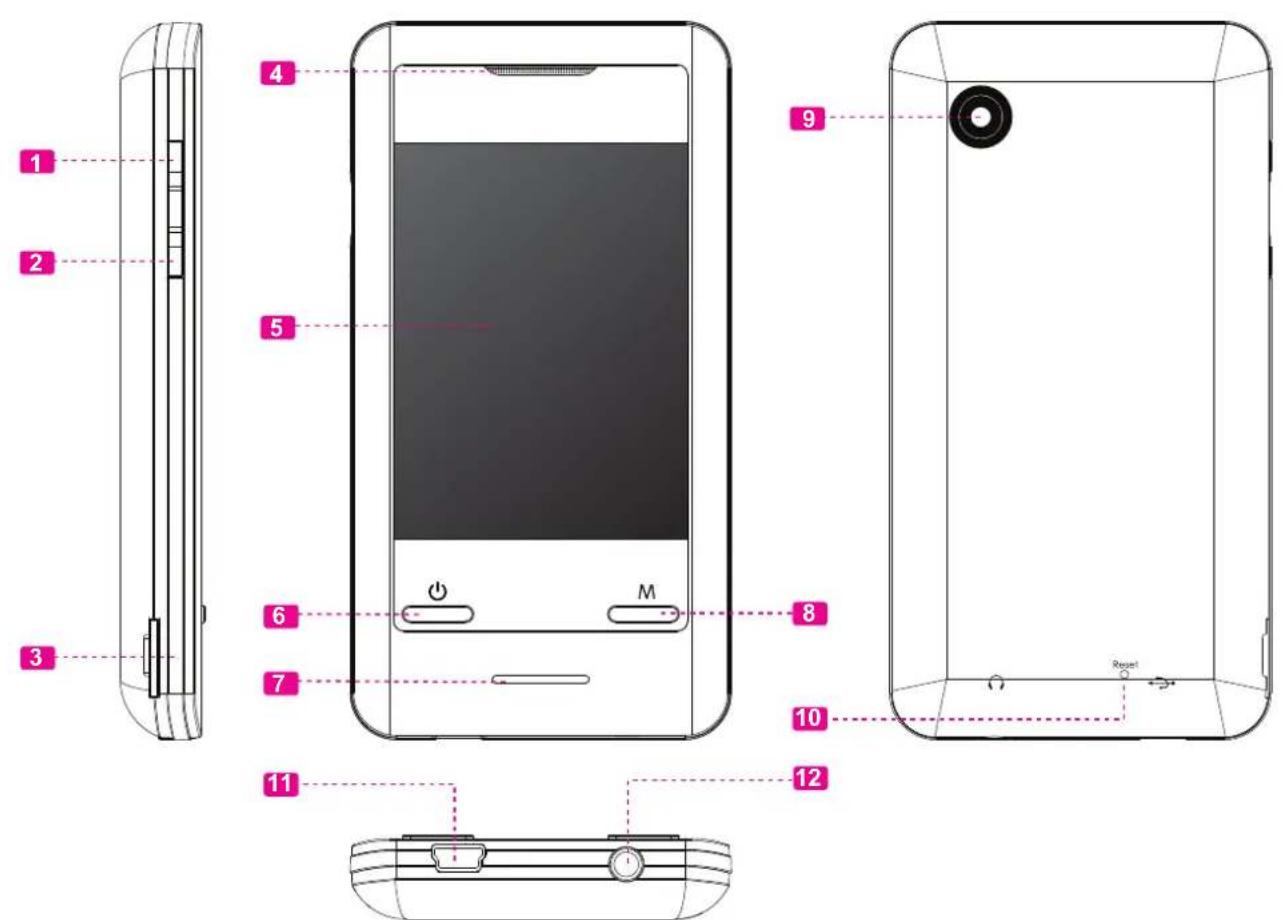
Controls at a Glance

Left View
1. Volume Up button
2. Volume Down button
3. microSD Card slotLoad a microSD memory card here to upgrade the memory capacity of the player.
Front View
4. Speaker
5. LCD touchscreenTap the display with your finger to activate the on-screen control.
6. Power/Enter buttonPress and hold the button to power the palyer on or off.
7. LED indicator
8. Menu button
Rear View
9. Camera LENS
10. Reset button
Bottom View
11. USB Port/ChargeConnect to a computer to transfer media files to the player.
12. 3.5mm Headphone Jack

MPMAN TS302 PAK - Controls at a Glance - 1

text_image Diagram of a smartphone showing internal components with numbered labels and directional arrows indicating parts like battery, switch, and reset.

Page 7 Controls At A Glance

MPMAN TS302 PAK - Controls at a Glance - 2

Getting Started

Charging the Battery

Your player has an integrated rechargeable battery. Upon initial use, the battery should be charged fully to ensure optimal performance and battery life.

If the player has not been used in a while, the battery may need to be recharged overnight (about 8 hours).

MPMAN TS302 PAK - Charging the Battery - 1

The battery used in this device may present a fire or chemical burn if mistreated. Do not disassemble, incinerate, or heat the battery. Do not leave the battery in a place subject to direct sunlight, or in a car with its windows closed.

MPMAN TS302 PAK - Charging the Battery - 2

Do not connect the player to a power source other than that which is indicated here or on the label as this may result in the risk of fire or electric shock.

Charging with a Computer

Your player can be charged through a USB computer connection. Use the supplied USB cable to connect the player to a high-power USB port of a computer. The computer must be powered on and not in sleep mode.

MPMAN TS302 PAK - Charging with a Computer - 1

When the player is connected and charging, a USB symbol will be displayed on the player's screen.

Turning the Player On/Off

To turn the player on, press and hold the button until the screen turns on.
To turn the player off, press and hold the button until the screen turns off.

Resetting the Player

Reset the player if it should freeze and not respond or otherwise malfunction.

  1. Disconnect your player if it is connected to a computer.
  2. Use a paper clip to gently press the button located on the rear of the player.

Using the Touchscreen Controls

Your video MP3 player comes equipped with an easy-to-use touchscreen which allows access to the player's functions. Use your finger tip or the stylus to tap the area of the screen where a control icon is displayed. If you tap and hold an icon, it will register as a continuous button press.

MPMAN TS302 PAK - Using the Touchscreen Controls - 1

To avoid damaging the screen, do not touch it with excessive force or with any object other than your finger or the stylus. For best response, make sure your hands are clean before using the touchscreen controls.

Installing a microSD Memory Card (optional)

You can upgrade the memory capacity of your player by adding microSD memory card.

Insert microSD card into the slot as shown in the illustration below.

MPMAN TS302 PAK - Installing a microSD Memory Card (optional) - 1

This player supports memory cards up to 2GB in size.

MPMAN TS302 PAK - Installing a microSD Memory Card (optional) - 2

When you turn on the player, you will see the Main menu.

From the Main menu, you can access each of your MP3 player's function modes. These modes are:

MusicBrowse and play music
VideoBrowse and play movies
PhotoBrowse and view pictures
RadioListen to FM radio broadcasts
TextBrowse and read text files
ExplorerBrowse all files
SettingAdjust the player's options
DVRecord video clips
CameraCapture still images
CalendarLaunch the calendar program
ClockSet the internal clock display

Each function mode is represented by an icon on the Main Menu screen. To enter a mode, tap the icon with your finger.

You may also use the player's standard controls to access each mode:

  • Press the or button to move the selection.
    ✦ Press to confirm.

MPMAN TS302 PAK - Main Menu Controls - 1

Music Mode

Browse for and play your music files.

MPMAN TS302 PAK - Music Mode - 1

For information about loading music onto your player, please refer to the section "Transferring Files to the Player".

Music Browser Controls

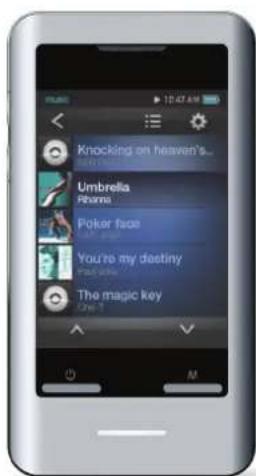
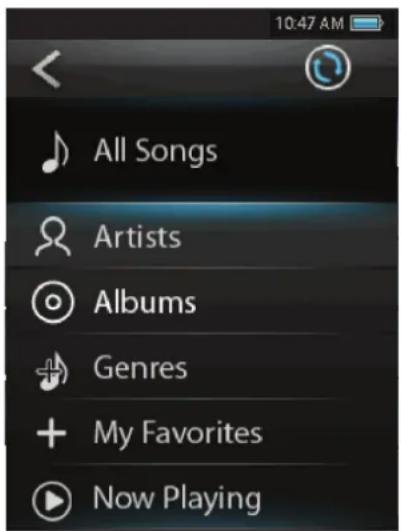
When you choose MUSIC mode from the Main menu, you will see the Music Browser screen.

Function Key Action
To browse through the Music & folders Pressoror
To select/view an item Press, or tapthe desired selection on the LCD screen.or tapthe desired selection on the LCD screen.
To return to the previous screenTap< on screen or press
To return to the Main menu Hold

You can also touch the > icon to refresh the music library if you have loaded new music files onto the player, this process may take several minutes. You will not be able to access the Music Browser screen until you refresh the music library.
MPMAN TS302 PAK - Music Browser Controls - 1

text_image 10:47 AM All Songs Artists Albums Genres My Favorites Now Playing

Now Playing Controls (Music Playback)

To start playing music, browse for a song and then tap the song title to start playback, or you can press to start playback.

When a song is playing, the Now Playing screen appears (see below).
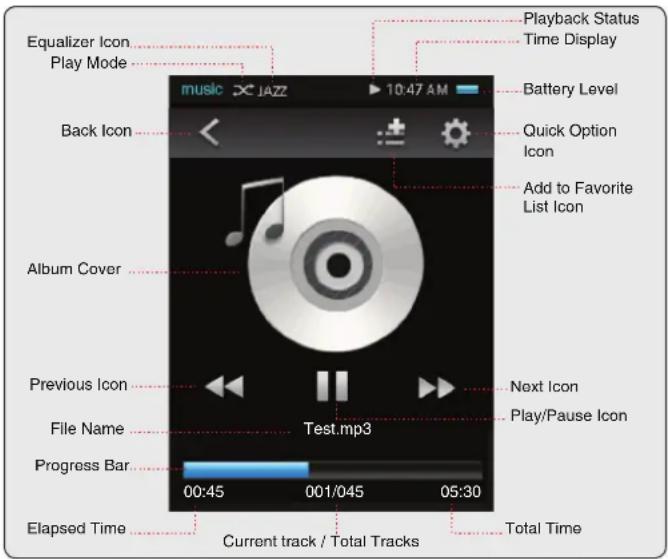
MPMAN TS302 PAK - Now Playing Controls (Music Playback) - 1

text_image Equalizer Icon Play Mode Back Icon Album Cover Previous Icon File Name Progress Bar Elapsed Time Playback Status Time Display Battery Level Quick Option Icon Add to Favorite List Icon Next Icon Play/Pause Icon 00:45 001/045 05:30 Current track / Total Tracks Total Time

The following functions may be performed from the Now Playing screen.

Function Key Action
To pause/resume playbackPressor tap the Play/Pause Icon on screen
To play the next track Tap▶▶on screen
To forward-scan through the track Hold▶▶on screen
To play the previous track Tap◀◀on screen
To reverse-scan through the track Hold◀◀on screen
To adjust the volume levelPressorbutton.
To access the Quick Option menu (see section below for details)Tap 🎨on screen
To return to the Music Explorer screenTap < on screen or pressbutton

MPMAN TS302 PAK - Now Playing Controls (Music Playback) - 2

Tap the screen once to view the controls.

Quick Option Menu

To access the quick option menu, tap 📋 on the Now Playing screen.

To browse through the settings, press the or button.
To select a setting, press the button tap the desired selection on screen.
To return to the previous screen, tap < > on screen or press the

button.

Repeat Mode

Change the repeat options to adjust the order in which tracks are played.

ItemDescription
Normal Play tracks in normal order and no repeat.
Single Play the current track repeatedly.
Random Play all tracks in random order.
All Play all tracks repeatedly.

Equalizer

Select a digital equalizer preset to optimize the way the player processes audio signals. The options are: Normal, Classic, Pop, Rock, and Jazz.

Add to Favorite

Add the current song to the Favorite list.

You can also tabicon on the Now Playing screen to add the song to the Favorite list.

MPMAN TS302 PAK - Add to Favorite - 1

To play the favorite songs, select "My Fave-reites" from the Music Browser screen.

Lyric

Set the Lyric display ON or OFF.

MPMAN TS302 PAK - Lyric - 1

Lyric display requires a ".LRC" lyric file which may be found on the internet or may be created with a Lyric file editor. Lyric files can contain synchronized timing information as well as lyric information.

Lyric files must have the same name as its corresponding music file (e.g., "SongTitle1.lrc" and "SongTitle1.mp3") and must be placed in the same directory.

MPMAN TS302 PAK - Lyric - 2

Video Mode

Browse for and play your movie files.

MPMAN TS302 PAK - Video Mode - 1

Your player supports AVI files. Videos may need to be encoded with the included software for device playback.

To return to the Main menu Hold

Movie Browser Controls

When you choose Video mode from the Main menu, you will see the Movie Browser screen.

Use the Movie Browser to find all movie files loaded on your player.

Function Key Action
To browse through the list of movie files & foldersPressor
To select/play an itemPressor tap the selection on screen directly
To return to the previous screenTap< on screen or press

Movie Playback Controls

When a video is playing, hold the player horizontally, the Now Playing screen appears:

Video playing window

MPMAN TS302 PAK - Movie Playback Controls - 1

text_image mvoie 10:47 AM test.avi 00:03:00 00:45:00 Elapsed time File name Total time

MPMAN TS302 PAK - Movie Playback Controls - 2

Tap the screen once to view the controls.

The following functions may be performed from the Now Playing screen.

Function Key Action
To play the next movie Tap▶▶
To play the previous movie Tap◀◀
To forward-scan quickly through the current movieHold▶▶
To reverse-scan quickly through the current movieHold ◀◀
To pause/resume playback Pressor tapIIor tap
To adjust the volume level Pressor
To return to the Movie Browser screenPressor tap<
To return to the Main menu Hold

MPMAN TS302 PAK - Movie Playback Controls - 3

Photo Mode

Browse for and view your photo files.

Photo Browser Controls

When you choose Photo mode from the Main menu, you will see the Photo Browser screen. Your Photo will be displayed as thumbnail images.

Use the Photo Browser to find all Photo files loaded on your player.

MPMAN TS302 PAK - Photo Browser Controls - 1

text_image photo 1247 AM icecream.jpg
  1. Folder
  2. Photo
  3. Name of the selected folder or photo
Function Key Action
To select/view an item Press, ortapthe desired selection on the LCD screen.
To return to the previous screenTap < on screen or press
To return to the Main menu Hold

Photo Viewer Controls

To view a Photo, browse through the thumbnail Photo and then press or tap on the selection directly.

The following functions may be performed from the Photo Viewer screen.

Function Key Action
To browse through the Photo & folders Pressoror
To view the next or previous Photo Pressor, ortap◀◀ ▶▶ screenor, or
To start or stop slideshow mode Tap or▶ II
To rotate the Photo Pressor tapon screen
To access the Quick Option menuTap 🎨 on screen
To return to the Photo Browser screen Pressor tap< on screenor tap< on screen
To return to the Main menu Hold

MPMAN TS302 PAK - Photo Viewer Controls - 1

Tap the screen once to view the controls.

Quick Option Menu

To access the quick option menu, tap 📋 on the photo viewing screen.

To browse through the settings, press the or button.

To select a setting, press the button or tap the desired selection on screen.
To return to the previous screen, tap < <> on screen or press the

button.

Save to PowerOn picture

Save the current photo as a PowerOn picture that will display when you power on the player.

Save to PowerOff picture

Save the current photo as a PowerOff picture that will display when you power off the player.

Slide Setting

Enter this menu to turn slideshow mode on or off, or to adjust the amount of time between photos during slideshow mode.

MPMAN TS302 PAK - Slide Setting - 1

Radio Mode

Listen to FM radio broadcasts.

MPMAN TS302 PAK - Listen to FM radio broadcasts. - 1

You must have a pair of headphones connected to the headphone jack to receive FM broadcasts; your player will utilize the headphone cord as an antenna.

Radio Tuning Controls

When you choose RADIO from the Main menu, you will see the Radio Tuning screen. You can search for stations, tune to stations manually, or tune to preset stations.

MPMAN TS302 PAK - Radio Tuning Controls - 1

text_image radio 10:47 AM ch.02 107.70 mono

The following functions may be performed from the Radio Tuning screen.

Function Key Action
To tune to a higher station manually Tap▶▶
To tune to a lower station manually Tap◀◀
To tune to the next preset stationTap▶
To access the Quick Option menuTap 🔊
To adjust the volume levelPressor
To return to the Main menuTap < on screen or press

Quick Option Menu

To access the quick option menu, tap 📋 on the Radio screen.

Area Select

Set the FM frequency range area

To browse through the settings, press the or button.
To select a setting, press the button or tap the desired selection on screen.
To return to the previous screen, tap < > on screen or press the

button.

Save Station Info

Save the current station to the Preset Station list.

You can also 📁 on the Radio screen to add the current station to the Preset Station list.

Read Station Info

Load the Preset station list.

Search Station

Scan for all stations in broadcast reception range. The player will automatically seek and save all frequencies with a broadcast signal to the Preset Station list.

MPMAN TS302 PAK - Search Station - 1

The auto scan feature will overwrite any previously stored Preset Stations.

You can also 📋 on the Radio screen to load the list.

✿ Press or to browse through the stations.
✿ Press or tap the desired selection to listen the station.

Delete Station Info

Delete station from the Preset Station list.

Delete All Stations Info

Delete all stations from the Preset Station list.

MPMAN TS302 PAK - Delete Station Info - 1

Text Mode

Read .TXT files loaded on your player.

Text Browser Controls

When you choose Text from the Main menu, you will see the Text Browser Screen.

Use the Text Browser to find all text files loaded on your player.

Function Key Action
To browse through the Photo & folders Pressoror
To select/view an item Press, or tapthe desired selection on the LCD screen.
To return to the previous screenTap<on screen or press
To return to the Main menu Hold

MPMAN TS302 PAK - Text Browser Controls - 1

text_image Upward Directory Friends.txt News.txt Story.txt

Text Reader Controls

The following functions may be performed from the Text Display screen.

MPMAN TS302 PAK - Text Reader Controls - 1

text_image A PIGEON, oppressed by excessive thirst, saw a goblet of water painted on a signboard. Not supposing it to be only a picture, she flew towards it with a loud whir and unwittingly dashed against the signboard, jarring herself terribly. Having broken her wings by the blow, she fell to the ground, and was caught
Function Key Action
To read the next page TapMPMAN TS302 PAK - Text Reader Controls - 2
To read the previous page Tap[Y330]
To read the next line Press
To read the previous line Press
To access the Quick Option menuTap [W0XX]
To return to the Text Browser screenTap MPMAN TS302 PAK - Text Reader Controls - 3press

To return to the Main menu Hold

Quick Option Menu

To access the quick option menu, tap 📋 on the Text reading screen.

To browse through the settings, press the or button.
To select a setting, press the button or tap the desired selection on screen.
To return to the previous screen, tap < > on screen or press the

button.

Auto Browse

Set the auto page scroll on or off.

✿ Press or tap the "Auto Browse" menu bar to toggle the setting.

Scroll Interval

Adjust the amount of time between pages during Auto Scroll mode.

✿ Press and or tap ⬆ and ⬇ to adjust the time in second.
✿ Press or tap to confirm the setting.
✿ Press

or tap<◀> to exit the setting without saving.

Scroll Extent

Set the type of Auto Scroll with One Line or One Page.

MPMAN TS302 PAK - Scroll Extent - 1

Explorer Mode

Enter Explorer mode to browse all folders and files loaded on your player.

To enter Explorer mode, select and confirm EXPLORER from the Main Menu.

Explorer Controls

When you choose EXPLORER mode from the Main menu, you will see the File Explorer screen.

Function Key Action
To browse through the Photo & folders Pressoror
To select/view an item Press, or tapthe desired selection on the LCD screen.tap
To access the Quick Option menuTap
To return to the previous screenTap<on screen or press
To return to the Main menu Hold

Files and folders will be displayed in a list. If a compatible file is selected, it will be played in its corresponding mode:

Playback Mode File Type
Music MP3, WMA
Video AVI
PhotoJPG, BMP, GIF
TextTXT

Quick Option Menu

To access the quick option menu, tap ⚙️ on the Explorer Browsing screen.

To browse through the settings, press the or button.
To select a setting, press the button or tap the desired selection on screen.
To return to the previous screen, tap < on screen or press the

button.

Add audio to List

Add the current song to the Favorite list.

MPMAN TS302 PAK - Add audio to List - 1

This additional setting just available when you selected a music file.

  1. Tap 🔒 to access the Quick Option menu.
  2. Select "Paste" and tap it to confirm.

File Information

Select to view the file storage information.

Delete

Delete the selected file or folder

Delete All

Delete all files in the selected folder.

Copy

Copy the selected file to another location on the player. Once you have copied the desired file:

  1. Tap on screen or press the button to back to the previous screen.
  2. Press or to highlight a desired destination folder that you want to copy the file to.

MPMAN TS302 PAK - Copy - 1

Setting Mode

Enter the Setup mode to set your player's system options.

To enter Setup mode, select SETUP in the Main menu.

Function Key Action
To browse through the options Pressor
To select an item Press, or tap the desired selection on the LCD screen.
To cancel and return to the previous screenTap< on screen or press
To return to the Main menu Hold

The following options are available. Some of these options may be set from the Quick Option menus.

ItemDescription
Language
-- Set the on-screen menu language.
Memory Information
--View used and available memory info.
Version
--View the player's firmware version.
Factory Setup
-- Restore all of the player's settings to their factory-default state.
Personal Setup
Auto PowerOff Time Set the duration of time (in minutes) that the player will remain on when it is idle. The setting of "Close" will disable this power-saving feature.
Screen Savers TimeAdjust the duration of time (in seconds) that the backlight will remain on after a key press. A setting of "Close" will keep the backlight on continuously.
Screen Calibrate Follow the screen signal to calibrate the touch point of LCD.
animation UI Set the slide transition effect between the different menu displays.

MPMAN TS302 PAK - Setting Mode - 1

DV Mode

Record video clips from your player.

Video Recording Controls

When you choose DV from the Main menu, you will see the Video Recording screen.

◆ Press the button to start recording.
- Press the button again to stop and save the recording.

The video recording files will be saved to the folder "C:\VIDEO\RECORD" and named "AKXXXXXX.AVI" where XXXXXX corresponds to the numerical sequence in which the recording was made (numbering starts from 000001).

- Press the

button to return the Main Menu without saving.

Change the video recording resolution

Tap on the right side of screen to toggle the resolution, the options include: 176 x 144, 352 x 288, 640 x 480. A lower recording resolution will result in a smaller size video.

MPMAN TS302 PAK - Change the video recording resolution - 1

Camera Mode

Capture still images from your player. Image Capturing Controls

When you choose Camera from the Main menu, you will see the Image Capturing screen.

Hold the player steady, then press the button to take a image.

The images were be saved to the directory: Time Capture

C:/IMAGE/RECORD and named "AKXXXXXX.JPG" where XXXXXX corresponds to the numerical sequence in which the recording was made (numbering starts from 000001).

- Press the

button to return the Main Menu without saving.

Change the shooting resolution

Tap on the right side of screen to toggle the resolution, the options include: 640 x 480, 1280 x 1024, 1600 x 1200. A lower shooting resolution will result in a smaller size image.

:Time Capture

Tap on the right side of screen to set the duration of time(in seconds) that the image will captured automatically after the button is pressed. Tap will disable this feature.

MPMAN TS302 PAK - :Time Capture - 1

Calendar Mode

View the Calendar.

MPMAN TS302 PAK - Calendar Mode - 1

Before using Calendar Mode, be sure that you have set the correct date and time in Clock Mode.

Calendar Viewing Controls

When you choose Calendar from the Main menu, you will see the Calendar screen.

◆ Press the or button to navigate from day to day.
Tap < or > icons that locate above the calendar list to navigate from month to month.

MPMAN TS302 PAK - Calendar Viewing Controls - 1

text_image < June 2010 >

Tap < that locate on the top side of screen or press

to exit to the Main Menu.

MPMAN TS302 PAK - Calendar Viewing Controls - 2

Clock Mode

To set the internal date and time.

Clock Setting Controls

When you choose Clock from the Main menu, you will see the Clock display screen.

MPMAN TS302 PAK - Clock Setting Controls - 1

text_image clock tue 16 / 07 / 2010 AM 04:58

Touch to access the clock setting screen.

MPMAN TS302 PAK - Clock Setting Controls - 2

text_image clock Set Time&Date Time 11:25 Date 12/08/10

Tap on to adjust the corresponding field.

From up to down and left to right, the fields are: Hour, Minute, Date, Month, and Year.

- Press to back to the Clock display screen and save the setting.

MPMAN TS302 PAK - Clock Setting Controls - 3

MPMANAGER

For movie and music synchronisation and conversion, please use MPMANAGER software supplied in the CD ROM.

This software can be used also for UPDATE of your player.

MPMANAGER manual is included in your CDROM.

MPMAN TS302 PAK - MPMANAGER - 1

Specifications

Design, specifications, and manual are subject to change without notice.

Display Type 2.8"TFT LCD @ 240x320
Memory IntegratedFlash Memory
Audio Format SupportMP3, WMA
Video Format SupportAVI: 320x240, 25fps
Photo Format SupportJPEG, BMP
Song Info SupportID3, Windows Media
FM Frequency Range87.5 - 108.0MHz
PC Interface USB 2.0 (MSC)
Plug and Play SupportWindows 7/Vista/XP Macintosh OS X
Audio Output 3.5mm Stereo (Headphone) Integrated Speakers
Power Rechargeable Li-Poly Battery USB Charge
Play Time Music: 7 hours*

* Music play time is an estimated value based on playing an MP3 encoded at 128 kbps. Actual play time may vary depending on encoding method used and other factors.

MPMAN TS302 PAK - Specifications - 1

Troubleshooting & Support

If you have a problem with this device, please check the troubleshooting guide below.

The player does not turn on.

◆ Ensure that the player is fully charged. Try charging the player overnight (8 hours).
Reset the player (use a paper clip to gently press the Reset button on the rear of the player) and try again.

The buttons do not work.

Reset the player (use a paper clip to gently press the Reset button on the rear of the player) and try again.

I cannot transfer files to the player.

◆ Ensure that your computer is running a supported operating system.
If using a USB extension cable, ensure that it is securely attached to the player and the PC, or try using another USB cable.
Ensure that the player's memory capacity is not full.

There is no sound during playback.

✦ Check the volume level.

- Ensure that the headphones are attached securely to the player.

The sound quality of the music is poor.

Try playing the file on your computer. If the sound quality is still poor, try downloading the file again or re-encoding the file yourself.
- Ensure that the bit rate of the file is not too low. The higher the bit rate of the file, the better it will sound. The minimum recommended bitrate is 128kbps for MP3s and 96kbps for WMAs.
♦ Try lowering the volume of the player.
- Ensure that the headphones are attached securely to the player.

The player will not play my music file.

◆ Ensure that the file is in a compatible format.
The file may be copy-protected and you no longer have authorization to play this file. If you feel this is in error, please contact the service from which you downloaded the file.

The LCD characters are corrupted or something is wrong with the display.

◆ Ensure that the correct menu language has been set.
Reset the player (use a paper clip to gently press the Reset button on the rear of the player) and try again.

The player has malfunctioned.

Reset the player (use a paper clip to gently press the Reset button on the rear of the player) and try again.

For more information please check our website

www.mpmaneurope.com

MPMAN TS302 PAK - The player has malfunctioned. - 1

CE

MPMAN TS302 PAK - The player has malfunctioned. - 2

A pleine puissance, l'écoute prolongée du baladeur peut endommager l'oreille de l'utilisateur

Table of contents Click a title to access it
Manual assistant
Powered by Anthropic
Waiting for your message
Product information

Brand : MPMAN

Model : TS302 PAK

Category : Mp3 player