
MultiSteam FC7008 - Steam cleaner PHILIPS - Free user manual and instructions
Find the device manual for free MultiSteam FC7008 PHILIPS in PDF.


| Product Type | Steam Cleaner |
| Brand | Philips |
| Model | MultiSteam FC7008 |
| Water Tank Capacity | 75 ml |
| Heat-up Time | Approx. 45 seconds |
| Noise Level | 71 dB(A) |
| Steam Control | Trigger mechanism (full press required) |
| Ready Indicator | Blue continuous light |
| Water Type Recommended | Demineralised water |
| Replacement Pads | Type FC8055 |
| Suitable Surfaces | Sealed stone, tiles, glass, ovens (not for untreated wood or laminate) |
| Safety Features | Automatic shut-off when not in use? Not specified; caution: hot steam |
| Power Source | Mains (corded) |
| Voltage | Check local voltage (typically 220-240 V) |
| Indoor Use Only | Yes |
Frequently Asked Questions - MultiSteam FC7008 PHILIPS
User questions about MultiSteam FC7008 PHILIPS
0 question about this device. Answer the ones you know or ask your own.
Ask a new question about this device
Download the instructions for your Steam cleaner in PDF format for free! Find your manual MultiSteam FC7008 - PHILIPS and take your electronic device back in hand. On this page are published all the documents necessary for the use of your device. MultiSteam FC7008 by PHILIPS.
USER MANUAL MultiSteam FC7008 PHILIPS
Register your product and get support at www.philips.com/welcome
Important Information

PHILIPS
ENGLISH
Introduction
Congratulations on your purchase and welcome to Philips! To fully benefit from the support that Philips offers, register your product at www.philips.com/welcome.
Important
Read this important information carefully before you use the appliance and save it for future reference.
Danger
- Never immerse the appliance in water or any other liquid, nor rinse it under the tap, except for the parts that can be removed for cleaning according to the instructions.
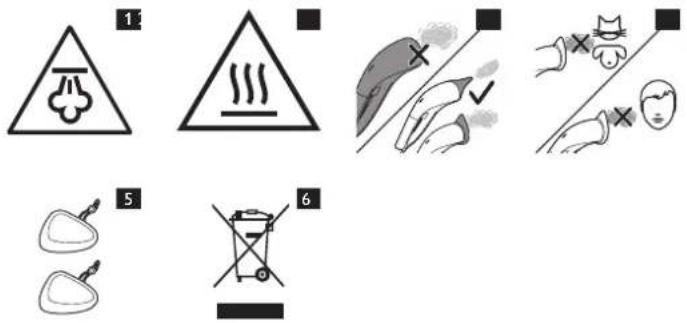
- Beware of hot steam that comes out of the appliance. Steam may cause scalding (Fig. 1).
- To avoid a hazard, do not move the appliance over its own mains cord or the mains cords of other appliances.
- Beware of the hot stove. Make sure the stove has cooled down sufficiently before you start to clean it.
Warning
- Check if the voltage indicated on the appliance corresponds to the local mains voltage before you connect the appliance.
- Do not use the appliance if the plug, the mains cord or the appliance itself shows visible damage, or if the appliance has been dropped or leaks.
- Always return the appliance to a service centre authorised by Philips for examination or repair. Do not attempt to repair the appliance yourself, otherwise the guarantee becomes invalid.
- If the mains cord is damaged, you must have it replaced by Philips, a service centre authorised by Philips or similarly qualified persons in order to avoid a hazard.
- Never leave the appliance unattended when it is connected to the mains.
- This appliance is not intended for use by persons (including children) with reduced physical, sensory or mental capabilities, or lack of experience and knowledge, unless they have been given supervision or instruction concerning use of the appliance by a person responsible for their safety.
- Children should be supervised to ensure that they do not play with the appliance.
- Keep the appliance and its mains cord out of reach of children.
- The surfaces, including nozzles and pads, can become extremely hot and may cause burns if touched during use (Fig. 2).
- The attachment must be fitted to the appliance before use. (Fig. 3)
- The water tank has a capacity of 75ml. Never fill the water tank with more than this amount.
- Never store the appliance at a temperature lower than 0°C.
- Never direct the hot steam from the appliance at people or pets (Fig. 4).
- Never direct the hot steam from the appliance at equipment containing electrical components such as the interior of ovens.
- Do not open the water tank cap when the appliance is operating.
Caution
- Only connect the appliance to an earthed wall socket.
- Do not use the appliance on the same spot too long, as this may damage the surface.
- Do not use the appliance to clean wood or laminate surfaces without a water-resistant top coat or whose water-resistant top coat is damaged. The steam may remove the sheen of wax-treated wooden surfaces. Always test an area out of direct view to make sure the surface can be cleaned with hot steam. We also advise you to check the maintenance instructions from the surface manufacturer.
- When the appliance is switched off, some steam may still come out. This is normal. When you have finished steam cleaning, always switch off and unplug the appliance and let the it cool down for 60 minutes before you store it.
- This appliance is intended for indoor household use only.
- Steam may damage or cause discolouration of certain surfaces.
- Noise level: Lc = 71 dB(A)
Type of water to be used
- To ensure a longer life for your appliance, use demineralised water in the water tank. This prevents fast scale build-up, especially in areas with hard tap water.
- Do not put detergents, perfume, vinegar, starch, descaling agents, ironing aids or other chemicals in the water tank, as your appliance is not designed to work with these chemicals.
Electromagnetic fields (EMF)
This Philips appliance complies with all applicable standards and regulations regarding exposure to electromagnetic fields.
Ordering accessories
To buy accessories or spare parts, visit www.shop.philips.com/service or go to your Philips dealer. You can also contact the Philips Consumer Care Centre in your country (see the worldwide guarantee leaflet for contact details). - You can order a set of new pads under type number FC8055 (Fig. 5).
Environment
- Do not throw away the appliance with the normal household waste at the end of its life, but hand it in at an official collection point for recycling. By doing this, you help to preserve the environment (Fig. 6).
Guarantee and service
If you need service or information or if you have a problem, please visit the Philips website at www.philips.com/support or contact the Philips Consumer Care Centre in your country. You find its phone number in the worldwide guarantee leaflet. If there is no Consumer Care Centre in your country, go to your local Philips dealer.
Troubleshooting
This chapter summarises the most common problems you could encounter with the appliance. If you are unable to solve the problem with the information below, visit www.philips.com/support for a list of frequently asked questions or contact the Consumer Care Centre in your country.
| Problem Cause Solution | ||
| The appliance does not produce any steam. | The appliance has not heated up sufficiently. | Let the appliance heat up for approx. 45 seconds. When the 'appliance ready' light burns blue continuously, the appliance is ready for use. |
| You have not pressed the steam trigger fully. | Press the steam trigger fully. The appliance only produces steam when you press the steam trigger fully. | |
| The water level in the water tank is too low. | Unplug the appliance and refill the water tank. | |
| The water tank is not in place. | Insert the water tank properly. | |
| Under certain conditions, the appliance may stop producing steam, even though the water tank still contains water. | Hold the appliance upside down to let water flow into the steam chamber. The appliance starts to produce steam again and you can continue steam cleaning. | |
| Water droplets drip from the steamer head. | The appliance has not heated up sufficiently. | Let the appliance heat up for approx. 45 seconds. When the 'appliance ready' light burns blue continuously, the appliance is ready for use. |
| The appliance produces a pumping sound/the handle vibrates. | Water is pumped to the steamer head to be converted into steam. | This is normal. |
| Under certain conditions, the appliance may stop producing steam, even though the water tank still contains water. | Hold the appliance upside down to let water flow into the steam chamber. The appliance starts to produce steam again and you can continue steam cleaning. | |
| The appliance does not heat up. | The appliance is not switched on. | Set the main switch to I to switch on the appliance. |
| The blue 'appliance ready' light goes on from time to time during steam cleaning. | This indicates that the appliance is heating up again. | This is normal. |
INDONESIA
Pendahuluani
Brand : PHILIPS
Model : MultiSteam FC7008
Category : Steam cleaner