
Studiophile AV 40 - Loudspeaker Avid - Free user manual and instructions
Find the device manual for free Studiophile AV 40 Avid in PDF.


| Product Type | Two-way desktop reference monitor |
| Brand | Avid (M-Audio) |
| Model | Studiophile AV 40 |
| LF Driver | 4" diameter, magnetically shielded, polypropylene treated paper cone with high-temperature voice coil |
| HF Driver | 1" diameter, magnetically shielded silk dome tweeter |
| Frequency Response | 85 Hz – 20 kHz |
| Crossover Frequency | 2.7 kHz |
| RMS SPL | 101.5 dB @ 1 meter |
| Signal-to-Noise Ratio | >90 dB (typical, A-weighted) |
| Input Connectors | Left and right RCA line input, left and right 1/4" TRS input, 1/8" aux input |
| Output Connectors | Stereo headphone output (front), right channel spring-clip terminals |
| Dynamic Power | 20 watts continuous per channel into 4 Ω |
| Input Impedance | 10 kΩ unbalanced, 20 kΩ balanced |
| Input Sensitivity | 100 mV pink noise produces 90 dBA SPL at 1 m with max volume |
| Protection | RF interference, output current limiting, over temperature, turn on/off transient, subsonic filter |
| Indicator | Blue power LED ring around volume knob on front panel |
| Power Requirements | 100-120V / 220-240V, ~50/60 Hz (switchable via red AC Select switch) |
| Cabinet Material | Vinyl-laminated MDF with internal bracing and acoustic damping |
| Dimensions (H x W x D) | 8.75" x 6" x 7.25" (222 x 152 x 184 mm) |
| Weight (pair) | 14 lbs (6.34 kg) |
| Magnetic Shielding | Yes (woofer and tweeter) |
| Bass Boost | 2-position switch on rear panel for ± low-frequency gain |
| Included Accessories | 1/8" stereo mini-to-RCA cable, 1/8" to 1/8" cable, tinned bare wire speaker cable, acoustic/traction pads, power cable, owner's manual |
| Warranty | Standard M-Audio warranty (register online at www.m-audio.com/warranty) |
Frequently Asked Questions - Studiophile AV 40 Avid
User questions about Studiophile AV 40 Avid
0 question about this device. Answer the ones you know or ask your own.
Ask a new question about this device
Download the instructions for your Loudspeaker in PDF format for free! Find your manual Studiophile AV 40 - Avid and take your electronic device back in hand. On this page are published all the documents necessary for the use of your device. Studiophile AV 40 by Avid.
USER MANUAL Studiophile AV 40 Avid
Professional Reference Speaker System

natural_image
Two black audio/video speakers on a studio with blurred background (no visible text or symbols)English User Guide
English 5
Introduction. 5
What's in the Box? 5
Studiophile AV 40 Features....6
Installation....7
Placing the Studiophile AV 40....9
Your Studiophile AV 40 Warranty 9
Appendices. 10
Introduction
1
Thank you for choosing the Studiophile AV 40 professional desktop multimedia audio monitors. Top recording engineers and producers in studios around the world use M-Audio monitors. Now, with the Studiophile AV 40 monitors, you can enjoy the same professional standard of audio quality right on your desktop.
The Studiophile AV 40 has been designed and tested by veteran audio engineers to meet your needs in a desktop audio monitoring environment. Custom-tuned cabinets, optimized speaker design, and advanced crossover technology deliver the best sound you can get in monitors this size. Complete with magnetic shielding for desktop use, Studiophile AV 40 delivers great audio experiences from your music and multimedia applications. The Studiophile AV 40 monitor is self-powered, directly accepting a line-level signal from a variety of sources.
What's in the Box?
2
Your Studiophile AV 40 box contains:
■ Two Studiophile AV 40 speakers (Left and Right)
Left: built-in amp and power supply; volume control, headphone jack, and auxiliary stereo input on the front; main RCA stereo input, 1/4" TRS input and right channel signal output on the back
Right: audio connection from left speaker on back
One 1/8" stereo mini-to-RCA audio cable for use with the main inputs
■ 2-conductor standard (keyed) power cable
1/8" stereo to 1/8" stereo audio cable (black color) for use with the "Aux" input
■ Tinned bare wire audio cable to send right channel audio to the right speaker (transparent color)
■ Acoustic/traction pads for speakers
Owner's manual
Studiophile AV 40 Features
3

1. Woofer
The woofer unit is 4" in diameter and is magnetically shielded to protect your computer video monitor from interference. It includes a high-temperature voice coil and 4" polypropylene treated paper cone. The woofer delivers balanced mid- and low-frequency response.
2. Tweeter
By employing a specially developed 1" treated silk dome with protective magnetic shielding, the tweeter can deliver an extremely natural response. It minimizes resonance by adapting a unique internal damping technology.
3. Bass Reflex Port
The hole in the rear panel is a bass reflex port. It is designed to discharge very low frequency signals and enhance the overall bass response.
4. Bass-Boost Control
The back panel Bass-Boost control on the Studiophile AV 40 gives you additional low-frequency gain and makes the monitors versatile for different spaces and listening preferences.
5. Enclosure
Along with the other components, the Studiophile AV 40's enclosure plays an important role. In order to provide more stable performance, we used a special medium-density fiberboard (MDF) and unique interior reinforcement designed to absorb vibration and impact generated under extreme conditions. Additionally, our innovative speaker monitor cabinet includes carefully placed acoustic material that makes the Studiophile AV 40 sound much bigger than it is—resulting in a smooth, natural bass response.
6. Stereo Auxiliary Input and Headphone Output
For maximum flexibility, we have included a stereo "Aux" input which allows you to plug in a secondary audio source (such as your portable music player) in addition to the main RCA and 1/4" TRS inputs in the back. The volume control works on all inputs simultaneously. Additionally, there is a stereo headphone output next to the "Aux" jack that mutes the sound coming out of the speakers and redirects it to your headphones.
7. Network & Power Amplifiers
The power amplifiers and crossover network, for the Studiophile AV 40 are specially designed for this woofer and tweeter. The network distributes low-, mid-, and high-frequency audio signals to the proper components in order to minimize distortion and to achieve a balanced sound.
Installation
4
For optimal performance of the Studiophile AV 40, please read the following directions carefully before installation.
Precautions
Connections: Your Studiophile AV 40 monitors have a variety of inputs for use with a multitude of devices. Soundcards or other devices with RCA line outputs (e.g., M-Audio Delta Audiophile 24/96) can be connected to the RCA inputs on your left speaker's back panel. Professional audio devices with balanced or unbalanced 1/4" outputs should be connected to the 1/4" TRS back panel inputs. If your soundcard or portable music player has an 1/8" output, you can connect it to the front panel aux input, using the provided 1/8" to 1/8" cable.
Correct Power Operation: Since the Studiophile AV 40 contains amplifiers, it must be connected to a power outlet using the detachable AC cable that is provided. Before connecting power, please make sure that the On/Off switch on the back of the Studiophile AV 40 is set to the off position.
WARNING! - Use of improper voltage may result in hazardous conditions and/or damage to speaker components not covered by speaker warranty. Please make sure the voltage is set appropriately by checking the the position of the red "AC Select" switch on the back before powering on your speakers.
Acoustic/Traction Pads
In order to minimize vibrations and maximize physical stability, we recommend you use the provided acoustic/traction pads on the bottoms of the Studiophile AV 40 monitors.
Speaker Wire Connections ①
Use the transparent tinned bare wire cable included in the Studiophile AV 40 package to connect the Left and Right speakers via the red /black spring-clip terminals on the back of each speaker.
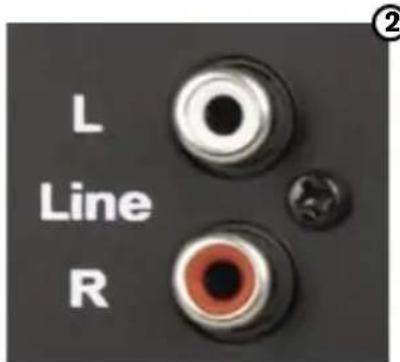
Connecting to a Computer Sound Card or Other Audio Output Device ②
Before connecting the Studiophile AV 40 monitors, make sure the power from the computer or other output device has been turned off and the Studiophile AV 40 system is also turned off.
Connect the 1/4" or RCA input jacks to the corresponding output connectors of a computer sound card, portable music player, etc. You can also use the black 1/8" stereo mini cable to connect a secondary audio device to the "Aux" input on the front of the Studiophile AV 40.
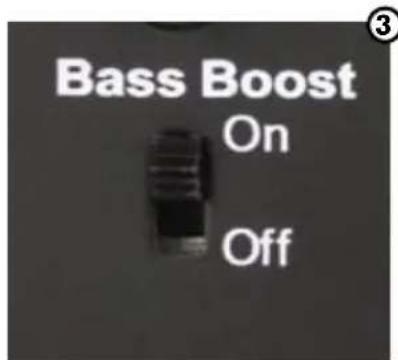
Setting the "Bass Boost" EQ Switch ③
This 2-position switch provides a subtle increase in bass response. The On mode increases the low-frequency gain slightly via the woofer and bass-reflex port. The Off mode produces a natural, even response for most listening conditions.
Please see Appendix C for the "Bass Boost" frequency response curve.

Placing the Studiophile AV 40
5
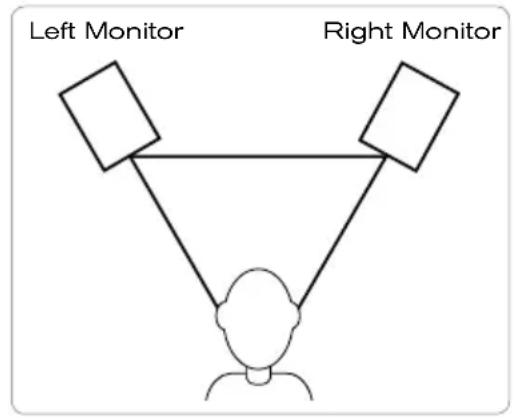
The way you position your speaker monitors can greatly affect the way they sound. Please refer to the following description for correct Studiophile AV 40 placement.
- The two speaker monitors and the listener should align to form an equilateral triangle.
- Ideally, the tops of the woofers should be level with the listener's ears.
flowchart
graph TD
    A["Person at bottom"] --> B["Left Monitor"]
    A --> C["Right Monitor"]
    B --> D["Line"]
    C --> D
    D --> E["Line"]
Your Studiophile AV 40 Warranty
6
Warranty Terms
M-Audio warrants products to be free from defects in materials and workmanship, under normal use and provided that the product is owned by the original, registered user. Visit www.m-audio.com/warranty for terms and limitations applying to your specific product.
Warranty Registration
Immediately registering your new M-Audio product entitles you to full warranty coverage and helps M-Audio develop and manufacture the finest quality products available. Register online at www.m-audio.com/register to receive FREE product updates and for the chance to win M-Audio giveaways.
Appendices
7
Appendix A - Technical Specifications
| Type: Two-way desktop reference monitor | |
| LF Driver: 4" diameter, magnetically shielded and curved cone with high-temperature voice coil | |
| HF Driver: 1" diameter, magnetically shielded silk dome tweeter | |
| Frequency Response: 85 Hz - 20 kHz | |
| Crossover Frequency: 2.7 kHz | |
| RMS SPL: 101.5dB @ 1 meter | |
| S/N Ratio: >90dB (typical, A-weighted) | |
| Input Connectors: left and right RCA Line input, left and right 1/4" TRS input and 1/8" aux input | |
| Polarity: positive signal at "+" input produces outward low-frequency cone displacement | |
| Dynamic Power: | 20 watts continuous, per channel into 4 Ω |
| Input Impedance: | 10 kΩ unbalanced, 20 kΩ balanced |
| Input Sensitivity: | 100 mV pink noise input produces 90 dBA output SPL at 1 meter with volume control at maximum |
| Protection: | RF interference, output current limiting, over temperature, turn on/off transient, subsonic filter |
| Indicator: | Blue power LED ring around volume knob on front panel |
| Power Requirements: | 100-120V/~50/60Hz, 220~240V/~50/60Hz; powered via detachable 2-conductor line cord |
| Cabinet: Vinyl-laminated MDF | |
| Dimensions: | 8.75" (H) x 6" (W) x 7.25" (D) |
| Weight: | 14 lbs./6.34 kg |
Specifications subject to change without notice
Appendix B - Block Diagram

flowchart
graph LR
    A["LEFT IN"] --> B["Balance INPUT AMPLIFIER"]
    C["RCA INPUT LEFT"] --> D["+"]
    E["TRS INPUT LEFT"] --> F["+"]
    G["AUX INPUT"] --> H["+"]
    I["TRS INPUT RIGHT"] --> J["+"]
    K["RCA INPUT RIGHT"] --> L["+"]
    M["VOLUME"] --> N["BASS-BOOST SWITCH"]
    N --> O["BASS-BOOST"]
    O --> P["NON-INVERTING AMPLIFIER"]
    P --> Q["+"]
    R["HEADPHONES"] --> S["POWER AMP"]
    T["Crossover"] --> U["2.7kHz"]
    V["1*HF Driver"] --> W["4*LF Driver"]
    X["RIGHT SPEAKER"] --> Y["2.7kHz"]
    Z["1*HF Driver"] --> AA["4*LF Driver"]
Appendix C - "Bass Boost" Frequency Response Curve

line
| Hz | d B r A | | ---- | ------- | | 20 | -12.0 | | 50 | +7.0 | | 100 | +4.0 | | 200 | +2.0 | | 500 | +0.5 | | 1k | 0.0 | | 2k | 0.0 | | 5k | 0.0 | | 10k | -1.0 | | 20k | -3.0 || M-Audio USA5795 Martin Rd., Irwindale, CA 91706 | |
| Technical Supportweb: www.m-audio.com/techtel (pro products): (626) 633-9055tel (consumer products): (626) 633-9066fax (shipping): (626) 633-9032 | |
| Salese-mail: sales@m-audio.comtel: 1-866-657-6434fax: (626) 633-9070 | |
| Web | www.m-audio.com |
| M-Audio U.K.Floor 6, Gresham House, 53 Clarenden Road, WatfordWD17 ILA, United Kingdom | |
| Technical Supporte-mail: support@maudio.co.uktel:(Mac support): +44 (0)1765 650072tel: (PC support): +44 (0)1309 671301 | |
| Salestel: +44 (0)1923 204010fax: +44 (0)1923 204039 | |
| Web | www.maudio.co.uk |
| M-Audio FranceFloor 6, Gresham House, 53 Clarenden Road, WatfordWD17 ILA, United Kingdom | |
| Renseignements Commerciauxtel: 0 810 001 105e-mail: info@m-audio.fr | |
| Assistance TechniquePC: 0 0820 000 731MAC: 0 0820 391 191 | |
| Assistance Techniquee-mail: support@m-audio.frmac@m-audio.frfax: +33 (0)01 72 72 90 52 | |
| Site Web | www.m-audio.fr |
| M-Audio GermanyKuhallmand 34, D-74613 Ohringen, Germany | |
| Technical Supporte-mail: support@m-audio.detel: +49 (0)7941 - 9870030fax: +49 (0)7941 98 70070 | |
| Salese-mail: info@m-audio.detel: +49 (0)7941 98 7000fax: +49 (0)7941 98 70070 | |
| Web | www.m-audio.de |
| M-Audio Canada1400 St-Jean Baptiste Ave. #150, Quebec City,Quebec G2E 5B7, Canada | |
| Technical Supportemail: techcanada@m-audio.comphone: (418) 872-0444fax: (418) 872-0034 | |
| Salese-mail: infocanada@m-audio.comphone: (866) 872-0444fax: (418) 872-0034 | |
| Web | www.m-audio.ca |
- English User Guide
- English 5
- Introduction
- 1
- What's in the Box?
- 2
- Studiophile AV 40 Features
- 3
- Woofer
- Tweeter
- Bass Reflex Port
- Bass-Boost Control
- Enclosure
- Stereo Auxiliary Input and Headphone Output
- Network & Power Amplifiers
- Installation
- 4
- Precautions
- Acoustic/Traction Pads
- Speaker Wire Connections ①
- Connecting to a Computer Sound Card or Other Audio Output Device ②
- Setting the "Bass Boost" EQ Switch ③
- Placing the Studiophile AV 40
- 5
- Your Studiophile AV 40 Warranty
- 6
- Warranty Terms
- Warranty Registration
- Appendices
- 7
- Appendix B - Block Diagram
- Appendix C - "Bass Boost" Frequency Response Curve
Brand : Avid
Model : Studiophile AV 40
Category : Loudspeaker