
CA-PHLHA57 - Hearing aid Pyle - Free user manual and instructions
Find the device manual for free CA-PHLHA57 Pyle in PDF.


| Product Type | Digital Voice Amplifier / Hearing Aid |
| Brand | Pyle |
| Model | CA-PHLHA57 |
| Material | ABS |
| Dimensions (L x W x H) | 0.94" x 0.55" x 0.35" (24 x 14 x 9 mm) |
| Battery Type | Built-in rechargeable Lithium-ion |
| Battery Life | 12-20 hours (depending on sound output) |
| Charging Time | Minimum 2 hours for full charge |
| Power Supply | DC 3.7-5V (via Micro USB) |
| Working Voltage | DC 1.5V |
| Working Current | ≤ 4mA |
| Input Noise | ≤ 30dB |
| Sensitivity | ≥ 30dB |
| Total Harmonic Distortion (THD) | 4% |
| Max Sound Output | 120 ± 5dB |
| Frequency Range | 200 - 5000 Hz |
| Listening Modes | Normal, Noisy Background |
| Noise Reduction | Active Noise Reduction |
| Ear Tip Sizes | 4 interchangeable ear tips included |
| Charging Base | Included with Micro USB slot |
| What's in the Box | Voice Amplifier, 4 Ear Tips, Charging Base, Manual |
| Safety Warnings | Not for use under age 18; remove before showering, sleeping, or vigorous exercise |
| Cleaning Instructions | Remove debris from ear cap; clean with brush; replace ear cap if damaged |
| Replaceable Ear Caps | Yes, replaceable when worn or damaged |
| Battery Cycle Life | At least 400 charge cycles (up to 800 with proper care) |
Frequently Asked Questions - CA-PHLHA57 Pyle
User questions about CA-PHLHA57 Pyle
0 question about this device. Answer the ones you know or ask your own.
Ask a new question about this device
Download the instructions for your Hearing aid in PDF format for free! Find your manual CA-PHLHA57 - Pyle and take your electronic device back in hand. On this page are published all the documents necessary for the use of your device. CA-PHLHA57 by Pyle.
USER MANUAL CA-PHLHA57 Pyle
natural_image
Exterior view of a modern office building (no signage)
natural_image
Five black star and cross symbols arranged horizontally on a white background (no text or labels)
natural_image
Collection of geometric and symbolic icons including stars, circles, and shapes (no text or labels)Rechargeable Invisible Earstud Voice Sound Amplifier
KNOW YOUR DEVICE
fig.1 fig.2
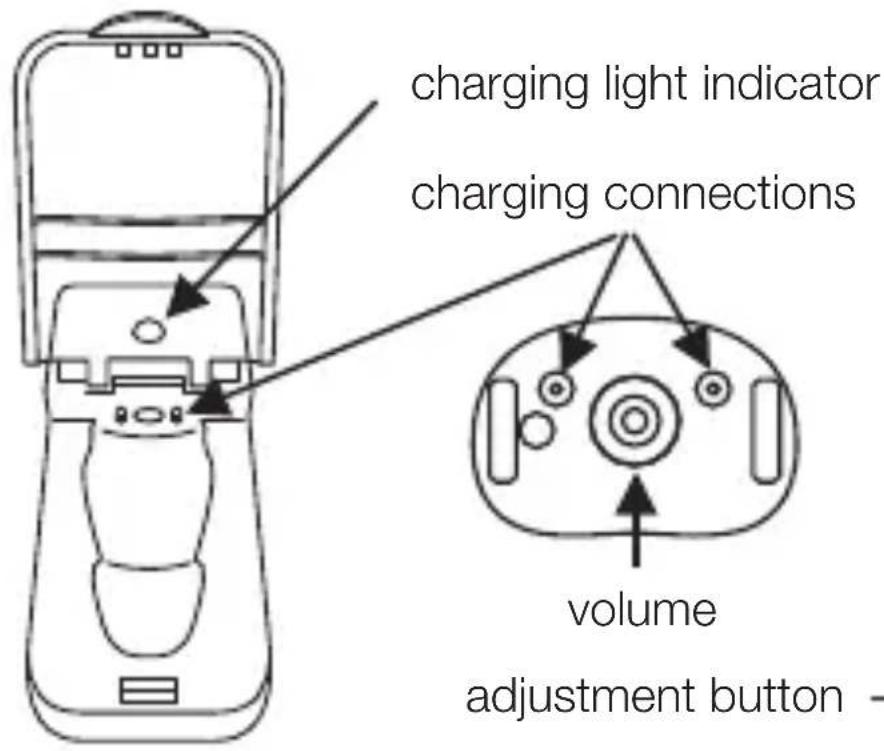
fig.3


fig.5fig.4

fig.6
Micro USB slot

natural_image
Simple line drawing of a container with an arrow pointing to it and a small rectangular shape inside (no text or symbols)CHARGING INSTRUCTIONS
Charge your Digital Voice Amplifier
- Ensure that the Digital Voice Amplifier is OFF. The Digital Voice Amplifier will not charge if the device is ON.
- Slide the Digital Voice Amplifier into the charging unit as shown in fig.4 and fig.5, with the charging connections, fig.2, facing the charging light indicator, fig.5. The small arrow at the base of the Digital Voice Amplifier should point towards the charging light indicator.
- Push lightly on the Digital Voice Amplifier until it clicks into place.
- Insert charging cable to the slot, fig.6, and the other end into the USB socket of your AC Adaptor. Switch ON at the mains and the charging light indicator will light up. The cable can be used with most standard USB AC adaptors.
- If the charging light indicator does not light up check that the USB cable has been inserted correctly and the mains power is switched ON.
- The charging light indicator is red when charging. If the charging light indicator shows red and green together the Digital Voice Amplifier has been inserted incorrectly, remove and re-insert the Digital Voice Amplifier. Once charged the charging light indicator will turn green.
- A full charge takes a minimum of 2 hours, and will
allow for up to 12-20 hours of usage, depending on sound output.
Please note that the rechargeable battery inside the PHLHA57 should not be removed and/or replaced. Attempting to self-service will void the warranty.
- The rechargeable battery is designed to last for at-least 400 recharge cycles. With proper care, the battery can last more than 800 charge cycles.
• To extend the life of the battery, keep the PHLHA57 in the charging unit and on charge when not in use.
OPERATING INSTRUCTIONS
Before using your PHLHA57, ensure that it is fully charged.
• TURNING ON AND OFF
To turn ON or OFF press the volume adjustment button, fig.2
-
Gently place the Digital Voice Amplifier into the ear, once in place increase the volume by pressing the volume adjustment button.
-
Using your finger, keep pressing the volume adjustment button until you reach a comfortable level. There are six levels of volume, you will hear a beep after each level and a double beep when you have reached maximum volume.
-
Once you have set the volume level the Digital Voice Amplifier will remember this setting on your next usage.
-
Always turn OFF before inserting into the charging unit. Always keep the Digital Voice Amplifier in the charging unit and ON charge when not in use.
CARE & CLEANING
- Before and after each use remove all debris from the ear cap.
- Ensure the ear cap hole is free of any debris. Use the cleaning brush to clean any earwax adhered to the Digital Voice Amplifier
• EAR CAP REPLACEMENT
If the Ear Cap can no longer be properly cleaned, or if they have any tears or damage, then it is time to replace the Ear Cap.

natural_image
Diagram showing two stages of a bottle being inserted into a container, with arrows indicating direction (no text or symbols)-
Remove the old Ear Cap
-
Turn up the rim of the new Ear Cap

flowchart
graph TD
    A["Circle Node"] --> B["Arrow to Top"]
    style A fill:#f9f,stroke:#333
    style B fill:#bbf,stroke:#333
- Insert new Ear Cap on Digital Voice Amplifier

natural_image
Diagram showing a tool being processed from a nozzle, with no text or symbols present- Turn the rim of the new Ear Cap down

natural_image
Diagram showing a bottle being twisted with a curved arrow indicating rotation (no text or symbols)- Troubleshooting
THE DIGITAL VOICE AMPLIFIER WILL NOT CHARGE:
- Is the Digital Voice Amplifier seated into the charging unit correctly.
- Is the Digital Voice Amplifier turned OFF? Ensure that it has been turned OFF as it will not charge if left ON.
- Is the USB cable inserted correctly at both ends in both the charging unit and the AC Adaptor, and is the mains power turned ON?
CAN'T HEAR ANYTHING:
- Has the Digital Voice Amplifier been turned ON?
Check that the volume has been turned up by pressing the volume adjustment button.
- Is the ear tip blocked with wax or debris?
Clean the ear tip using the cleaning brush.
Do not wash the ear tip in water or use any cleaning solutions.
- Is the Digital Voice Amplifier fully recharged?
Place and ensure the Digital Voice Amplifier in the charging case for 1-2 hours.
WARNING:
This product is not intended for use by anyone under the age of 18. It is designed to rectify mild to moderate hearing impairment. You may incur interference when using a mobile phone or radio near the device. Remove your Digital Voice
Amplifier when showering, washing your face, using hair spray, etc. Remove prior to vigorous exercise and when sleeping.
PLEASE NOTE:
Medical studies show that your brain requires up to 21 days to adjust to a new hearing device. Your brain will need to re-learn how to process sounds by prioritizing foreground over background sounds, this will subside after few weeks. We recommend wearing PHLHA57 for 30 to 60 minutes a day at first and gradually extend the time that you wear it. Medical studies have shown that you will get far greater satisfaction and the BEST results by wearing two devices.
What's in the Box:
- Voice Amplifier
• (4) Ear Tip - Charging Base
- Manual
PHLHA57
DIGITAL VOICE AMPLIFIER
Features:
• Digital Voice Amplifier
• Universal Fit Earstud
• Built-in Rechargeable Lithium Battery
- Interchangeable Ear Tip to Seal Out the Noise
- Selectable Listening Modes: Normal, Noisy Background
- Unique Ergonomic Design to Prevent Occlusion Effect
• Circular Volume Adjustment Knob
• Active Noise Reduction
• Over Discharge/Charge Feature
- Wider Dynamic Range Compression
Technical Specs:
• Construction Material: ABS
- Input Noise: ≤30dB
- Sensitivity: ≥ 30dB
• THD: 4%
• Max Sound Output: 120±5dB
• Frequency Range:200-5000Hz
• Power Supply: D.C.3.7-5V
• Working Voltage: D.C.1.5V
• Working Current: ≤4mA
• Built-in Rechargeable Battery: Lithium-ion
- Dimensions (L x W x H): 0.94" x 0.55" x 0.35" -inches
- Sold as: 1
- KNOW YOUR DEVICE
- CHARGING INSTRUCTIONS
- Charge your Digital Voice Amplifier
- OPERATING INSTRUCTIONS
- • TURNING ON AND OFF
- CARE & CLEANING
- • EAR CAP REPLACEMENT
- - Troubleshooting
- THE DIGITAL VOICE AMPLIFIER WILL NOT CHARGE:
- CAN'T HEAR ANYTHING:
- WARNING:
- PLEASE NOTE:
- What's in the Box:
- PHLHA57
- DIGITAL VOICE AMPLIFIER
- Features:
- Technical Specs:
Brand : Pyle
Model : CA-PHLHA57
Category : Hearing aid