
FO-HDM-IP4K-SET - Video Converter Avenview - Free user manual and instructions
Find the device manual for free FO-HDM-IP4K-SET Avenview in PDF.


| Product Type | HDMI Extender over Fiber Optic |
| Brand | Avenview |
| Model | FO-HDM-IP4K-SET |
| Dimensions (Transmitter/Receiver) | 5.9 in x 3.7 in x 0.9 in (each) |
| Weight (each unit) | 0.8 lbs |
| Power Supply | 2 x DC 5V/2A power adapters (included) |
| Power Consumption | 4W max (each unit) |
| HDMI Compliance | Yes |
| HDCP Compliance | Yes |
| Supported Resolutions | 480i@60Hz, 480p@60Hz, 576i@50Hz, 576p@50Hz, 720p@50/60Hz, 1080i@50/60Hz, 1080p@50/60Hz, 4K@25/30Hz |
| Maximum Transmission Distance | 20 km (12.4 miles) over single mode fiber |
| Fiber Optic Connector | SC Single Mode |
| Input Connector (Transmitter) | 1x HDMI (Type A female) |
| Output Connector (Receiver) | 1x HDMI (Type A female) |
| IR Support | IR pass-through (20~60 kHz), includes IR blaster and IR extender |
| Operating Temperature | 32°F to 140°F (0°C to 60°C) |
| Storage Temperature | -4°F to 140°F (-20°C to 60°C) |
| Relative Humidity | 20% to 90% RH (non-condensing) |
| Warranty | 3 years (parts and labor) |
Frequently Asked Questions - FO-HDM-IP4K-SET Avenview
User questions about FO-HDM-IP4K-SET Avenview
0 question about this device. Answer the ones you know or ask your own.
Ask a new question about this device
Download the instructions for your Video Converter in PDF format for free! Find your manual FO-HDM-IP4K-SET - Avenview and take your electronic device back in hand. On this page are published all the documents necessary for the use of your device. FO-HDM-IP4K-SET by Avenview.
USER MANUAL FO-HDM-IP4K-SET Avenview
HDMI Extender up to 20KM over Fiber Optic with IR Support





Model #: FO-HDM-IP4K-SET
Product Application & Market Sectors

Corporate House

/orship

Military Residenti


Education Industri


Medical Aviation

TABLE OF CONTENTS
I. IMPORTANT SAFEGUARDS....I
I.1 SAFETY INSTRUCTIONS ....
1.2 REGULATOR Y NOTICES FEDERAL COMMUNICATIONS COMMISSION (FCC) 2
2. INTRODUCTION....3
2.1 PACKAGE CONTENTS 4
2.2 BEFORE INSTALLATION....4
2.3 APPLICATION DIAGRAM....5
2.4 DEVICE DESCRIPTION & LAYOUT....7
2.4.1 Front Panel & Rear Panel (Transmitter, FO-HDM-IP4K-S)....7
2.4.2 Front Panel & Rear Panel (Receiver, FO-HDM-IP4K-R) 8
2.5 IR CONTROL DESCRIPTION, FO-HDM-IP4K-SET)....9
- INSTALLATION....10
- GENERAL TROUBLESHOOTING....10
- SPECIFICATIONS......11
- PIN AND WIRING STANDARD DEFINITION....12
I. IMPORTANT SAFEGUARDS
Please read all of these instructions carefully before you use the device. Save this manual for future reference.
What the warranty does not cover
- Any product, on which the serial number has been defaced, modified or removed.
• Damage, deterioration or malfunction resulting from: - Accident, misuse, neglect, fire, water, lightning, or other acts of nature, unauthorized product modification, or failure to follow instructions supplied with the product.
• Repair or attempted repair by anyone not authorized by us.
• Any damage of the product due to shipment. - Removal or installation of the product.
- Causes external to the product, such as electric power fluctuation or failure.
• Use of supplies or parts not meeting our specifications.
• Normal wear and tear.
• Any other causes which does not relate to a product defect. - Removal, installation, and set-up service charges.
I.1 SAFETY INSTRUCTIONS
The Avenview FO-HDM-IP4K-SET, HDMI Extender has been tested for conformity to safety regulations and requirements, and has been certified for international use. However, like all electronic equipment's, the FO-HDM-IP4K-SET should be used with care. Read the following safety instructions to protect yourself from possible injury and to minimize the risk of damage to the unit.
Do not dismantle the housing or modify the module.
Dismantling the housing or modifying the module may result in electrical shock or burn.
⚠️ Refer all servicing to qualified service personnel.
Do not attempt to service this product yourself as opening or removing housing may expose you to dangerous voltage or other hazards
⚠️ Keep the module away from liquids.
Spillage into the housing may result in fire, electrical shock, or equipment damage. If an object or liquid falls or spills on to the housing, unplug the module immediately.
Have the module checked by a qualified service engineer before using it again.
Do not use liquid or aerosol cleaners to clean this unit. Always unplug the power to the device before cleaning.
1.2
REGULATORY NOTICES FEDERAL COMMUNICATIONS COMMISSION (FCC)
This equipment has been tested and found to comply with Part 15 of the FCC rules. These limits are designed to provide reasonable protection against harmful interference in a residential installation.
Any changes or modifications made to this equipment may void the user's authority to operate this equipment.
Warning symbols Description

ONLY USE THE PROVIDED POWER CABLE OR POWER ADAPTER SUPPLIED. DO NOT TAMPER WITH THE ELECTRICAL PARTS. THIS MAY RESULT IN ELECTRICAL SHOCK OR BURN.

DO NOT TAMPER WITH THE UNIT. DOING SO WILL VOID THE WARRANTY AND CONTINUED USE OF THE PRODUCT.


BEWARE this unit contains static sensitive devices
THE VIDEO BOARDS ARE VERY SENSITIVE TO STATIC. PLEASE ENSURE IF RACK MOUNTED OR INSTALLED ON A SURFACE, IT SHOULD BE IN A GROUNDED ENVIROMENT.

natural_image
Blue circular icon with a white stylized face wearing sunglasses (no text or symbols)LASER BEAM USED IN OPTICAL COMMUNICATIONS ARE INVISIBLE AND CAN SERIOUSLY DAMAGE THE EYES. VIEWING IT DIRECTLY DOES NOT CAUSE ANY PAIN TO THE EYE BUT SERIOUS DAMAGE CAN BE DONE TO THE RETINA OF THE EYE

natural_image
Blue circular icon with a white human figure holding an open book (no text or symbols)⚠ WARNING
Read & understand user guide before using this device.
Failure to follow the proper installation instructions could result in damage to the product and preventing expected results.
2. INTRODUCTION
FO-HDM-IP4K-SET, HDMI extender set is designed to provide high quality video signal transmission over fiber optic cable or an existing fiber network. Avenview's FO-HDM-IP4K-SET delivers an amazing pixel to pixel transmission of 4K@30 or 1080p HDMI signal up to 20 kilometers. With this extender users overcome the length restrictions of standard HDMI cables or UTP Extenders. This unit can control your IR device from the monitors side with its supplied IR technology built in.
Bonus feature: The FiberTransmitter is also compatible with the HDM-C6IPX-R CAT5/6 Receiver, this simply means user can migrate from a Fiber network to to copper network by adding the comptible RX device.
FEATURES:
- The Sender and Receiver units can extend 20000 meters (20 km) over a Fiber Optic cable point to point;
- The Sender can be connected to a Fiber network switch to establish an IP address therefore sending 1080p/4K video signals to multiple Receivers connected to the Fiber network switch and the HDMI displays;
- Multiple Senders can be connected to a Managed Fiber switch with VLAN/IGMP support therefore sending 1080p/4K video signals to Receivers connected to the network switch to show different sources on multiple displays;*
- Extends HDMI signal up to 20 km over fiber optic;
• HDCP compliant; - Supported resolutions: 480i@60Hz,480p@60Hz,576i@50Hz,576p@50Hz,720p@50/60Hz,1080i@50/60Hz,1080p@50/60Hz 4K@25/30Hz
- Supports point to point transmission function which can be expanded to the multi-point to point transmission function.
• Number of Senders and Receivers that can be used is dependent on bandwidth of the network switch.
- Single mode fiber optic transmission.
• Support IR pass back for easy control.
• Built-in electromagnetic interference prevention in environment for long distance transmission.
- Low signal loss, wide frequency band and strong anti-interference features;
• Wall-mountable design for convenient installation.
• High-end aluminum alloy enclosure design.

natural_image
Front view of a network switch device with multiple ports and indicator lights (no visible text or labels)FIBER Network Switch with copper ports

natural_image
Front view of a black network switch device with multiple Ethernet ports (no visible text or labels)COPPER Network Switch with Fiber ports
*Requires a managed Gigabit switch with VLAN/IGMP support to have a solution with multiple sources (Transmitters). Standard Gigabit switch can only support one transmitter.
- The managed switch must support port based IEEE 802.1Q VLAN, IGMP, and to allow duplicate IP addresses across the VLAN domains.
- Each VLAN acts as independent HDMI over IP Channel on the network.
2.1 PACKAGE CONTENTS
Before you start the installation of FO-HDM-IP4K, please check the package contents:
| 1 | HDMI IPX TRANSMITTER X I |  |
| 2 | HDMI IPX RECEIVER X I | 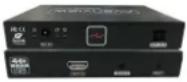 |
| 3 | IR EXTENDER × I |  |
| 4 | IR BLASTER × I |  |
| 5 | POWER ADAPTER (5VDC2A) × 2 |  |
| 6 | USER'S MANUAL × I |  |
2.2 BEFORE INSTALLATION
- Put the product in an even and stable location. If the product falls down or drops, it may cause an injury or malfunction.
- Don't place the product in too high temperature (over 50^ ), too low temperature (under 0^ ) or high humidity.
- Use the DC power adapter with correct specifications. If inappropriate power supply is used then it may cause a fire.
FO-HDM-IP4K-SET
CABLE INDEX
INPUT/OUTPUT
SC FIBER OM2/3
IR CONTROL
1080p = 20Km (20000m) OM2/3 SINGLE MODE 4K30p = 20Km (20000m) OM2/3 SINGLE MODE
Application Diagram 1 POINT TO POINT

natural_image
3D modeling software interface displaying a humanoid robot and a green wireframe model of a basketball on a court (no text or symbols visible)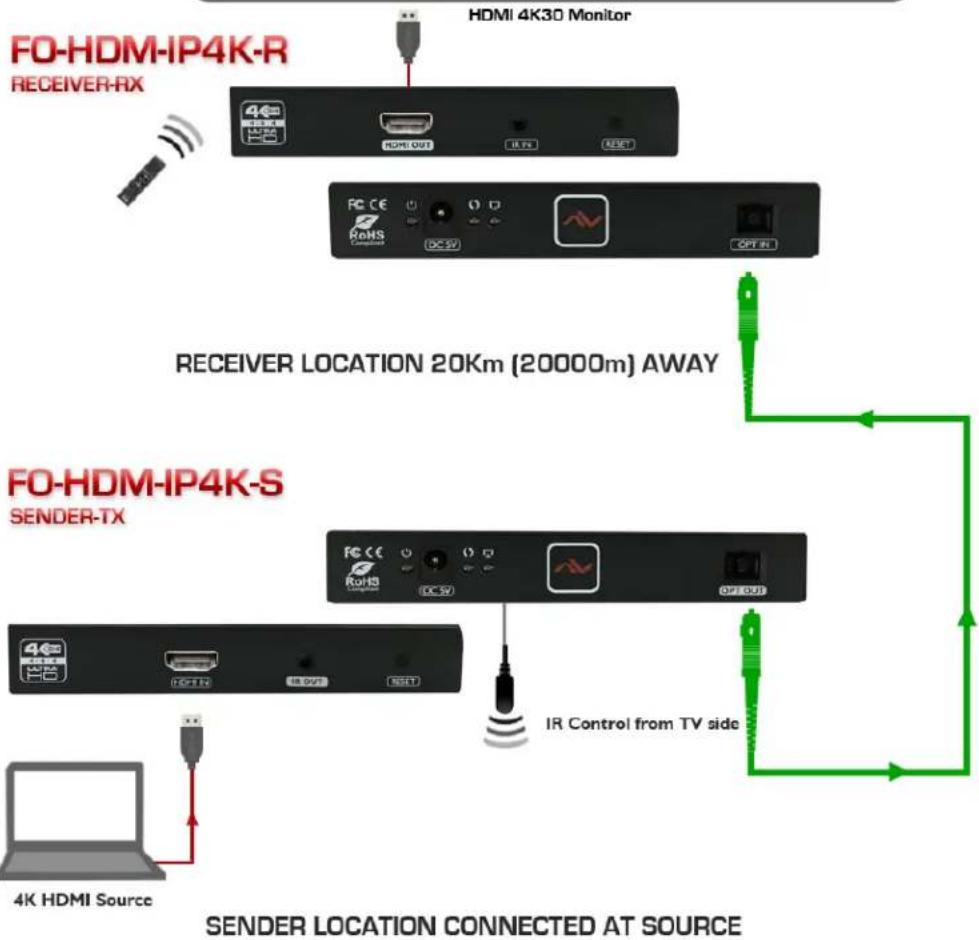
flowchart
graph TD
    A["4K HDMI Source"] --> B["4K HDM-IP4K-S SENDER-TX"]
    B --> C["4K HDM-IP4K-R RECEIVER-RX"]
    C --> D["HDMI 4K30 Monitor"]
    D --> E["ROHS Connection"]
    E --> F["DC 5V"]
    F --> G["RESET"]
    G --> H["IR Control from TV side"]
    H --> I["20000m AWAY"]
    I --> J["RECEIVER LOCATION 20Km (20000m) AWAY"]
    J --> K["FO-HDM-IP4K-R"]
    style A fill:#f9f,stroke:#333
    style B fill:#f9f,stroke:#333
    style C fill:#ccf,stroke:#333
    style D fill:#ccf,stroke:#333
    style E fill:#ccf,stroke:#333
    style F fill:#ccf,stroke:#333
    style G fill:#ccf,stroke:#333
    style H fill:#ccf,stroke:#333
    style I fill:#ccf,stroke:#333
    style J fill:#ccf,stroke:#333
    style K fill:#ccf,stroke:#333
2.4
PANEL DESCRIPTION & LAYOUT
This product is SDFNDJHG□DV□D□VHN Z KLFK□LQF□XGHV a Transmitter and a Receiver.
2.4.1 Front Panel (Transmitter, FO-HDM-IP4K-S)
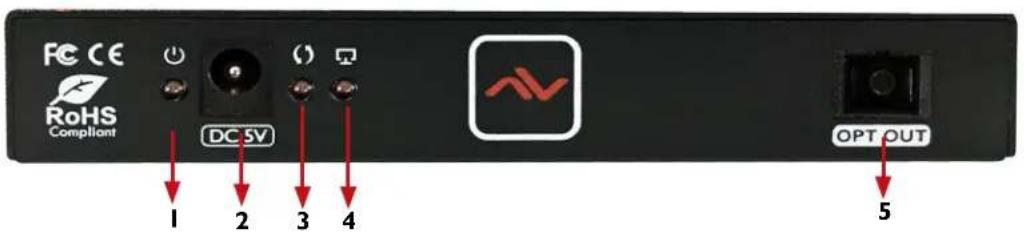
| 1. POWER LED: LED lights red when device is powered on | 2. DC 5V: Connect the 5 V DC power supply included. |
| 3. DATA LED: When data is transmitting from the source the led will continuously flash YELLOW. | 4. LINK LED: When connected to RX or network switch the LED will light GREEN. |
| 5. OPTICAL OUT: Connect SC single mode fiber optic cable. | |
2.4.2 Rear Panel (Transmitter, FO-HDM-IP4K-S)

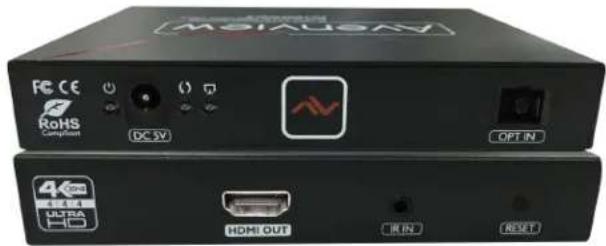
| 1. HDMI IN: Connect to HDMI source via HDMI Cable. | 2. IR OUT: Plug the IR Blaster cable for IR signal being transmitted.place IR Blaster within direct site of the device being controlled. |
| 3. RESET: To reset the unit when no link is established. | |
Important Please do not connect the FO-HDM-IP4K to a POE network switch this will damage and the units will be come non functional.
2.4.4 Front Panel (Receiver, FO-HDM-IP4K-R)

| 1. POWER LED: LED lights red when device is powered on | 2. DC 5V: Connect the 5 V DC power supply included. |
| 3. DATA LED: When data is transmitting from the source the led will continuously flash YELLOW. | 4. LINK LED: When connected to RX or network switch the LED will light GREEN. |
| 5. OPTICAL IN: Connect SC single mode fiber optic cable. | |
2.4.5 Rear Panel (Receiver, FO-HDM-IP4K-R)

| 1. HDMI OUT: Connect to HDMI Display via HDMI Cable. | 2. IR IN: plug the IR Extender cable for IR signal being received. place IR Extender within direct line of site with the IR Remote. |
| 3. RESET: To reset the unit when no link is established. | |

IR Sockets
-- IR OUT -IR BLASTER: plug in the IR blaster to the HDMC6IPX-S to emit all IR command signals received from the IR Extender plugged into the Rx (Monitor Side) to control the devices corresponding to the IR signals. Example: Set Top Box or DVD player (The Source).
-- IR IN - IR EXTENDER: plug in the IR Extender into the (RX) Receiver (Monitor Side) to receive all IR command signals from the IR remote controls of the corresponding source. Example: Set Top Box or DVD player (IR Remote Control).
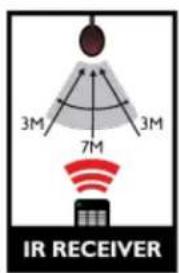

Important IR signals can be affected by very bright fluorescent light and also EMI Interference on the cables so be aware of when you place and position your IR cables. Please follow these instructions for best results.
3. INSTALLATION
Please ensure all the package contents are all received before proceeding.
To setup Avenview FO-HDM-IP4K-SET follow these steps for connection:
I. Connect your HDMI source (such as a Blu-ray Disc player) to Transmitter (FO-HDM-IP4K-S).
2. Connect your HDMI display (such as a LCD TV) to the receiving unit FO-HDM-IP4K-R.
3. Connect your SC Optic Fiber cord (Single Mode) between the transmitting and receiving units.
4. Make sure Optic Fiber cord (Single Mode) cable is tightly connected and not loose.
5. Plug in 5V DC power cord to the power jack of the transmitting unit FO-HDM-IP4K-S
6. Plug in 5V DC power cord to the power jack of the receiving unit FO-HDM-IP4K-R.
4. GENERAL TROUBLESHOOTING
| PROBLEM | POSSIBLE SOLUTION |
| NO IMAGE | Check if connection to the source and the display are correct.Ensure that display device supports 480p, 720p and 1080p/4K resolution |
| SCREEN DEFECTS APPEAR | Check the HDMI connection if loose or change to a premium HDMI cord |
| DATA TRANSMISSION LIGHT FLASHING SLOW | Check both units and make sure the TX and RX are not ReversedCheck the source device is powered ON |
| DATA TRANSMISSION LIGHT FLASHING FAST/NO IMAGE | Check Graphics card on PC/HD Player. This product supports up to 4K@30p (3840x2160) resolution. |
| NO LIGHT ON DATA TRANSMISSION | Check Network cable. only use TIA-568B StandardNetwork cable run is out of range |
5. SPECIFICATIONS
| ITEM DESCRIPTION | ||
| UNITS | FO-HDM-IP4K-S FO-HDM-IP4K-R | |
| UNIT DESCRIPTION | HDMI FiberTransmitter HDMI Fiber Receiver | |
| HDMI COMPLIANCE | Yes | |
| HDCP COMPLIANCE Yes | ||
| TMDS BANDWIDTH | 10.2Gpbs | |
| SUPPORTED RESOLUTIONS | 480i@60Hz,480p@60Hz,576i@50Hz,576p@50Hz,720p@50/60Hz,1080i@50/60Hz,1080p@50/60Hz 4Kx2K@25/30Hz,4Kx2K@25/30Hz | |
| DDC SIGNAL VOLTAGE | 5Vp-p(TTL) | |
| AUDIO SUPPORT Surround Sound (up to 7.1 Ch) or Stereo Digital Audio | ||
| IR PASS-THRU | Supportrs 20~60KHz IR devices | |
| CENTRAL WAVELENGTH 1310nm | ||
| LINK LOSS | ≤14dB | |
| OUTPUT LIGHT POWER | ≥-11dBm | |
| RECEIVE SENSITIVITY | ≤-32dBm | |
| RETURN LOSS | 15dB | |
| INPUT | Ix HDMI | Ix FO, 1x IR IN |
| OUTPUT | Ix FO, 1x IBD Out | |
| HDMI CONNECTOR | Type A (19 pin female) | |
| FIBER OPTIC CONNECTOR | SC Single Mode | |
| POWER ADAPTER | 2 X DC 5V/2A | |
| POWER CONSUMPTION | 4W Max (each) | |
| DIMENSION L X W X H | 5.9" x 3.7" x0.9" | |
| WEIGHT | 0.8 lbs | |
Environmental
| OPERATING TEMPERATURE | 32° ~ 140°F (0° to 60°C) |
| STORAGE TEMPERATURE | -4° ~ 140°F (-20° ~ 60°C) |
| RELATIVE HUMIDITY | 20~90% RH.(no condensation) |
6. PIN & WIRING STANDARD DEFINITION
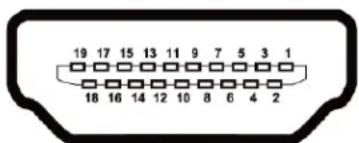
TYPE A (RECEPTACLE) HDMI
| Pin 1 TMDS Data2+ Pin 11 TMDS Clock Shield | |
| Pin 2 TMDS Data2 Shield Pin 12 TMDS Clock- | |
| Pin 3 TMDS Data2- Pin 13 CEC | |
| Pin 4 TMDS Data1 + Pin 14 Reserved (N.C. on device) | |
| Pin 5 TMDS Data1 Shield Pin 15 SCL | |
| Pin 6 TMDS Data1- Pin 16 SDA | |
| Pin 7 TMDS Data0+ Pin 17 DDC/CEC Ground | |
| Pin 8 TMDS Data0 Shield Pin 18 +5V Power | |
| Pin 9 TMDS Data0- Pin 19 Hot Plug Detect | |
| Pin 10 TMDS Clock+ |
7. OPTICAL FIBER HAZARD
SAFETY FIRST
FOR YOUR OWN PROTECTION
YOU MUST OBSERVE AND OBEY ALL SAFETY SIGNS
- Persons installing fiber optic products must take all necessary safety precautions, such as wearing protective clothing and goggles and observing warning signs.
- To ensure that the required personnel and equipment is properly installed, secure from unnecessary failure of the components or failure of the whole system, injury to one's self and in addition to legal responsibility; everyone is responsible for his own health
- Keep exposed optical fiber ends away from skin and eyes.
- The waste fragments should be treated with care and not picked up with bare hands, but rather with special gloves.
- Dispose of waste in a suitable container via an approved agency. Make sure that the quantity of optical fiber waste is minimized.
- Closures containing termination points for optical fiber cabling must be labeled with appropriate warning signs or clearly visible text.
- Make sure that the quantity of optical fiber waste is minimized. Closures containing termination points for optical fiber cabling must be labeled with appropriate warning signs or a clearly viewable text.
• There are four laser Classifications based on risk levels. Laser manufacturers are required to label their lasers accordingly.
AviewWarranty Certificate
AVENVIEW CORP. ("Avenview") warrants Avenview-branded product(s) contained in the original packaging against defects in materials and workmanship when used normally in accordance with Avenview's enclosed manual guidelines for a period of THREE (3) YEARS from the date of original retail purchase - Warranty Period. Avenview's published guidelines include but are not limited to information contained in technical specifications, user manuals and service communications.
LABOR: During the Warranty Period of THREE (3) YEARS, Avenview will repair or replace the product(s) at no cost using new or used parts equivalent to novel performance and reliability if the product(s) is determined to have abide by Avenview's published guidelines. Cost of Labor applicable to product(s) after Warranty Period. For labor costs, please contact support@avenview.com.
PARTS: During the Warranty Period of THREE (3) YEARS, Avenview will supply new or rebuilt replacements in exchange for defective parts of the product(s) at no cost if the product(s) is determined to have abide by Avenview's published guidelines. Cost of Parts applicable to product(s) after Warranty Period. For part(s) costs, please contact support@avenview.com.
To obtain Warranty: (a) proof of purchase in the form of a bill of sale or receipted invoice reflecting that the registered product(s) is within warranty period must be presented to obtain warranty service; (b) product(s) must be registered at time of purchase. Failure to do so will result in applicable parts and labor charges. Returning product(s) must be shipped in Avenview's original packaging or in packaging pertaining equal degree of protection to Avenview's. Both Avenview and purchaser are responsible for freight charges and brokerages when shipping the product(s) to the receiver.
NOT COVERED BY THIS WARRANTY
This warranty does not apply to any non-Avenview branded product(s); non-registered Avenview product(s). This warranty does not apply: (a) to cosmetic damage, including but not limited to scratches, dents and broken cords; (b) to damage caused by use with another product; (c) to damage caused by accident, abuse, misuse, liquid contact, fire, earthquake or other external cause; (d) to damage caused by operating the Avenview product(s) outside Avenview's manuals or guidelines; (e) to damage caused by service performed by anyone who is not a representative of Avenview or an Avenview authorized personnel; (f) to defects caused by normal wear and tear or otherwise due to the normal aging of the Avenview product(s), or (g) if any serial number has been removed or defaced from the Avenview product(s).
AVENVIEW IS NOT LIABLE FOR DIRECT, SPECIAL, INCIDENTAL OR CONSEQUENTIAL DAMAGES RESULTING FROM ANY BREACH OF WARRANTY OR CONDITION, OR UNDER ANY OTHER LEGAL THEORY, INCLUDING BUT NOT LIMITED TO LOSS OF USE; LOSS OF REVENUE; LOSS OF ACTUAL OR ANTICIPATED PROFITS (INCLUDING LOSS OF PROFITS ON CONTRACTS); LOSS OF THE USE OF MONEY; LOSS OF ANTICIPATED SAVINGS; LOSS OF BUSINESS; LOSS OF OPPORTUNITY; LOSS OF GOODWILL; LOSS OF REPUTATION; LOSS OF DAMAGE TO, COMPROMISE OR CORRUPTION OF DATA; OR ANY INDIRECT OR CONSEQUENTIAL LOSS OR DAMAGE REPAIR OR REPLACEMENT AS PROVIDED UNDER THIS WARRANTY IS THE EXCLUSIVE REMEDY OF THE CONSUMER.
Some states do not allow the inclusion or limitation of incidental or consequential damages, or allow limitations on duration implements of the Warranty Period; therefore the above limitations or exclusions may not be applicable to you. This warranty gives you specific legal rights, and you may have other rights which vary from state to state.

1100 Military Road, Kenmore, NY 14217 1.866.508.0269

TECHNICAL SUPPORT
CONTACT US

Phone: I (866) 508 0269

Email: support@avenview.com

natural_image
Illustration of a globe with a headset and ear, symbolizing global communication or internet access (no text or symbols present)USA Head Office
Avenview Corp.
1100 Military Road
Kenmore, NY 14217
Ph: (866) 508 0269
Fax: (866) 387 8764
Email: info@avenview.com
Canada Sales
Avenview
151 Esna Park Drive, Units 11 & 12
Markham, Ontario, L3R3B1
Phone: 1.905.907.0525
Fax: 1.866.387.8764
Email: info@avenview.com
Avenview Europe
While every precaution has been taken in the preparation of this document, Avenview Inc. assumes no liability with respect to the operation or use of Avenview hardware, software or other products and documentation described herein, for any act or omission of Avenview concerning such products or this documentation, for any interruption of service, loss or interruption of business, loss of anticipatory profits, or for punitive, incidental or consequential damages in connection with the furnishing, performance, or use of the Avenview hardware, software, or other products and documentation provided herein.
Avenview Inc. reserves the right to make changes without further notice to a product or system described herein to improve reliability, function or design. With respect to Avenview products which this document relates, Avenview disclaims all express or implied warranties regarding such products, including but not limited to, the implied warranties of merchantability, fitness for a particular purpose, and non-infringement.


- HDMI Extender up to 20KM over Fiber Optic with IR Support
- Product Application & Market Sectors
- TABLE OF CONTENTS
- IMPORTANT SAFEGUARDS
- What the warranty does not cover
- I.1 SAFETY INSTRUCTIONS
- 1.2
- REGULATORY NOTICES FEDERAL COMMUNICATIONS COMMISSION (FCC)
- Warning symbols Description
- ⚠ WARNING
- INTRODUCTION
- FEATURES:
- PACKAGE CONTENTS
- BEFORE INSTALLATION
- FO-HDM-IP4K-SET
- 2.4
- PANEL DESCRIPTION & LAYOUT
- Front Panel (Transmitter, FO-HDM-IP4K-S)
- Rear Panel (Transmitter, FO-HDM-IP4K-S)
- Front Panel (Receiver, FO-HDM-IP4K-R)
- Rear Panel (Receiver, FO-HDM-IP4K-R)
- IR Sockets
- INSTALLATION
- GENERAL TROUBLESHOOTING
- SPECIFICATIONS
- PIN & WIRING STANDARD DEFINITION
- OPTICAL FIBER HAZARD
- SAFETY FIRST
- AviewWarranty Certificate
- NOT COVERED BY THIS WARRANTY
- TECHNICAL SUPPORT
- CONTACT US
- USA Head Office
- Canada Sales
- Avenview Europe
Brand : Avenview
Model : FO-HDM-IP4K-SET
Category : Video Converter