
SS-WM15-TAB - Wall mount Auray - Free user manual and instructions
Find the device manual for free SS-WM15-TAB Auray in PDF.


| Product Type | Wall Mount Speaker Bracket |
| Brand | Auray |
| Model | SS-WM15-TAB |
| Weight Capacity | 80 lb (36.3 kg) |
| Material | Steel |
| Swivel Range | 180° |
| Tilt Range | 30° |
| Arm Length | 15.5 in (39.4 cm) |
| Plate Dimensions (H x W x D) | 9.25 x 4.75 x 0.5 in (23.5 x 12.1 x 1.3 cm) |
| Product Weight | 4.6 lb (2.1 kg) |
| Mount Size | 1.375 in (35 mm) |
| Adjustments | Tilt, swivel, and back platform depth |
| Included Tools | Hex wrench |
| Installation | Wall mounting with anchors or studs |
| Cleaning Instructions | Soft, dry cloth only |
| Warranty | 1-year limited warranty |
| Compliance | Do not exceed maximum load capacity |
Frequently Asked Questions - SS-WM15-TAB Auray
User questions about SS-WM15-TAB Auray
0 question about this device. Answer the ones you know or ask your own.
Ask a new question about this device
Download the instructions for your Wall mount in PDF format for free! Find your manual SS-WM15-TAB - Auray and take your electronic device back in hand. On this page are published all the documents necessary for the use of your device. SS-WM15-TAB by Auray.
USER MANUAL SS-WM15-TAB Auray
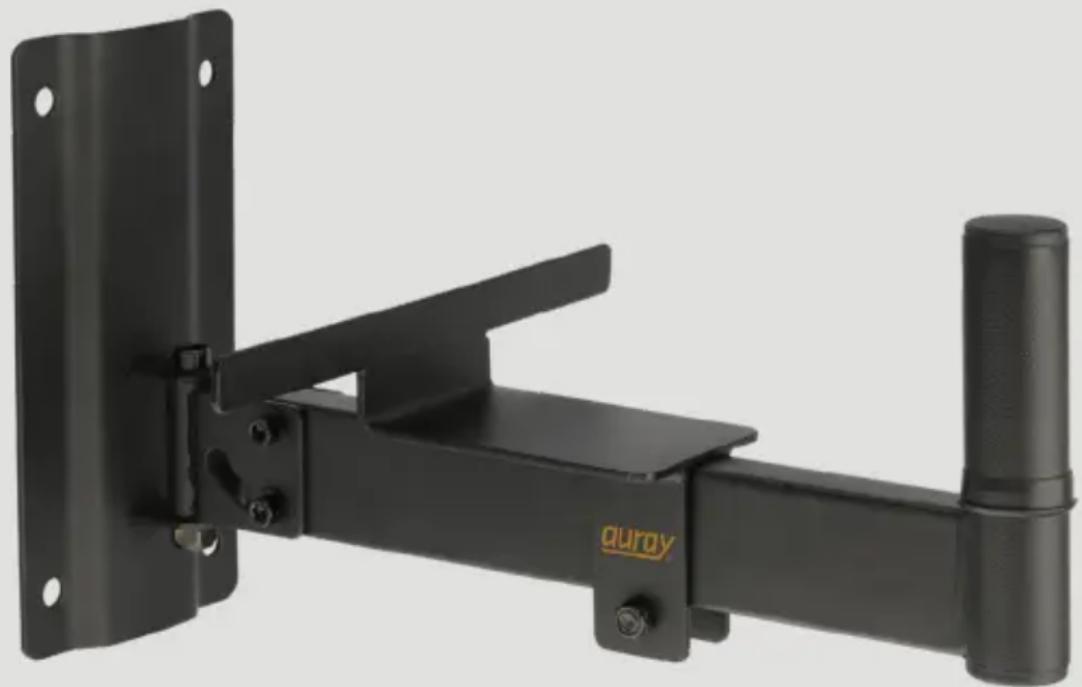
Wall Mount Speaker Bracket with Tilt and Angle Adjustment and Adjustable Back Plate (Pair)
Owner's Manual
natural_image
Black metal mechanical clamp or bracket with mounting holes and a handle, no visible text or symbolsThank you for choosing Auray.
The heavy-duty Auray wall mount bracket features all-steel construction and will hold speakers up to 80 pounds. It offers tilt and swivel adjustment for easy aiming and optimal speaker placement. A back platform and bracket adjusts to the depth of your speaker cabinet and offers excellent steadiness and security for your wall-mounted speaker.
Precautions

- Please read and follow these instructions, and keep this manual in a safe place.
- Handle the unit with care.
- Clean the unit with only a soft, dry cloth.
- Make sure everything is secure before proceeding.
- Do not exceed the maximum load capacity.
- All images are for illustrative purposes only.
Mounting Instructions
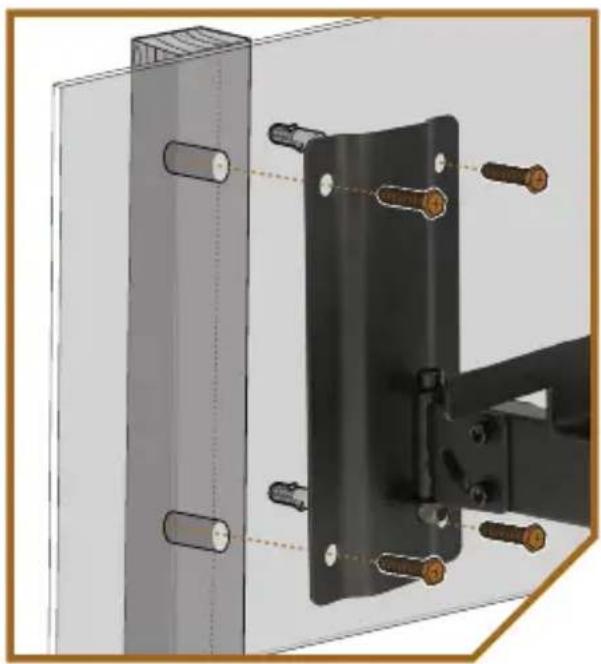
- Use the wall plate to mark the position of the mounting holes on the wall.
- Drill holes in the marked locations. Make appropriately sized holes for the wall anchors, molly bolts, or toggle bolts. If you're using wall anchors, tap the anchors into the holes.
Note: Many wall anchors and molly bolts are self-tapping and don't require a drill for installation.
- Put the plate against the wall, and insert screws (for wall anchors), molly bolts, or toggle bolts through the holes, and fasten them until they're fully tightened, and the wall bracket is secure.
Note: When screwing the plate directly into a wall stud, make sure at least two screws are attached to the stud.
natural_image
Technical diagram of a mechanical assembly with bolted components and mounting bracket (no text or symbols)Swivel Adjustment
Tighten the top hex screw with theincluded hex wrench to ensure themounted speaker stays in place.
Loosen the top hex screw to make swivel adjustment easier.
Tilt Adjustment
Important! When adjusting the angle with a mounted speaker, make sure the speaker is supported from beneath the bracket.
Adjust the tilt to aim your speakers at the optimum angle.
Tighten or loosen the four side hex screws with the included hex wrench to adjust the speaker angle and ensure the bracket maintains its position once it's set.
Adjusting the Back Platform and Bracket
Once the speaker is mounted on the bracket, use the included hex wrench to loosen the back platform and bracket locking nut.
Slide the platform under the speaker until the back is flush against the back edge of the speaker, and retighten the locking nut.

natural_image
Close-up of a hand holding a wrench inserted into a wall-mounted device (no visible text or symbols)Specifications
Weight Capacity: 80 lb. (36.3 kg)
Mount: 1.375 in. (35 mm)
Material: Steel
Swivel: 180°
Tilt: 30^
Arm Length: 15.5 in. (39.4 cm)
Plate Dimensions (H × W × D): 9.25 × 4.75 × 0.5 in. (23.5 × 12.1 × 1.3 cm)
Weight: 4.6 lb. (2.1 kg)
One-Year Limited Warranty
This Auray product is warranted to the original purchaser to be free from defects in materials and workmanship under normal consumer use for a period of one (1) year from the original purchase date or thirty (30) days after replacement, whichever occurs later. The warranty provider's responsibility with respect to this limited warranty shall be limited solely to repair or replacement, at the provider's discretion, of any product that fails during normal use of this product in its intended manner and in its intended environment. Inoperability of the product or part(s) shall be determined by the warranty provider. If the product has been discontinued, the warranty provider reserves the right to replace it with a model of equivalent quality and function.
This warranty does not cover damage or defect caused by misuse, neglect, accident, alteration, abuse, improper installation or maintenance. EXCEPT AS PROVIDED HEREIN, THE WARRANTY PROVIDER MAKES NEITHER ANY EXPRESS WARRANTIES NOR ANY IMPLIED WARRANTIES, INCLUDING BUT NOT LIMITED TO ANY IMPLIED WARRANTY OF MERCHANTABILITY OR FITNESS FOR A PARTICULAR PURPOSE. This warranty provides you with specific legal rights, and you may also have additional rights that vary from state to state.
To obtain warranty coverage, contact the Auray Customer Service Department to obtain a return merchandise authorization (“RMA”) number, and return the defective product to Auray along with the RMA number and proof of purchase. Shipment of the defective product is at the purchaser’s own risk and expense.
For more information or to arrange service, visit www.aurayaudio.com or call Customer
Service at 212-594-2353.
Product warranty provided by the Gradus Group.
www.gradusgroup.com

AURAY® A Gradus Group Brand
GG1
AURAY is a registered trademark of the Gradus Group. © 2022 Gradus Group LLC. All Rights Reserved.
Brand : Auray
Model : SS-WM15-TAB
Category : Wall mount