
F1DN102B - Switch BELKIN - Free user manual and instructions
Find the device manual for free F1DN102B BELKIN in PDF.


| Product Type | 2-Port KVM Switch |
| Brand | Belkin |
| Model | F1DN102B |
| Number of Ports | 2 |
| Supported Video Interfaces | VGA (HD-15) and DVI-D |
| Supported USB Devices | Keyboard, Mouse, USB 2.0 peripherals |
| Maximum Resolution | 1920 x 1200 (VGA), 1920 x 1200 (DVI) |
| Dimensions (W x D x H) | 4.33 x 2.56 x 0.94 inches (110 x 65 x 24 mm) |
| Weight | 0.55 lbs (250 g) |
| Power Supply | USB bus-powered, no external adapter required |
| Switching Method | Push-button on unit, keyboard hotkeys (Scroll Lock, etc.) |
| LED Indicators | Port selection LEDs (1, 2) |
| Supported Operating Systems | Windows, macOS, Linux |
| Compliance | FCC, CE, RoHS |
| Operating Temperature | 32°F to 104°F (0°C to 40°C) |
| Storage Temperature | -4°F to 140°F (-20°C to 60°C) |
| Humidity | 0% to 80% RH, non-condensing |
| Maintenance | Wipe with a soft, dry cloth; do not use liquids or solvents |
| Safety | Keep away from liquids, do not disassemble, use only with compatible cables |
| Spare Parts and Repairability | No user-serviceable parts; contact Belkin support for warranty service |
Frequently Asked Questions - F1DN102B BELKIN
User questions about F1DN102B BELKIN
0 question about this device. Answer the ones you know or ask your own.
Ask a new question about this device
Download the instructions for your Switch in PDF format for free! Find your manual F1DN102B - BELKIN and take your electronic device back in hand. On this page are published all the documents necessary for the use of your device. F1DN102B by BELKIN.
USER MANUAL F1DN102B BELKIN
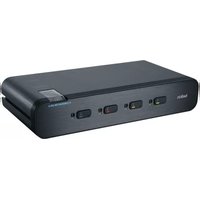
Secure DVI-I KVM Switch with Audio

natural_image
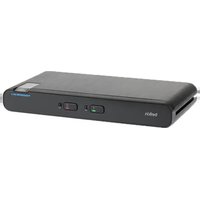
Front view of a black Belkin network device with four ports and indicator lights (no readable text beyond branding)User Manual
F1DN102B - Secure 2-Port DVI-I KVM with Audio
F1DN102C - Secure 2-Port DVI-I KVM with Audio Plus
F1DN104B - Secure 4-Port DVI-I KVM with Audio
F1DN104C - Secure 4-Port DVI-I KVM with Audio Plus
8820-00762 Rev. A00
TABLE OF CONTENTS
| Table of Contents | SECTIONS | 1 | 2 | 3 | 4 | 5 | 6 | 7 | 8 |
| Introduction | 1 | Operating the KVM Switch | 14 | ||||||
| Package Contents | 1 | Common Access Card (CAC) Configuration and Installation . 15 | |||||||
| Overview | 2 | Frequently Asked Questions | 16 | ||||||
| Security Features | 2 | ||||||||
| Other Features | 4 | ||||||||
| Equipment Requirements | 5 | Troubleshooting | 17 | ||||||
| System Requirements | 6 | ||||||||
| Unit Display Diagrams | 7 | Information. | 19 | ||||||
| Specifications | 9 | ||||||||
| Installation | 11 | ||||||||
| Pre-Configuration | 11 | ||||||||
| Connection and Installation. | 11 | ||||||||
| Color Code Chip Installation | 13 | ||||||||
INTRODUCTION
| Table of Contents | SECTIONS | 1 | 2 | 3 | 4 | 5 | 6 | 7 | 8 |
Thank you for purchasing this Belkin Secure DVI-I KVM Switch (the Switch). This KVM Switch is designed for use in secure defense and intelligence installations. The Switch offers safe centralized control, which prevents unintended data transfer between computers running at different security levels. The Switch provides the highest security safeguards and features that meet today's IA (Information Assurance) computing requirements.
This User Manual provides all the details you'll need to install and operate your new Switch, in addition to expert troubleshooting advice—in the unlikely event of a problem.
Package Contents
• Belkin Secure DVI-I KVM Switch
• 12V 1.5A DC Power Supply and Power Cord
• 10 Interchangeable Port Color Chips (multiple colors)
• 12 Port-Naming Labels
- 6 Ft. USB Cable (F1DN102C, F1DN104C models only)
- User Manual
Important: This Switch is equipped with active anti-tamper triggers. Any attempt to open the enclosure will activate the anti-tamper triggers and render the unit inoperable. If the unit's enclosure appears disrupted or if all the port LEDs flash continuously, please call Belkin Technical Support at (800) 282-2355.
OVERVIEW
| Table of Contents | SECTIONS | 1 | 2 | 3 | 4 | 5 | 6 | 7 | 8 |
Security Features
The Belkin Secure DVI-I KVM Switch is the most advanced and secure commercially available KVM Switch available today. Below is a summary of all the security features incorporated into the Switch.
Dedicated Processors
The Switch features a dedicated processor per computer port. This keeps each computer running on different security levels physically separated and secure at all times, and prevents any unintended data leakage between computers.
No Memory Buffer
The Switch does not have a memory buffer and does not have the ability to store data. This prevents any keystrokes or other data input from being unintentionally transferred as you switch between computers, ensuring the integrity of your data.
Non-Reprogrammable Firmware
The Switch features custom firmware that is not reprogrammable, preventing the ability to tamper with the KVM logic.
Unidirectional Data Paths
Optical diodes used in USB data paths provide high isolation and prevent data leakage.
Solid-Aluminum, Uni-Body Enclosure
The one-piece aluminum enclosure reduces the entry points into the Switch's electronics and minimizes radiated signals that can be snooped or intercepted.
Active Anti-Tamper Triggers
Active chassis anti-tamper triggers prevent KVM electronics from being accessed and tampered with.
Tamper-Evident Tape
A holographic security tamper-evident label is placed on the enclosure to provide a visual indication if the Switch has been opened or compromised.
Tamper-Proof Hardware
All integrated circuits are soldered directly to the printed circuit board to prevent tampering with the components.
OVERVIEW
| Table of Contents | SECTIONS | 1 | 2 | 3 | 4 | 5 | 6 | 7 | 8 |
Protected Display Information
Protected DDC/EDID emulation prevents software weaknesses that can cause data leakage while maintaining compatibility with the console display.
USB Device Detection
Storage and other unsafe USB devices are rejected when connected to the Switch. Only mouse and keyboard data are passed through.
Secure Packaging
"Tear away" packaging ensures secure delivery of the Switch as it is routed to the end user.
NIAP Listing
The Switch is listed by the National Information Assurance Partnership (NIAP). It is NIAP Common Criteria validated to EAL 2+ (Evaluation Assurance Level 2).
OVERVIEW
| Table of Contents | SECTIONS | 1 | 2 | 3 | 4 | 5 | 6 | 7 | 8 |
Other Features
The Belkin Secure DVI-I KVM Switch was designed with the user in mind for today's IT environment. Below is a summary of some features incorporated into the Switch.
USB Support
The Switch is compatible with USB technology and supports plug-and-play connectivity with USB computers, keyboards, and mice.
DVI-I Support
The Switch supports both digital and analog video signals. Analog signals are passed through.
Dual-Link DVI Support
The Switch supports video resolutions of up to 2560x1600. This includes support for digital displays 24 inches and larger.
Audio Switching
Allows you to share speakers between computers.
Port Coloring
The included color chips can be inserted into each port-selector button. Colors can be associated with an established network to facilitate port identification and reduce user switching error.
Port Naming
The included network-name labels can be placed in the area underneath the port-selector button to facilitate port identification and reduce user switching error.
LED Indicators
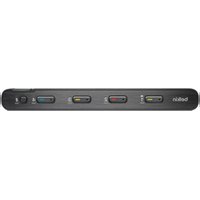
Each port button number illuminates to indicate that the console currently controls the corresponding computer. As a port selector is pushed, the LED number will light up.
Integrated Mounting Rails
Integrated mounting system for easy under-desk or side-wall mounting.
OVERVIEW
| Table of Contents | SECTIONS | 1 | 2 | 3 | 4 | 5 | 6 | 7 | 8 |
Equipment Requirements
Cables
Belkin highly recommends you use Belkin DVI/USB KVM Cable Kits for your Switch to help ensure superior performance. These cables offer the highest quality possible to ensure optimal data and video transmission. One Cable Kit is required per connected computer.
Belkin DVI-D/USB KVM Cable Kits with audio:
F1D9012b06 - 6 ft. (1.8m)
F1D9012b10 - 10 ft. (3m)
F1D9012b15 - 15 ft. (4.6m)
Belkin DVI-A to HD15/USB KVM Cable Kits with audio (support analog video only):
F1D9015b06 - 6 ft. (1.8m)
F1D9015b10 - 10 ft. (3m)
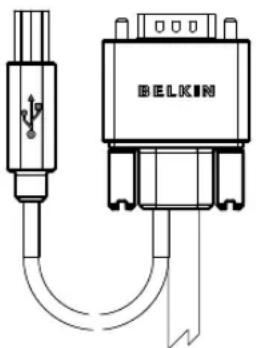
natural_image
Technical line drawing of a connector with two terminals and a cable, no text or symbols presentBelkin CAC USB A/B Cable (F1DN102C, F1DN104C models only)
F1D9013b06 - 6 ft. (1.8m)
F1D9013b10 - 10 ft. (3m)
F1D9013b15 - 15 ft. (4.6m)
Note: Due to USB and DVI signal limitations, the cable length cannot exceed 15 feet (4.6m).
OVERVIEW
| Table of Contents | SECTIONS | 1 | 2 | 3 | 4 | 5 | 6 | 7 | 8 |
System Requirements
Operating-System (OS) Platforms
The Switch is compatible with computers running on, but not limited to, the following OS platforms:
- Windows® 2000
• Windows XP (Home/Professional) - Windows 2003 Server
- Windows 7
- Windows Vista®
- Red Hat® Linux®
- Other Linux distributions
• Mac OS ^® X v10.3 and higher
Keyboards
• USB-compatible (non-composite)
• (or) PS/2-compatible
Mice
• USB-compatible (non-composite)
• (or) PS/2-compatible
Monitors
• Digital displays with DVI-D support, single-link and dual-link
• Analog displays with VGA support
Common Access Card (CAC) Readers (F1DN102C, F1DN104C models only)
- USB-compatible CAC or smart-card readers
OVERVIEW
| Table of Contents | SECTIONS | 1 | 2 | 3 | 4 | 5 | 6 | 7 | 8 |
Unit Display Diagram, Front View


IMPORTANT NOTICE:
If for any reason the tamper-evident seal is missing, appears disrupted, or looks different than the example shown here, please call Belkin Technical Support at (800) 282-2355.
OVERVIEW
| Table of Contents | SECTIONS | 1 | 2 | 3 | 4 | 5 | 6 | 7 | 8 |
Unit Display Diagram, Back View
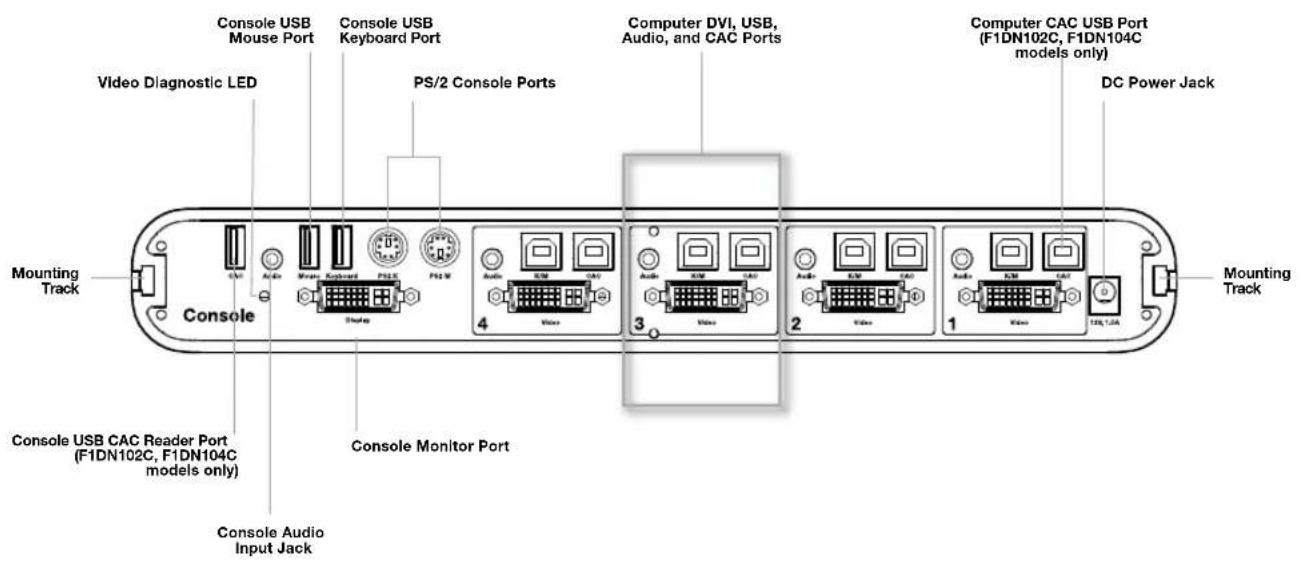
OVERVIEW
| Table of Contents | SECTIONS | 1 | 2 | 3 | 4 | 5 | 6 | 7 | 8 |
| Specifications | |||||||||
| Part No.: F1DN102B, F1DN102C,F1DN104B, F1DN104C | Console Monitor Port: | DVI-I dual-link female | |||||||
| Console Speaker: | 3.5mm female | ||||||||
| Enclosure: Metal enclosure with high-impactplastic faceplate | CPU Keyboard/Mouse Ports: | USB Type B | |||||||
| Power Requirements: 12V DC, 1.5A (minimum)power adapter withcenter-pin-positive polarity | CPU CAC Ports: | USB Type B | |||||||
| CPU Keyboard/Mouse Ports: | USB Type B | ||||||||
| AC Input: 100 to 240VAC | CPU Audio: | 3.5mm female | |||||||
| No. of Users Supported: 1 | CPU Monitor Ports: | DVI dual-link female | |||||||
| No. of Computers Supported: 2 (F1DN102B, F1DN102C),4 (F1DN104B, F1DN104C) | Port Selectors: | 2 and 4 respectively for 2- and4-port models | |||||||
| Monitors Supported: Single-link and dual-link digitalDVI-D displays; analog VGAmonitors with adapter | LED Indicators: | 2 and 4 respectively for 2- and4-port models | |||||||
| Operating Temp: | 32^ to 104^ F ( 0^ to 40^ C) | ||||||||
| Resolution Support: Up to 2560x1600 | Storage Temp: | -4^ to 140^ F ( -20^ to 60^ C) | |||||||
| Console Keyboard Input: USB Type A | Humidity: | 0-80% RH, non-condensing | |||||||
| Console Mouse Input: USB Type A | Warranty: | 3 years | |||||||
| Console CAC Input: USB Type A (F1DN102C,F1DN104C models only) | |||||||||
OVERVIEW
| Table of Contents | SECTIONS | 1 | 2 | 3 | 4 | 5 | 6 | 7 | 8 |
Dimensions:
(F1DN102B) 12.5 (W) x 6.4 (D) x 1.7 (H) inches
(F1DN102C) 12.5 (W) x 6.4 (D) x 1.7 (H) inches
(F1DN104B) 12.5 (W) x 6.4 (D) x 1.7 (H) inches
(F1DN104C) 12.5 (W) x 6.4 (D) x 1.7 (H) inches
Weight:
(F1DN102B) 3.65 lbs.
(F1DN102C) 3.7 lbs.
(F1DN104B) 3.85 lbs.
(F1DN104C) 3.9 lbs.
Made in the USA
INSTALLATION
| Table of Contents | SECTIONS | 1 | 2 | 3 | 4 | 5 | 6 | 7 | 8 |
Pre-Configuration
Where to place the Switch:
The enclosure of the Switch is designed for desktop or under-mount configuration. An optional Mount Kit (Belkin part number F1D006) is available.
Consider the following when deciding where to place the Switch:
- your proximity to the port selectors on the front of the Switch
- the lengths of the cables attached to your keyboard, monitor, and mouse
- the location of your computers in relation to your console
- the lengths of the cables you use to connect your computers to the Switch
Warning: Avoid placing cables near fluorescent lights, air-conditioning equipment, or machines that create electrical noise (e.g., vacuum cleaners).
Connection and Installation
Step 1 Connecting the Console to the Switch
Warning: Before attempting to connect anything to the Switch or your computers, please ensure that all computer equipment and devices are powered off.
Connect your monitor, keyboard, mouse, and speaker to the rear of the Switch in the "User Console" section. (Refer to diagram on page 8.)
Step 2 Power Up
2.1 Power on the monitor.
2.2 Power up the KVM Switch by connecting the power. The display diagnostic LED should be solid green a few seconds after power up. This indicates the display EDID information has been captured and secured. If the display diagnostic LED remains blinking for longer than 10 seconds after power up, refer to the Troubleshooting section of this user manual.
INSTALLATION
| Table of Contents | SECTIONS | 1 | 2 | 3 | 4 | 5 | 6 | 7 | 8 |
Step 3 Connecting Computers to the Switch
3.1 Make sure all computers are powered off.
3.2 Using the Belkin DVI/USB KVM Cable Kit, connect the computers to a port on the rear of the KVM Switch. (Refer to diagram on page 8.)
Note: The Cable Kit must be connected directly to a free USB port on your computer with no USB hubs or other devices in between. Refer to the Troubleshooting section of this manual if you are having problems with the USB keyboard or mouse.
Step 4 Powering Up the Computers
Power up all the attached computers and check for display and peripheral functionality. All computers can be powered on simultaneously.
Note: Your computers should recognize the Switch and automatically install the HID USB driver if necessary.
When you power on your computers, the Switch emulates both a mouse and keyboard on each port and allows your computers to boot normally. The computer connected to port "1" will be displayed on the monitor. Check to see that the keyboard, monitor, and mouse are working normally. Proceed to do this with all occupied ports to verify that all computers are connected and responding correctly. If you encounter an error, check your cable connections for that computer and reboot. If the problem persists, please refer to the Troubleshooting section in this User Manual.
INSTALLATION
| Table of Contents | SECTIONS | 1 | 2 | 3 | 4 | 5 | 6 | 7 | 8 |
Color Code Chip Installation
The KVM Switch's port-selector buttons can be color-coded for easier identification. Refer to the installation instructions below.
Note: You may have to remove the existing black color chip first.
Port Name Label
The included network-name labels can be placed in the area underneath the port-selector buttons for port identification.
Insert color chip Remove color chip

| Table of Contents | SECTIONS | 1 | 2 | 3 | 4 | 5 | 6 | 7 | 8 |
Operation
Selecting a Computer Using Port Selectors
Now that you have connected your console and computers to the Switch, it is ready for use. You can select which computer you wish to control by pressing the corresponding port selector on the front of the Switch. The LED number will illuminate to indicate which computer (or port) is currently selected. It may take approximately 1 second for the video signal to sync after switching ports. This is normal behavior and is dependent on the display connected. This is normal operation and ensures that proper synchronization is established between the monitor and the connected computers.
Keyboard and mouse inputs can only be sent to the selected computer, and video outputs can only be received from the selected computer. The Switch also prevents any data transfer between connected computers, ensuring the security of your computers.
Please note that the default port at power-up is port 1. In case of a power failure or if the power is cycled, the Switch will default to port 1.
COMMON ACCESS CARD (CAC) CONFIGURATION AND INSTALLATION
| Table of Contents | SECTIONS | 1 | 2 | 3 | 4 | 5 | 6 | 7 | 8 |
Common Access Card (CAC) Configuration and Operation (F1DN102C, F1DN104C models only)
CAC connection to the computer requires a separate USB cable connection and allows the user to specify whether there is a CAC required for that computer or not. This allows the CAC to be connected and controlled separately to the keyboard, mouse, video, and audio.
Notice: The CAC functionality was not certified by Common Criteria. Currently, Common Criteria does not offer any guidelines for CAC peripheral support in the Peripheral Sharing Protection Profile. The inclusion of this functionality does not affect the Common Criteria certification applied to the rest of the product.
Step 1 Installation
1.1 Using the included USB cable, connect one end of the cable to the computer that requires CAC, and the other end to the CAC port on the KVM Switch that corresponds to the computer.
1.2 Enable CAC for the same port connection in Step 1.1 by switching the CAC switch to the right.
1.3 Repeat steps above for additional computers that require CAC. Make sure that the CAC switch is disabled (left) for all other non-connected CAC systems.
1.4 Once configured, the CAC connection will be switched only when required by the connected computer. When switching from a CAC-enabled port to a non-CAC-enabled port, the CAC connection will remain with the last previously selected port where the CAC was set to "Enable."
FREQUENTLY ASKED QUESTIONS
| Table of Contents | SECTIONS | 1 | 2 | 3 | 4 | 5 | 6 | 7 | 8 |
| What does “NIAP Common Criteria validation to EAL” mean?To learn more about NIAP Common Criteria and EAL, visithttp://www.niap-ccevs.org/ | Can I use the Switch with a computer that does not support USB?The Switch is designed to work with USB-capable computers. Call your sales rep for Secure KVM accessories that allow support of different input and video formats. | ||||||||
| What do I do if I find that the tamper-evident seal on the Switch has been removed or disrupted?Please call Belkin Technical Support at (800) 282-2355 immediately.The KVM Switch’s circuitry may have been compromised. | Does the Switch require an AC adapter?Yes, the Switch requires a 12-volt DC, 1.5-Amp (minimum) power adapter in order to function properly. | ||||||||
| How far can the Switch be from my computer?The Switch can be located up to 15 feet (4.6m) away from your computer due to DVI- and USB-cable limitation. | Does the Switch support Linux?Yes, the Switch works with Red Hat Linux and other Linux distributions configured for USB support. | ||||||||
| Do I have to install software to use the Switch?No, the Switch does not require any software to be installed in your computers. | What computer equipment does the KVM support?The Switch is compatible with systems and peripherals from Dell, HP, ClearCube, WYSE, Microsoft, Logitech, etc. Please contact Belkin Technical Support at (800) 282-2355 for compatibility issues you may experience. | ||||||||
TROUBLESHOOTING
| Table of Contents | SECTIONS | 1 | 2 | 3 | 4 | 5 | 6 | 7 | 8 |
General
My computer does not boot when connected to the Switch but works fine when I connect my keyboard, video, and mouse directly to my computer.
- Make sure that the DVI/USB KVM Cable Kit is connected tightly between the Switch and the computer.
Video
I am getting ghosting, shadowing, or fuzzy images on my monitor.
- Check that all video cables are inserted properly to the Switch, computer, and monitor.
- With everything connected, power-cycle the KVM Switch to reset the video. Make sure the Video Diagnostic LED is solid green.
- Check that the monitor you are using supports the resolution and refresh-rate setting on your computer.
- Lower the video resolution of your monitor.
- Check that the video-cable length does not exceed 15 feet (4.6m).
- Check that the graphics card you are using supports the resolution and refresh-rate setting on your computer.
- Connect the monitor directly into the computer you are having trouble with to see if the problem still appears.
I am getting a black screen on my monitor.
- Check that all video cables are inserted properly.
- Check that there is proper voltage available to the power adapter and that it is inserted correctly.
- Connect your monitor directly to the computer to verify that your monitor is functioning properly.
- Reboot the computer.
The display diagnostic LED does not stop blinking.
- Check that the cable that connects to the monitor is inserted properly on both ends.
- Check that the monitor is powered on.
- Power-cycle the KVM unit by removing and reattaching the power plug.
- Try a different monitor.
TROUBLESHOOTING
| Table of Contents | SECTIONS | 1 | 2 | 3 | 4 | 5 | 6 | 7 | 8 |
Keyboard
The computer does not detect my keyboard, or my keyboard does not work when I switch computers or reboot.
- Check that the keyboard you are using is connected properly to the Switch.
- Check that the USB cable between the Switch and the computer is completely connected.
- Try connecting to a different USB port on the computer.
- Make sure the keyboard works when directly plugged into the computer (the HID USB driver is installed on the computer). Rebooting may be necessary when trying this.
- Make sure you are not using a keyboard with an integrated USB hub or other USB-integrated devices.
- If the computer is coming out of standby mode, allow up to one minute to regain mouse function.
- Try a different keyboard.
The CAPS, NUM, and Scroll Lock lights on my keyboard do not function when I connect to the KVM Switch.
This is normal operation. The lock-state information is fully functional. Due to the security of the KVM Switch and known exploitation of lock-state information for leakages, the LED status is not supported. Please refer to the operating system for verification of the lock-state information for CAPS, NUM, and Scroll Lock.
Mouse
The computer does not detect my mouse, or my mouse does not work when I switch computers or reboot.
- Check that the mouse you are using is connected properly to the Switch.
- Check that the USB cable between the Switch and the computer is completely connected.
- Try connecting to a different USB port on the computer.
- Make sure the mouse works when directly plugged into the computer (the HID USB driver is installed on the computer). Rebooting may be necessary when trying this.
- Make sure you are not using a keyboard with an integrated USB hub or other USB-integrated devices.
- If the computer is coming out of standby mode, allow up to one minute to regain mouse function.
- Try a different mouse.
INFORMATION
| Table of Contents | SECTIONS | 1 | 2 | 3 | 4 | 5 | 6 | 7 | 8 |
FCC Statement
DECLARATION OF CONFORMITY WITH FCC RULES FOR ELECTROMAGNETIC COMPATIBILITY
We, Belkin International, Inc., of 12045 E. Waterfront Drive, Playa Vista, CA 90094, declare under our sole responsibility that the products: F1DN102B, F1DN102C, F1DN104B, F1DN104C
to which this declaration relates:
Comply with Part 15 of the FCC Rules. Operation is subject to the following two conditions: (1) this device may not cause harmful interference, and (2) this device must accept any interference received, including interference that may cause undesired operation.
CE Declaration of Conformity
We, Belkin International, Inc., declare under our sole responsibility that the products F1DN102B, F1DN102C, F1DN104B, F1DN104C, to which this declaration relates, are in conformity with Emissions Standard EN55022 and with Immunity Standard EN55024, LVP EN61000-3-2, and EN61000-3-3.
ICES
Belkin International, Inc., Limited 3-Year Product Warranty
What this warranty covers.
Belkin International, Inc. ("Belkin") warrants to the original purchaser of this Belkin product that the product shall be free of defects in design, assembly, material, or workmanship.
What the period of coverage is.
Belkin warrants the Belkin product for three years.
What will we do to correct problems?
Product Warranty.
Belkin will repair or replace, at its option, any defective product free of charge (except for shipping charges for the product). Belkin reserves the right to discontinue any of its products without notice, and disclaims any limited warranty to repair or replace any such discontinued products. In the event that Belkin is unable to repair or replace the product (for example, because it has been discontinued), Belkin will offer either a refund or a credit toward the purchase of another product from Belkin.com in an amount equal to the purchase price of the product as evidenced on the original purchase receipt as discounted by its natural use.
INFORMATION
| Table of Contents | SECTIONS | 1 | 2 | 3 | 4 | 5 | 6 | 7 | 8 |
What is not covered by this warranty?
All above warranties are null and void if the Belkin product is not provided to Belkin for inspection upon Belkin's request at the sole expense of the purchaser, or if Belkin determines that the Belkin product has been improperly installed, altered in any way, or tampered with. The Belkin Product Warranty does not protect against acts of God such as flood, lightning, earthquake, war, vandalism, theft, normal-use wear and tear, erosion, depletion, obsolescence, abuse, damage due to low voltage disturbances (i.e. brownouts or sags), non-authorized program, or system equipment modification or alteration.
How to get service.
To get service for your Belkin product you must take the following steps:
- Contact Belkin International, Inc., at 12045 E. Waterfront Drive, Playa Vista, CA 90094, Attn: Customer Service, or call (800)-223-5546, within 15 days of the Occurrence. Be prepared to provide the following information:
a. The part number of the Belkin product.
b. Where you purchased the product.
c. When you purchased the product.
d. Copy of original receipt.
- Your Belkin Customer Service Representative will then instruct you on how to forward your receipt and Belkin product and how to proceed with your claim.
Belkin reserves the right to review the damaged Belkin product. All costs of shipping the Belkin product to Belkin for inspection shall be borne solely by the purchaser. If Belkin determines, in its sole discretion, that it is impractical to ship the damaged equipment to Belkin, Belkin may designate, in its sole discretion, an equipment repair facility to inspect and estimate the cost to repair such equipment. The cost, if any, of shipping the equipment to and from such repair facility and of such estimate shall be borne solely by the purchaser. Damaged equipment must remain available for inspection until the claim is finalized. Whenever claims are settled, Belkin reserves the right to be subrogated under any existing insurance policies the purchaser may have.
INFORMATION
| Table of Contents | SECTIONS | 1 | 2 | 3 | 4 | 5 | 6 | 7 | 8 |
How state law relates to the warranty.
THIS WARRANTY CONTAINS THE SOLE WARRANTY OF BELKIN. THERE ARE NO OTHER WARRANTIES, EXPRESSED OR, EXCEPT AS REQUIRED BY LAW, IMPLIED, INCLUDING THE IMPLIED WARRANTY OR CONDITION OF QUALITY, MERCHANTABILITY OR FITNESS FOR A PARTICULAR PURPOSE, AND SUCH IMPLIED WARRANTIES, IF ANY, ARE LIMITED IN DURATION TO THE TERM OF THIS WARRANTY.
Some states do not allow limitations on how long an implied warranty lasts, so the above limitations may not apply to you.
IN NO EVENT SHALL BELKIN BE LIABLE FOR INCIDENTAL, SPECIAL, DIRECT, INDIRECT, CONSEQUENTIAL OR MULTIPLE DAMAGES SUCH AS, BUT NOT LIMITED TO, LOST BUSINESS OR PROFITS ARISING OUT OF THE SALE OR USE OF ANY BELKIN PRODUCT, EVEN IF ADVISED OF THE POSSIBILITY OF SUCH DAMAGES.
This warranty gives you specific legal rights, and you may also have other rights, which may vary from state to state. Some states do not allow the exclusion or limitation of incidental, consequential, or other damages, so the above limitations may not apply to you.
belkin.com
© 2011 Belkin International, Inc. All rights reserved. All trade names are registered trademarks of respective manufacturers listed. Windows, Windows Vista, Microsoft, and IntelliMouse are either registered trademarks or trademarks of Microsoft Corporation in the United States and/or other countries. Mac OS and Mac are trademarks of Apple Inc., registered in the U.S. and other countries.

- Secure DVI-I KVM Switch with Audio
- User Manual
- INTRODUCTION
- Package Contents
- OVERVIEW
- Security Features
- Dedicated Processors
- No Memory Buffer
- Non-Reprogrammable Firmware
- Unidirectional Data Paths
- Solid-Aluminum, Uni-Body Enclosure
- Active Anti-Tamper Triggers
- Tamper-Evident Tape
- Tamper-Proof Hardware
- Protected Display Information
- USB Device Detection
- Secure Packaging
- NIAP Listing
- Other Features
- USB Support
- DVI-I Support
- Dual-Link DVI Support
- Audio Switching
- Port Coloring
- Port Naming
- LED Indicators
- Integrated Mounting Rails
- Equipment Requirements
- Cables
- System Requirements
- Operating-System (OS) Platforms
- Keyboards
- Mice
- Monitors
- Common Access Card (CAC) Readers (F1DN102C, F1DN104C models only)
- IMPORTANT NOTICE:
- Dimensions:
- Weight:
- Made in the USA
- INSTALLATION
- Pre-Configuration
- Where to place the Switch:
- Consider the following when deciding where to place the Switch:
- Connection and Installation
- Step 1 Connecting the Console to the Switch
- Step 2 Power Up
- Step 3 Connecting Computers to the Switch
- Step 4 Powering Up the Computers
- Color Code Chip Installation
- Port Name Label
- Operation
- Selecting a Computer Using Port Selectors
- COMMON ACCESS CARD (CAC) CONFIGURATION AND INSTALLATION
- Common Access Card (CAC) Configuration and Operation (F1DN102C, F1DN104C models only)
- Step 1 Installation
- FREQUENTLY ASKED QUESTIONS
- TROUBLESHOOTING
- General
- Video
- Keyboard
- Mouse
- INFORMATION
- FCC Statement
- DECLARATION OF CONFORMITY WITH FCC RULES FOR ELECTROMAGNETIC COMPATIBILITY
- CE Declaration of Conformity
- ICES
- Belkin International, Inc., Limited 3-Year Product Warranty
- What this warranty covers.
- What the period of coverage is.
- What will we do to correct problems?
- What is not covered by this warranty?
- How to get service.
- How state law relates to the warranty.
- belkin.com
Brand : BELKIN
Model : F1DN102B
Category : Switch