
WS-9400U - Thermostat LA CROSSE TECHNOLOGY - Free user manual and instructions
Find the device manual for free WS-9400U LA CROSSE TECHNOLOGY in PDF.


| Brand | La Crosse Technology |
| Model | WS-9400U |
| Product Type | Thermostat |
| Power Source | 2 AA batteries (not included) |
| Temperature Range | 32°F to 122°F (0°C to 50°C) |
| Temperature Accuracy | ±1°F (±0.5°C) |
| Display Type | LCD digital display |
| Programmable | 7-day programmable |
| Number of Programs | 4 periods per day (Morning, Day, Evening, Night) |
| Dimensions | 5.5 x 3.5 x 1 inches (14 x 8.9 x 2.5 cm) |
| Weight | 0.3 lbs (136 g) without batteries |
| Mounting | Wall mount or table stand |
| Wireless Remote Sensor | Supports up to 3 remote sensors (sold separately) |
| Wireless Range | Up to 330 feet (100 meters) open air |
| Warranty | 1 year limited |
| Cleaning Instructions | Wipe with a soft, damp cloth. Do not use abrasive cleaners. |
| Safety Certifications | FCC, CE, RoHS |
| Battery Life | Approximately 12 months |
| Low Battery Indicator | Yes, icon on display |
Frequently Asked Questions - WS-9400U LA CROSSE TECHNOLOGY
User questions about WS-9400U LA CROSSE TECHNOLOGY
0 question about this device. Answer the ones you know or ask your own.
Ask a new question about this device
Download the instructions for your Thermostat in PDF format for free! Find your manual WS-9400U - LA CROSSE TECHNOLOGY and take your electronic device back in hand. On this page are published all the documents necessary for the use of your device. WS-9400U by LA CROSSE TECHNOLOGY.
USER MANUAL WS-9400U LA CROSSE TECHNOLOGY
Congratulations on purchasing this temperature station with indoor temperature, humidity and comfort indicator. To enjoy the full benefits of this innovative product, please read this operating manual completely before operating.
TEMPERATURE STATION:
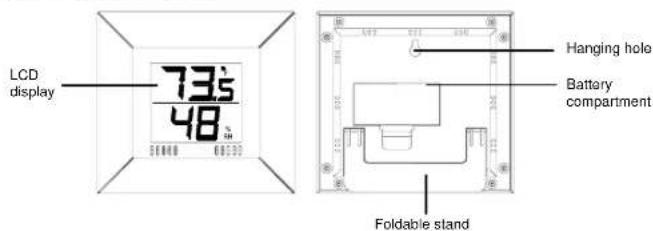
FEATURES:
- Indoor temperature display in degree Fahrenheit (°F)
- Indoor humidity display in RH%
• Wall mounting or table standing
SETTING UP:
Please follow these steps to ensure that your new temperature station works correctly:
1. Insert the batteries into the temperature station. See "How to install and replace batteries in the Temperature Station" below.
2. Once the batteries are in place, all segments of the LCD will light up briefly. Then the indoor temperature and humidity will be displayed. If the indoor temperature is not displayed after a few seconds, remove the batteries and wait for at least 30 seconds before reinserting them.
HOW TO INSTALL AND REPLACE BATTERIES IN THE TEMPERATURE STATION:
The temperature station uses 2 x AAA, 1.5V batteries. To install and replace the batteries, please follow the steps below:
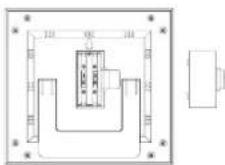
- Insert finger or other solid object in the space at the right center of the battery compartment and lift up to remove the cover.
- Insert batteries observing the correct polarity (see marking).
- Replace battery compartment cover.
TO RESET THE TEMPERATURE STATION:
- Remove the batteries from the temperature station
- Wait at least 30 seconds and repeat the procedures in Setting up above
BATTERY CHANGE:
It is recommended to replace the batteries in all units on an annual basis to ensure optimum accuracy of this unit.

Please participate in the preservation of the environment. Return used batteries to an authorized depot.
LCD SCREEN
The Temperature Station's LCD is divided into 2 sections, displaying indoor humidity and indoor temperature.

USING THE TEMPERATURE STATION
INDOOR RELATIVE HUMIDITY:
The indoor relative humidity is displayed on the second line of the LCD under the indoor temperature. The temperature station' built in sensor automatically measures the surrounding indoor humidity level once the batteries are inserted.
INDOOR TEMPERATURE:
The indoor temperature is displayed on the top line of the. The indoor temperature is automatically displayed once the batteries are inserted.
POSITIONING THE TEMPERATURE STATION:
The Temperature Station comes complete with a foldable stand that gives the option of table standing or wall mounting.

To wall mount:
-
Fix a screw into the desired wall, leaving the head extended out by about 5mm.
-
Using the Temperature Station's hanging hole, carefully hang it onto the screw.
Note: Always ensures that the unit locks onto the screw head before releasing.
To table stand:
Unfold the Temperature Station's stand located at the back of the unit
CARE AND MAINTENANCE:
- Avoid placing the unit in areas prone to vibration and shock as these may cause damage.
- Avoid areas where the unit can be exposed to sudden changes in temperature, i.e. direct sunlight, extreme cold and wet/moist conditions as these will lead to rapid changes in temperature which reduces the accuracy of readings.
- When cleaning the LCD and casing, use a soft damp cloth only. Do not use solvents or scouring agents.
- Do not submerge the unit into water.
- Immediately remove all low powered batteries to avoid leakage and damage.
Replace only with new batteries of the recommended size.
- Do not make any repairs to the unit. Please return it to the original point of purchase for repair by a qualified engineer. Opening and tampering with the unit may invalidate its guarantee.
SPECIFICATIONS:
Indoor temperature measuring range: 14.2° to 122°F with 0.2°F resolution
("OF.L#F" displayed if outside this range)
Indoor humidity measuring range : 1% to 99% with 3 digits display resolution
("-- .-%" displayed if outside this range)
Indoor temperature and humidity checking intervals: every 8 seconds
Power source : 2 x AAA, 1.5V batteries
Battery life : Approximately 12 months (Alkaline batteries recommended)
Dimensions (L x W x H) : 6" x 5.5" x 0.65" (152.2 x 141.2 x 17 mm)
LIABILITY DISCLAIMER:
- The manufacturer and supplier cannot accept any responsibility for any incorrect readings and any consequences that occur should an inaccurate reading take place.
- This product is designed for use in the home only as indication of the temperature.
• This product is not to be used for medical purposes or for public information.
• The specifications of this product may change without prior notice.
• This product is not a toy. Keep out of the reach of children.
• No part of this manual may be reproduced without written authorization of the manufacturer.
WARRANTY INFORMATION:
La Crosse Technology, Ltd provides a 1-year limited warranty on this product against manufacturing defects in materials and workmanship.
This limited warranty begins on the original date of purchase, is valid only on products purchased and used in North America and only to the original purchaser of this product. To receive warranty service, the purchaser must contact La Crosse Technology, Ltd for problem determination and service procedures. Warranty service can only be performed by a La Crosse Technology, Ltd authorized service center. The
original dated bill of sale must be presented upon request as proof of purchase to La Crosse Technology, Ltd or La Crosse Technology, Ltd's authorized service center.
La Crosse Technology, Ltd will repair or replace this product, at our option and at no charge as stipulated herein, with now or reconditioned parts or products if found to be defective during the limited warranty period specified above. All replaced parts and products become the property of La Crosse Technology, Ltd and must be returned to La Crosse Technology, Ltd. Replacement parts and products assume the remaining original warranty, or ninety (90) days, whichever is longer. La Crosse Technology, Ltd will pay all expenses for labor and materials for all repairs covered by this warranty. If necessary repairs are not covered by this warranty, or if a product is examined which is not in need or repair, you will be charged for the repairs or examination. The owner must pay any shipping charges incurred in getting your La Crosse Technology, Ltd product to a La Crosse Technology, Ltd authorized service center. La Crosse Technology, Ltd will pay reasonable return shipping charges to the owner of the product.
Your La Crosse Technology, Ltd warranty covers all defects in material and workmanship with the following specified exceptions: (1) damage caused by accident, unreasonable use or neglect (including the lack of reasonable and necessary maintenance); (2) damage occurring during shipment (claims must be presented to the carrier); (3) damage to, or deterioration of, any accessory or decorative surface; (4) damage resulting from failure to follow instructions contained in your owner's manual; (5) damage resulting from the performance of repairs or alterations by someone other than an authorized La Crosse Technology, Ltd authorized service center; (6) units used for other than home use (7) applications and uses that this product was not intended or (8) the products inability to receive a signal due to any source of interference. This warranty covers only actual defects within the product itself, and does not cover the cost of installation or removal from a fixed installation, normal set-up or adjustments, claims based on misrepresentation by the seller or performance variations resulting from installation-related circumstances.
LA CROSSE TECHNOLOGY, LTD WILL NOT ASSUME LIABILITY FOR INCIDENTAL, CONSEQUENTIAL, PUNITIVE, OR OTHER SIMILAR DAMAGES ASSOCIATED WITH THE OPERATION OR MALFUNCTION OF THIS PRODUCT. THIS PRODUCT IS NOT TO BE USED FOR MEDICAL PURPOSES OR FOR PUBLIC INFORMATION. THIS PRODUCT IS NOT A TOY. KEEP OUT OF CHILDREN'S REACH.
This warranty gives you specific legal rights. You may also have other rights specific to your State. Some States do no allow the exclusion of consequential or incidental damages therefore the above exclusion of limitation may not apply to you.
For warranty work, technical support, or information contact
La Crosse Technology 190 Main Street
La Crescent, MN 55947
Phone: 507.895.7095
Fax: 507.895.8000
e-mail:
support@lacrossetechnology.com
(warranty work)
sales@lacrossetechnology.com
(information on other products)
web:
www.lacrossetechnology.com
All rights reserved. This handbook must not be reproduced in any form, even in excerpts, or duplicated or processed using electronic, mechanical or chemical procedures without written permission of the publisher.
This handbook may contain mistakes and printing errors. The information in this handbook is regularly checked and corrections made in the next issue. We accept no liability for technical mistakes or printing errors, or their consequences.
All trademarks and patents are acknowledged.
- FEATURES
- SETTING UP
- HOW TO INSTALL AND REPLACE BATTERIES IN THE TEMPERATURE STATION
- TO RESET THE TEMPERATURE STATION
- BATTERY CHANGE
- LCD SCREEN
- USING THE TEMPERATURE STATION
- INDOOR RELATIVE HUMIDITY
- INDOOR TEMPERATURE
- POSITIONING THE TEMPERATURE STATION
- TO WALL MOUNT
- TO TABLE STAND
- CARE AND MAINTENANCE
- SPECIFICATIONS
- LIABILITY DISCLAIMER
- WARRANTY INFORMATION
Brand : LA CROSSE TECHNOLOGY
Model : WS-9400U
Category : Thermostat