
WS-9412U - Wristwatch LA CROSSE TECHNOLOGY - Free user manual and instructions
Find the device manual for free WS-9412U LA CROSSE TECHNOLOGY in PDF.


| Product Type | Atomic Watch |
| Brand | La Crosse Technology |
| Model | WS-9412U |
| Dimensions (approx) | 1.5 x 1.5 x 0.5 inches (38 x 38 x 13 mm) |
| Weight (approx) | 1.8 oz (50 g) including battery |
| Power Source | 1 x CR2032 3V lithium battery |
| Battery Life (approx) | 12 months |
| Display Type | LCD digital display |
| Main Functions | Atomic time (WWVB), time, date, day of week, alarm, indoor temperature (°F/°C), 12/24 hour format |
| Atomic Time Reception | Automatic daily synchronization (up to 4 times per day) |
| Time Zones | Selectable: Atlantic, Eastern, Central, Mountain, Pacific |
| Alarm | Daily alarm with snooze |
| Temperature Range | Indoor: 32°F to 122°F (0°C to 50°C) |
| Water Resistance | Not waterproof (splash resistant only) |
| Care & Cleaning | Wipe with a soft, dry cloth. Avoid solvents, water, and extreme temperatures. |
| Safety | Keep out of reach of children under 3 years. Do not expose to direct sunlight or high heat. |
| Spare Parts | Battery type CR2032 is available separately. |
| Repairability | Battery replacement by user; no other user-serviceable parts. |
| General Information | Desk or tabletop use. Included: watch, CR2032 battery (pre-installed), quick start guide. |
Frequently Asked Questions - WS-9412U LA CROSSE TECHNOLOGY
User questions about WS-9412U LA CROSSE TECHNOLOGY
0 question about this device. Answer the ones you know or ask your own.
Ask a new question about this device
Download the instructions for your Wristwatch in PDF format for free! Find your manual WS-9412U - LA CROSSE TECHNOLOGY and take your electronic device back in hand. On this page are published all the documents necessary for the use of your device. WS-9412U by LA CROSSE TECHNOLOGY.
USER MANUAL WS-9412U LA CROSSE TECHNOLOGY
technology tools for home & office
Contents
Language Page
English 2
French 16
Spanish 30
TABLE OF CONTENTS
| Topic Page | |
| Inventory of Contents/ Additional Equipment 3 | |
| About WWVB 3 | |
| Quick Set-Up Guide 3 | |
| Detailed Set-Up Guide | |
| Battery Installation 4 | |
| Program Mode | |
| Function Buttons 6 | |
| Time Zone Setting 6 | |
| DST (Daylight Saving Time) Setting 6 | |
| Time Setting 7 | |
| Calendar Setting 7 | |
| Selecting °F or °C 8 | |
| Features & Operations | |
| Displaying the Seconds 8 | |
| Indoor Temperature 9 | |
| Mounting | 9 |
| Maintenance & Care | 10 |
| Troubleshooting | 11 |
| Specifications | 12 |
| Warranty Information | 12 |
GB P.2
DETAILED SET-UP GUIDE
I. BATTERY INSTALLATION
Note: To avoid start-up problems make sure that the batteries do not spring free.

A. ATOMIC CLOCK
- Remove the battery cover, located on the backside of the function buttons.
- Observe the correct polarity, and install 2 AAA batteries.
- Replace the battery cover.
Note: After the batteries have been installed all the LCD's (Liquid Crystal Display) will briefly light up. Then the indoor temperature, the date as "1/1" and the weekday as "MON" will be displayed. Also, the time will appear as "-:-" for approximately 1 minute. Then the WWVB search is automatically initiated, and a tower icon appears and flashes with the time colon (no tower icon will appear if the WWVB is too weak to be detected). While the WWVB search is being conducted various numbers will appear in the time display. The numbers "0", "1", or
INVENTORY OF CONTENTS
- WS-9412U
- Instruction manual and warranty card.
ADDITIONAL EQUIPMENT (not included)
- Two fresh 1.5V AAA batteries.
- One wall-hanging screw.
- Appropriate screwdriver for screw.
ABOUT WWVB (Radio Controlled Time)
The NIST (National Institute of Standards and Technology-Time and Frequency Division) WWVB radio station is located in Ft. Collins, Colorado, and transmits the exact time signal continuously throughout the United States at 60 kHz. The signal can be received up to 2,000 miles away through the internal antenna in the Atomic Clock. However, due to the nature of the Earth's Ionosphere, reception is very limited during daylight hours. The Atomic Clock will search for a signal every night when reception is best. The WWVB radio station derives its signal from the NIST Atomic clock in Boulder, Colorado. A team of atomic physicists is continually measuring every second, of every day, to an accuracy of ten billionths of a second per day. These physicists have created an international standard, measuring a second as 9,192,631,770 vibrations of a Cesium-133 atom in a vacuum. This Atomic Clock regulates the WWVB transmitter.
QUICK SET-UP GUIDE
- Insert two AAA batteries into the Atomic Clock.
- Wait 15 minutes for WWVB reception.
- If there is no WWVB reception, manually set the time and date (instructions in the Program Mode).
- Program the settings.
- Mount the WS-9412U in a suitable location, where WWVB signals can be received.
P.3
GB
"8" will appear in the hour position and the seconds will appear in the minute display. The Atomic Clock will either display the WWVB time, or discontinue the search after 10 minutes if the time is not found. When the search is cancelled "-"will appear in the time LCD. The Atomic Clock will conduct a WWVB search every hour until the first signal is found. Once the WWVB time is found, a search is automatically conducted nightly at midnight. If the signal is found at midnight, the tower icon will remain, if not, another search will take place every hour (up to 6:00 am) until the signal is found successfully. If no signal is found during this period, the tower icon will not appear and the clock will search again at 12:00 am the next night.

PROGRAM MODE
To enter the Program Mode hold down the "SET" button for 2 seconds, until the time zone flashes in the Date LCD. The Program Mode is laid out in a manner that allows you to program each function separately, or you can follow the instructions entirely to program the Atomic Clock. Complete programming is usually done for the initial set-up, and will require you to skip step 1 of programming sections III through VI. Wait approximately 15 seconds for the Atomic Clock to automatically return to normal operation after completing the final step.
I. FUNCTION BUTTONS
There are 2 function buttons located on the front of the Atomic Clock. The function buttons are labeled: SET and +.
II. TIME ZONE SETTING
- Hold down the "SET" button for 2 seconds, the default setting "EST" will flash in the Date LCD.
- Press and release the "+" button to select the appropriate time zone. There are 13 time zones to choose from:
| EST(-5) Eastern Time (default setting) | |
| CST(-6) Central Time | |
| MST(-7) Mountain Time | |
| PST(-8) Pacific Time | |
| ALA(-9) Alaskan Time | |
| HAW(-10) Hawaiian Time | |
| -11 | |
| -12 | |
| GMT Greenwich Mean Time | |
| -1 | |
| -2 | |
| -3 | |
| ATL(-4) Atlantic Time | |
- Press and release the "SET" button to confirm the time zone setting, and to advance to DST (Daylight Saving Time) setting.
III. DST (DAYLIGHT SAVING TIME) SETTING
Note: The DST default is "On", meaning that the WWVB will automatically change the time according to Daylight Saving Time in the spring and fall. For areas that do not recognize DST changes (Arizona and parts of Indiana) turn the DST "OFF".
GB
P.6
- Hold down the "SET" button for 2 seconds (the selected time zone will flash), press the "SET" button once more until "On" and "DST" alternate flash where the Weekday normally appears.
- Press and release the "+" button to turn the DST off, as will be indicated by the display of "OFF" in the time LCD.
- Press and release the "SET" button to confirm the DST setting, and to advance to select the manual time setting.
IV. TIME SETTING
Note: When the WWVB signal is found, that time will over-ride the manually set time.
- Hold down the "SET" button for 2 seconds (the selected time zone will flash), press the "SET" button 3 more times, until the hour "12:00" flashes in the time LCD.
- Press and release the "+" button to select the hour.
Note: when setting the hour, "PM" will appear to the left of the hour display, if it is AM nothing will be displayed. - Press and release the "SET" button to confirm the hour setting, and to shift to select the minutes.
- Press and release the "+" button to select the minutes.
- Press and release the "SET" button to confirm the time setting, and to advance to manually set the calendar.
V. CALENDAR SETTING
Note: When the WWVB signal is found, that date will over-ride the manually set date.
- Hold down the "SET" button for 2 seconds (the selected time zone will flash), press the "SET" button 4 more times, until the default year "00" flashes in the date LCD.
P.7
GB
- Press and release the "+" button to select the year.
- Press and release the "SET" button to confirm the year, and to set the month.
- The default month "1" will flash. Press and release the "+" button to select the appropriate month.
- Press and release the "SET" button to confirm the month, and to set the date.
- The default date "1" will flash. Press and release the "+" button to select the appropriate date.
- Press and release the "SET" button to confirm the date, and to set the weekday.
- The default weekday "MON" (depends on selected language) will flash. Press and release the "+" button to select the appropriate weekday.
- Press and release the "SET" button to confirm the calendar settings, and to advance to select either °F or °C temperature display.
VI. SELECTING 'F OR 'C
- Hold down the "SET" button for 2 seconds (the selected time zone will flash), press the "SET" button 10 more times, until the default "F" flashes in the time LCD.
- Press and release the "+" button to toggle between °F and °C.
- Press and release the "SET" button to confirm the °F or °C selection, and exit the Program Mode.
FEATURES & OPERATIONS
I. CHANGING DISPLAY MODE (SECONDS, AND TEMPERATURE)
There are 2 possible display modes to view the day, seconds, and temperature. The month & date/weekday/indoor temperature is the default.
To change the display:
- Press and release the "+" button. The display should now show the month & date/ weekday/ seconds.
- Press and release the "+" button a 2 time and the display will return to the normal display.
II. INDOOR TEMPERATURE
The Indoor Temperature appears on the right side of the Date LCD. The temperature is checked every 10 seconds, and updated whenever there is a change.
MOUNTING
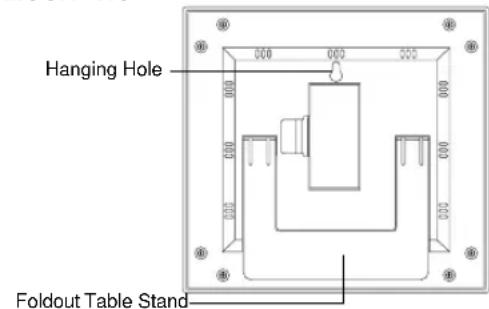
There are two possible ways to mount the atomic clock:
- use of the foldout table stand, or
- w all mounting.
I. FOLDOUT TABLE STAND

The foldout table stand leg is located on the backside of the atomic clock. The hinge is towards the center of the atomic clock, and the end (with no hinge) needs to be folded in towards the center. Once the foldout table stand is extended, place the atomic clock in an appropriate location.
II. WALL MOUNTING
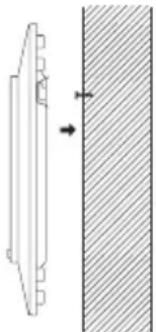
- Place a screw in your desired position on your wall.
- Install the mounting screw (not included) into a wall - leaving approximately 3/16 of an inch (5mm) extended from the wall.
- Place the Atomic Clock onto the screws, using the hanging hole on the backside. Gently pull the Atomic Clock down to lock the screws into place.
MAINTENANCE & CARE
- Extreme temperatures, vibrations, and shock should be avoided to prevent damage to the unit.
- Clean display and unit with a soft, damp cloth. Do not use solvents or scouring agents-they may mark and damage the display and casing.
- Do not submerge in water.
- Immediately remove all low powered batteries to avoid leakage and damage. Replace with new batteries only, and of recommended size.
- Opening the casings invalidates the warranty. Do not try to repair the unit. Contact La Crosse Technology for Repairs.
TROUBLESHOOTING
Problem: The LCD is faint.
Solution:
- Replace the batteries.
Problem: "OFL" appears in the LCD.
Solution:
- Move unit to an area with warmer or cooler surrounding temperature. Current surrounding temperatures are outside measuring range.
Problem: No reception of WWVB signal.
Solution:
- It may help reception to face the front of the Atomic Clock in the general direction of Ft. Collins, Colorado.
- Wait overnight for signal.
- Be sure the Atomic Clock is at least 6 feet from any electrical devices, i.e. TV sets, computers, or other radio controlled clocks.
- Remove batteries for five minutes, reinsert and leave the unit alone overnight without pressing buttons.
- If problems persist contact La Crosse Technology.
Problem: Hour is incorrect (minute and date are correct).
Solution:
- Be sure correct time zone and daylight saving time are selected.
Note: For any questions not answered, contact La Crosse Technology with the contact information found at the end of this instructional manual.
GB
P.10
P.11
GB
WARRANTY INFORMATION
La Crosse Technology, Ltd provides a 1-year limited warranty on this product against manufacturing defects in materials and workmanship.
This limited warranty begins on the original date of purchase, is valid only on products purchased and used in North America and only to the original purchaser of this product. To receive warranty service, the purchaser must contact La Crosse Technology, Ltd for problem determination and service procedures. Warranty service can only be performed by a La Crosse Technology, Ltd authorized service center. The original dated bill of sale must be presented upon request as proof of purchase to La Crosse Technology, Ltd or La Crosse Technology, Ltd's authorized service center.
La Crosse Technology, Ltd will repair or replace this product, at our option and at no charge as stipulated herein, with new or reconditioned parts or products if found to be defective during the limited warranty period specified above. All replaced parts and products become the property of La Crosse Technology, Ltd and must be returned to La Crosse Technology, Ltd. Replacement parts and products assume the remaining original warranty, or ninety (90) days, whichever is longer. La Crosse Technology, Ltd will pay all expenses for labor and materials for all repairs covered by this warranty. If necessary repairs are not covered by this warranty, or if a product is examined which is not in need or repair, you will be charged for the repairs or examination. The owner must pay any shipping charges incurred in getting your La Crosse Technology, Ltd product to a La Crosse Technology, Ltd authorized service center. La Crosse Technology, Ltd will pay ground return shipping charges to the owner of the product to a USA address only.
Your La Crosse Technology, Ltd warranty covers all defects in material and workmanship with the following specified exceptions: (1) damage caused by accident, unreasonable use or neglect (including the lack of reasonable and necessary maintenance); (2) damage occurring during shipment (claims must be presented to the carrier); (3) damage to, or deterioration of, any accessory or decorative surface; (4) damage resulting from failure to follow instructions contained in your owner's manual; (5) damage resulting from the performance of repairs or alterations by someone other than an authorized La Crosse Technology, Ltd authorized service center; (6) units used for other than home use (7) applications and uses that this product was not intended or (8) the products inability to receive a signal due to any source of interference.. This warranty covers only actual defects within the product itself, and does not cover the cost of installation or removal from a fixed installation, normal set-up or
adjustments, claims based on misrepresentation by the seller or performance variations resulting from installation-related circumstances.
LA CROSSE TECHNOLOGY, LTD WILL NOT ASSUME LIABILITY FOR INCIDENTAL, CONSEQUENTIAL, PUNITIVE, OR OTHER SIMILAR DAMAGES ASSOCIATED WITH THE OPERATION OR MALFUNCTION OF THIS PRODUCT. THIS PRODUCT IS NOT TO BE USED FOR MEDICAL PURPOSES OR FOR PUBLIC INFORMATION. THIS PRODUCT IS NOT A TOY. KEEP OUT OF CHILDREN'S REACH.
This warranty gives you specific legal rights. You may also have other rights specific to your State. Some States do no allow the exclusion of consequential or incidental damages therefore the above exclusion of limitation may not apply to you.
For warranty work, technical support, or information contact:
La Crosse Technology, Ltd
2809 Losey Blvd S.
La Crosse, WI 54601
Phone: 608.782.1610
Fax: 608.796.1020
e-mail:
support@lacrossetechnology.com
(warranty work)
sales@lacrossetechnology.com
(information on other products)
web:
www.lacrossetechnology.com
FCC DISCLAIMER
This device complies with part 15 of the FCC rules. Operation is subject to the following two conditions:
(1) This device may not cause harmful interference.
(2) This device must accept any interference received, including interference that may cause undesired operation.
La Crosse Technology
Made in China
All rights reserved. This handbook must not be reproduced in any form, even in excerpts, or duplicated or processed using electronic, mechanical or chemical procedures without written permission of the publisher.
This handbook may contain mistakes and printing errors. The information in this handbook is regularly checked and corrections made in the next issue. We accept no liability for technical mistakes or printing errors, or their consequences.
All trademarks and patents are acknowledged.

- CONTENTS
- DETAILED SET-UP GUIDE
- BATTERY INSTALLATION
- ATOMIC CLOCK
- INVENTORY OF CONTENTS
- ADDITIONAL EQUIPMENT (NOT INCLUDED)
- ABOUT WWVB (RADIO CONTROLLED TIME)
- QUICK SET-UP GUIDE
- PROGRAM MODE
- FUNCTION BUTTONS
- TIME ZONE SETTING
- DST (DAYLIGHT SAVING TIME) SETTING
- TIME SETTING
- CALENDAR SETTING
- SELECTING 'F OR 'C
- FEATURES & OPERATIONS
- CHANGING DISPLAY MODE (SECONDS, AND TEMPERATURE)
- INDOOR TEMPERATURE
- WALL MOUNTING
- MAINTENANCE & CARE
- TROUBLESHOOTING
- SOLUTION
- WARRANTY INFORMATION
- FCC DISCLAIMER
Brand : LA CROSSE TECHNOLOGY
Model : WS-9412U
Category : Wristwatch