
SR11010WRN - Refrigerator SWAN - Free user manual and instructions
Find the device manual for free SR11010WRN SWAN in PDF.


| Product Type | Fridge Freezer |
| Brand | Swan |
| Model | SR11010WRN |
| Total Capacity (Fridge) | 168 L |
| Total Capacity (Freezer) | 40 L |
| Freezing Capacity | 2 kg per 24 h |
| Energy Rating | A+ |
| Dimensions (H x W x D) | 1497 x 638 x 545 mm |
| Weight | 51 kg |
| Temperature Control | Rotary thermostat (1-7), medium setting 4-5 recommended |
| Interior Light | Yes (10W bulb, replaceable) |
| Shelves | 3 glass fridge shelves, 1 glass freezer shelf, 1 chrome wine rack |
| Crisper | 1 salad crisper drawer |
| Door Reversal | Not reversible |
| Adjustable Feet | Yes, for leveling |
| Power Supply | 220-240 V, 50 Hz (typical UK) |
| Plug Type | BS 1363 with fuse (earthed) |
| Warranty | 1 year (UK and Eire) |
| Service Helpline | 0845 610 4118 |
| Cleaning | Mild detergent, soft cloth; do not use abrasives |
| Defrosting | Manual (freezer compartment) |
| Refrigerant | Non-CFC/HFC natural substances (flammable) |
| Compliance | WEEE Directive, CE marked |
Frequently Asked Questions - SR11010WRN SWAN
User questions about SR11010WRN SWAN
0 question about this device. Answer the ones you know or ask your own.
Ask a new question about this device
Download the instructions for your Refrigerator in PDF format for free! Find your manual SR11010WRN - SWAN and take your electronic device back in hand. On this page are published all the documents necessary for the use of your device. SR11010WRN by SWAN.
USER MANUAL SR11010WRN SWAN
Installation and User Guide
For model: SR11010 (all colours)
Swan Service Helpline
0845 610 4118

Table of Contents
- Your Refrigerator
- Important Safeguards
5 - 6. Installation Notes - First Time Use
- Food Storage Tips
- Cleaning & Maintenance
- Troubleshooting
- Service & Spares, Specification, BS Plug Wiring
- WEEE Directive, Warranty

Your Refrigerator
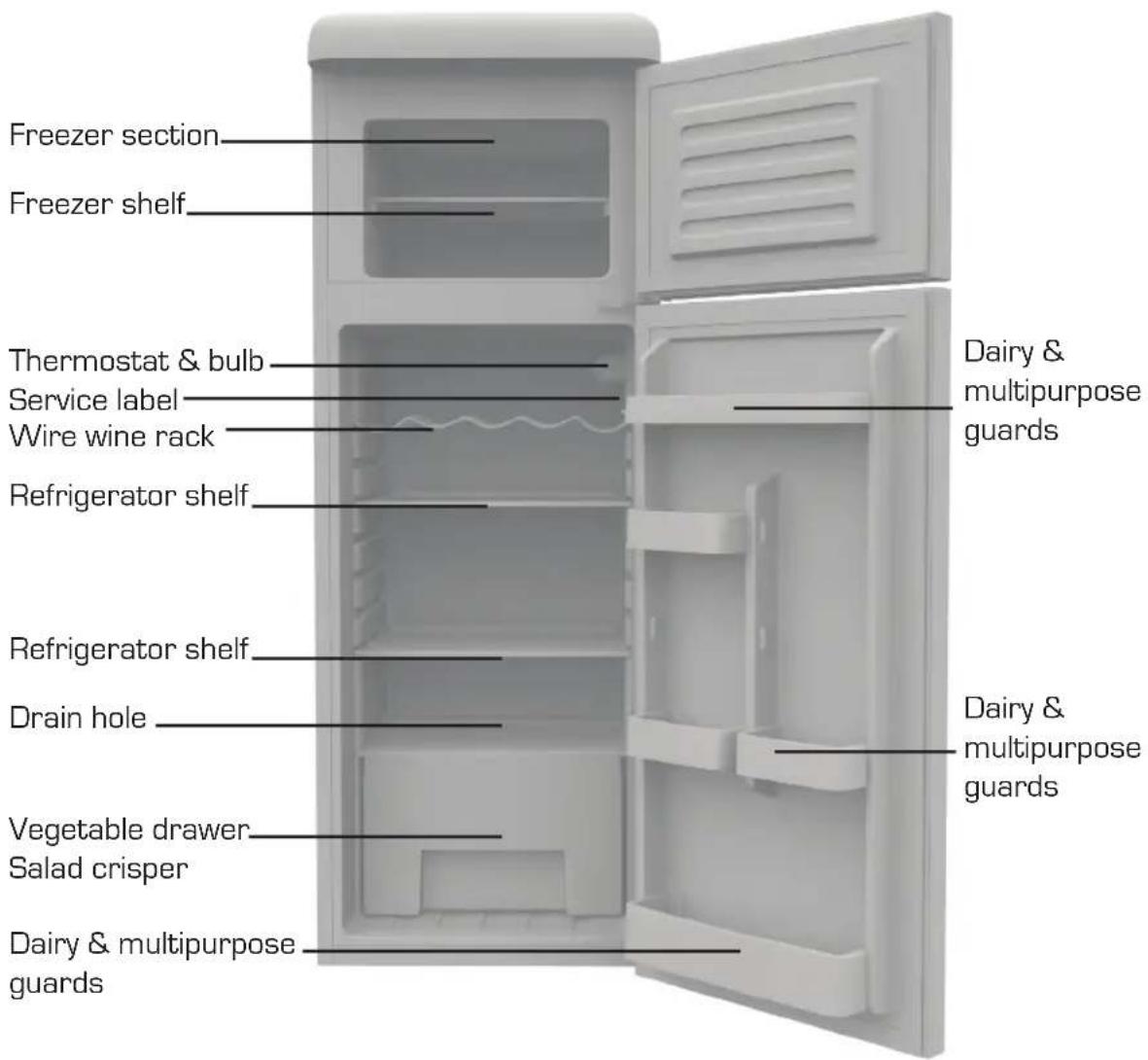
CHANGING THE BULB
- Turn off the refrigerator and disconnect the plug from the outlet.
- Using a Phillips screwdriver to remove the bulb lens
- Remove the old bulb by turning it counterclockwise.
- Replace a new bulb (10W) clockwise making sure you have correctly positioned the bulb.
- Replace the light cover in original location and click to put in place.
- Reconnect the refrigerator to the electrical outlet and switch on.

Swan designed for life

Important Safeguards
- Do not connect your appliance to the electricity supply until all packing and transit protectors have been removed.
- Leave to stand upright for at least 4 hours before switching on to allow compressor oil to settle
- This fridge/freezer must only be used for its intended purpose i.e the storing and freezing of edible foodstuff.
- Do not dispose of the appliance on a fire. Your appliance contains non CFC/HFC natural substances in the cooling system and in the insulation, which are potentially flammable if exposed to fire. Therefore, take care not to damage, the cooling circuit or pipes of the appliance in transportation and in use. In case of damage do not expose the appliance to fire or potential ignition source and immediately ventilate the room where the appliance is situated.
- We suggest you contact your local authority for disposal information and facilities available.
- See installation section for information on suitable location.
- On delivery, check to make sure that the product is not damaged and that all the parts and accessories are in perfect condition.
- Ensure that the plug remains readily accessible. Do not use multiple adaptor or extension cables.
- Failure to observe these instructions may invalidate your right to free service during the guarantee period.
- Keep ventilation openings, in the appliance enclosure or in the built-in structure, clear of obstruction.
WARNING: Keep ventilation openings, in the appliance enclosure or in the built-in structure, clear of obstruction.
WARNING: Do not use mechanical devices or other means to accelerate the defrosting process, other than those recommended by the manufacturer.
WARNING: Do not damage the refrigerant circuit.
WARNING: Do not use electrical appliances inside the food storage compartments of the appliance, unless they are of the type recommended by the manufacturer.
- We suggest you keep these instructions in a safe place for easy reference.
- This appliance is not intended for use by persons (including children) with reduced physical, sensory or mental capabilities, or lack of experience and knowledge, unless they have been given supervision or instruction concerning use of the appliance by a person responsible for their safety.
- If the supply cord is damaged, it must be replaced by the manufacturer, its service agent or similarly qualified persons in order to avoid a hazard.
- The plug must be accessible after the installation.
- Children should be supervised to ensure that they do not play with the appliance.
CAUTION: In order to avoid a hazard due to inadvertent resetting of the thermal cutout, this appliance must not be supplied through an external switching device, such as a timer, or connected to a circuit that is regularly switched on and off by the utility company
This appliance should only be connected to an earthed, switched mains socket. Do not use an extension cord with this appliance

Installation Notes
It is important that upon receipt you stand your appliance upright for at least 4 hours before switching on to allow the system to settle. Please note that the door cannot be reversed on this product.


- The appliance should not be tilted more than 45 degrees when you move it. Do not use force on any part such as the condenser, the door or handle. They could distort and affect the operation of the refrigerator. Ensure ALL packaging is removed before installation


- Make sure there is enough ventilation space around refrigerator.

- The appliance should not be installed near external heat sources eg direct sunshine - or external moisture sources.


Installation Notes

- Ensure the supply voltage of scoket is same as rating label.
- The plug must be properly inserted to the wall socket.
- The mains supply socked must be earthed - preferably with a switch. If it is not earthed, do NOT install this appliance there. Do not use an extension cord
- The product is equipped with adjustable feet. Once the product is in place, adjust these to ensure the fridge is level and doesn't rock.
DO NOT SITE THE PRODUCT WHERE THE AMBIENT TEMPERATURE IS LIKELY TO DROP BELOW 5 DEGREES CENTIGRADE - EG: GARAGE OR SHED

First Time Use
- It is important that upon receipt you stand your appliance upright for at least 4 hours before switching on to allow the system to settle
- When using the refrigerator for the first time, set the thermostat inside the refrigerator to 5 without any food inside. When the refrigerator starts, you will hear the quiet hum of the compressor. You may also hear the circulation of liquids and gases in the refrigeration system. This is normal on first start up, Generally it will take 2-3 hours for the appliance to reach temperature. Once temperature has been reached then put the food inside.
- The temperature of the refrigerator can be adjusted by rotating the disc of the thermostat. The higher the value on the setting of the thermostat, the maximum value of refrigeration (coldest being 7). Typically a medium setting of 4-5 is best for most circumstances.
- Do not put too much food in the refrigerator. Avoid opening the doors too frequently as this will waste energy and can cause excessive frost build-up.


Food Storage Tips
REFRIGERATOR COMPARTMENT
Dairy and multi-purpose Guard
- Store fatty foods, like butter and cheese.
- Store small, packed foods, like milk, yogurt and beverages.
Refrigerator compartment: 1°C to 5°C
This is the area where the food should be stored to be kept cold/chilled:
- Note: raw and uncooked foods should always be wrapped
• pre-cooked chilled foods - pre-cooked meats
- prepared salads, desserts, homemade products, and leftovers
Vegetable Drawer/Crisper
- This is the part of the refrigerator has higher humidity.
- Vegetables, fruit, fresh salads should be stored in this compartment.
Wire Wine Rack
For storing bottled liquids. Always ensure lids are air tight and sealed properly.
Notes:
• Always place raw meat, fish and poultry on the lowest shelf of the refrigerator.
- Ensure that food is well-wrapped or covered before it is stored. This will prevent food from dehydrating, deteriorating in colour or losing flavour and will help maintain freshness. It will also prevent cross-flavouring.
FREEZER COMPARTMENT
Above freezer shelf
- Store food in small portions
- Seal food in containers with lids, in plastic wrap or in plastic bags to prevent drying and the mingling of odors.
Below freezer shelf
Wrapping food
- Pack the food in suitably sized portions for your household.
- Vegetable and fruit portions should be no heavier than 1 kg, while meat portions can be up to 2.5 kg.
- Smaller portions freeze through more quickly and the quality is thereby maintained better when defrosting and preparing the food.
- It is important to seal food in airtight bags or containers before freezing to prevent it from losing favor or dehydrating.
- Wrap the food, press out any air and seal it airtight.
Suitable wrapping materials:
- Plastic bags, cling-film, aluminium foil and freezer containers. These items are available from any dealer.
Unsuitable wrapping materials:
- Wrapping paper, greaseproof paper, cellophane, bin bags or used carrier bags.
Suitable sealing materials:
- Rubber bands, plastic clips, string, freezer tape or similar.
- Plastic film and bags may be heat-sealed using a special sealing iron or press.
Before placing a package in the freezer, it should be clearly labelled with the contents and date of freezing.

Cleaning & Maintenance
DAILY CLEANING
The outside of your refrigerator can be cleaned using a soft cloth moistened with a mild detergent solution. Wipe dry with kitchen towel.
Do not use chemical or abrasive cleaners on any part of your refrigerator as these could permanently damage or discolour the surfaces.
INTERNAL CLEANING
Wipe up any internal spills immediately with a soft cloth moistened with a mild detergent solution. Dry thoroughly.
SHELVES AND GUARDS
The Dairy guards, and shelves can be removed and cleaned separately. However, we don't recommend cleaning the transparent plastic parts in a dishwasher because the high temperatures can dull the plastic over time.
DOOR SEALS
Ensure that the door seals are kept free from debris at all times. If they don't seal properly this can waste energy and cause excessive ice build-up
DRAIN HOLE AND CLEANING TOOL
There is a small drain hole at the back of the refrigerator cabinet. There is also a small cleaning tool in the hole. Use the tool to clear the drain hole when necessary. Do not allow foodstuff to clog this hole
PERIODIC MAINTENANCE
From time to time, it may be necessary to perform more extensive cleaning to keep your refrigerator in top condition and to maintain energy efficiency.
Before performing any of these maintenance steps, switch off your refrigerator and remove the plug from the mains socket. Allow the freezer section to defrost thoroughly.
EVAPORATOR TRAY
At the other side of the drain hole in the refrigerator cabinet, there is a small plastic tray that sits on top of the compressor. This should be removed and cleaned thoroughly from time to time to prevent unpleasant odours.
Take care when moving the refrigerator not to damage the cooling matrix or tilt the appliance more than 45 degrees.
After maintenance, replace any shelves etc and reconnect the appliance to the mains supply.

Troubleshooting
1. If the refrigerator does not run:
Check the supply voltage is available at the socket and check that the power plug is correctly connected.
2. If the refrigerator does not become cold enough:
a. is the thermostat is set too low? (setting 1 is warmest setting 7 is coldest)
b. is there enough space around the refrigerator?
c. is the door is opened too frequently or not closed properly? [check seals].
d. is there direct sun shine on the appliance or are there heat sources nearby?
e. is there too much food inside the compartment?
f. is there dust and debris built up on cooling matrix or compressor?
3. Food is freezing or too cold in refrigerator compartment:
a. There is too little food in the refrigerator
b. Thermostat is set too high
4. If the refrigerator operates noisily:
a. Check that the appliance is installed on a stable, level floor. Adjust the feet if necessary. The refrigerator is too near the wall
b. The food stored in the refrigerator is not touching - particularly applies to bottles.
The refrigerator creates very slight vibrations, which can be amplified greatly with touching bottles!
Note:
During high relative humidity environment, condensation may occur on the surface of the refrigerator. This is not a malfunction. Simply clean the surface of condensation.
If the refrigerator is not working properly after all these checks, contact the service center without further delay.

Service and Spares
If you experience any problems at all with your refrigerator or require spare parts, expert help is just a phone call away!
0845 610 4118
You will need to quote the model and serial number of your appliance. This is printed on the service label just inside the door under the thermostat.

Specifications
Refrigerator section capacity: 168L
Freezer section capacity: 40L
Freezing capacity: 2kg/item
Energy rating: A+
Includes: 3 x Glass fridge shelves / 1 x Chrome wine rack
1 x Freezer glass shelf and 1 x Salad crisper
Outer dimensions: (H)1497 x (W)638 x (D) 545mm
Weight: 51kg

BS Plug Wiring
The wires in the mains lead are coloured in accordance with the following code:
BLUE NEUTRAL
BROWN LIVE
GREEN/YELLOW EARTH
As the colours of the wire in the mains lead of this appliance may not correspond with the colour markings identifying the terminals on your plug, proceed as follows:
The wire which is coloured BLUE must be connected to the terminal which is marked with the letter N or coloured black. The wire which is coloured BROWN must be connected to the terminal which is marked with the letter L or coloured red. The wire which is coloured GREEN/YELLOW must be connected to the terminal which is marked with the letter E or (earth symbol) and is coloured GREEN or GREEN/YELLOW.
WARNING: THIS APPLIANCE MUST BE EARTHED

①


WEEE Directive

Disposal of Unit
Disposal instructions for Swan items in accordance with the WEEE directive. Appliances bearing the symbol shown here may not be disposed of in domestic rubbish. You are required to dispose of old electrical and electronic appliances like this separately. Please visit www.recyclemore.co.uk, or www.recyclenow.co.uk for access to information about the recycling of electrical items. The WEEE directive, introduced in August 2006, states that all electrical items must be recycled, rather than taken to landfill. Please arrange to take this appliance to your local Civic Amenity site for recycling, once it has reached the end of its life.

Warranty
This product is guaranteed for one year from the date of original purchase. If any defect arises due to faulty materials of workmanship the faulty product will be repaired, refunded or replaced at our discretion.
The following conditions apply:
The product must have been purchased from new. Proof of purchase will be required The product must be installed and used in accordance with the instructions contained in this instruction guide. It must be used only for household and similar purposes such as:
- staff kitchen areas in shops, offices and other working environments;
- farm houses and by clients in hotels, motels and other residential type environments;
• bed and breakfast type environments;
• catering and similar non-retail applications.
The appliance has not been altered, serviced, dismantled or otherwise interfered with by any person not authorised by Swan.
Any repair work must be undertaken by us or our appointed agent.
Any parts removed during repair work or any appliance that is replaced becomes our property. It does not cover wear and tear, damage, misuse or consumable parts. Swan Products Ltd has no liability for incidental or consequential loss or damage. Food value is NOT covered by the warranty.
This guarantee is valid in the UK and Eire Only.

www.swan-brand.co.uk

Scan this QR code
to hear about
our story

We love what we do

we're proud of our quality

Find us on Facebook
Copyright © 2012
Swan Products Ltd. PO Box 3117, Stoke-on-Trent ST4 9GD
- TABLE OF CONTENTS
- YOUR REFRIGERATOR
- CHANGING THE BULB
- IMPORTANT SAFEGUARDS
- INSTALLATION NOTES
- FIRST TIME USE
- FOOD STORAGE TIPS
- REFRIGERATOR COMPARTMENT
- DAIRY AND MULTI-PURPOSE GUARD
- REFRIGERATOR COMPARTMENT: 1°C TO 5°C
- VEGETABLE DRAWER/CRISPER
- WIRE WINE RACK
- NOTES
- FREEZER COMPARTMENT
- ABOVE FREEZER SHELF
- BELOW FREEZER SHELF
- WRAPPING FOOD
- SUITABLE WRAPPING MATERIALS
- UNSUITABLE WRAPPING MATERIALS
- SUITABLE SEALING MATERIALS
- CLEANING & MAINTENANCE
- DAILY CLEANING
- INTERNAL CLEANING
- SHELVES AND GUARDS
- DOOR SEALS
- DRAIN HOLE AND CLEANING TOOL
- PERIODIC MAINTENANCE
- EVAPORATOR TRAY
- TROUBLESHOOTING
- IF THE REFRIGERATOR DOES NOT RUN
- IF THE REFRIGERATOR DOES NOT BECOME COLD ENOUGH
- FOOD IS FREEZING OR TOO COLD IN REFRIGERATOR COMPARTMENT
- IF THE REFRIGERATOR OPERATES NOISILY
- NOTE
- SERVICE AND SPARES
- 0845 610 4118
- SPECIFICATIONS
- BS PLUG WIRING
- WEEE DIRECTIVE
- DISPOSAL OF UNIT
- WARRANTY
- THE FOLLOWING CONDITIONS APPLY
Brand : SWAN
Model : SR11010WRN
Category : Refrigerator