
TWS-09 - Bluetooth earphones Savio - Free user manual and instructions
Find the device manual for free TWS-09 Savio in PDF.


| Product Type | Bluetooth Earphones |
| Model | TWS-09 |
| Brand | Savio |
| Connectivity | Bluetooth 5.0 |
| Driver Size | 10 mm |
| Frequency Response | 20 Hz - 20 kHz |
| Impedance | 32 Ω |
| Battery Capacity (Earbuds) | 40 mAh each |
| Battery Capacity (Charging Case) | 300 mAh |
| Charging Time | 1.5 hours |
| Playback Time | Up to 4 hours |
| Standby Time | Up to 100 hours |
| Charging Interface | Micro USB |
| Water Resistance | IPX4 |
| Dimensions (Earbuds) | 25 x 18 x 22 mm |
| Weight (Earbuds) | 4.5 g each |
| Dimensions (Charging Case) | 62 x 42 x 28 mm |
| Weight (Charging Case) | 35 g |
| Noise Cancellation | CVC 8.0 for calls |
| Microphone | Built-in, omnidirectional |
| Control | Touch control |
| Compatibility | iOS, Android, Windows |
| Included Accessories | Charging case, USB cable, ear tips (3 sizes) |
| Cleaning | Wipe with dry cloth; avoid liquids |
| Safety | Li-ion battery; do not expose to extreme heat |
Frequently Asked Questions - TWS-09 Savio
User questions about TWS-09 Savio
0 question about this device. Answer the ones you know or ask your own.
Ask a new question about this device
Download the instructions for your Bluetooth earphones in PDF format for free! Find your manual TWS-09 - Savio and take your electronic device back in hand. On this page are published all the documents necessary for the use of your device. TWS-09 by Savio.
USER MANUAL TWS-09 Savio
Thank you for choosing Savio product!
If our product meets your expectations, share your opinion with other people on the portal ceneo.pl, social media or on the website of the store where you made the purchase. If you want to show our device on SAVIO Facebook Page, we will be very pleased.
If there is something that we could improve on our products, please write to us at support@savio.net.pl
Thanks to your feedback, we will be able to better adapt the product to your expectations.
Before starting the use of purchased device it is recommended to read the whole manual.
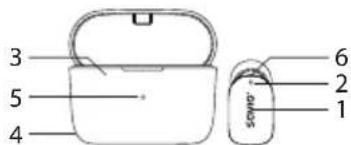
1. Product diagram:
- Multi-function touch button
- Microphone
- Docking station / power bank
- Charging USB-C socket in power bank
- Signalling diode of power bank
- LED indicator on earphones
2. Charging device:
2.1 Charging the earphones and power bank from an external power source.
2.1.1 Connect the USB-C cable to the charging socket in the power bank.
2.1.2 Insert the earphones into the dock (the diode placed on the front side of power bank will blink in green colour informing about power bank charging). When earphones are discharged, the diodes on earphones will light up in red colour and charging will start.
2.1.3 If the power bank is fully charged, green diode will light up steadily. When earphones are fully charged the diode will turn off. Earphones are ready to use.
2.2 Charging the earphones using the built-in power bank.
2.2.1 Insert the earphones into the power bank dock.
2.2.2 The power bank diodes will light up green and the earphones will light up red to indicate charging.
2.2.3 If the earphones are fully charged, the red backlight turns off, the earphones are ready to use.
ATTENTION!
Before charging the earphones for the first time, remove the protective stickers located on the charging pins (down part of the earphone).
3. Earphones pairing:
3.1 Take out the earphones from power bank, the earphones will automatically power on, earphones diodes will start blinking in green and red colour informing that the earphones are ready to pair with smartphone.
3.2 Turn on the Bluetooth in the device (e.g. smartphone), choose SAVIO TWS-09 earphones from Bluetooth devices, then pair them. If the headphones had already been paired with the device, they will be connected automatically. After proper connection of the earphones the diodes will stop blinking.
3.3 Earphones are ready to use. The notification light on the earphones will flash green every 5 seconds, informing about a successful connection.
- Touch control function:
| Left earphone (L) | Right earphone (R) | |
| Take / End a call | Double press | |
| Rejecting an incoming call | Press and hold (per 2 s) | |
| Play / Pause | Double press | |
| Next song | Press and hold (for 2 s) | |
| Previous song | Press and hold (for 2 s) | |
| Volume increase | Fast press | |
| Volume decrease | Fast press | |
| Turn ON Google Assistant / Siri | Triple press | |
5. Restart earphones:
Take out the earphones from power bank and turn off Bluetooth function in your smartphone. Press touch button (with diode blinking green-red colour) on the master earphone five times. After proper restart process, diodes on both earphones will light on orange-green colour.
6. Package content:
- Wireless earphones
• USB-A - USB-C charging cable
- Docking station / power bank
- User manual
• Additional silicone pads: S, M, L sizes
7. Technical specification:
- Bluetooth version: 5.1
• Supported Bluetooth profile: HSP, HFP, A2DP, AVRCP
• Total working time: up to 32 h (with use of power bank)
• Earphones working time on single charging cycle: up to 8 h
• Frequency response: 20 Hz - 20 kHz - Frequency bands in which the radio equipment operates: 2400 - 2483.5 MHz
• Maximum radio-frequency power transmitted in the frequency band in which the radio equipment operates: 4 dBm - Impedance: 16 Ω
• Microphone sensitivity: -42 ± 1 dB
• IPX waterproof rating: IPX5
• Built-in HD microphone: yes
• Standby time: up to 120 h
8. Safety conditions:
- Use this device as intended.
- Incorrect use of the device may damage the device.
- For charging the power bank it is highly recommended to use 1 A charger, or charge it from a USB port in the computer.
- Independent repairs and modification results in automatic loss of the warranty.
- Hitting or dropping the device could cause damage of the device.
- The device should be used in dry area, the device should be protected from water and high humidity.
Savio
Słuchawki Bluetooth model: TWS-09
POLSKI
Instrukcja obsługi
Information for customers and contractors and communication regarding complaints: Pursuant to Article 13 section 1 and 2 of the General Data Protection Regulation (EU) 2016/679 of the European Parliament and of the Council of 27 April 2016 (hereinafter referred to as GDPR), please be advised that Elmak Sp. z o.o., with its registered seat at ul. Morgowa 81; 35-323 Rzeszów becomes the Administrator of your personal data. The Specialist for General Data Protection (SODO) can be contacted in writing to: SODO, Elmak Sp. z o.o., ul. Morgowa 81; 35-323 Rzeszów, via e-mail address: sodo@elmak.pl, and by phone at +48 (17) 854 98 14. Your personal data will be processed in order to perform the contract, in accordance with Article 6(1)(b) of the aforementioned regulation, to the extent resulting from tax laws and financial regulations. Recipients of your personal data include entities authorized by legal regulations to obtain personal data as well as processing entities providing services to Elmak Sp. z o.o. Your personal data will be stored on the basis of Administrator's legitimate interest. You have the right to access your data, and the right to rectify, delete or limit processing of your data. You have the right to lodge a complaint to the supervisory body if you believe that the processing violates the GDPR. The provision of personal data is voluntary, however, a failure to provide such data may result in a refusal to conclude or in termination of a contract. Your personal data will not be subjected to automated decision making, including profiling referred to in Article 22 section 1 and 4 of the GDPR of April 27, 2016.
Information of the utilization of electrical and electronic equipment
This symbol indicates that electrical appliances should not be discarded with other household waste. Used equipment should be handed over to a local collection point for this type of waste or to a recycling center. Please contact your local authorities for information about disposal methods available in your area. Waste electrical equipment may contain hazardous substances (e.g. mercury, lead, cadmium, chromium, phthaltes) which can get into air, soil and groundwater when leaking from used appliances. Environmental pollution with these substances leads to their bioaccumulation, causing lesion of disease in living organisms, which would pose a risk to human and animal health or life. Households may contribute to environmental protection by proper waste collection. In such way, hazardous substances from the equipment are neutralized and valuable secondary raw materials are reused for production of new equipment.
The warranty covers a period of 24 months. Independent repairs and modifications result in automatic loss of the warranty. Warranty card is available for download on our website: www.savio.net.pl/en/service
Gwarancja:
Brand : Savio
Model : TWS-09
Category : Bluetooth earphones