
CA-R-FOR.009 - Car control interface PIONEER - Free user manual and instructions
Find the device manual for free CA-R-FOR.009 PIONEER in PDF.


| Product Type | Car Audio Accessory |
| Brand | Pioneer |
| Model | CA-R-FOR.009 |
| Dimensions (approx.) | 4.5 x 2.5 x 1.0 inches |
| Weight (approx.) | 0.25 lbs |
| Power Supply | 12V DC |
| Main Functions | Audio signal transmission, remote control compatibility |
| Installation Method | Plug-and-play with compatible Pioneer head units |
| Compatibility | Select Pioneer car stereo models |
| Material | Plastic casing with metal connectors |
| Color | Black |
| Operating Temperature | -4°F to 158°F |
| Storage Temperature | -22°F to 176°F |
| Maintenance & Cleaning | Wipe with a soft, dry cloth. Avoid liquids. |
| Safety Precautions | Do not expose to moisture or extreme heat. Disconnect power before installation. |
| Spare Parts & Repairability | Contact Pioneer support for replacement parts. Not user-serviceable. |
| General Information | Designed for seamless integration with Pioneer car audio systems. |
Frequently Asked Questions - CA-R-FOR.009 PIONEER
User questions about CA-R-FOR.009 PIONEER
0 question about this device. Answer the ones you know or ask your own.
Ask a new question about this device
Download the instructions for your Car control interface in PDF format for free! Find your manual CA-R-FOR.009 - PIONEER and take your electronic device back in hand. On this page are published all the documents necessary for the use of your device. CA-R-FOR.009 by PIONEER.
USER MANUAL CA-R-FOR.009 PIONEER
...connecting to the aftermarket
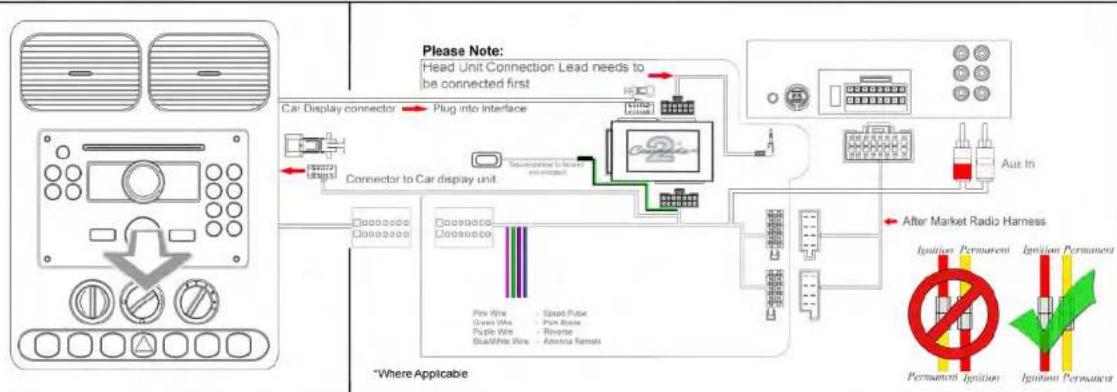
flowchart
graph TD
    A["Car Display Connector"] --> B["Plug into Interface"]
    B --> C["Connector to Car display unit"]
    C --> D["After Market Radio Harness"]
    D --> E["Impiston Permanent"]
    D --> F["Impiston Permanent"]
    D --> G["Permanent Ignition"]
    D --> H["Imponent Permanent"]
    style A fill:#f9f,stroke:#333
    style B fill:#ccf,stroke:#333
    style C fill:#cfc,stroke:#333
    style D fill:#fcc,stroke:#333
    style E fill:#ffc,stroke:#333
    style F fill:#fcc,stroke:#333
    style G fill:#ffc,stroke:#333
    style H fill:#fcc,stroke:#333

Vehicle Compatibility:
Ford Ranger 2012>
Steering Wheel Control Functions

natural_image
Close-up of a Ford car interior showing the logo and control buttons (no readable text or symbols beyond the logo)Seek/Track-
Volume +

Seek/Track+
Volume -
* Note All Dates are guide lines only as specifications of vehicles change
Installation Guide
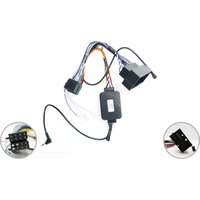
Part No: CTSFO008
Ford Can-Bus Steering Wheel Control Interface

...connecting to the aftermarket
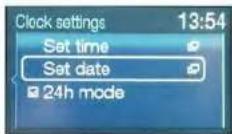
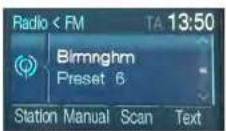
User guide to change the time and date

1 - Speech Button
2 - Select Right
3 - Select up
4 - Select left
5 - Select down
Single Press (Button 1) switches display on. Press & Hold Speech Button (button 1) for 2 seconds this will enable menu mode option.
Press (Buttons 3/5) Up/down till clock setting is selected. Then press (Button 1) to confirm.
To Adjust the clock use (Buttons 3/5), select the next option use (Buttons 2/4). and then press (Button 1) to confirm.
Press (Buttons 3/5) Up/down till set date is selected Then press (Button 1), to confirm.
To adjust the date use (Buttons 3/5) And to select the next option use (Buttons 2/4).press (Button 1) to confirm.
When the time and date has been set, Press the speech button(Button 1) once to confirm.
The menu option will time out after 15-20 seconds.




Brand : PIONEER
Model : CA-R-FOR.009
Category : Car control interface