
DiNET DAN-RX2 - Processor Radial Engineering - Free user manual and instructions
Find the device manual for free DiNET DAN-RX2 Radial Engineering in PDF.


| Product Type | Dante Network Audio Receiver |
| Dimensions (W x D x H) | 3.5" x 3.5" x 1.5" (89mm x 89mm x 38mm) |
| Weight | 0.75 lbs (0.34 kg) |
| Power Supply | PoE IEEE 802.3af (Power over Ethernet) |
| Digital-to-Analog Converter | 24-bit / 96 kHz |
| Network Input | RJ45 EtherCon, supports Dante |
| Audio Outputs | 2 x Balanced XLR |
| Frequency Response | 20 Hz - 20 kHz (±0.5dB) |
| Dynamic Range | >114 dB |
| THD+N | <0.005% |
| Latency | <1 ms |
| Key Features | Converts Dante digital audio to balanced analog; network looping |
| Remote Control | Via Dante Controller software |
| Maintenance | Clean with dry cloth; avoid moisture |
| Safety | Use in dry environment; do not expose to liquids |
| Spare Parts / Repairability | No user-serviceable parts; contact authorized service center |
| Warranty | 3 years parts and labor |
Frequently Asked Questions - DiNET DAN-RX2 Radial Engineering
User questions about DiNET DAN-RX2 Radial Engineering
0 question about this device. Answer the ones you know or ask your own.
Ask a new question about this device
Download the instructions for your Processor in PDF format for free! Find your manual DiNET DAN-RX2 - Radial Engineering and take your electronic device back in hand. On this page are published all the documents necessary for the use of your device. DiNET DAN-RX2 by Radial Engineering.
USER MANUAL DiNET DAN-RX2 Radial Engineering
2-Channel Dante Network Receiver

User Guide
Radial Engineering Ltd.
1845 Kingsway Ave., Port Coquitlam, BC V3C 1S9, Canada
Tel: 604-942-1001 · Fax: 604-942-1010
Email: info@radialeng.com
Radial® DAN-RX2 User Guide
Table of Contents Page
Overview....1
Features 2-3
Getting Started 4
Making Connections....5
The Headphone Amplifier....6
Specifications 7
Warranty ....Back cover
Thank you for purchasing the Radial DiNET DAN-RX2. The DAN-RX2 is a high-resolution digital-to-analog converter that is designed to connect to a Dante™ or AES67-enabled Ethernet network — seamlessly transferring the audio stream to a pair of balanced audio outputs to feed a PA, recording device or broadcast mixing console.
This manual covers the setup and operation of the DAN-RX2 in various applications. Please take a few minutes to read through and familiarize yourself with the DAN-RX2 features and functions. If you have any questions that are not covered in this manual, please consult the FAQ section on our website. This is where we post the latest updates. If you still do not find what you are looking for, feel free to send us an email at info@radialeng.com and we will do our best to reply in short order.
OVERVIEW
The Radial DiNET DAN-RX2 is a professional grade digital-to-analog audio converter designed specifically for use with Dante or AES67-enabled networks. It allows you to create a stereo audio endpoint at any location within a Dante network, featuring an Ethernet connector to receive the digital signal, and balanced analog outputs to feed mixing consoles, power amplifiers, or self-powered speakers.
High quality 24bit/96kHz converters provide pristine audio and ensure that the digital source content is reproduced as faithfully as possible, and a rugged 14-gauge steel chassis features a locking etherCON connector carrier that protects the Ethernet connectors from damage. The DAN-RX2 also features a built-in headphone amplifier with an adjustable level control, allowing you to easily check the audio signals or feed a monitor mix to any destination.

flowchart
graph TD
    A["Dante Network"] -->|Cat 5e / Cat6| B["DINET DAN-RX2 Interface"]
    B --> C["Radiofer"]
    C --> D["Audio Device"]
    D --> E["Headphones"]
    B --> F["Radiofer"]
    F --> G["Audio Device"]
The DAN-RX2 is easy to use, with no setup required on the device itself. It is completely configured by Dante Controller, which manages digital audio routing across the Dante network. Dante Controller is a software application by Audinate™ that allows the user to manage all Dante-enabled devices across a network. Use Dante Controller to route audio to the DAN-RX2 and all other components on the network. Simply connect the DAN-RX2 to the network and it will automatically appear as an available output device within Dante Controller.
The DAN-RX2 will initially have the name “DiNET-RX2-xxxxxx”, where the last 6 digits will be the unique media access control address (MAC address) of your DAN-RX2. As this can be changed to a user-generated name using Dante Controller, we recommend writing down the MAC address of your unit in the space provided below for future reference.
Record your DAN-RX2 MAC address here:
DiNET-RX2-
Dante Controller can be downloaded for free at www.audinate.com. For the latest firmware for the DAN-RX2 please visit www.radialeng.com.
FEATURES

- HEADPHONE OUTPUTS: 3.5mm and 1/4" TRS headphone outputs work with earbuds and headphones.
- HEADPHONE LEVEL: Sets the output level of the headphone amplifier.
- HEADPHONES ON: Activates the headphone amplifier.
- SYNC LEDs: Red LED illuminates when the unit is powered. Green LED will illuminate once connected to an Ethernet network. Flashing green LED indicates that the DAN-RX2 is in master clock mode, solid green LED indicates that it is in slave mode.
- SYS LEDs: Red LED illuminates when power is first applied. Switches to green LED once Dante processor becomes active.
- +15V LED: Illuminates when the DAN-RX2 is receiving power via the included DC power adapter.
- POE LED: Illuminates when the DAN-RX2 is receiving Power over Ethernet (PoE).

- POWER: 15VDC connection for use with included Radial power adapter.
- CABLE CLAMP: Used to secure the power supply cable to prevent accidental disconnection.
- ETHERNET PORT: Connects to the Dante network via standard CAT5e or CAT6 Ethernet cable. This port delivers the digital audio signal from the network and powers the DAN-RX2 when Power over Ethernet (PoE) is available.
- ETHERCON COMPATIBLE CONNECTION: Locking connector prevents accidental disconnection and damage to RJ45 connectors when used with Neutrik etherCON cable connector carriers.
- LEFT AND RIGHT XLR OUT: Balanced analog audio outputs. Output level is controlled by the audio playback source.
- GROUND LIFT: Lifts pin-1 on both XLR outputs to eliminate hum and buzz from ground loops.
- NON SLIP PAD: Provides electrical & mechanical isolation and keeps the unit from sliding around.
GETTING STARTED
Before making any connections, always ensure your amplifiers or speakers are either turned down or turned off in order to protect sensitive components from damage due to loud transients that can occur when plugging in or turning on various components.
Power for the DAN-RX2 can be provided via Power over Ethernet (PoE) from a PoE-capable network switch or a separate PoE injector. Once power is available, the side panel PoE LED indicator will illuminate and the DAN-RX2 will be ready to use.
Power Supply
The included 15VDC power supply is provided for use when PoE is not available. Once you have connected the DAN-RX2 to the Ethernet switch, plug in the power supply. The +15VDC LED will illuminate and the DAN-RX2 will be ready to use.
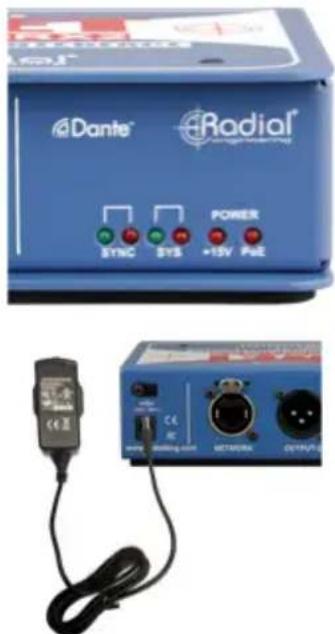
As a backup option, the DAN-RX2 is designed to be able to have both PoE and the 15VDC adaptor connected at the same time. If one fails, the other will maintain power without interruption.
ETHERNET CONNECTION
The DAN-RX2 connects to an Ethernet switch using a standard CAT5e or CAT6 cable. Once the Ethernet switch is connected to a computer running the Dante Controller software, the DAN-RX2 will appear as an available receive device.

MAKING CONNECTIONS
Connect two standard balanced XLR cables from Output-1 and Output-2 to the inputs of your PA or recording system. These XLR outputs are balanced to drive long cable runs up to 100 meters (300') without noise, and are suitable for connecting the DAN-RX2 to professional mixing consoles, preamps and power amplifiers. The signal level at these outputs is controlled by the audio playback source.

Audio connections for PA system and recording systems use balanced XLR cables up to 100 meters (300') without noise.
IMPORTANT NOTE: The DAN-RX2 does not require phantom power to operate. The DAN-RX2 is equipped with blocking capacitors to prevent damage from DC voltage, but for best results please ensure that the phantom power is switched off when connecting to the microphone input of a mixer.
MOUNTING THE DAN-RX2 IN A RACK
The DAN-RX2 can be mounted in standard 19" equipment racks using the optional SA Series Rack Adaptor kit (Part # R800 9422). This 1 RU adaptor allows you to mount one or two DAN-RX2 receivers in a single rack space.

natural_image
Blue DINET Radio/Dan-TK2 device mounted on black metal frame with mounting holes (no visible text or symbols)USING THE HEADPHONE AMPLIFIER
The DAN-RX2 is equipped with a dedicated stereo headphone amplifier. Headphone outputs are available over 3.5mm and 1/4" TRS connectors for both earbuds and headphones. The headphone outputs are active only when the ON switch is engaged on the front of the DAN-RX2: this switch and the level control will only affect the headphone outputs, as the XLR outputs will always be active with their level controlled by the audio playback source.
Always ensure the volume control is set to its lowest point (fully counter-clockwise) when plugging in headphones, and slowly increase the level to a satisfactory level. If no signal is present, ensure that audio is routed to the unit via the Dante Controller software.

natural_image
Blue electronic device labeled 'Dante Radial' connected to a black headset (no visible text or symbols on the device body)
Headphone Safety Warning Caution: Very Loud Amplifier
As with all products capable of producing high sound pressure levels (SPL), users must be very careful to avoid the hearing damage that may occur from prolonged exposure. This is particularly important when applied to headphones, as prolonged listening at high SPL's will eventually cause tinnitus and can lead to partial or complete loss of hearing. Please be aware of the recommended exposure limits within your jurisdiction and follow them closely. The user agrees that Radial Engineering Ltd is not liable for any health effects resulting from the use of this product and the user clearly understands that he or she is entirely responsible for the safe and proper use of this product. Please consult the Radial Limited Warranty for further details.
SPECIFICATIONS\*
Audio Circuit Type: ......High current balanced active output device
Number of Channels: 2
Sample Rate: 44.1kHz, 48kHz, 88.2kHz, and 96kHz
Bit Depth: 24 bit
Frequency Response: 20Hz-20kHz
Idle Channel Noise: -108dB
Dynamic Range:.....>100dB
Channel Separation:....>75dB
Gain:....+18dBu max @ 0dBFS
Total Harmonic Distortion + Noise: 0.007% @ -6dBFS
Output Impedance: 150Ω
Power Consumption: 1.25W
Features
Input Connections:....RJ45 Ethernet with locking etherCON
Output Connectors: 2x XLR male, 1x 3.5mm & 2x 1/4" headphone out
LED Indicators: SYNC, SYS, +15V, and PoE
Extras:....Headphone amplifier with level control
General
Power: 15VDC 400mA (included) or PoE
Power over Ethernet (PoE):......Class 1 IEEE 802.3af
FCC Approval: ......Meets FCC Part 15B Class A
Construction: 14-gauge steel
Finish: Durable powder coat
Size (L x W x D): 4.5" x 2" x 6" (121 x 6 x 147mm)
Warranty: Radial 3-year, transferable

Note: This device has been tested and found to comply with the limits for a Class A digital device, according to Part 15 of the FCC Rules and EN55022. These limits are designed to provide reasonable protection against harmful interference when the device is operated in a commercial environment. This device generates, uses, and can radiate radio frequency energy and, if not installed and used in accordance with the user manual, may cause harmful interference to radio communications. Operation of this device in a residential area is likely to cause harmful interference, in which case the user will be required to correct the interference at their own expense.
NOTES
NOTES
THREE YEAR TRANSFERABLE LIMITED WARRANTY
RADIAL ENGINEERING LTD. ("Radial") warrants this product to be free from defects in material and workmanship and will remedy any such defects free of charge according to the terms of this warranty. Radial will repair or replace (at its option) any defective component(s) of this product (excluding finish and wear and tear on components under normal use) for a period of three (3) years from the original date of purchase. In the event that a particular product is no longer available, Radial reserves the right to replace the product with a similar product of equal or greater value. In the unlikely event that a defect is uncovered, please call 604-942-1001 or email service@radialeng.com to obtain an RA number (Return Authorization number) before the 3 year warranty period expires. The product must be returned prepaid in the original shipping container (or equivalent) to Radial or to an authorized Radial repair centre and you must assume the risk of loss or damage. A copy of the original invoice showing date of purchase and the dealer name must accompany any request for work to be performed under this limited and transferable warranty. This warranty shall not apply if the product has been damaged due to abuse, misuse, misapplication, accident or as a result of service or modification by any other than an authorized Radial repair center.
THERE ARE NO EXPRESSED WARRANTIES OTHER THAN THOSE ON THE FACE HEREOF AND DESCRIBED ABOVE. NO WARRANTIES WHETHER EXPRESSED OR IMPLIED, INCLUDING BUT NOT LIMITED TO, ANY IMPLIED WARRANTIES OF MERCHANTABILITY OR FITNESS FOR A PARTICULAR PURPOSE SHALL EXTEND BEYOND THE RESPECTIVE WARRANTY PERIOD DESCRIBED ABOVE OF THREE YEARS. RADIAL SHALL NOT BE RESPONSIBLE OR LIABLE FOR ANY SPECIAL, INCIDENTAL OR CONSEQUENTIAL DAMAGES OR LOSS ARISING FROM THE USE OF THIS PRODUCT. THIS WARRANTY GIVES YOU SPECIFIC LEGAL RIGHTS, AND YOU MAY ALSO HAVE OTHER RIGHTS, WHICH MAY VARY DEPENDING ON WHERE YOU LIVE AND WHERE THE PRODUCT WAS PURCHASED.
To meet the requirements of California Proposition 65, it is our responsibility to inform you of the following:
WARNING: This product contains chemicals known to the State of California to cause cancer, birth defects or other reproductive harm.
Please take proper care when handling and consult local government regulations before discarding.

Radial Engineering Ltd.
1845 Kingsway Ave., Port Coquitlam, BC V3C 1S9, Canada
Tel: 604-942-1001 • Fax: 604-942-1010 • Email: info@radialeng.com

- 2-Channel Dante Network Receiver
- User Guide
- Radial® DAN-RX2 User Guide
- Table of Contents Page
- OVERVIEW
- DiNET-RX2-
- FEATURES
- GETTING STARTED
- Power Supply
- ETHERNET CONNECTION
- MAKING CONNECTIONS
- MOUNTING THE DAN-RX2 IN A RACK
- USING THE HEADPHONE AMPLIFIER
- Headphone Safety Warning Caution: Very Loud Amplifier
- SPECIFICATIONS\*
- General
- NOTES
- THREE YEAR TRANSFERABLE LIMITED WARRANTY
Brand : Radial Engineering
Model : DiNET DAN-RX2
Category : Processor