
29984 - Audiovisual Equipment C2G - Free user manual and instructions
Find the device manual for free 29984 C2G in PDF.


| Product Type | Adapter / Cable |
| Connector Type | USB-C to HDMI |
| Length | 1.8 m (6 ft) |
| Material | PVC jacket, copper conductors |
| Weight | Approx. 100 g |
| Power Delivery | Passive, no external power required |
| Video Resolution | Up to 4K@60Hz |
| Audio Support | Multi-channel audio pass-through |
| Compatibility | Devices with USB-C Alt Mode (laptops, tablets, smartphones) |
| Plug-and-Play | Yes, no driver installation needed |
| Operating Temperature | 0°C to 50°C |
| Storage Temperature | -20°C to 70°C |
| Housing Material | Aluminum with PVC overmold |
| Connector Plating | Gold-plated for corrosion resistance |
| Maintenance | Wipe with a dry cloth; avoid liquids |
| Safety | Low voltage, CE and RoHS compliant |
| Spare Parts | Not available separately |
| Repairability | Non-repairable; replace unit if faulty |
Frequently Asked Questions - 29984 C2G
User questions about 29984 C2G
0 question about this device. Answer the ones you know or ask your own.
Ask a new question about this device
Download the instructions for your Audiovisual Equipment in PDF format for free! Find your manual 29984 - C2G and take your electronic device back in hand. On this page are published all the documents necessary for the use of your device. 29984 by C2G.
USER MANUAL 29984 C2G
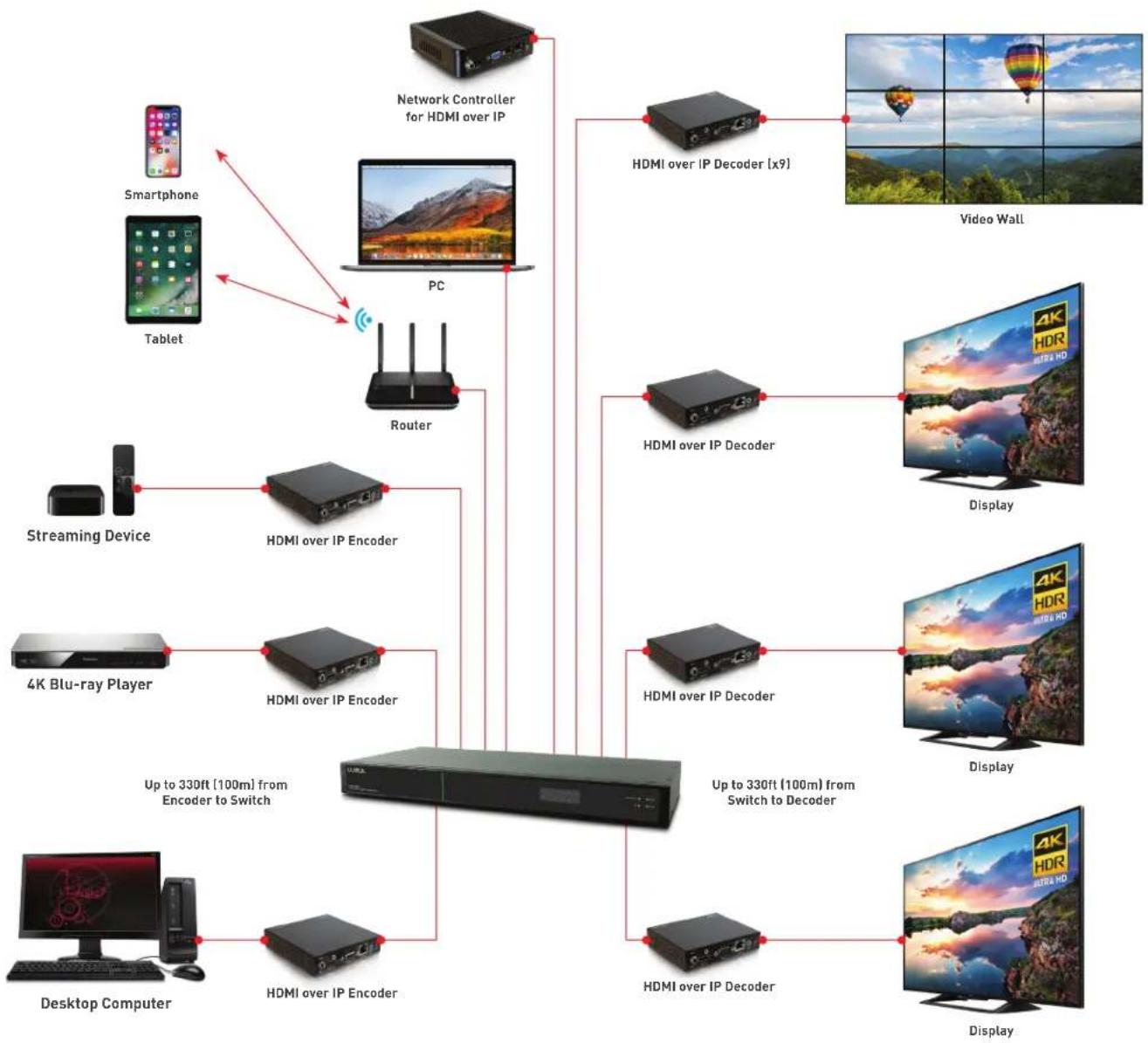
HDMI over IP streams HDMI audio/video signals at up to a 4K resolution over a network or the Internet. Multiple configurations offer the flexibility to support a digital signage system, video wall, and point to point extension, including multi-view capabilities
H.264/265 technology has exceptionally low bandwidth requirements allow for streaming audio/video content over a local area network (LAN), over Wi-Fi ^™ , and over the Internet for distributed installations.
Applications
- Digital signage
- Video wall
- Multi-view
• A/V matrix switching - Point-to-point extension
Configurations
- Point-to-multipoint
- Multipoint-to-point
- Multipoint-to-multipoint
- Point-to-point

natural_image
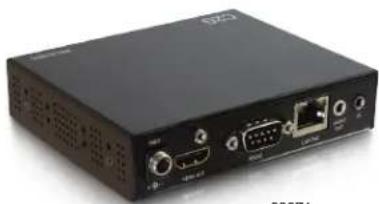
Black electronic device with ports and ventilation slots (no visible text or symbols)29975 Encoder
natural_image
Black electronic device with ports and connectors (no visible text or symbols)29976 Decoder
HDMI over IP Features
• Supports an input resolution of up to 4K at 30Hz and an output resolution of up to 4K at 60Hz
- Utilises H.264/H.265 video codec making it ideal for LAN & Internet transmissions
- Scalable matrix switching applications support over 600 sources and displays
- Serial RS232 and directional IR control signal provide complete control of distributed A/V systems
- Conveniently powered through PoE by a PoE(PSE) Ethernet switch
- Easy setup and system management through the Network Controller for HDMI over IP web interface or smartphone app
SKU Description
| 29975 HDMI over IP Encoder - 4K 30Hz |
| 29976 HDMI over IP Decoder - 4K 60Hz |

natural_image
Front view of a black industrial electronic device with ports and connectors (no visible text or symbols)29977 Front

natural_image
Front view of a black industrial electronic device with ventilation slots and ports (no visible text or labels)29977Back
Network Controller for HDMI over IP Features
- Provides centralised setup, configuration, and control of a HDMI over IP system, including auto-discovery of devices
- Conveniently managed via web interface or smartphone control app
- Serves as a base platform to develop automation control applications
- Simplifies firmware updates through centralised management
- An available Application Program Interface (API) supports a number of third party partner control applications running on smartphones and tablets
SKU Description
29977 Network Controller for HDMI over IP
flowchart
graph TD
    A["Desktop Computer"] --> B["4K Blu-ray Player"]
    B --> C["Streaming Device"]
    C --> D["Computer"]
    D --> E["Router"]
    E --> F["PC"]
    F --> G["Smartphone"]
    F --> H["Tablet"]
    D --> I["Desktop Computer"]
    D --> J["4K Blu-ray Player"]
    D --> K["Streaming Device"]
    D --> L["Desktop Computer"]
    D --> M["4K Blu-ray Player"]
    D --> N["Streaming Device"]
    D --> O["Desktop Computer"]
    D --> P["4K Blu-ray Player"]
    D --> Q["Streaming Device"]
    D --> R["Desktop Computer"]
    D --> S["4K Blu-ray Player"]
    D --> T["Streaming Device"]
    D --> U["Desktop Computer"]
    D --> V["4K Blu-ray Player"]
    D --> W["Streaming Device"]
    D --> X["Desktop Computer"]
    D --> Y["4K Blu-ray Player"]
    D --> Z["Streaming Device"]
    D --> AA["Desktop Computer"]
    D --> AB["4K Blu-ray Player"]
    D --> AC["Streaming Device"]
    D --> AD["Desktop Computer"]
    D --> AE["4K Blu-ray Player"]
    D --> AF["Streaming Device"]
    D --> AG["Desktop Computer"]
    D --> AH["4K Blu-ray Player"]
    D --> AI["Streaming Device"]
    D --> AJ["Desktop Computer"]
    D --> AK["4K Blu-ray Player"]
    D --> AL["Streaming Device"]
    D --> AM["Desktop Computer"]
    D --> AN["4K Blu-ray Player"]
    D --> AO["Streaming Device"]
    D --> AP["Desktop Computer"]
    D --> AQ["4K Blu-ray Player"]
    D --> AR["Streaming Device"]
    D --> AS["Desktop Computer"]
    D --> AT["4K Blu-ray Player"]
    D --> AU["Streaming Device"]
    D --> AV["Desktop Computer"]
    D --> AW["4K Blu-ray Player"]
    D --> AX["Streaming Device"]
    D --> AY["Desktop Computer"]
    D --> AZ["4K Blu-ray Player"]
    D --> BA["Streaming Device"]
    D --> BB["Desktop Computer"]
    D --> BC["4K Blu-ray Player"]
    D --> BD["Streaming Device"]
    D --> BE["Desktop Computer"]
    D --> BF["4K Blu-ray Player"]
    D --> BG["Streaming Device"]
    D --> BH["Desktop Computer"]
    D --> BI["4K Blu-ray Player"]
    D --> BJ["Streaming Device"]
    D --> BK["Desktop Computer"]
    D --> BL["4K Blu-ray Player"]
    D --> BM["Streaming Device"]
    D --> BN["Desktop Computer"]
    D --> BO["4K Blu-ray Player"]
    D --> BP["Streaming Device"]
    D --> BQ["Desktop Computer"]
    D --> BR["4K Blu-ray Player"]
    D --> BS["Streaming Device"]
    D --> BT["Desktop Computer"]
    D --> BU["4K Blu-ray Player"]
    D --> BV["Streaming Device"]
    D --> BW["Desktop Computer"]


Brand : C2G
Model : 29984
Category : Audiovisual Equipment