
HDS-4PS - Hi-Fi System Smart-AVI - Free user manual and instructions
Find the device manual for free HDS-4PS Smart-AVI in PDF.


| Product Type | 4-Port HDMI Splitter |
| Brand | Smart-AVI |
| Model | HDS-4PS |
| Video Format | HDMI 1.3c (Deep Color, xvYcc color space supported) |
| HDMI Compliance | HDMI 1.1 |
| HDCP Compliance | HDCP 1.2 |
| Video Bandwidth | Single-link 225 MHz [6.75 Gbps] |
| Max Resolution | Up to WUXGA (1920x1200 @ 60 Hz) & UXGA (1600x1200 @ 60 Hz) |
| Input Interface | 1 x HDMI (7.1ch audio & video) |
| Output Interface | 4 x HDMI (7.1ch audio & video) |
| Connector Type | Type A (19-pin male) |
| Audio Support | DTS-HD Master Audio, Dolby TrueHD, Dolby Digital, DTS, DVD-Audio, LPCM, SACD, MPCM |
| DDC Signal | 5 Volts (peak-to-peak), TTL |
| TDMS Signal | 1.2 Volts (peak-to-peak), TTL |
| Power Supply | External 5VDC 2A |
| Dimensions (W x H x D) | 6.5" x 1.125" x 3" (165.1 x 28.6 x 76.2 mm) |
| Weight | 0.35 lbs (159 g) |
| Approvals | Device: CE, RoHS; Power Supply: cULus, CE |
| Operating Temperature | 0°C to 50°C (estimated) |
| Storage Temperature | -20°C to 60°C (estimated) |
| Key Features | Compliant with HDMI 1.3c, DVI 1.0; supports HDMI CEC (not bypassing); easy installation; wide frequency range 25-225 MHz |
| Applications | Home theater, restaurants/bars, digital signage, information kiosks, film/recording studios |
Frequently Asked Questions - HDS-4PS Smart-AVI
User questions about HDS-4PS Smart-AVI
0 question about this device. Answer the ones you know or ask your own.
Ask a new question about this device
Download the instructions for your Hi-Fi System in PDF format for free! Find your manual HDS-4PS - Smart-AVI and take your electronic device back in hand. On this page are published all the documents necessary for the use of your device. HDS-4PS by Smart-AVI.
USER MANUAL HDS-4PS Smart-AVI
Technical Specifications
| VIDEO | |
| Format | HDMI 1.3c [Deep Color, xvYcc color space supported] |
| HDMI Compliance | HDMI 1.1 |
| HDCP Compliance | Yes |
| Video Bandwidth | Single-link 225MHz [6.75Gbps] |
| Resolution | Up to WUXGA [1920x1200 @ 60Hz] & UXGA [1600x1200 @ 60Hz] |
| Input Interface | (1) HDMI[7.1ch audio & video] |
| Output Interface | (4) HDMI[7.1ch audio & video] |
| Connector | Type A[19-pin male] |
| AUDIO | |
| Supported Formats | DTS-HD Master Audio, Dolby TrueHD Dolby Digital, DTS, DVD-Audio, LPCM, SACD, MPCM |
| OTHER | |
| DDC Signal | 5 Volts [peak to- peak], TTL |
| TDMS Signal | 1.2 Volts[peak to- peak], TTL |
| Power | External 5VDC2A |
| Dimensions | 6.5"W x 1.125"H x 3"D |
| Weight | 0.35 lbs. |
| Approvals | Device: CE, ROHSPower Supply: C UL US, CE |
© Copyright 2010 Smart-AVI, All Rights Reserved
NOTICE
The information contained in this document is subject to change without notice. Smart-AVI makes no warranty of any kind with regard to this material, including but not limited to, implied warranties of merchantability and fitness for any particular purpose.
Smart-AVI will not be liable for errors contained herein or for incidental or consequential damages in connection with the furnishing, performance or use of this material.
No part of this document may be photocopied, reproduced or translated into another language without prior written consent from Smart-AVI.
For more information, visit www.smartavi.com.
Smart-AMI SMART AUDIO VIDEO INNOVATION
Installation Manual
HDS-4P
4-Port HDMI Splitter
natural_image
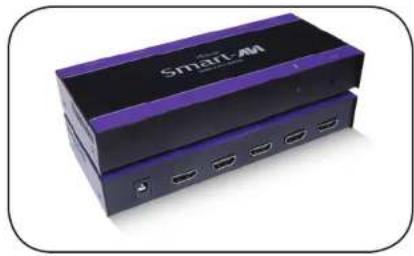
Exterior view of a two-tiered SmartAM device with purple and black casing (no visible text or symbols)Connect One HDMI/HDTV Component to Four Displays
Smart-AM SMART AUDIO VIDEO INNOVATION
SmartAVI, Inc. / Twitter: smartavi 2840 N. Naomi Ave. Burbank, CA 91504 Tel: (818) 565-0011 Fax: (818) 565-0020 http://www.SmartAVI.com
www.smartavi.com
Introduction
The HDMI Splitter allows set-top boxes, DVD players, HDMI game console, and other HDTV devices with a HDMI output to be connected to four or more HDTV displays.
Supports HDTV's 480i/480p/720i/720p/1080i/1080p & PC's WUXGA/1900x1200 and works with flat panel, plasma screen, projector, switch, splitter, computer video display, HDTV/HDCP, set-top boxes, DTV and DVD.
HDMI can output up to 20 feet from an HDMI device to the HDMI splitter, and then 20 feet from the HDMI splitter to the displays.
Features
• HDMI 1.3c and DVI 1.0 compliant
• HDCP 1.2 compliant
• Wide Frequency Range: 25MHz\~225MHz
• Video bandwidth: 6.7GBPS
• Resolution up to 1080p or WUXGA
• Supports CEC (not bypassing)
• Supports Dolby Digital, DTS-HD and Dolby True HD audio
- Easy installation
Applications
• Home Theater Integration
• Restaurants and Bars
• Digital Signage Deployment
• Information Kiosks/Displays
• Film/Recording Studios
Product - Installation Diagram

flowchart
graph TD
    A["PS3"] --> B["HDS-4P"]
    B --> C["HDMI"]
    C --> D["Monitor x4"]
    D --> E["HDMI"]
    E --> F["Monitor x5"]
    F --> G["Display 1-4"]
    G --> H["Connector View"]
    style A fill:#99CCFF
    style B fill:#99CCFF
    style C fill:#99CCFF
    style D fill:#99CCFF
    style E fill:#99CCFF
    style F fill:#99CCFF
    style G fill:#99CCFF
    style H fill:#99CCFF
- Turn off the HDMI device and the displays.
- Connect an HDMI cable from the HDMI output device to the input port on the HDS-4P.
- Connect the displays to the HDMI outputs on the HDS-4P.
- Connect the power cord to the HDS-4P.
- Power on the HDMI device and the displays.

HDS-4P Front

HDS-4P Rear
Brand : Smart-AVI
Model : HDS-4PS
Category : Hi-Fi System