
CP-X250W - Video projector HITACHI - Free user manual and instructions
Find the device manual for free CP-X250W HITACHI in PDF.


| Product Type | LCD Projector |
| Model | CP-X250W |
| Brand | Hitachi |
| Resolution | XGA (1024 x 768) |
| Brightness | 2500 ANSI Lumens |
| Contrast Ratio | 500:1 |
| Lamp Type | UHB |
| Lamp Life | 2000 hours (Normal), 3000 hours (Eco) |
| Lens Type | Zoom lens with manual focus |
| Projection Size | 30 - 300 inches |
| Keystone Correction | Vertical +/- 30 degrees (manual) |
| Built-in Speaker | 1 x 1W |
| Input Connectors | RGB D-sub 15 (2), Composite Video (RCA), S-Video, Audio (3.5mm) |
| Output Connectors | RGB D-sub 15 (monitor out), Audio (3.5mm) |
| Noise Level | 36 dB (Normal), 31 dB (Eco) |
| Dimensions (W x H x D) | 317 x 98 x 245 mm (12.5 x 3.9 x 9.6 inches) |
| Weight | 3.2 kg (7.1 lbs) |
| Power Consumption | 310W (Normal), 5W (Standby) |
| Power Supply | AC 100-120V/220-240V, 50/60Hz |
| Filter Cleaning | Every 100 hours (removable filter) |
| Safety Features | Auto shutdown, key lock |
| Reparability | Lamp replacement (user-accessible), filter replacement |
Frequently Asked Questions - CP-X250W HITACHI
User questions about CP-X250W HITACHI
0 question about this device. Answer the ones you know or ask your own.
Ask a new question about this device
Download the instructions for your Video projector in PDF format for free! Find your manual CP-X250W - HITACHI and take your electronic device back in hand. On this page are published all the documents necessary for the use of your device. CP-X250W by HITACHI.
USER MANUAL CP-X250W HITACHI
| Name of | 2014 | 2015 | 2016 | 2017 |
| Age, years and sex (n) | 1.39 ± 0.001 | 1.38 ± 0.001 | 1.39 ± 0.001 | 1.39 ± 0.001 |
| Gender (n) | 18.4 ± 0.001 | 18.4 ± 0.001 | 18.4 ± 0.001 | 18.4 ± 0.001 |
| BMI, kg/m2 | 1.62 ± 0.001 | 1.62 ± 0.001 | 1.62 ± 0.001 | 1.62 ± 0.001 |
| Females | 1.00 ± 0.001 | 1.00 ± 0.001 | 1.00 ± 0.001 | 1.00 ± 0.001 |
| Gender (%) | 19% | 19% | 19% | 19% |
| Age (y) | 18.4 ± 0.001 | 18.4 ± 0.001 | ||
| Sex (n) | Male: 18.4 ± 0.001 | Male: 18.4 ± 0.001 | ||
| Gender (%) | Male: 18.4 ± 0.001 | Female: 18.4 ± 0.001 | ||
| Race (n) | 18.4 ± 0.001 | Race (n) | 18.4 ± 0.001 | |
| Gender (%) | 18.4 ± 0.001 | Gender (%) | 18.4 ± 0.001 | |
| Age (years) | 18.4 ± 0.001 | Age (years) | 18.4 ± 0.001 | |
| Sex (years) | Male: 18.4 ± 0.001 | Sex (years) | 18.4 ± 0.001 | |
| Gender (%) | Male: 18.4 ± 0.001 | Gender (%) | 18.4 ± 0.001 | |
| Race (years) | 18.4 ± 0.001 | Race (years) | 18.4 ± 0.001 | |
| Gender (%) | Male: 18.4 ± 0.001 | Gender (%) | 18.4 ± 0.001 | |
| Age (years) | 18.4 ± 0.001 | Age (years) | 18.4 ± 0.001 | |
| Sex (years) | Male: 18.4 ± 0.001 | Sex (years) | 18.4 ± 1.001 | |
| Gender (%) | Male: 18.4 ± 0.001 | Gender (%) | 18.4 ± 1.001 | |
| Race (years) | Male: 18.4 ± 0.001 | Race (years) | 18.4 ± 1.001 | |
| Gender (%) | Male: 18.4 ± 0.001 | Gender (%) | 18.4 ± 1.001 | |
| Race (years) | Male: 18.4 ± 0.001 | Race (years) | 18.4 ± 1.001 | |
| Gender (%) | Male:18.4 ± 0.001 | Gender (%) | 18.4 ± 1.001 | |
| Race (years) | Male: 18.4 ± 0.001 | Race (years) | 18.4 ± 1.001 | |
| Gender (%) | Male: 18.4 ± 0.001 | Gender (%) | 18.4 ± 1,001 | |
| Race (years) | Male: 18.4 ± 0.001 | Race (years) | 18.4 ± 1.001 | |
| Gender (%) | Male: 18.4 ± 0.001 | Gender (%) | 18.4 ± 1.001 | |
| Race (years) | Male: 18.4 ± 0.01 | Race (years) | 18.4 ± 1.001 | |
| Gender (%) | Male: 18.4 ± 0.001 | Gender (%) | 18.4 ± 1.001 | |
| Race (years) | Male: 18.4 ± 0.001 | Race (years) | 18.4 ± 1.001 | |
| Sex (years) | Male: 18.4 ± 0.001 | Male: 18.4 ± 0.001 | ||
| Sex (years) | Male: 18.4 ± 0.001 | Sex (years) | 18.4 ± 1.001 | |
| Race (years) | Male: 18.4 ± 0.001 | Race (years) | 18.4 ± 1.001 | |
| Gender (%) | Male: 18.4 ± 0.001 | Gender (%) | 18.4 ± 1.001 | |
| Race (years) | Male: 20.4 ± 0.001 | Race (years) | 18.4 ± 1.001 | |
| Sex (years) | Male: 20.4 ± 0.001 | Sex (years) | 18.4 ± 1.001 | |
| Gender (%) | Male: 20.4 ± 0.001 | Gender (%) | 18.4 ± 1.001 | |
| Race (years) | Male: 20.4 ± 0.001 | Race (years) | 18.4 ± 1.001 | |
| Gender (%) | Male: 20.4 ± 0.001 | Race (years) | 18.4 ± 1.001 | |
| Race (years) | Male: 20.4 ± 0.001 | Race (years) | 18.4 ± 1.001 | |
| Race (years) | Male: 20.4 ± 0.001 | Race (years) | 18.4 ± 1.001 | |
| Race (years) | Male: 20.4 ± 0.001 | Race (Years) | 18.4 ± 1.001 | |
| Race (years) | Male: 20.4 ± 0.001 | Race (Years) | 18.4 ± 1.001 | |
| Race (years) | Male: 20.4 ± 0.001 | Race (Years) | 18.4 ± 1.001 | |
| Race (years | Male: 20.4 ± 0.001 | Race (Years) | 18.4 ± 1.001 | |
| Race (years) | Male: 20.4 ± 0.001 | Race (Years) | 18.4 ± 1.001 | |
| Race (years) | Male: 20.4 ± 0.001 | Race (Year) | 18.4 ± 1.001 | |
| Race (years) | Male: 20.4 ± 0.001 | Race (Year) | 18.4 ± 1.001 | |
| Race (years) | Male: 20.4 ± 0.001 | Race (Years) | 18.4 ± 1.001 | |
| Race (years) | Male: 20.4 ± 0.001 | Race (Years) | 18.4 ± 1.001 | |
| Race (years | ||||
DIMENSIONS PROJECTION DISTANCE
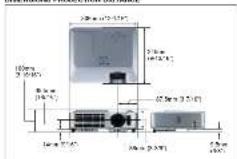
For you are conditional, you are subject to help up us
• 2017, the company's shareholding structure is being fully owned by the parent company. The company holds a 50% stake in the subsidiaries of the company.
Hachi, Lxi, Digital Media Division (Yokohama Plant) has received ISO 1000 certification on.
HITACHI
Irish Europe Ltd.
Talve ma 1265206-18
- 12 (1)
PAA 2016
Hischl Zearks, Ind. Digital Vasci Chakins
Hillal: 1952, 2013, w/ 16 of Peking, N. al., 22104 E-7083, USA
注:-130 HITAC-1 sec -1 050 244 77%
产表 2014 年 10 月
Hitch Canada Ltd.
ZOMEXUS RESEARCH
Hilachi Sales (Malaysia) Sdn. Dte
Munu Hua, He & Leang 100%, and Peking 198.
- 1237548 (m, 0)
公司于2014年6月
Black Belo (Thailand) Us.
24 5d "Kanak, Gao" (19) 7ad. Pekay T##
Hindi (Hong Kong) Ltd.
“我”是公司2015年1月1日
[Unreadable]
2014年1月1日
A versatile lineup of Hitachi projectors for meeting a wide range of needs.
- LAN-based Network Function
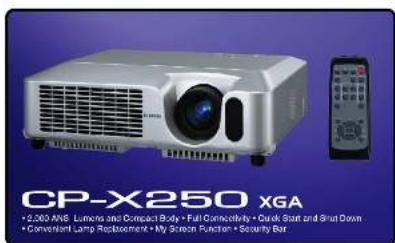
- 2,000 ANSI Lumana and Compact Body
- 2017年1月1日
• Full Connectivity
• Quick Start and Shut Down - Convenient Lamp Replacement
m - 1 0 ;
• My Screen Function
• Security Bar
HITACHI LCD PROJECTORS CP-X255/CP-S24
HITACHI
Inspire the Next
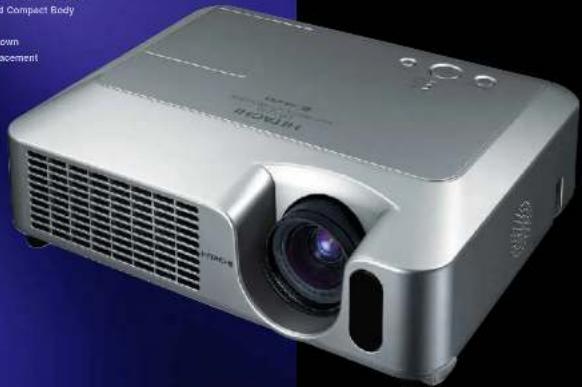
natural_image
Exterior view of a silver projector with a camera lens, shown against a blue background (no visible text or symbols)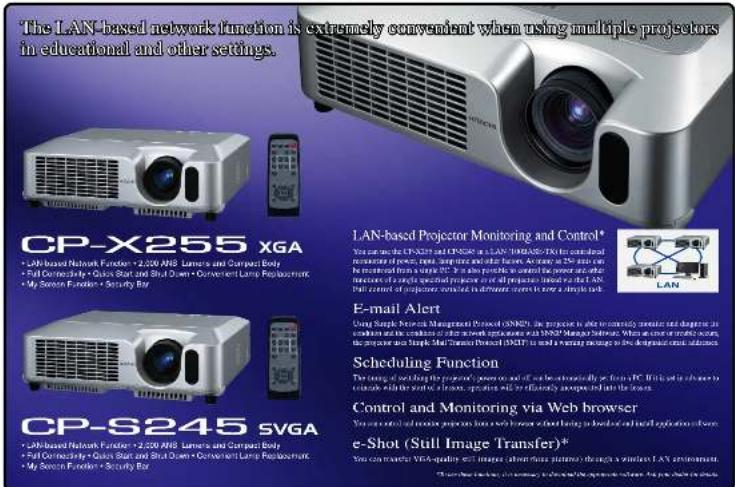
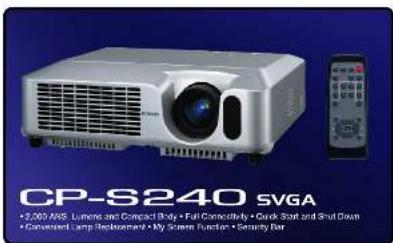
2,000 ANSI Lumens and Compact Body With a 2.0kg (5.2 lbs) Lightweight body, these projects have a high brightness of 2,000 ANSI Lumens. You can use them to reach close and make presentations without having to durban the room. *12P-XSVEP-ANSI 2.5kg (5.2 lbs) 12P-XSVEP-S23h 1.9kg (6.1 lbs)
Full Connectivity
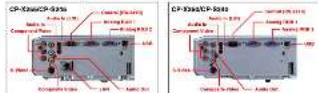
Tasa mode's an equipped with a wide variety of controls including two XGB inputs. 3 Viter input. Composite input. Comporeal input. XGB output. USB corner function and BJ-45 (CP-X255XP-S245 only).
Quick Start and Shut Down
Starting is so far that the image appears only two seconds after you turn the power in. And since projections are able to draw down the main person during the cooling period. So you spend less time waiting for starting and until you can put the unit as an
• The most recent data is being extracted from the United Kingdom. Linked to the latest of the impact of the UK and its international level, as the most recent results are the impact and the value in the past year is immediately free.
Convenient Lamp Replacement The lamp can be replaced with one by removing the lamp door on the top of the projector. You can even charge the lamp only when the projector is suspended from the ceiling.
My Screen Function
Display any desired image closure from PC or video screens on the startup screen and blank screens. To ensure that an image you have created its original by mistake, you can use the Lock function extracted from the Minority section or mouse control.
Security Bar
The security but effectively prevents him by allowing the provisions to be secured with a chair.
Other Features
• Ping and Play • Surge Function • Magnifying • Digital Gamma Correction • 3.5 Pull Down • Filter Timer • Control Panel Lock
Brand : HITACHI
Model : CP-X250W
Category : Video projector