
HSK44I32SH - Frying Pan BOSCH - Free user manual and instructions
Find the device manual for free HSK44I32SH BOSCH in PDF.


Pick your language and provide your email: we'll send you a specifically translated version.
| Product Type | Built-in Induction Hob |
| Model | HSK44I32SH |
| Brand | Bosch |
| Number of Cooking Zones | 4 |
| Cooking Zone Types | Induction |
| Dimensions (Width x Depth x Height) | 60 cm x 52 cm x 5 cm |
| Weight | Approx. 11 kg |
| Power Supply | 220-240 V ~ 50/60 Hz |
| Total Power Output | 7.4 kW |
| Control Type | Touch control with 17 power levels |
| Main Functions | PowerBoost, timer, pan detection, warm function |
| Safety Features | Child lock, automatic shut-off, residual heat indicator, overheat protection |
| Cleaning and Maintenance | Glass ceramic surface, wipe with damp cloth, avoid abrasive cleaners |
| Spare Parts and Repairability | Main control board, induction coils, power module, availability through authorized service |
| Installation Type | Flush mount or built-in |
| Energy Efficiency Class | A |
Frequently Asked Questions - HSK44I32SH BOSCH
What type of cookware is compatible with this induction hob?
Only cookware with a magnetic base (e.g., cast iron, enameled steel, stainless steel with magnetic bottom) is suitable. Use a magnet to test if the pan is compatible.
How do I clean the glass ceramic surface?
Allow the hob to cool completely. Clean with a soft cloth or sponge and a mild detergent. Use a dedicated glass ceramic scraper for stubborn residues. Avoid abrasive pads.
What does the PowerBoost function do?
PowerBoost provides extra power to a cooking zone for rapid heating, useful for boiling water quickly. It activates for a limited time to prevent overheating.
How do I activate the child lock?
Press and hold the child lock button (usually a key symbol) for 3 seconds until an indicator lights up. Repeat to deactivate.
Why does the hob show an error code?
Error codes indicate issues such as overheating, improper voltage, or faulty cookware. Refer to the manual for specific codes. Common fix: turn off and restart after 30 seconds.
Can I use a pan with a diameter smaller than the cooking zone?
Yes, but the hob may not detect very small pans (below 12 cm). Use pans that cover the marked area for efficient heating.
What is the maximum installation depth?
Ensure a minimum clearance of 5 cm below the hob for ventilation. The worktop cutout should be approximately 56 x 49 cm.
How do I reset the hob after a power failure?
Switch off the main circuit breaker for 10 seconds, then turn it back on. The hob will reset and display the standby screen.
Is the hob compatible with a 3-phase power supply?
No, this model requires a single-phase 220-240 V connection. Do not connect to 3-phase without a proper adapter.
What does the residual heat indicator mean?
After cooking, the hob displays 'H' for hot zones. Do not touch until the indicator disappears. It remains lit until the surface cools below 60°C.
User questions about HSK44I32SH BOSCH
0 question about this device. Answer the ones you know or ask your own.
Ask a new question about this device
No questions yet. Be the first to ask one.
Download the instructions for your Frying Pan in PDF format for free! Find your manual HSK44I32SH - BOSCH and take your electronic device back in hand. On this page are published all the documents necessary for the use of your device. HSK44I32SH by BOSCH.
USER MANUAL HSK44I32SH BOSCH
www.bosch-home.com/co
Colombia
Casa Bosch
natural_image
Exterior view of a modern kitchen stove with multiple gas outlets and control knobs (no visible text or symbols)Servicio Técnico:
57-1-7425060
Línea de Cocinas
Professional
NOTA
natural_image
Line drawing of a door frame with a handle and side panel (no text or symbols)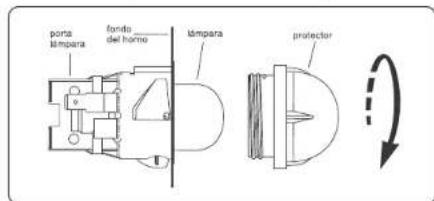
12 - Parrillas de Horno
12.1 - Deslizante
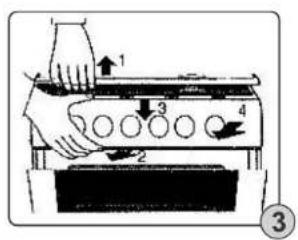
natural_image
Simple line drawing of a traditional Chinese architectural structure with hanging ornaments and circular elements (no text or symbols)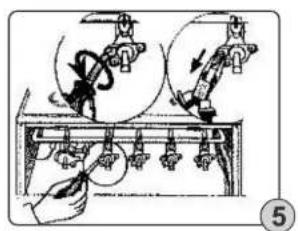
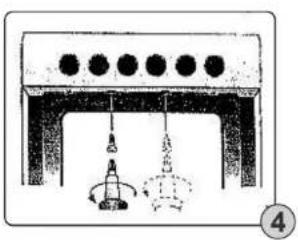
natural_image
Illustration of a vintage stove or stove with a large glass lid and internal circuitry (no visible text or symbols)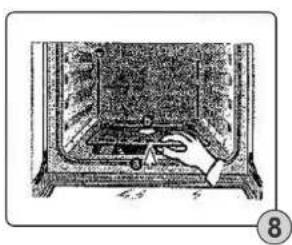
natural_image
Illustration of a hand operating a vintage electronic device with a control panel (no text or symbols visible)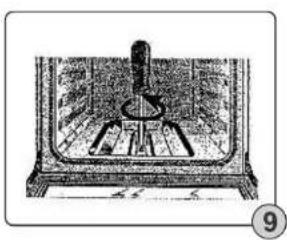
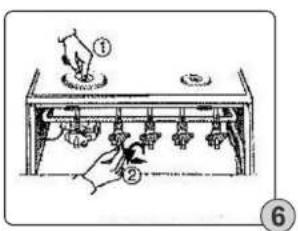
natural_image
Illustration of a mechanical device with a central knob and surrounding components (no visible text or symbols)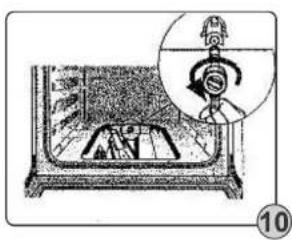
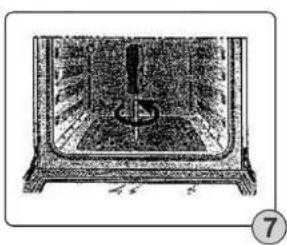
natural_image
Illustration of a person inside a stove with a magnified inset showing the device (no text or symbols)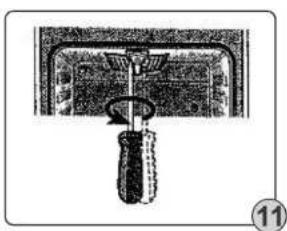
natural_image
Simple line drawing of a mechanical device with a handle and base, no text or symbols present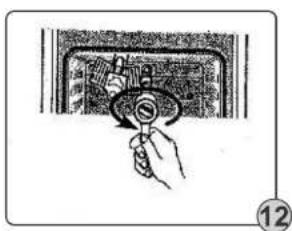
natural_image
Hand holding a rotary knob inside a control panel (no text or symbols visible)
Table of contents
Click a title to access it
Manual assistant
Powered by Anthropic
Waiting for your message
Product information
Brand : BOSCH
Model : HSK44I32SH
Category : Frying Pan