
KF26035 - Office Supplies Q-Connect - Free user manual and instructions
Find the device manual for free KF26035 Q-Connect in PDF.


| Product Type | Office Stapler |
| Model | KF26035 |
| Brand | Q-Connect |
| Dimensions | 15 x 5 x 5 cm (5.9 x 2.0 x 2.0 in) |
| Weight | 0.5 kg (1.1 lb) |
| Material | Plastic body, metal stapling mechanism |
| Stapling Capacity | Up to 20 sheets of 80 gsm paper |
| Staple Size | 24/6 or 26/6 staples |
| Loading Type | Top loading |
| Throat Depth | 6 cm (2.4 in) |
| Color | Black |
| Power Source | Manual (hand operated) |
| Main Functions | Stapling documents, temporary or permanent fastening |
| Base Features | Non-slip rubber feet, built-in staple remover |
| Maintenance | Clean with dry cloth; do not lubricate |
| Safety | Keep away from children; avoid contact with moving parts |
| Spare Parts | Staples widely available; mechanism not user-serviceable |
| Repairability | Not designed for repair; replace if faulty |
| General Information | Designed for home and office use |
Frequently Asked Questions - KF26035 Q-Connect
User questions about KF26035 Q-Connect
0 question about this device. Answer the ones you know or ask your own.
Ask a new question about this device
Download the instructions for your Office Supplies in PDF format for free! Find your manual KF26035 - Q-Connect and take your electronic device back in hand. On this page are published all the documents necessary for the use of your device. KF26035 by Q-Connect.
USER MANUAL KF26035 Q-Connect
1 Identification of the substance/mixture and of the company/undertaking
Product identifier
- Trade name: Series WB 73xx.1 ; x = 04, 02, 35, 36,38,39, 51, 81
Registration number
The ingredients of this ink have been pre-registered according to 1907/2006/EC (REACH)
- Relevant identified uses of the substance or mixture and uses advised against
Currently no such applications are identified
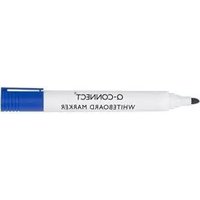
· Application of the substance / the mixture dry erase whiteboard ink
· Details of the supplier of the safety data sheet
Manufacturer/Supplier:
DOKUMENTAL GmbH & Co KG Schreibfarben
Woellnerstraße 26
D-67065 Ludwigshafen
Phone + 49(0)621/5402321
Fax + 49(0)621/5402391
www. dokumental.de
- Further information obtainable from:
Technical Service, Dr. B. Polzin
Tel.: +49-621-5402322
Mobile +49-1726204412
E-Mail: bernd.polzin@dokumental.de
· Emergency telephone number:
GBK Gefahrgut Büro GmbH
++49 (0) 6132 / 84463
Ingelheim, Deutschland
2 Hazards identification
. Classification of the substance or mixture
- Classification according to Directive 67/548/EEC or Directive 1999/45/EC

F; Highly flammable
R11: Highly flammable.
R67: Vapours may cause drowsiness and dizziness.
· Information concerning particular hazards for human and environment:
The product has to be labelled due to the calculation procedure of the "General Classification guideline for preparations of the EU" in the latest valid version.
Has a narcotizing effect.
. Classification system:
The classification is according to the latest editions of the EU-lists, and extended by company and literature data.
- Label elements
- Labelling according to EU guidelines:
The product has been classified and marked in accordance with EU Directives / Ordinance on Hazardous Materials.
- Code letter and hazard designation of product:
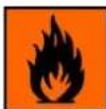
F Highly flammable
· Risk phrases:
11 Highly flammable.
67 Vapours may cause drowsiness and dizziness.
Safety phrases:
7/9 Keep container tightly closed and in a well-ventilated place.
16 Keep away from sources of ignition - No smoking.
24/25 Avoid contact with skin and eyes.
60 This material and its container must be disposed of as hazardous waste.
- Other hazards
- Results of PBT and vPvB assessment
· PBT: Not applicable.
vPvB: Not applicable.
3 Composition/information on ingredients
Chemical characterization: Mixtures
Mixture of the following substances, containing non-hazardous substances and colouring agents.
Description: Mixture of substances listed below with nonhazardous additions.
(Contd. on page 2)
EU
Trade name: Series WB 73xx.1 ; x = 04, 02, 35, 36,38,39, 51, 81
(Contd. of page 1)
| · Dangerous components: | ||
| CAS: 64-17-5EINECS: 200-578-6 | ethanolF R11Flam. Liq. 2, H225 | 25-50% |
| CAS: 107-98-2EINECS: 203-539-1 | 1-Methoxy-2-propanolR10-67Flam. Liq. 3, H226; ISTOT SE 3, H336 | 10-25% |
| CAS: 67-63-0EINECS: 200-661-7 | propan-2-olXi R36; R11R67Flam. Liq. 2, H225; Eye Irrit. 2, H319; STOT SE 3, H336 | 10-25% |
· Additional information: For the wording of the listed risk phrases refer to section 16.
4 First aid measures
• Description of first aid measures
· After inhalation: Supply fresh air; consult doctor in case of complaints.
After skin contact: Generally the product does not irritate the skin.
· After swallowing: If symptoms persist consult doctor.
- Information for doctor:
. Most important symptoms and effects, both acute and delayed
No further relevant information available.
- Indication of any immediate medical attention and special treatment needed
No further relevant information available.
· After eye contact: Rinse opened eye for several minutes under running water. Then consult a doctor.
5 Firefighting measures
- Extinguishing media
Suitable extinguishing agents:
CO2, powder or water spray. Fight larger fires with water spray or alcohol resistant foam. - Special hazards arising from the substance or mixture No further relevant information available.
- Advice for firefighters
- Protective equipment: No special measures required.
6 Accidental release measures
· Personal precautions, protective equipment and emergency procedures
Wear protective equipment. Keep unprotected persons away.
Wear protective clothing.
· Environmental precautions:
Prevent seepage into sewage system, workpits and cellars.
Dilute with plenty of water.
Do not allow to enter sewers/ surface or ground water.
- Methods and material for containment and cleaning up:
Absorb with liquid-binding material (sand, diatomite, acid binders, universal binders, sawdust).
Ensure adequate ventilation.
• Reference to other sections
See Section 7 for information on safe handling.
See Section 8 for information on personal protection equipment.
See Section 13 for disposal information.
7 Handling and storage
Handling:
- Precautions for safe handling Ensure good ventilation/exhaustion at the workplace.
· Information about fire - and explosion protection:
Keep ignition sources away - Do not smoke.
Protect against electrostatic charges.
- Conditions for safe storage, including any incompatibilities
Storage:
- Requirements to be met by storerooms and receptacles: Store in a cool location.
· Information about storage in one common storage facility: Not required.
• Further information about storage conditions:
Keep container tightly sealed.
Store in cool, dry conditions in well sealed receptacles.
- Specific end use(s) No further relevant information available.
Trade name: Series WB 73xx.1 ; x = 04, 02, 35, 36,38,39, 51, 81
(Contd. of page 2)
8 Exposure controls/personal protection
• Additional information about design of technical facilities: No further data; see item 7.
. Control parameters
- Ingredients with limit values that require monitoring at the workplace:
107-98-2 1-Methoxy-2-propanol (10-25%)
IOELV Short-term value: 568 mg/m ^3 , 150 ppm Long-term value: 375 mg/m ^3 , 100 ppm Skin
• Additional information: The lists valid during the making were used as basis.
- Exposure controls
- Personal protective equipment:
- General protective and hygienic measures: Wash hands before breaks and at the end of work.
· Respiratory protection: Not required.
• Protection of hands:

Protective gloves
The glove material has to be impermeable and resistant to the product/ the substance/ the preparation.
Due to missing tests no recommendation to the glove material can be given for the product/ the preparation/ the chemical mixture.
Selection of the glove material on consideration of the penetration times, rates of diffusion and the degradation
Material of gloves
The selection of the suitable gloves does not only depend on the material, but also on further marks of quality and varies from manufacturer to manufacturer. As the product is a preparation of several substances, the resistance of the glove material can not be calculated in advance and has therefore to be checked prior to the application.
Penetration time of glove material
The exact break trough time has to be found out by the manufacturer of the protective gloves and has to be observed.
· Eye protection:

Tightly sealed goggles
9 Physical and chemical properties
Information on basic physical and chemical properties
- General Information
· Appearance:
Form:
Colour:
. Odour:
· Odour threshold:
- Important information on protection of health and environment, and on safety.
· pH-value:
· Change in condition
Melting point/Melting range: Boiling point/Boiling range:
Flash point:
· Flammability (solid, gaseous):
Ignition temperature:
· Decomposition temperature:
. Self-igniting:
· Danger of explosion:
- Explosion limits:
Lower:
Fluid
According to product specification
Alcohol-like
Not determined.
m = 311
-
Not determined.
Undetermined.
Undetermined.
13 °C
Not applicable.
287 °C
Not determined.
Product is not selfigniting.
Product is not explosive. However, formation of explosive air/vapour mixtures are possible.
1,7 Vol %
(Contd. on page 4)
Trade name: Series WB 73xx.1 ; x = 04, 02, 35, 36,38,39, 51, 81
(Contd. of page 3)
| Upper: | 15,0 Vol % |
| ·Vapour pressure at 20 °C: | 59 hPa |
| ·Density at 20 °C: | 0,85 g/cm ^3 |
| ·Relative density | Not determined. |
| ·Vapour density | Not determined. |
| ·Evaporation rate | Not determined. |
| ·Solubility in / Miscibility with water: | Partly miscible. |
| ·Partition coefficient (n-octanol/water): | Not determined. |
| ·Viscosity: | |
| Dynamic at 20 °C: | 10 mPas |
| Kinematic: | Not determined. |
| ·Solvent content: | |
| Organic solvents: | 81,1 % |
| ·Other information | surface tension: 24,5 mN/M |
10 Stability and reactivity
- Reactivity
Chemical stability - Thermal decomposition / conditions to be avoided: No decomposition if used according to specifications.
- Possibility of hazardous reactions No dangerous reactions known.
- Conditions to avoid No further relevant information available.
· Incompatible materials: No further relevant information available. - Hazardous decomposition products: No dangerous decomposition products known.
11 Toxicological information
• Information on toxicological effects
· Acute toxicity:
· Primary irritant effect:
on the skin: No irritant effect.
on the eye: No irritating effect.
- Sensitization: No sensitizing effects known.
12 Ecological information
- Toxicity
· Aquatic toxicity: No further relevant information available.
· Persistence and degradability No further relevant information available.
Behaviour in environmental systems:
· Bioaccumulative potential No further relevant information available. - Mobility in soil No further relevant information available.
• Additional ecological information: - General notes:
Water hazard class 1 (German Regulation) (Self-assessment): slightly hazardous for water Do not allow undiluted product or large quantities of it to reach ground water, water course or sewage system. - Results of PBT and vPvB assessment
· PBT: Not applicable.
· vPvB: Not applicable. - Other adverse effects No further relevant information available.
13 Disposal considerations
· Waste treatment methods
- Recommendation
Must not be disposed together with household garbage. Do not allow product to reach sewage system.
· Uncleaned packaging:
- Recommendation: Disposal must be made according to official regulations.
· Recommended cleansing agents: Water, if necessary together with cleansing agents.
Trade name: Series WB 73xx.1 ; x = 04, 02, 35, 36,38,39, 51, 81
(Contd. of page 4)
14 Transport information
| · UN-Number· ADR, IMDG, IATA | UN1263 |
| · UN proper shipping name· ADR· IMDG, IATA | 1263 PAINTPAINT |
· Transport hazard class(es)· ADR · Class· Label · Class· Label | 3 (F1) Flammable liquids.3 |
· IMDG, IATA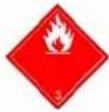 · Class· Label · Class· Label | 3 Flammable liquids.3 |
| · Packing group· ADR, IMDG, IATA | II |
| · Environmental hazards:· Marine pollutant: | No |
| · Special precautions for user· Danger code (Kemler):· EMS Number: | Warning: Flammable liquids.33F-E,S-E |
| · Transport in bulk according to Annex II of MARPOL73/78 and the IBC Code | Not applicable. |
| · Transport/Additional information:· ADR· Limited quantities (LQ)· Transport category· Tunnel restriction code | 5L2D/E |
15 Regulatory information
. Safety, health and environmental regulations/legislation specific for the substance or mixture
· National regulations:
- Technical instructions (air):
| Class Share in % |
| NK 50-100 |
- Waterhazard class: Water hazard class 1 (Self-assessment): slightly hazardous for water.
· Chemical safety assessment: A Chemical Safety Assessment has not been carried out.
16 Other information
This information is based on our present knowledge. However, this shall not constitute a guarantee for any specific product features and shall not establish a legally valid contractual relationship.
- Relevant phrases
H225 Highly flammable liquid and vapour.
H226 Flammable liquid and vapour
H319 Causes serious eye irritation.
H336 May cause drowsiness or dizziness.
R10 Flammable.
R11 Highly flammable.
R36 Irritating to eyes.
R67 Vapours may cause drowsiness and dizziness.
* Data compared to the previous version altered.


- Identification of the substance/mixture and of the company/undertaking
- Hazards identification
- Composition/information on ingredients
- First aid measures
- Firefighting measures
- Accidental release measures
- Handling and storage
- Exposure controls/personal protection
- Physical and chemical properties
- Stability and reactivity
- Toxicological information
- Ecological information
- Disposal considerations
- Regulatory information
- Other information
Brand : Q-Connect
Model : KF26035
Category : Office Supplies