
MS-15MJ - Loudspeaker Moonki - Free user manual and instructions
Find the device manual for free MS-15MJ Moonki in PDF.


| Product Type | Portable Bluetooth Speaker |
| Brand | Moonki |
| Model | MS-15MJ |
| Dimensions (W x H x D) | 15 x 10 x 10 cm |
| Weight | 450 g |
| Power Source | Rechargeable Li-ion battery, 5V USB |
| Battery Capacity | 1200 mAh |
| Playback Time | Up to 6 hours |
| Charging Time | 2-3 hours |
| Connectivity | Bluetooth 5.0, AUX 3.5mm |
| Bluetooth Range | 10 m |
| Speaker Output | 5W RMS |
| Frequency Response | 100 Hz – 20 kHz |
| Controls | Power, Volume +/- , Play/Pause, Next/Previous |
| Additional Features | Built-in microphone for hands-free calls, TWS pairing |
| Cleaning | Wipe with a soft dry cloth; do not use harsh chemicals |
| Safety | Keep away from water and extreme heat; do not disassemble |
| Package Contents | Speaker, USB charging cable, AUX cable, Manual |
Frequently Asked Questions - MS-15MJ Moonki
User questions about MS-15MJ Moonki
0 question about this device. Answer the ones you know or ask your own.
Ask a new question about this device
Download the instructions for your Loudspeaker in PDF format for free! Find your manual MS-15MJ - Moonki and take your electronic device back in hand. On this page are published all the documents necessary for the use of your device. MS-15MJ by Moonki.
USER MANUAL MS-15MJ Moonki
natural_image
Technical line drawing of a speaker chamber with a circular speaker and antenna, labeled 'moonki' (no text or symbols on the device itself)Bt

CLASS D
350RMS
15 INCHES WOOFER
IMPORTANT

Please read this manual carefully and completely before performing any action with the equipment, in order to know how to use it properly.
The information is presented for reference only and there may be differences. The images shown are illustrative. The design and operation of the product may vary without prior notice. Please consult our website www.moonki.com for a more recent version of this manual.
PRECAUTIONS
•Children should be supervised to ensure that they do not use the device as a toy.
- Before turning on the equipment, make sure that the volume controls are at the minimum level.
- Do not place heavy objects on the speaker.
- Do not use or store the speaker in places where there are drips, splashes or near sources of heat or extreme cold.
•Clean it with a soft, dry cloth.
• Only connect the equipment to a grounded outlet.
• To disconnect the equipment, carefully pull the plug and remove it from the outlet. Never pull the power cable to disconnect it.
- Do not attempt to open the equipment; it may cause malfunctions and void the warranty.
- Do not use solvents to clean it.
- Place the equipment in a place with sufficient ventilation.
Operation of this equipment is subject to the following two conditions: (1) this equipment or device may not cause harmful interference, and (2) this equipment or device must accept any interference, including interference that may cause its operation.
TABLE OF CONTENTS
OVERVIEW 4
BLUETOOTH LINK....7
SPECIFICATIONS....7
PACKAGE CONTENTS


Rear view
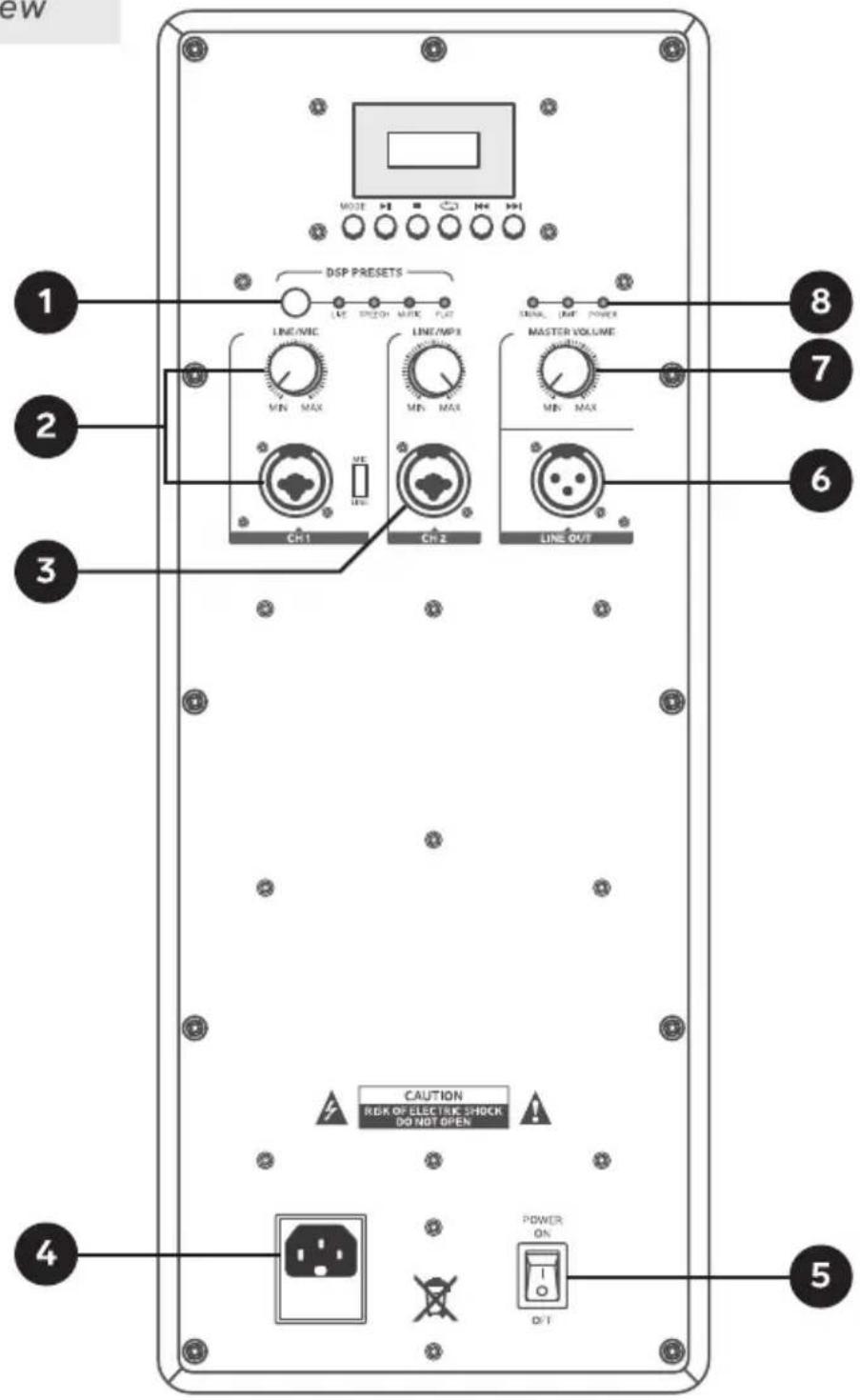
- Equalizer presets: DSP effects (Live- Speech- music - Flat).
- Line/microphone input and volume control for this input
- Line input
- Power connector
- On/Off switch
- Line output: A balanced XLR connector is provided for connecting to another amplifier or other active speaker.
- Master or master volume control.
-
Signal limit power indicator: The power LED indicator lights up when the power switch is turned on and when the input signal is distorted.
-
Start or pause playback of an audio track.
- Switch to the previous song [Press once] / Decrease volume [Hold button down].
- Switch to the next song [Press once] / Increase volume [Hold button down].
- Repeat tracks: one (ONE) or all (ALL).
- Switch between operating modes.

WIRELESS PAIRING
1
Press the MODE button repeatedly on the MP3 player until Bt mode is selected.
2
On your cell phone, perform a search for Bt devices, and select MS-15MJ.

SPECIFICATIONS
Power: 115-230V - 50/60 Hz 400 W
RMS Power: 350 W
Nominal Consumption: 400W
Specifications may vary without prior notice.
Amplifier:
Frequency response: 40 - 18000 Hz
Distortion: THD 0.2%
Sensitivity: 98 dB±3 dB
Woofer:
Diameter: 12 Inches
Impedance: 4
Power: 280 W
Coil diameter: 3 Inches
Magnet: 3,75 Lb
Freq. response: 55-3500 Hz
Tweeter:
Coil diameter: 1.7 Inches
Impedance: 8 Ω
Power: 70 W
Magnet: 1,20 Lb
Freq. response: 2.5 - 18 kHz
moonki®

bar
| Category | Value | | -------- | ----- | | 1 | 1 | | 2 | 2 | | 3 | 3 | | 4 | 4 | | 5 | 5 | | 6 | 6 | | 7 | 7 | | 8 | 8 | | 9 | 9 | | 10 | 10 | | 11 | 11 | | 12 | 12 | | 13 | 13 | | 14 | 14 | | 15 | 15 | | 16 | 16 | | 17 | 17 | | 18 | 18 | | 19 | 19 | | 20 | 20 | | 21 | 21 | | 22 | 22 | | 23 | 23 | | 24 | 24 | | 25 | 25 | | 26 | 26 | | 27 | 27 | | 28 | 28 | | 29 | 29 | | 30 | 30 | | 31 | 31 | | 32 | 32 | | 33 | 33 | | 34 | 34 | | 35 | 35 | | 36 | 36 | | 37 | 37 | | 38 | 38 | | 39 | 39 | | 40 | 40 | | 41 | 41 | | 42 | 42 | | 43 | 43 | | 44 | 44 | | 45 | 45 | | 46 | 46 | | 47 | 47 | | 48 | 48 | | 49 | 49 | | 50 | 50 | | 51 | 51 | | 52 | 52 | | 53 | 53 | | 54 | 54 | | 55 | 55 | | 56 | 56 | | 57 | 57 | | 58 | 58 | | 59 | 59 | | 60 | 60 | | 61 | 61 | | 62 | 62 | | 63 | 63 | | 64 | 64 | | 65 | 65 | | 66 | 66 | | 67 | 67 | | 68 | 68 | | 69 | 69 | | 70 | 70 | | 71 | 71 | | 72 | 72 | | 73 | 73 | | 74 | 74 | | 75 | 75 | | 76 | 76 | | 77 | 77 | | 78 | 78 | | 79 | 79 | | 80 | 80 | | 81 | 81 | | 82 | 82 | | 83 | 83 | | 84 | 84 | | 85 | 85 | | 86 | 86 | | 87 | 87 | | 88 | 88 | | 89 | 89 | | 90 | 90 | | Note: The actual values may vary due to the random nature of the data generation. The provided values are just an example. The actual values will be the result of the data generation. The actual values will be the same as the original data generated by the code. There is only one data point in this case. The actual values will be the result of the data generation. The actual values will be the same as it's calculated from the formula provided in the code.Brand : Moonki
Model : MS-15MJ
Category : Loudspeaker