
ACT-1 - Audio cable tester Audibax - Free user manual and instructions
Find the device manual for free ACT-1 Audibax in PDF.


| Type of product | Wireless Microphone System |
| Brand | Audibax |
| Model | ACT-1 |
| Dimensions (approx.) | 25 cm x 5 cm x 5 cm (handheld microphone) |
| Weight (approx.) | 200 g (microphone only) |
| Power source | 2 x AA batteries (or built-in rechargeable battery depending on variant) |
| Operating frequency | UHF 500-900 MHz (typical) |
| Number of channels | 16 selectable channels |
| Transmission range | Up to 50 meters (line of sight) |
| Audio output | XLR or 1/4" jack (depending on receiver) |
| Frequency response | 50 Hz - 16 kHz |
| Signal-to-noise ratio | > 90 dB |
| Total harmonic distortion | < 0.5% (typical) |
| Microphone type | Dynamic or condenser (unconfirmed) |
| Polar pattern | Cardioid (typically) |
| Color | Black or metallic (common) |
| Included accessories | Handheld microphone, receiver, power adapter, audio cable |
| Maintenance | Clean with a soft, dry cloth; avoid moisture |
| Safety | Keep away from water and extreme temperatures |
| Repairability | Battery compartment accessible; otherwise not user-serviceable |
| Spare parts | Batteries, cables, microphone windscreen (if applicable) |
Frequently Asked Questions - ACT-1 Audibax
User questions about ACT-1 Audibax
0 question about this device. Answer the ones you know or ask your own.
Ask a new question about this device
Download the instructions for your Audio cable tester in PDF format for free! Find your manual ACT-1 - Audibax and take your electronic device back in hand. On this page are published all the documents necessary for the use of your device. ACT-1 by Audibax.
USER MANUAL ACT-1 Audibax
ACT-1
Multi Audio Cable Tester Tester de Cables Multiconexión
www.audibax.comwww.audibax.com
INDEX / ÍNDICE
ENGLISH
WELCOME TO AUDIBAX....1
SAFETY INSTRUCTIONS....1 IMPORTANT INFORMATION....2
IMPORTANT INFORMATION....2 PACKAGE CONTENT 3
PRODUCT DESCRIPTION....3
FEATURES....3
USAGE METHODS....3
TECHNICAL SPECIFICATIONS....4
DISPOSAL....4
ESPAÑOL
BIENVENIDOS A AUDIBAX....5
Thank you very much for choosing Audibax. We hope you enjoy your new product.
It has been developed and designed paying attention to the smallest details, with quality control with European standards supervised by our great team of professional technicians, who work every day to offer our customers the best quality.
We make sure that every Audibax product is built to last long. All our references are made with long lasting materials and our specialists are dedicated to constantly doing quality controls to guarantee the best result.
Please read carefully this manual in order to use your Audibax product in the best way. Do not hesitate to visit our website for further information: www.audibax.com
SAFETY INSTRUCTIONS
GENERAL INFORMATION
- It is important to read and follow the instructions carefully.
- Keep all information and instructions in a secure location.
- Always follow the instructions provided.
- Take note of all safety warnings and never remove them from the equipment.
- Use the equipment only as intended and for its intended purpose.
- Ensure that the stands and/or mounts used are sufficiently stable and compatible for fixed installations. Wall mounts should be properly installed and secured, and the equipment should be installed securely to prevent falls.
- When installing the equipment, be sure to observe the relevant safety regulations in your country.
- Do not install or operate the equipment near sources of heat, such as radiators, heat
registers, or ovens, and ensure that it is always cooled sufficiently and cannot overheat. - Do not place sources of ignition, such as burning candles, on the equipment.
- Keep ventilation slits unobstructed.
- For equipment designed for indoor use only should not be used near water, flammable materials, fluids, or gases. Special outdoor equipment should be used in accordance with the manufacturer's instructions.
- Ensure that no dripping or splashed water can enter the equipment and do not place containers filled with liquids on the equipment.
- Prevent objects from falling into the equipment.
- Use the equipment only with recommended accessories intended by the manufacturer.
- Do not attempt to open or modify the equipment.
- Check all cables after connecting the equipment to prevent accidents or damage due to tripping hazards.
- During transport, take steps to prevent the equipment from falling and causing damage or injury.
- If the equipment is not functioning properly, fluids or objects have gotten inside, or is otherwise damaged, switch it off immediately and unplug it from the power outlet (if applicable). Only authorized, qualified personnel should repair the equipment.
- Clean the equipment with a dry cloth.
- Comply with all applicable disposal laws and separate plastic and paper/cardboard during packaging disposal.
- Keep plastic bags out of the reach of children.
www.audibax.com
1www.audibax.com
FOR DEVICES DESIGNED TO BE CONNECTED TO THE MAIN POWER SUPPLY:
- ATTENTION: If your equipment has a power cord with a grounding plug, it must be connected to a wall outlet with a ground connection. Never remove the grounding plug from the power cord.
- If your equipment has been exposed to extreme temperature changes, allow it to reach room temperature before turning it on. Otherwise, moisture and condensation may damage the equipment.
- Before plugging in the equipment, make sure that the voltage and frequency of the power outlet match the specifications of the equipment. If the equipment has a voltage selector, only connect it to the power outlet if the values match. If the power cord or adapter does not fit your outlet, contact an electrician.
- Do not step on the power cord. Make sure it is not pinched at the outlet, adapter, or equipment connection.
- Keep the power cord or adapter within reach and disconnect the equipment from the power supply when not in use or when cleaning it. Always unplug the cord or adapter by pulling the plug or adapter, not the cord. Never touch the cord or adapter with wet hands. - Avoid frequently turning the equipment on and off, as this can reduce its useful life.
- IMPORTANT: Only replace fuses with those of the same type and rating. If a fuse repeatedly blows, contact an authorized service center.
- To completely disconnect the equipment from the power mains, unplug the power cord or adapter from the outlet.
- If your device has a Volex power connector, the mating Volex connector must be unlocked before it can be removed. Be careful when laying cables, as the equipment can slide or fall if the power cord is pulled.
- Unplug the power cord or adapter before an extended period of disuse or in case of lightning strike risk.
- Only install the equipment when it is disconnected from the power source.
- To prevent damage and overheating, qualified personnel should regularly clean and service the equipment depending on ambient conditions like dust, nicotine, and fog.
If the product contains the following symbols, please, read carefully:

CAUTION: To reduce the risk of electric shock, do not remove cover (or back). There are no user serviceable parts inside. Maintenance and repairs should be exclusively carried out by qualified service personnel.

The warning triangle with lightning symbol indicates dangerous uninsulated voltage inside the unit, which may cause an electrical shock.
The warning triangle with exclamation mark indicates important operating and maintenance instructions.
IMPORTANT INFORMATION
CAUTION! HIGH VOLUMES IN AUDIO PRODUCTS!
This equipment is designed for professional purposes and its commercial use must comply with the applicable national rules and regulations for accident prevention. As the manufacturer of this product, Audibax has the responsibility to inform you about the potential health risks associated with its use. One such risk is hearing damage caused by prolonged exposure to high volume.
When this product is in use, it can generate high sound-pressure levels that may cause irreversible hearing damage to performers, employees, and audience members. To prevent this, it is important to avoid exposing yourself or others to volumes exceeding 90 dB for an extended period of time.
ACTI is a kind of multi audio cable tester. Whether you are specialized in stage or recording studio installation, facing to intact stage or equipment but the equipments have no sound or the sound is distortion inexplicable. ACTI helps you to check every cable or jack if they connecting properly (short circuit or poor contact test) to eliminate and solve the problem.
FEATURES
- Enables quick convenient continuity cable testing for all types of cable
- Tests cables with all types of combinations of the following connectors: 1/4" TRS, balanced XLR, Phono/RCA, banana plug, Speakon, GND, CAT5 and DIN
- 8-way switch for selecting connections to be tested, also includes internal battery and ground connection status checks
- LED's confirm each conductor continuity and connection.
USAGE METHODS

Install the battery: open the battery cover, then insert the battery into cabin under '+', push down, when you hearing 'd' it indicates the battery clocking.
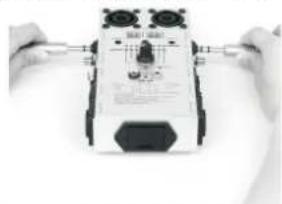
Connect cable insert the testing cable into corresponding holes.

Battery testing: twist the knob to the "Battery Check" if "Battery Check" green light will light on, it indicates the battery is fully charged, cable tester will normal working. If not, please reopen the battery cover to check if the battery is in wrong position or the battery is run out of energy.

Test cable (one): twist the knob to the position of '1', if green and yellow light on at the same time, it indicates that PIN-I of this line is well.

Test cable (two): twist the knob to the position of "2" and "3", if the LED light on one by one, it indicates that PIN-2 and PIN-3 of this line is well. If the light is crossover light on or one light is not light on, it indicates there is something wrong with line.
ACT-1 ACT(1013426)
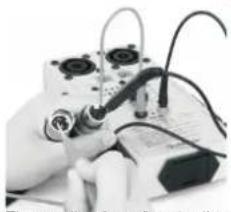
The application of probe line: insert two probe lines into banana jacks, if you hear buzzing and yellow LED light on, it indicates that the line is well. According to this method, to test audio cable which the inserting holes are not matching. Use probe pen to connect audio cable, if you hear buzzing it indicates that the line is well.
TECHNICAL SPECIFICATIONS
- Length x width x height: 190mm*90mm*35mm
- Net weight: 796g
- Gross weight: 995g
DISPOSAL
Packaging:

- The packaging can be recycled using standard disposal methods and reintroduced into the reusable material cycle.
- Please follow the laws and regulations regarding disposal and recycling of packaging in your country.
Device:

- This device is subject to the Waste Electrical and Electronic Equipment (WEEE) Directive of the European Union. Used appliances should not be disposed of with household waste. Used device must be disposed of through an approved disposal company or a municipal disposal facility. Please comply with the applicable regulations in your country.
- Please follow all the disposal laws and regulations in your country.
- As a customer, you can obtain information on environmentally-friendly disposal options from the product seller or the appropriate regional authorities.
AUDIBAXI
BIENVENIDO A AUDIBAX
Brand : Audibax
Model : ACT-1
Category : Audio cable tester