
Opti-V Single PGF10 - Frying Pan Real Flame - Free user manual and instructions
Find the device manual for free Opti-V Single PGF10 Real Flame in PDF.


| Product Type | Electric fireplace insert |
| Brand | Real Flame |
| Model | Opti-V Single PGF10 |
| Power Supply | 100-240V~ 50/60Hz |
| Power Consumption | 32W |
| Standby Power | 1W |
| Control Type | Remote control (AAA batteries) and manual controls |
| Installation | Fixed installation into a cabinet or wall opening |
| Recommended Viewing Height | 65–110 cm from floor to bottom opening |
| Safety Class | Class I (must be earthed) |
| Safety Features | No naked flames, no objects filled with liquid, not for outdoor use |
| Cleaning | Soft duster; glass cleaned with soft lint-free cloth; no abrasive cleaners |
| Warranty | 2 years domestic, 1 year commercial |
| Patents | GB2502814, EP2802746 |
| After-Sales Service | Contact www.realflame.com.au (Australia) or www.realflame.co.nz (New Zealand) |
Frequently Asked Questions - Opti-V Single PGF10 Real Flame
User questions about Opti-V Single PGF10 Real Flame
0 question about this device. Answer the ones you know or ask your own.
Ask a new question about this device
Download the instructions for your Frying Pan in PDF format for free! Find your manual Opti-V Single PGF10 - Real Flame and take your electronic device back in hand. On this page are published all the documents necessary for the use of your device. Opti-V Single PGF10 by Real Flame.
USER MANUAL Opti-V Single PGF10 Real Flame
Opti-V Fire

natural_image
Line drawing of a rectangular enclosure with internal compartments and window (no text or symbols)Model: PGF10
Instructions
IMPORTANT: THESE INSTRUCTIONS SHOULD BE READ CAREFULLY AND RETAINED FOR FUTURE REFERENCE
Introduction
Thank you for choosing this Real Flame Opti-V fire. Please read information guide carefully to be able to safely install, use and maintain your product. The appliance is designed to be installed into a cabinet or wall opening.
Important Safety Advice
This appliance is not intended for use by persons (including children) with reduced physical, sensory or mental capabilities, or lack of experience and knowledge, unless they have been given supervision or instruction concerning use of the appliance by a person responsible for their safety. When using electrical appliances, basic precautions should be followed to reduce the risk of fire, electric shock, and injury to persons, including the following:
If the appliance is damaged, check immediately with the supplier before installation and operation.
Do not use this appliance in the immediate surroundings of a bath, shower or swimming pool.
Means for disconnection must be incorporated in the fixed wiring in accordance with the wiring regulations.
Do not use outdoors.
In the event of a fault switch off the appliance.
Switch off the appliance when not required for long periods.
If the supply cord is damaged, it must be replaced by a special cord or assembly available from the manufacturer or its service agent. Always have a professional technician, manufacturer or service agent replace a damaged power cord.
Warning - No naked flame sources, such as candles, should be placed on this apparatus.
Warning - The appliance shall not be exposed to dripping or splashing and that no objects filled with liquid, such as vases, shall be placed on the apparatus.
Warning - this appliance is of Class I construction and must be connected to a mains outlet with protective earthing connection.
Electrical
WARNING – THIS APPLIANCE MUST BE EARTHED
Do not switch the appliance on until properly installed. Please read all the safety warnings and operating instructions.
General
Unpack the appliance carefully and retain the packaging for possible further use, in the event of moving or returning the appliance to the supplier.
Contents of Carton
• Opti-V Fire Model PGF10
• Remote control and batteries (AAA type)
Product Features
Volume Control
Remote or Manual operation
Red light indication of standby mode
Installation
Warning.
Do not connect the appliance until properly fixed to a secure base and the instruction leaflet is read fully.
At installation of the appliance, care must be taken not to damage any cables that may be concealed in the wall.
Positioning the Fire
The Opti-V uses an illusory reflection technique and is designed to work best when ambient light levels are low. If the Opti-V is installed in brightly lit areas, the strong reflections may diminish the flame picture.
Fixing dimensions
The Opti-V is supplied in an assembled state.
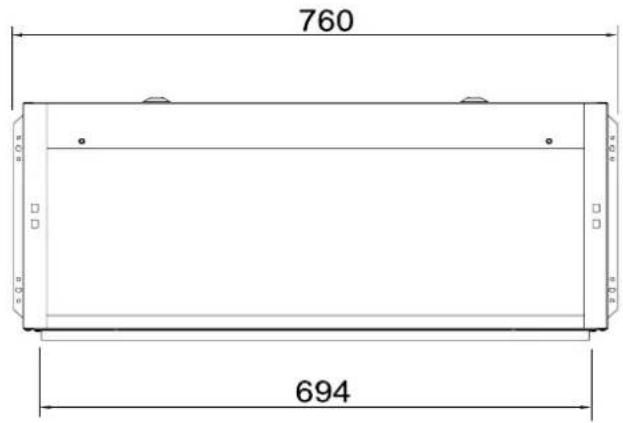
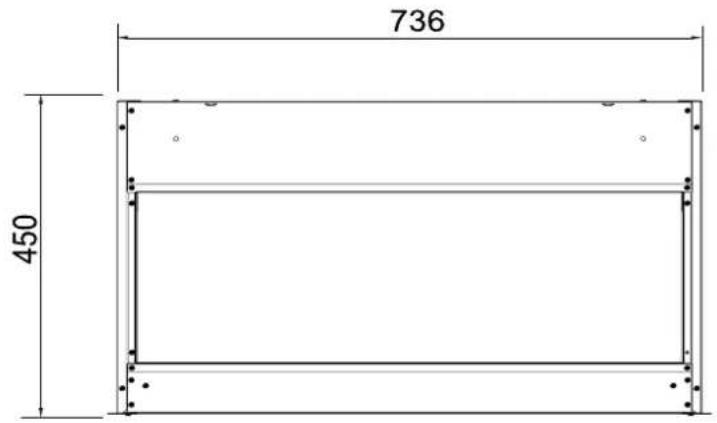
This model is designed to be permanently fixed. Please see Fig.2a and 2b for recommended fixing dimensions.
Height of Fire
There is a choice of height when fitting the fire.
Recommended heights (from floor to bottom opening of fire - * Fig 2a):
- Minimum 65cm when the fire is viewed while sitting (e.g. lounge).
- Maximum 110cm when the fire is viewed while standing (e.g. reception area).
Electrical connection
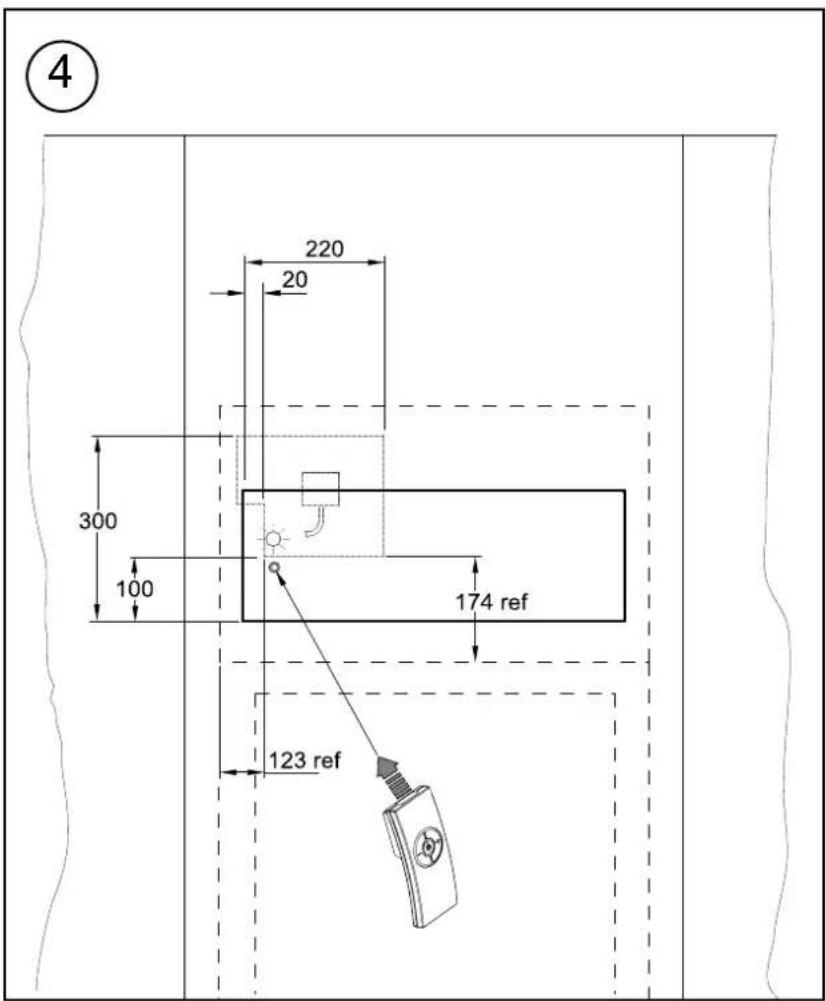
The outline of the chassis and the position of the electrical socket are shown as dotted outlines in Fig.4. Please consult with a qualified electrician for appropriate wiring requirements.
Operation: -
The power 'ON' switch ('O/I' see Fig.3) must first be switched 'I' to operate the appliance.
An 'Opti-V' screen will appear for about 3 seconds before the flame picture starts.
Note: The user may notice a blank screen for approximately 5 seconds, every 30 minutes. This is normal and should not be a cause for concern.
Manual Control Operation: -
The manual controls for the screen are located at the inner top left hand side of the appliance above the glass.(see Fig.3).
The appliance Power switch ('O/I' see Fig.3) may be used to switch the appliance off ('O') when it is not required, for example, overnight or for long periods, to avoid energy wastage.
The standby button (☐) is located just below the mains switch.
Remote Control Operation: -
The remote control may be operated once the appliance is switched 'I' ('I' see Fig.3).
Aim the remote control at the fire (the sensor is indicated in Fig. 4). The volume may be adjusted up or down by pressing the volume control buttons (+ and -).
The button funtions are identified as described below;
Standby
- Volume down
- Volume up
A red light will indicate when the appliance is in standby mode. (see Fig 4)
Remote Control - Battery Information
Note : The remote control is packed separately in the carton.
-
Slide Open the battery cover on the back of the remote transmitter.
-
Install the AAA batteries into the remote control (see Fig. 5). NOTE - Use Alkaline batteries only.
Batteries should not be exposed to heat such as sunshine, fire and the like.
Attention should be drawn to the environmental aspects of battery disposal.
Maintenance
WARNING – ALWAYS DISCONNECT FROM THE POWER SUPPLY BEFORE ATTEMPTING ANY MAINTENANCE.
To disconnect from mains - set the mains switch to 'O'. The mains (power) switch is located at the top left hand side of the appliance above the manual controls - see 'O/I' Fig.3. Mains switch shall remain readily operable.
Technical Information:
100-240V \~ 50/60Hz
Power consumption 32W
Stand-by Power 1W
Cleaning
For general cleaning use a soft clean duster – never use abrasive cleaners. The glass screen should be cleaned carefully with a soft, lint-free cloth.
RECYCLING

Waste electrical products should not be disposed of with household waste.
Please recycle where facilities exist.
Check with your local authority or retailer for recycling advice.
PATENT
Opti-V products are protected by the following International patents: GB2502814 & EP2802746.
AFTER SALES SERVICE
Your product is guaranteed for 2 years from the date of purchase if installed in a domestic/residential setting. If the product is installed in a commercial setting, it is guaranteed for 1 year. Within this period, we undertake to repair or exchange this product free of charge provided it has been installed and operated in accordance with these instructions. Your rights under this guarantee are additional to your statutory rights, which in turn are not affected by this guarantee.
Should you require after sales information or assistance with this product please go to www.realflame.com.au in Australia and www.realflame.co.nz in New Zealand and select "Contact". Please retain your receipt as proof of purchase.
Glen Dimplex Australia Pty Ltd
1340 Ferntree Gully Road,
Scoresby,
Victoria 3179,
Australia
PH: 1300 554 155
Fax: 1800 058 900
Email: flame@glendimplex.com.au
Web: www.realflame.com.au
Glen Dimplex New Zealand Ltd
38 Harris Road,
East Tamaki, Auckland 2013,
New Zealand
PH: 0800 666 2824
Fax: 09 274 8472
Email: sales@glendimplex.co.nz
Web: www.realflame.co.nz

1




natural_image
Diagram of a device with two open compartments and a close-up view of internal components (no text or symbols)Glen Dimplex Australia Pty Ltd
1340 Ferntree Gully Road,
Scoresby,
Victoria 3179,
Australia
PH: 1300 554 155
Fax: 1800 058 900
Email: flame@glendimplex.com.au
Web: www.realflame.com.au
Glen Dimplex New Zealand Ltd
38 Harris Road,
East Tamaki, Auckland 2013,
New Zealand
PH: 0800 666 2824
Fax: 09 274 8472
Email: sales@glendimplex.co.nz
Web: www.realflame.co.nz
This product is protected by Intellectual property rights and patents owned by Glen Dimplex Australia Pty Ltd or members of the Glen Dimplex Group on an international basis. The Glen Dimplex Group of Companies will actively protect these rights.

- IMPORTANT: THESE INSTRUCTIONS SHOULD BE READ CAREFULLY AND RETAINED FOR FUTURE REFERENCE
- Introduction
- Important Safety Advice
- Electrical
- WARNING – THIS APPLIANCE MUST BE EARTHED
- General
- Contents of Carton
- Product Features
- Installation
- Warning.
- Positioning the Fire
- Fixing dimensions
- Height of Fire
- Electrical connection
- Operation: -
- Manual Control Operation: -
- Remote Control Operation: -
- Standby
- Remote Control - Battery Information
- Maintenance
- Technical Information:
- Cleaning
- RECYCLING
- PATENT
- AFTER SALES SERVICE
Brand : Real Flame
Model : Opti-V Single PGF10
Category : Frying Pan