
POD-291 - Phone accessory Steren - Free user manual and instructions
Find the device manual for free POD-291 Steren in PDF.


| Product Type | Phone Car Mount / Holder |
| Brand | Steren |
| Model | POD-291 |
| Compatibility | Smartphones up to 6.5 inches |
| Material | ABS plastic and silicone grip |
| Dimensions | 4.5 x 3.0 x 2.0 inches (11.4 x 7.6 x 5.1 cm) |
| Weight | 2.8 oz (80 g) |
| Mounting Type | Dashboard / windshield suction cup or vent clip |
| Rotation | 360° rotation for portrait/landscape viewing |
| Grip Mechanism | Automatic locking arms or manual clamp |
| Power Supply | None (passive holder) |
| Cleaning Instructions | Wipe with a soft, dry cloth |
| Safety Note | Do not block airbags or driver's view |
| Spare Parts Availability | Suction cup replacements sold separately |
| Repairability | Not user-serviceable; replace if damaged |
| Warranty | 1 year limited warranty |
Frequently Asked Questions - POD-291 Steren
User questions about POD-291 Steren
0 question about this device. Answer the ones you know or ask your own.
Ask a new question about this device
Download the instructions for your Phone accessory in PDF format for free! Find your manual POD-291 - Steren and take your electronic device back in hand. On this page are published all the documents necessary for the use of your device. POD-291 by Steren.
USER MANUAL POD-291 Steren
natural_image
Technical line drawing of a mechanical assembly with no visible text or symbolsMODO DE USO
natural_image
Line drawing of a smartphone and its internal components, including a magnifying glass and a separate device (no text or symbols)Opción B
natural_image
Line drawing of a car interior showing dashboard, steering wheel, and control panel (no text or symbols)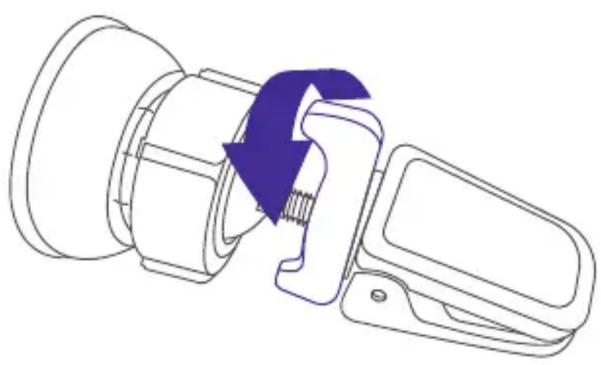
natural_image
Diagram of a mechanical assembly with a purple arrow indicating direction (no text or symbols present)natural_image
Diagram showing a device being processed into a battery, with no visible text or symbols
IMPORTADO POR
ELECTRÓNICA STEREN S.A. DE C.V.
STEREN PRODUCTO EMPACADO S.A. DE C.V.
Autopista México-Querétaro, Km 26.5, sin número, Nave Industrial 3-A, col. Lomas de Boulevares, Tlalnepantla de Baz, Estado de México, C.P. 54020, RFC: SPE-941215-H43
Brand : Steren
Model : POD-291
Category : Phone accessory