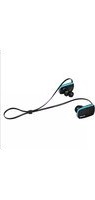
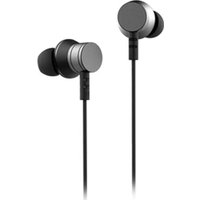
ELBE AU-A41-MIC - Headphones

AU-A41-MIC - Headphones ELBE - Free user manual and instructions

Find the device manual for free AU-A41-MIC ELBE in PDF.

📄 4 pages English EN Download 💬 AI Question 10 questions ⚙️ Specs
Notice ELBE AU-A41-MIC - page 1
Pick your language and provide your email: we'll send you a specifically translated version.
Product Type Wired Over-Ear Headphones with Microphone
Brand ELBE
Model AU-A41-MIC
Connectivity Wired (3.5 mm audio jack)
Driver Size 40 mm
Impedance 32 ohms
Frequency Response 20 Hz - 20 kHz
Sensitivity 105 dB
Microphone Built-in omnidirectional microphone
Cable Length 1.2 m (approx.)
Plug Type 3.5 mm gold-plated stereo plug
Controls In-line remote: volume up/down, play/pause, call answer/hang up, track skip
Battery 2 x AAA batteries (not included) for active features (if applicable)
Weight 200 g (approx.)
Dimensions (W x H x D) 180 x 160 x 70 mm
Materials Plastic headband, synthetic leather ear cushions
Color Black (assumed)
Warranty 1 year (check manufacturer)
Safety Warning Prolonged use at high volume may cause hearing loss. Dispose of batteries properly.
Care Instructions Clean with a soft dry cloth. Do not expose to liquids or extreme temperatures.

Frequently Asked Questions - AU-A41-MIC ELBE

How do I adjust the volume on my ELBE AU-A41-MIC headphones?
Use the in-line remote: push up the volume up button (marked as up) to increase volume, and push down the volume down button to decrease.
How do I play or pause music?
Press the multifunction button (button 1) once to play or pause the current track.
How do I answer or end a phone call?
Press the multifunction button (button 1) once to answer an incoming call. Press it again to hang up.
How do I skip to the next or previous song?
Press the multifunction button twice quickly to skip to the next song. Press it three times quickly to go back to the previous song.
What type of battery does the AU-A41-MIC use and how do I replace it?
The active features (e.g., microphone amplification) require 2 AAA batteries (not included). To replace them, open the battery compartment (usually on the ear cup) and insert new batteries respecting polarity. Dispose of old batteries according to local regulations.
Why is there no sound coming from my headphones?
First, check that the 3.5 mm plug is fully inserted into your device. Ensure the volume is turned up on both your device and the headphone remote. If using batteries, verify they are properly installed and not depleted. Test with another device to isolate the issue.
Are the ear cushions replaceable?
The ear cushions are not designed to be user-replaceable on this model. To clean them, gently wipe with a damp cloth. Avoid using harsh chemicals. If they wear out, contact ELBE customer service for repair options.
Can I use these headphones with a computer?
Yes, the AU-A41-MIC uses a standard 3.5 mm audio jack, compatible with most computers, smartphones, and tablets. For computers, ensure the single plug is inserted into the headphone/mic combo port. If your computer has separate ports, a splitter adapter may be required.
How should I clean and maintain my headphones?
Use a soft, dry cloth to wipe the headband and ear cushions. Do not immerse in water. Store in a cool, dry place. Avoid exposing to extreme heat or moisture. To prevent hearing damage, do not listen at very high volumes for extended periods.
What is the microphone quality like?
The built-in omnidirectional microphone captures sound from all directions, making it suitable for phone calls and voice commands. For best performance, speak clearly and keep the microphone area unobstructed. In noisy environments, background noise may be picked up.

User questions about AU-A41-MIC ELBE

0 question about this device. Answer the ones you know or ask your own.

Ask a new question about this device

The email remains private: it is only used to notify you if someone responds to your question.

No questions yet. Be the first to ask one.

Download the instructions for your Headphones in PDF format for free! Find your manual AU-A41-MIC - ELBE and take your electronic device back in hand. On this page are published all the documents necessary for the use of your device. AU-A41-MIC by ELBE.

USER MANUAL AU-A41-MIC ELBE

natural_image Pure electrical circuit lines without any symbols

Microphone

How to use the controller
Volume upPush up number 2 buon (←)
Volume downPush down number 2 buon (→)
Play/Pause musicPress buon number 1 once
Answer/Hang up callPress buon number 1 once
Next songPress buon number 1 twice
Previous songPress buon number 1 three mes

Warning: Excessive pressure from headphones can cause hearing loss.

Important: When disposing of the unit, always comply with applicable laws relating to the disposal of batteries. Please place them in a proper disposal container to ensure that they are eliminated safely and in an environmentally friendly way.
Manual assistant
Powered by Anthropic
Waiting for your message
Product information

Brand : ELBE

Model : AU-A41-MIC

Category : Headphones