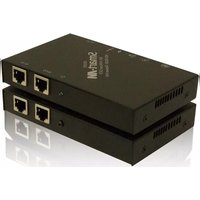
KDX-TX200S - Switch Smart-AVI - Free user manual and instructions
Find the device manual for free KDX-TX200S Smart-AVI in PDF.


| Product Type | Video Switch / KVM Switch |
| Brand | Smart-AVI |
| Model | KDX-TX200S |
| Number of Inputs | 2 (HDMI) |
| Number of Outputs | 1 (HDMI) |
| Maximum Resolution | 4K@30Hz (3840x2160) |
| Video Support | HDMI 1.4, HDCP 1.4 |
| Audio Support | Pass-through up to 7.1ch |
| Switching Method | Front panel button or IR remote |
| Power Supply | 5V DC 1A via USB or adapter |
| Power Consumption | 2.5W |
| Dimensions (W x D x H) | 170 x 100 x 30 mm |
| Weight | 300 g |
| Material | Metal chassis |
| Operating Temperature | 0°C to 50°C |
| Storage Temperature | -20°C to 60°C |
| Connector Type | HDMI Type A, USB Type-C for power |
| Control Interface | IR (included remote) and manual button |
| Compliance | CE, FCC, RoHS |
| What's in the Box | Switch, power adapter, IR remote, user manual |
| Warranty | 2 years |
Frequently Asked Questions - KDX-TX200S Smart-AVI
User questions about KDX-TX200S Smart-AVI
0 question about this device. Answer the ones you know or ask your own.
Ask a new question about this device
Download the instructions for your Switch in PDF format for free! Find your manual KDX-TX200S - Smart-AVI and take your electronic device back in hand. On this page are published all the documents necessary for the use of your device. KDX-TX200S by Smart-AVI.
USER MANUAL KDX-TX200S Smart-AVI
Technical Specifications
| snoitacifi | |
| Systems | Windows 2000, XP, 2003 and Linux |
| Video | DVI-D |
| Resolution | 1920 x 1200 @ 60Hz |
| Keyboard | Minidin color coded, supports PS2 compatible. |
| Mouse | Minidin color coded, PS/2, wheelmouse, 5-button mouse |
| Audio | Signal Type Stereo Audio Bandwidth 15MHz, 0dB Impedance 100 Ohm Connector 3.5mm mini jack, female |
| Power Supply | 5VDC |
| Size (in) | (L) 6.125" x (W) 6.25" x (H) .825" |
| Weight (lbs) | 0.40 lbs |
© Copyright 2004 Smart-AVI, All Rights Reserved
Notice
The information contained in this document is subject to change without notice. Smart-AVI makes no warranty of any kind with regard to this material, including but not limited to, implied warranties of merchantability and fitness for any particular purpose.
Smart-AVI will not be liable for errors contained herein or for incidental or consequential damages in connection with the furnishing, performance or use of this material.
No part of this document may be photocopied, reproduced or translated into another language with out prior written consent from Smart-AVI.
For the complete manual, visit www.smartavi.com.
Smart-AM
Smart Audio Video Integration
User Manual
KDX-200KDX-20
natural_image
Purple electronic device with ports and connectors, no visible text or symbols on the device itself.Smart-AM
2840 N. Naomi Ave.
Burbank, California 91504
Phone: (818) 565-0011
Facsimile: [818] 565-0020
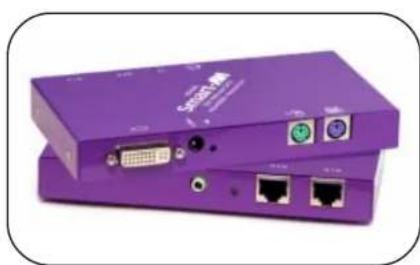
The KDX-200 extends any single-link DVI-D signal, PS2 keyboard, mouse, and audio up to 200 feet using two CAT5e or CAT6 shielded cables.
www.smartavi.com
Introduction
The KDX-200 extends any DVI-D signal, keyboard, mouse and audio up to 200 feet with two CAT5 cables.
Features
■ Top image quality at all resolutions.
■ Video resolutions up to 1920 x 1200 @ 60Hz (1280 x 1024 @ 75Hz) on all distances up to the maximum distance.
■ User selectable: DCC-Information used from the remotely located monitor, from the locally located monitor or from an internal DDC table.
■ Basic device to remotely locate monitor, keyboard/mouse and audio.
■ Supports PS2-keyboard/mouse.
■ Compatible with all operating systems.
■ Compatible with all major KVM switches.
- Rack mount options (19"): mount up to 4 devices in a 19"/1U rack mount kit. This saves expensive rack space.
■ Supports stereo sound.
Applications
■ Sharing: Sharing: easy access to one server from remote location.
■ Security: Securityards the servers by storing them in a secure and climate controlled environment.
■ Saving: Saving equipment costs, physical space and utilities expense.
■ Productivity: Productivity productivity by facilitating testing and performance evaluation of software and equipment, on multiple servers.
■ Multimedia: Multibedized in multimedia presentations where the presentation information is broadcasted to various KVMs.
Installation Diagram

flowchart
graph TD
    A["KDX-TX200"] -->|Power| B["Device"]
    B --> C["DVI-D"]
    B --> D["MOUSE"]
    B --> E["KEYBOARD"]
    F["KDX-RX200"] -->|Power| G["Device"]
    G --> H["DVI-D"]
    G --> I["MOUSE"]
    G --> J["KEYBOARD"]
    G --> K["Keyboard"]
    L["AUDIO"] --> M["Speaker"]
    M --> N["Computer"]
Installation
- Before installing any SmartAvi products, verify that the computer's DVI, mouse, keyboard, and sound all work properly when connected directly.
- Power off computer and monitor.
- Using included cables, connect the DVI, mouse, keyboard, and sound from the PC to the KDX-TX200.
- Connect and run two shielded CAT5 cables from the KDX-TX200 to the KDX-RX200's location.
- Plug in the DVI monitor, mouse, keyboard, and sound to the KDX-RX200.
- Connect the power supplies to the transmitter and receiver.
- Turn on the computer and monitor.
Front and Rear View

Brand : Smart-AVI
Model : KDX-TX200S
Category : Switch