PLCM11 - Camera Pyle - Free user manual and instructions
Find the device manual for free PLCM11 Pyle in PDF.


| Product Type | Digital Camera |
| Brand | Pyle |
| Model | PLCM11 |
| Video Resolution | 1080p Full HD (1920 x 1080) |
| Photo Resolution | Up to 12 MP |
| Image Sensor | CMOS |
| Viewing Angle | 120° wide angle |
| Display | 2.0 inch LCD screen |
| Storage | microSD card up to 32 GB (not included) |
| Connectivity | USB 2.0, HDMI output |
| Power Source | Rechargeable lithium-ion battery, 3.7V 500mAh |
| Charging | Via USB cable (5V DC) |
| Dimensions | 2.4 x 1.5 x 1.0 inches (61 x 38 x 25 mm) |
| Weight | 1.4 ounces (40 g) |
| Functions | Video recording, photo capture, loop recording, motion detection, playback |
| Maintenance | Clean lens with microfiber cloth; avoid direct sunlight exposure |
| Safety | Do not disassemble; keep away from water and extreme temperatures |
| Spare Parts & Repairability | Battery and charging cable available; not user-serviceable internally |
| Included Accessories | USB cable, mounting bracket, user manual |
Frequently Asked Questions - PLCM11 Pyle
User questions about PLCM11 Pyle
0 question about this device. Answer the ones you know or ask your own.
Ask a new question about this device
Download the instructions for your Camera in PDF format for free! Find your manual PLCM11 - Pyle and take your electronic device back in hand. On this page are published all the documents necessary for the use of your device. PLCM11 by Pyle.
USER MANUAL PLCM11 Pyle
natural_image
Close-up of a black rectangular camera with a yellow accent and metal frame, mounted on a white background (no text or symbols visible)
natural_image
Five abstract star and gear icons arranged horizontally (no text or symbols)
natural_image
Row of red decorative symbols including stars, squares, and circles (no text or labels)Parking Reverse Cam with Distance Scale Line Display, Night Vision, Waterproof
1. Wire Connection
Please hard wire the red positive wire connected to the round 1mm DC plug (pictured below) to your reverse tail light positive 12V connection and the black wire to the closest available ground. You will probably need a small length of wire to reach from your reverse tail light to the DC plug.

natural_image
Close-up of a hand holding a black cable with exposed wires (no text or symbols visible)-
There is one 2 jack on the camera unit cable, the yellow RCA jack is for the video output, and red is for 12V DC power supply.
-
Please plug the round 1mm DC plug that you just wired to your reverse tail light into the red (A) power connection (pictured above)
-
Use the included 5m video cable to connect the yellow video wire (B) to your video monitor.
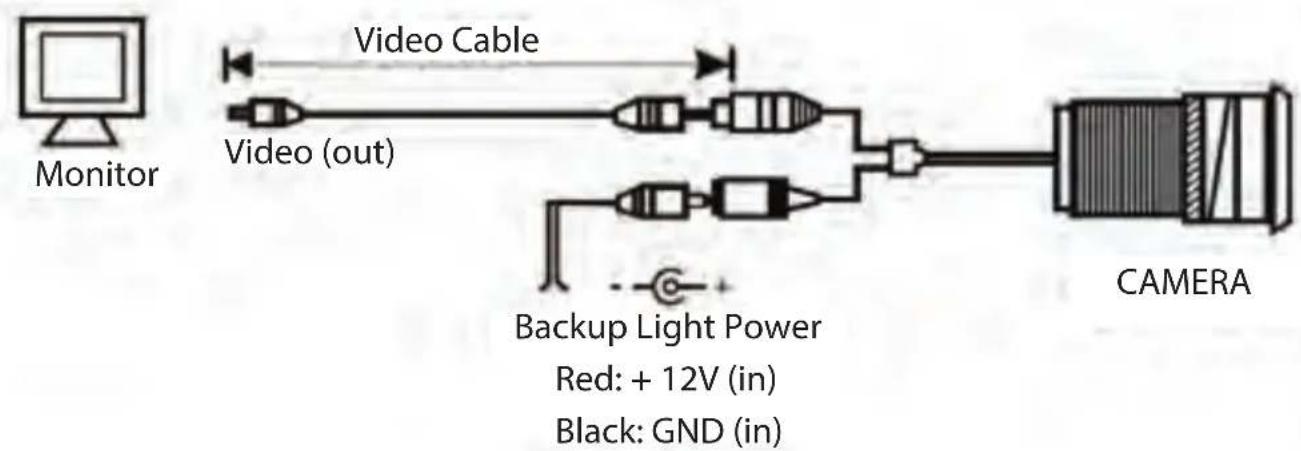
flowchart
graph LR
    A["Monitor"] --> B["Video Cable"]
    B --> C["Video (out)"]
    C --> D["Camera"]
    D --> E["Backup Light Power Red: +12V (in)"]
    D --> F["Black: GND (in)"]
Attention: The camera switch is controlled by the reverse gear shift. When
PLCM11
Rearview Back-Up Camera - Parking Reverse Cam with Distance Scale Line Display, Night Vision, Waterproof
Features:
• Rearview Back-Up Cam
- Compact Vehicle Camera Style
• Universal Mount – Fits All Types of Vehicles
• Night Vision Illumination
• Distance Scale Line Display for Depth Perception
• Waterproof & Weather-Resistant
• Marine Grade Camera Construction
• Rugged & Durable Metal Housing
- Tilt Adjustable Camera Lens Angle
• True Color Picture Output
• Auto White Balance & Image Adjustment
• Used for Car & Automobile, Mobile Vehicle Applications
What's in the Box:
- Backup Camera
• DC Power Cable, 3.3' ft.
• RCA Video Cable, 17' ft.
Technical Specs:
• Marine Grade Rating: IP-67
- Low Lux Light Performance: (0.2 LUX)
• Video Output: 1.0V PP-75 Ohm
• Resolution: 656 x 492 Pixels, 420 TV Lines
• Viewing Angle: 170 Degree
• Power Supply: DC 12V
- Dimension (L x W x H): 0.87" x 0.94" x 1.02"-inches
- Sold as: 1
PYLE
PyleUSA.com

natural_image
Illustration of a laptop with a red checkmark on screen (no text or symbols)VISIT US ONLINE:
Have a question?
Need service or repair?
Want to leave a comment?
PyleUSA.com/ContactUs

Brand : Pyle
Model : PLCM11
Category : Camera