
M205 - Griddle BLACK & DECKER - Free user manual and instructions
Find the device manual for free M205 BLACK & DECKER in PDF.


| Type | Iron (Plancha) |
| Model | M205 |
| Brand | Black & Decker |
| Power Rating | 1000 W |
| Voltage | 120 V |
| Frequency | 60 Hz |
| Water Tank Capacity | Approximately 150 ml (fill to MAX line) |
| Soleplate Material | Metal (non-stick coating not specified) |
| Weight | Approximately 1.1 kg (2.4 lbs) |
| Cord Length | Approximately 2.4 m (8 ft) with 360° swivel |
| Fabric Select Dial | Yes, with settings for different fabrics |
| Dry/Steam Selector | Yes |
| Steam Function | Yes, surge of steam available |
| Self-Cleaning | Not specified, but steam vents can be cleaned |
| Auto Shut-Off | No |
| Anti-Drip System | Not specified |
| Warranty | 2 years limited (US/Canada) |
| Safety Features | Polarized plug, tamper-resistant screw, cool down before storing |
| Includes | Iron, user manual |
| Dimensions (L x W x H) | Approximately 30 x 12 x 13 cm (12 x 4.8 x 5.2 in) |
Frequently Asked Questions - M205 BLACK & DECKER
User questions about M205 BLACK & DECKER
0 question about this device. Answer the ones you know or ask your own.
Ask a new question about this device
Download the instructions for your Griddle in PDF format for free! Find your manual M205 - BLACK & DECKER and take your electronic device back in hand. On this page are published all the documents necessary for the use of your device. M205 by BLACK & DECKER.
USER MANUAL M205 BLACK & DECKER
Please Read and Save this Use and Care Book

BLACK&DECKER® Home
Quick 'N Easy®
Plancha Iron

natural_image
White portable iron with a circular vent, showing internal components and branding (no readable text or symbols beyond branding)
USA/Canada 1-800-231-9786
Mexico 01-800-714-2503
www.blackanddecker.com
Accessories/Parts (USA/Canada)
1-800-738-0245
Modelo
Model
M205
IMPORTANT SAFETY INSTRUCTIONS
When using your iron, basic safety precautions should always be followed, including the following:
☐ Read all instructions before using.
☐ Use iron only for its intended use.
☐ To protect against a risk of electric shock, do not immerse the iron in water or other liquid.
☐ The iron should always be turned to off (refer to "How to Use" section) before plugging into or unplugging from an outlet. Never yank cord to disconnect from outlet; instead grasp plug and pull to disconnect.
☐ Do not allow cord to touch hot surfaces. Let iron cool completely before putting away. Loop cord loosely around iron when storing.
□ Always disconnect iron from electrical outlet when filling with or emptying of water, and when not in use.
☐ Do not operate iron with a damaged cord or if the iron has been dropped or damaged. To avoid the risk of electric shock, do not disassemble the iron, take it to a qualified serviceman for examination and repair. Or, call the appropriate toll-free number listed on the cover of this manual. Incorrect reassembly can cause a risk of electric shock when the iron is used.
☐ Close supervision is necessary for any appliance being used by or near children. Do not leave iron unattended while connected or on an ironing board.
☐ Burns can occur from touching hot metal parts, hot water, or steam. Use caution when you turn a steam iron upside down or use the surge of steam — there may be hot water in the water tank. Avoid rapid movement of iron to minimize hot water spillage.
SPECIAL INSTRUCTIONS
☐ To avoid a circuit overload, do not operate another high-wattage appliance on the same circuit.
☐ If an extension cord is absolutely necessary, a 15-ampere and 120-volt, or 7-ampere and 220-volt cord should be used. Cords rated for less amperage may overheat. Care should be taken to arrange the cord so that it cannot be pulled or tripped over.
SAVE THESE INSTRUCTIONS.
POLARIZED PLUG (120V Models Only)
This appliance has a polarized plug (one blade is wider than the other). To reduce the risk of electric shock, this plug is intended to fit into a polarized outlet only one way. If the plug does not fit fully into the outlet, reverse the plug. If it still does not fit, contact a qualified electrician. Do not attempt to modify the plug in any way.
TAMPER-RESISTANT SCREW
Warning: This appliance is equipped with a tamper-resistant screw to prevent removal of the outer cover. To reduce the risk of fire or electric shock, do not attempt to remove the outer cover. There are no user-serviceable parts inside. Repair should be done only by authorized service personnel
Note: If the power supply cord is damaged, it should be replaced by qualified personnel or in Latin America by an authorized service center.
Product may vary slightly from what is illustrated.
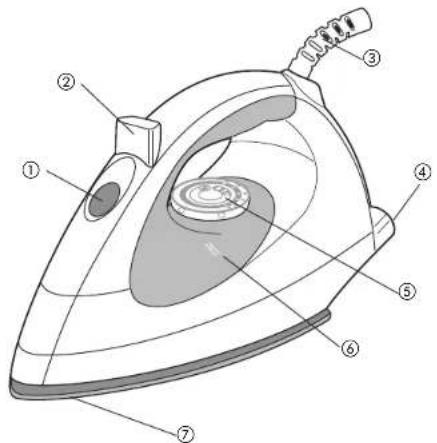
- Water-fill opening
- Dry/Steam selector button
- 360° swivel cord
- Heel rest
- Fabric-select dial
- Water tank
- Soleplate
How to Use
This appliance is for household use only.
GETTING STARTED
Remove any labels, stickers or tags attached to the body or soleplate of the iron. Note: Use ordinary tap water for ironing. Do not use water processed through a home softening system.
Important: For optimum performance, let the iron stand for 2 minutes before beginning to iron.
TO FILL THE WATER TANK
Important: Make sure the iron is unplugged.
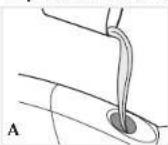
-
Tilt the iron and using a clean measuring cup, pour water into opening until the water reaches the MAX level mark on the water tank (A). Do not overfill.
-
Plug in the iron.
Tip: If unsure of a garment's fiber, test a small area (on an inside seam or hem) before ironing.
FOR STEAM IRONING
-
Turn the fabric-select dial to appropriate setting (B). Read garment's label to help you determine fabric type.
-
When finished ironing, turn the fabric-select dial to the "0" setting and unplug the iron.

FOR DRY IRONING
Turn the fabric-select dial to the appropriate setting for your fabric. Read garment's label to help you determine fabric type. You may want to empty the water (see "Emptying Water Tank After Ironing - Optional") or select DRY using the Dry/Steam selector button.
EMPTYING WATER TANK AFTER IRONING (OPTIONAL)

-
Turn the fabric-select dial to "0" Unplug the iron and let it cool.
-
Empty the water by holding the iron over a sink with the tip pointing down. Water will empty out of water-fill opening (C).
Care and Cleaning
This product contains no user serviceable parts. Refer service to qualified service personnel.
CLEANING OUTSIDE SURFACES
-
Make sure iron is unplugged and has cooled completely. Wipe the soleplate and outer surfaces with a soft cloth dampened with water and add mild household detergent. Never use abrasives, heavy-duty cleansers, vinegar or scouring pads that may scratch or discolor the iron.
-
After cleaning, steam iron over an old cloth to remove any residue from the steam vents.
STORING YOUR IRON
-
Unplug the iron and allow it to cool.
-
Check that the selector is set to min.
-
Store vertically on its heel rest to prevent water leaking from the soleplate.
;NECESITA AYUDA?
For service, repair or any questions regarding your appliance, call the appropriate "800" number on the cover of this book. Do not return the product to the place of purchase. Do not mail the product back to the manufacturer nor bring it to a service center. You may also want to consult the website listed on the cover of this manual.
Two-Year Limited Warranty
(Applies only in the United States and Canada)
What does it cover?
- Any defect in material or workmanship; provided; however, Applica's liability will not exceed the purchase price of the product.
For how long?
- Two years after the date of original purchase.
What will we do to help you?
- Provide you with a reasonably similar replacement product that is either new or factory refurbished.
How do you get service?
- Save your receipt as proof of the date of sale.
- Check our on-line service site at www.prodprotect.com/applica, or call our toll-free number, 1-800-231-9786, for general warranty service.
- If you need parts or accessories, please call 1-800-738-0245.
What does your warranty not cover?
• Damage from commercial use
• Damage from misuse, abuse or neglect
- Products that have been modified in any way
- Products used or serviced outside the country of purchase
• Glass parts and other accessory items that are packed with the unit
- Shipping and handling costs associated with the replacement of the unit
- Consequential or incidental damages (Please note, however, that some states do not allow the exclusion or limitation of consequential or incidental damages, so this limitation may not apply to you.)
How does state law relate to this warranty?
- This warranty gives you specific legal rights, and you may also have other rights that vary from state to state or province to province.
Póliza de Garantía
Guatemala City, Guatemala
Tel.: (502) 331-5020
360-0521
Honduras
Lady Lee
Centro Comercial Mega Plaza
Carrelera a la Lima
San Pedro Sula, Honduras
Tel.: (504) 553-1612
México
Authorized Service Center
Electrodomésticos, S.A.
33 Independence Square,
Port of Spain
Trinidad, W.I
Tel.: (868) 623-4696
Venezuela
Col. Centro, Mexico D. F., CP 06050
BLACK&DECKER. is a trademark of The Black & Decker Corporation, Towson, Maryland, USA
1000 W 120 V 60Hz

2006/7-25-41S/E
Copyright © 2006 Applica Consumer Products, Inc.
Pub. No. 1000003182-00-RV00
Made in People's Republic of China
Printed in People's Republic of China

- BLACK&DECKER® Home
- Quick 'N Easy®
- IMPORTANT SAFETY INSTRUCTIONS
- SPECIAL INSTRUCTIONS
- SAVE THESE INSTRUCTIONS.
- POLARIZED PLUG (120V Models Only)
- TAMPER-RESISTANT SCREW
- How to Use
- GETTING STARTED
- TO FILL THE WATER TANK
- FOR STEAM IRONING
- FOR DRY IRONING
- EMPTYING WATER TANK AFTER IRONING (OPTIONAL)
- Care and Cleaning
- CLEANING OUTSIDE SURFACES
- STORING YOUR IRON
- ;NECESITA AYUDA?
- Two-Year Limited Warranty
- (Applies only in the United States and Canada)
- What does it cover?
- For how long?
- What will we do to help you?
- How do you get service?
- What does your warranty not cover?
- How does state law relate to this warranty?
- Póliza de Garantía
- Honduras
- México
- Venezuela
Brand : BLACK & DECKER
Model : M205
Category : Griddle