
STV-029 - Flat Screen Mount Steren - Free user manual and instructions
Find the device manual for free STV-029 Steren in PDF.


| Product Type | Flat screen wall mount |
| Model | STV-029 |
| Brand | Steren |
| Compatible Screen Sizes | 26" to 55" |
| Maximum Weight Capacity | 50 kg (110 lbs) |
| VESA Compatibility | 200x200, 300x300, 400x200, 400x400 mm |
| Material | Heavy-duty steel |
| Tilt Range | -5° to +15° |
| Swivel Range | ±60° |
| Rotation | 360° |
| Distance from Wall | 50 mm to 450 mm (articulating arm) |
| Installation Type | Wall mount with dual stud attachment |
| Included Hardware | Screws, wall anchors, spacers, level |
| Color | Glossy black |
| Weight (mount only) | 3.5 kg (7.7 lbs) |
| Dimensions (folded) | 350 x 350 x 50 mm |
| Safety Certification | TUV/GS approved |
| Cleaning Instructions | Wipe with dry cloth; avoid solvents |
| Warranty | 1 year limited |
Frequently Asked Questions - STV-029 Steren
User questions about STV-029 Steren
0 question about this device. Answer the ones you know or ask your own.
Ask a new question about this device
Download the instructions for your Flat Screen Mount in PDF format for free! Find your manual STV-029 - Steren and take your electronic device back in hand. On this page are published all the documents necessary for the use of your device. STV-029 by Steren.
USER MANUAL STV-029 Steren
natural_image
Pure electrical circuit lines without any symbolsSoporte para pantallas de 23" a 42", ultradelgado
V0.0 / 0716v


MD (x4) ME (x4) MF (x4)

WA (x4) WB (x4) WC (x4)


natural_image
Pure electrical circuit lines without any symbols23 to 42" wall mount

IMPORTANT
Before to use the product, please read carefully this manual to avoid any malfunction. The info in this manual is shown as reference. Due to updates can exist differences.
Consult our website www.steren.com to obtain the most actual version of this manual.

• This product is NOT a toy; keep it away from children.

• This product has been designed for indoor use.

- Choose a solid surface to fix the support safely.

- Don't exceed the maximum charge capacity.

• This device cannot be used by people with different abilities, at less they have preparation and supervision.

SCREEN INSTALLATION
- Place the fastening bar into the rear of the screen. Choose 4 screws and 4 washers of the same size to fix the bars firmly.
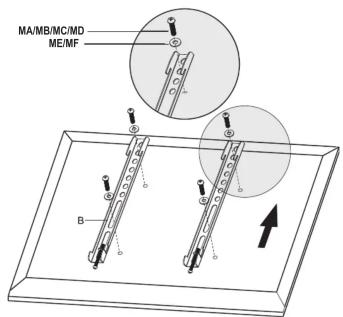
The supplied screws are standard size. Please refers to the instruction manual of your screen to obtain more info about the screws to mount in the support.
- Install the screen onto the stand.
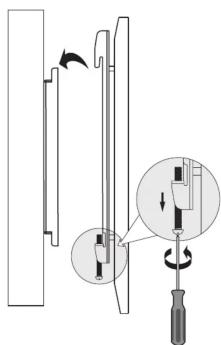
Loosen the inferior screws to mount the screen easily.
CONTENT
PIECE QUANTITY
| Stand | x1 |
| Fastening bars | x2 |
SCREW AND WASHERS KIT


MA (x4) MB (x4) MC (x4)

MD (x4) ME (x4) MF (x4)

WA (x4) WB (x4) WC (x4)
TOOLS YOU MAY NEED (not included)

- Tight the screws again to fix the bars.


STAND INSTALLATION
Use the stand and the level to make the drilling marks over the surface where you want to make the installation.


Before drill, make sure that does not exist electric wire pipes, gas or water.

STEREN® Product: 23 to 42" wall mount Number part: STV-029 Brand: Steren
This Steren product is warranted under normal usage against defects in workmanship and materials to the original purchaser for one year from the date of purchase.
CONDITIONS
-
This warranty card with all the required information, invoice or purchase ticket, product box or package, and product, must be presented when warranty service is required.
-
If the product is in the warranty time, the company will repair it free of charge.
-
The repairing time will not exceed 30 natural days, from the day the claim was received.
- Steren sell parts, components, consumables and accessories to customer, as well as warranty service, at any of the addresses mentioned later.
THIS WARRANTY IS VOID IN THE NEXT CASES:
If the product has been damaged by an accident, acts of God, mishandling, leaky batteries, failure to follow enclosed instructions, improper repair by unauthorized
personnel, improper safe keeping, among others.
a) The consumer can also claim the warranty service in the purchase establishment. b) If you want to pay up an insurance, you should be a purchase and
b) If you lose the warranty card, we can release it, if you show the invoice or purchase ticket.
RETAILER INFORMATION
Name of the retailer ____ Address ____ Product ____ Brand ____ Serial number ____ Date of delivery

In case your product fails or have questions, please contact your nearest dealer. If you are in Mexico, please call to our Call Center. 01 800 500 9000
Brand : Steren
Model : STV-029
Category : Flat Screen Mount