
CT-LS20 - Mobile storage furniture DA-LITE - Free user manual and instructions
Find the device manual for free CT-LS20 DA-LITE in PDF.


| Product Type | Portable Projector Screen |
| Brand | Da-Lite |
| Model | CT-LS20 |
| Screen Surface | Matte White |
| Gain | 1.0 |
| Viewing Angle | 160 degrees |
| Diagonal Size | 80 inches |
| Aspect Ratio | 4:3 |
| Screen Dimensions (W x H) | 64 x 48 inches (approx.) |
| Overall Dimensions (with tripod) | 72 x 12 x 6 inches (approx.) |
| Weight | 15 lbs |
| Power Source | None (manual operation) |
| Setup Type | Floor-standing tripod |
| Height Adjustment | Yes, telescopic legs |
| Storage | Collapsible, includes carrying case |
| Surface Material | Vinyl with fiberglass backing |
| Frame Type | Auto-locking tension rod |
| Compatibility | Standard and short-throw projectors |
| Warranty | 2 years limited |
| Included Accessories | Carrying case, user manual |
| Maintenance | Wipe with dry cloth; avoid solvents |
| Safety | Stable tripod base; avoid sharp objects |
| Spare Parts | Contact Da-Lite for replacement legs or screen fabric |
Frequently Asked Questions - CT-LS20 DA-LITE
User questions about CT-LS20 DA-LITE
0 question about this device. Answer the ones you know or ask your own.
Ask a new question about this device
Download the instructions for your Mobile storage furniture in PDF format for free! Find your manual CT-LS20 - DA-LITE and take your electronic device back in hand. On this page are published all the documents necessary for the use of your device. CT-LS20 by DA-LITE.
USER MANUAL CT-LS20 DA-LITE
natural_image
Line drawing of a multi-tiered industrial machine with wheels and a door open, no text or symbols presentINSTRUCTION BOOK FOR
Computer Table Laptop
Storage Cart
AUTION! The user of this product should exercise caution when moving the cart. Any sudden stop could cause instability of the cart and could cause serious injury and/or damage. The cart should always be pushed, never pulled, by the user. Always push from the side of the cart, never from the front or back of the cart.
Required Tools:
- 1/2" end wrench

natural_image
Line drawing of a multi-compartment electrical cabinet with wheels and internal compartments (no text or symbols)Procedure
- Remove contents from carton and examine.

| Item Description | CT-LS20 Qty | CT-LS30 Qty | |
| 1 Divider 16 24 | |||
| 2 Cart Assembly 11 | |||
| 3 Caster, Plate 5" W/B 2 2 | |||
| 4 Caster, Plate 5" | 2 2 | ||
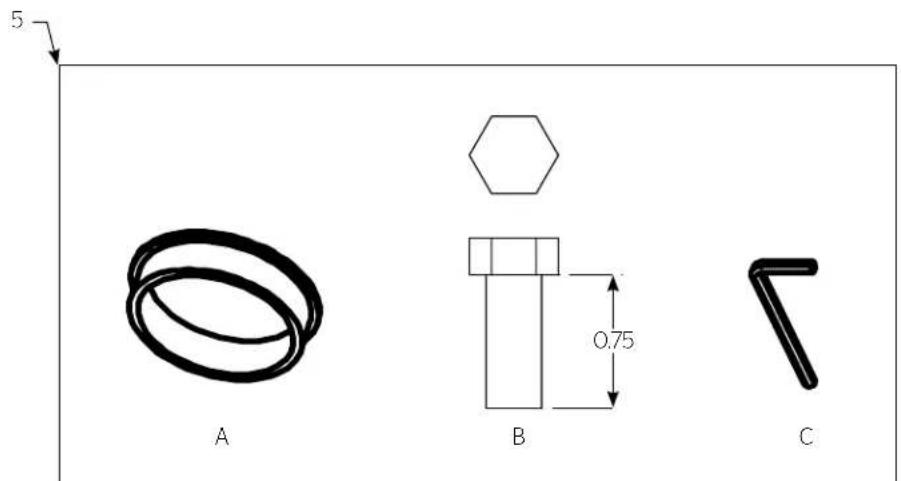
| 5 Package Set | 11 | ||
| A | Grommet, 2" | 8 | 8 |
| B | Bolt, HHCS 5/16'-18 x 3/4" | 16 | 16 |
| C | Wrench, Allen 5/32" | 11 | |
-
Lay cart onto rear panel. See Figure 1. Using a 1/2" wrench, Install Plate Casters (3 & 4) using 5/16"-18 x 3/4" Bolts (B). For maximum braking capacity, the two brake casters should be installed diagonally across from each other. Tighten all fasteners.
-
To disengage lock, insert and turn key 1/4 turn to the right. To open latch, push inward on chrome keypad.
- Install the dividers as needed. Install grommets. See Figure 2.


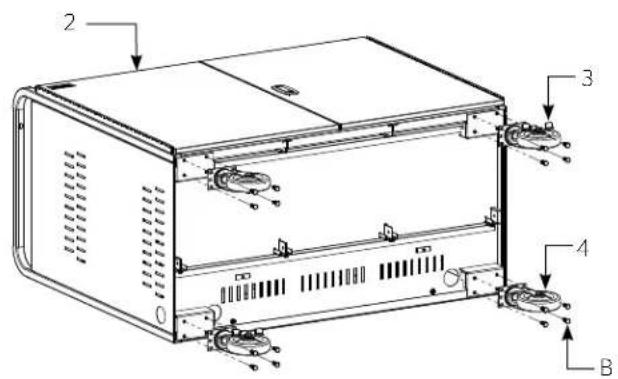
Figure 1b CT-LS30

Procedure (Continued)
- Remove rear panel by removing the hex head screws using the 5/32" hex key (C). See Figure 3.
Note: CT-LS20 has (5) hex head screws and CT-LS30 has (8).


A Milestone AV Technologies Brand
3100 North Detroit Street
Warsaw, Indiana 46582
P: 574.267.8101 or 800.622.3737
F:574.267.7804 or 877.325.4832
E: info@da-lite.com
www.da-lite.com
DL-0375 (Rev. 3) 01.16
© 2016 Milestone AV Technologies LLC. Printed in U.S.A.
- If power strips were ordered separately, install one on each shelf according to the instructions provided with the power strip. See Figure 4.
Note: If the cart was ordered as an assembly including power strips, a strip will be pre-installed on each shelf.
- Reattach rear panel using the (8) hex head screws removed in the step 6. See Figure 3.


Brand : DA-LITE
Model : CT-LS20
Category : Mobile storage furniture