
SLB085 - Projector Accessories Chief - Free user manual and instructions
Find the device manual for free SLB085 Chief in PDF.


| Product Type | Projector Mount |
| Brand | Chief |
| Model | SLB085 |
| Material | Steel |
| Finish | Black Powder Coat |
| Weight Capacity | 50 lbs (22.7 kg) |
| Projector Weight | Up to 50 lbs |
| VESA Compatibility | FP-MIS, DIS, VESA 75/100/200 |
| Mounting Pattern | Universal with adapter brackets |
| Distance from Ceiling | 1.5 inches (38 mm) |
| Vertical Adjustment | ±5° Tilt |
| Horizontal Adjustment | ±2° Roll |
| Security Features | Locking hardware, tamper-resistant |
| Installation Tools | Phillips screwdriver, level |
| Included Components | Mounting plate, adapter brackets, hardware kit |
| Warranty | 10 years |
| Compliance | UL Listed |
| Cleaning Instructions | Wipe with dry cloth; no solvents |
| Country of Origin | USA |
Frequently Asked Questions - SLB085 Chief
User questions about SLB085 Chief
0 question about this device. Answer the ones you know or ask your own.
Ask a new question about this device
Download the instructions for your Projector Accessories in PDF format for free! Find your manual SLB085 - Chief and take your electronic device back in hand. On this page are published all the documents necessary for the use of your device. SLB085 by Chief.
USER MANUAL SLB085 Chief
INSTALLATION INSTRUCTIONS
SSB-085, SSM-085, SLB-085 and SLM-085 Interface Brackets
SSB-085, SSM-085, SLB-085 and SLM-085 Interface Brackets are designed for use with Chief® Series Projector Mounts. See the specific installation instructions provided with the mount for additional installation information.
Unpack carton and verify kit contents. If any listed parts are missing, immediately contact a Chief Customer Service representative.

WARNING: IMPROPER INSTALLATION CAN LEAD TO EQUIPMENT FALLING CAUSING SERIOUS PERSONAL INJURY AND DAMAGE TO EQUIPMENT! DO NOT substitute hardware. Use only hardware supplied by manufacturer!
(1) Interface Bracket (3) Screw, Phillips Flat Head, Machine, M4 x 20mm ****
(6) 10-24 Thumb Nuts ** (3) 1/2" x .194 x 1/2" Nylon Spacer ****
(1) All-Points Security Kit

SLB-085
(Note: SSB-style interface bracket connections are endircled)
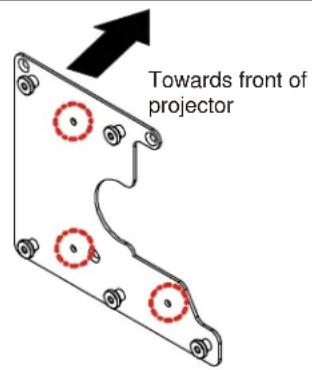
SLM-085
(Note: SSM-style interface bracket connections are encircled)
**Only used when installing SLB/SSB interface brackets. ****Used when mounting surface of projector is recessed.
NOTE: Specific to SSB-style and SSM-style interface bracket installation, all appropriate screws come pre-installed as reflected in the encircled locations above. DO NOT attempt to substitute and USE ONLY this pre-installed hardware for SSB-style and SSM-style interface bracket installation.
Installation Instructions

WARNING: OVER TIGHTENING OF SCREWS CAN DAMAGE PARTS AND CAN LEAD TO SERIOUS PERSONAL INJURY AND DAMAGE TO EQUIPMENT! DO NOT over tighten screws when installing interface brackets.
NOTE: Step 1 is only required when installing an SLB/SSB interface bracket. If an SLM/SSM bracket is being installed, proceed to step 2.
- Screw thumb screws onto 10-24 x 5/8" Phillips pan head screws. DO NOT fully tighten thumb screws at this time.
- Turn projector upside down on a flat surface.
- Place 1/2" spacers over threaded inserts in bottom of projector.
- Place interface bracket onto bottom of projector, aligning mounting holes and spacers.
- Using M4 x 20mm Phillips flat head screws and flat washers, secure interface bracket to projector and tighten all fasteners at this time.
NOTE: Security screws can be substituted when mounting interface bracket to projector by using the parts and installation instructions in the All-Points Security Kit.
Chief® is a registered trademark of Milestone AV Technologies. All rights reserved.

Milestone AV Technologies, and its affiliated corporations and subsidiaries (collectively, "Milestone"), intend to make this manual accurate and complete. However, Milestone makes no claim that the information contained herein covers all details, conditions or variations, nor does it provide for every possible contingency in connection with the installation or use of this product. The information contained in this document is subject to change without notice or obligation of any kind. Milestone makes no representation of warranty, expressed or implied, regarding the information contained herein. Milestone assumes no responsibility for accuracy, completeness or sufficiency of the information contained in this document.

CHIEF®
Our Mounts. Your Vision.
Chief Manufacturing, a products division of Milestone AV Technologies
8401 Eagle Creek Parkway, Savage, MN 55378
• P: 800.582.6480 / 952.894.6280 • F:877.894.6918 / 952.894.6918
8850-002016 Rev01
©2009 Milestone AV Technologies,
a Duchossois Group Company
05/09
Brand : Chief
Model : SLB085
Category : Projector Accessories