C3RR3 - Household Fan KDK - Free user manual and instructions
Find the device manual for free C3RR3 KDK in PDF.


| Product Type | Electric Fan (Pedestal) |
| Brand | KDK |
| Model | C3RR3 |
| Power Supply | Rated voltage (see product label) |
| Power Consumption | Approx. 50 W |
| Number of Speeds | 3 (typical) |
| Timer | Yes, with remaining time indication |
| Oscillation | Yes, via LOUVER button |
| Remote Control | Yes, included |
| Remote Control Range | Up to 4.5 m (front), up to 3 m within 25° angle |
| Remote Control Battery | Requires batteries (type not specified in manual) |
| Memory Function | Retains last speed setting when power cycled via remote (timer not saved) |
| Height Adjustment | Yes, with manual knob |
| Net Weight | Approx. 4.5 kg |
| Dimensions (H x W x D) | Approx. 130 x 40 x 40 cm |
| Cord Length | Approx. 1.5 m (typical) |
| Safety Features | Finger guard, tip-over stability (presumed) |
| Cleaning | Soft cloth with mild detergent, avoid chemicals |
| Usage Environment | Indoor, avoid high humidity, heat, chemicals |
| Package Contents | Fan, remote control, batteries, manual |
Frequently Asked Questions - C3RR3 KDK
User questions about C3RR3 KDK
0 question about this device. Answer the ones you know or ask your own.
Ask a new question about this device
Download the instructions for your Household Fan in PDF format for free! Find your manual C3RR3 - KDK and take your electronic device back in hand. On this page are published all the documents necessary for the use of your device. C3RR3 by KDK.
USER MANUAL C3RR3 KDK
Operating Instructions
使用説明書
تعليمات التشفيل
Electric Fan 電風扇

natural_image
Line drawing of a flat-screen electric fan with visible blades and mounting brackets (no text or symbols)■ Before operating this unit, please read instructions carefully for correct use.
■ 使用前務請詳細閱讀本書所載事項。
Use only with rated voltage.
Do not attempt force the louver to turn.
只能使用額定電壓。
請不要企圖用力旋轉百葉窗。
Do not insert finger or other objects within the louver and guard.
(The blade is especially dangerous.
Take care with children)
natural_image
Illustration of a child pushing a fan on an electric scooter (no text or symbols)NAME OF PARTS / HOW TO OPERATE
各部件名稱及使用方法
Do not spray anything such as insecticide.
(They cause damage)
不要噴射殺蟲劑。
(引致變質、破損)
natural_image
Line drawing of a hand holding a small container next to a fan device (no text or symbols)Do not remain in direct wind path for a long period.
(Especially infants, older and infirm individuals)
不要讓身體長時間吹風。
(特別請注意幼兒、老人和病人)
natural_image
Illustration of a person sleeping under a fan with steam rising (no text or symbols)
OFF/SPEED
TIME
LOUVER
OFF / SPEED BUTTON
開關 / 風速控制
زر الابقاف / السرعة
Press to turn OFF or switch to next Wind Power setting. Please unplug while not in use for a long period (Electric consumption of 1 W continues even while switched off.)
When switched off, then on again by the remo-controller, the setting will be whatever was last selected.
※ The time selection will not be retained in Memory.
※ When unplugged, Memory will be deleted.
Do not place near obstacles or on arabic plodforms.
(May fall or breakdown)
避免擺設在有障礙物和不穩定的場所。
(引致翻倒、故障)
natural_image
Line drawing of a hand holding a portable fan device (no text or symbols)Do not use under the following circumstances:
• High temperature High humidity (e.g. bathroom)
• Near fire source wet areas
- Near chemicals, oil, dust (e.g. factories)
不要在下列場所使用。
高温潮湿(浴室等)。
接近火源、水源的場所。
藥品、油、塵埃多的場所(工廠等)。
This appliance is provided with flexible cord. If the supply cord is damaged, it must be replaced by the manufacturer or its service agent or a similarly qualified person in order to avoid a hazard. 當買此電風扇時,本廠已為顧客提供特製的電源線,如發現損壞,請即連絡代理商或服務代理或特許技術人員以替換,以防備發生任何災害。
As time elapses, the remaining time will light up.
The louver rotates or stops with the button pressed.
※Please note that none of these buttons will be effective unless the power is on.
Do not cover up Receptor.
(Prevents Remote Control Unit from functioning)
不要擋住遙控器和受訊部。
(引致遙控器無法操作)。
natural_image
Illustration of a child using a radio next to a fan device (no text or symbols present)Do not spill liquids on
Remote Control Unit.
Do not drop or step on it.
(They cause damage)
不要讓遙控器接觸液體。
不能摔、跌、踏。
(引致故障)。
لا تسكب السوانل على
وحدة التحكم عن بعد
natural_image
Simple line drawing of a shoe pouring liquid into a container with a digital display (no text or symbols)C3RRK, C3RR3,
REMOTE CONTROL MODEL ONLY
遙控器型號
How to insert batteries (enclosed)
- Open lid
1 打開電池盒蓋。
① افتح الغطاء.

natural_image
Line drawing of a car interior with a blue arrow indicating rotation (no text or symbols)電池裝入方法(包括電池)
2 Insert batteries
2 裝入電池。
③ ادخل البطاريات.
- Follow ⊕ - marks
- 注意正主和負三記號、正確裝入
natural_image
Line drawing of a mobile phone casing with buttons and display panel (no text or symbols)Battery model
In order to prevent leaking or combustion of the batteries……
- Do not use rechargeable (Ni-Cd) batteries.
- Do not mix different kinds on batteries.
- Do not mix new and old batteries.
- If the Fan is not going to be used for a long time, remove batteries.
注意
- Point the Remote Control Unit in the direction of the Receptor.
- The controllable distance is about 4.5m from front panel and 3m within 25° to the right and left.
- If Remote Control Unit becomes ineffective, replace batteries.
- 將遙控器對向受訊器的正確部份進行操作。
有效的操作距離是前面4.5公尺,左右兩邊在25度3公尺以內的範圍。
如遙控器不能正常工作,請更換電池。
- Keep Receptor out of direct sunlight and strong artificial light. (Diminishes Remote Control effectiveness.)
注意
natural_image
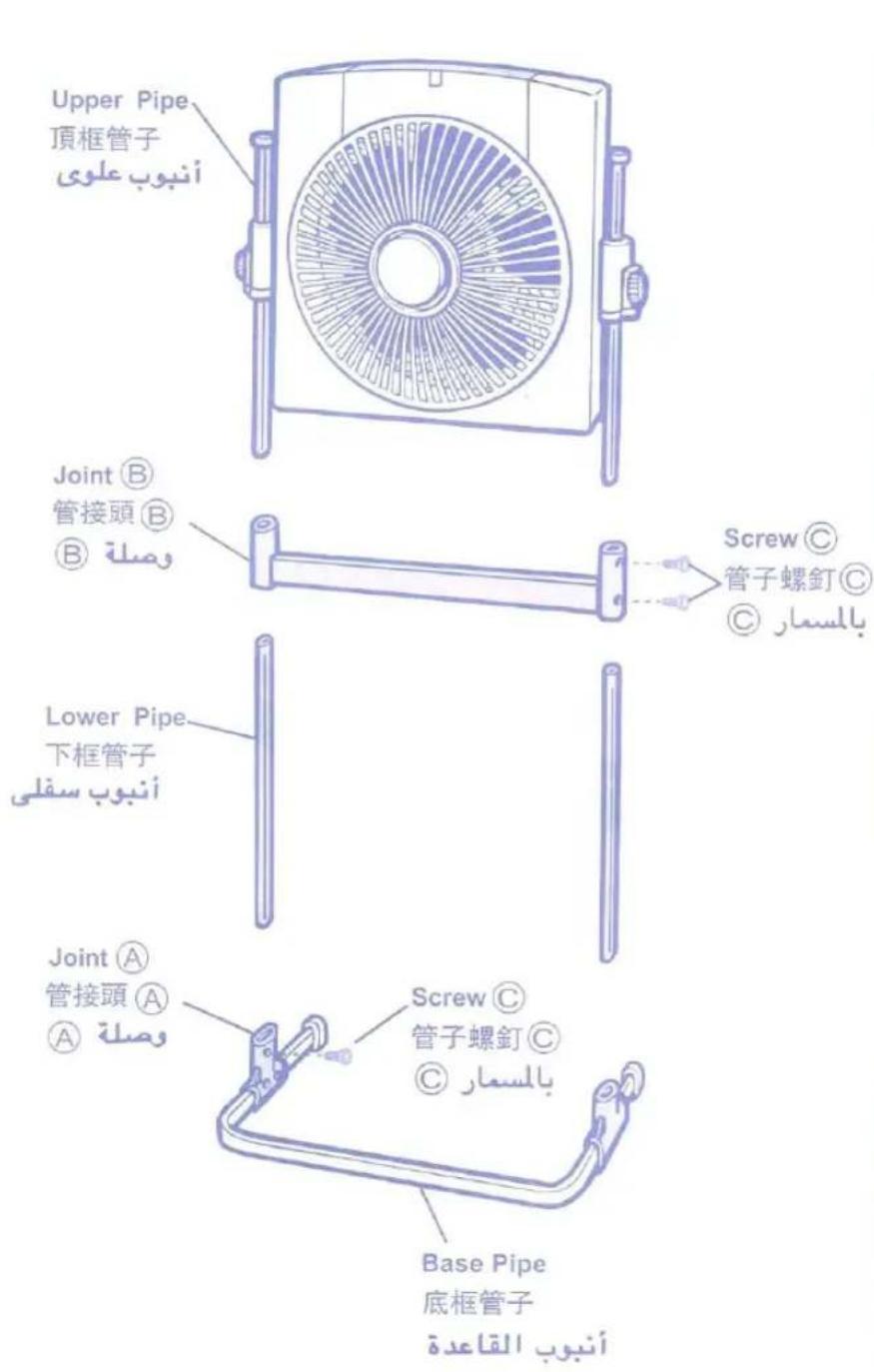
Line drawing of a hand holding a fan blade, no text or symbols presentLoosen the knobs and
adjust main body to
the desired height.
then tighten the knobs.
將紐子放鬆而按照需要的
高低調節後、把紐子上緊。
This product is not intended for use by persons (including children) with reduced physical,
sensory or mental capabilities, or lack of experience and knowledge, unless they have been given supervision or instruction concerning use of the product by a person responsible for their safety.
Children should be supervised to ensure that they do not play with the product during maintenance.
natural_image
Illustration of a hand holding an electrical plug with a screw, no text or symbols presentGrasp plug when pulling out. 抓住插頭部分。
Use soft cloth soaked in warm water with detergent. Wipe with dry cloth. 用浸有厨房用洗潔劑和溫水的軟布擦去污漬、並用乾布擦淨。
Note that rubbing too much with dry cloth may scratch the surface.
特别注意:为了避免留痕
使用乾布擦表面时,切勿用過大力量。
Do not use the following chemicals as they cause corrosion and discoloration. 為防止變質、變色、請不要使用下列用品。
When using chemical detergent follow its instructions.
如用化學清潔劑時,必須
按照所指示來進行。
Brand : KDK
Model : C3RR3
Category : Household Fan