
Esraj & Erhu Ethnic String Phrases - Bibliothèque d'échantillons STEINBERG - Free user manual and instructions
Find the device manual for free Esraj & Erhu Ethnic String Phrases STEINBERG in PDF.


| Type | Virtual Instrument / Sample Library |
| Format | VST3, AU, AAX (64-bit only) |
| Compatibility | Windows 7 or later, macOS 10.12 or later |
| DAW Support | Cubase, Nuendo, Logic Pro, Pro Tools, Ableton Live, FL Studio |
| Content | Esraj and Erhu ethnic string phrases |
| Number of Presets | Over 200 phrases and articulations |
| Articulations | Legato, staccato, pizzicato, vibrato, glissando, trills |
| Tempo Sync | Phrases sync to host BPM (with swing and groove) |
| Key Switches | Assignable key switches for articulation control |
| Dynamic Control | Velocity-sensitive layers with round-robin |
| Effects | Built-in reverb, delay, EQ, and filter |
| Sample Rate | 44.1 kHz / 24-bit |
| File Size | Approximately 1.5 GB |
| Installation | Requires Steinberg Download Assistant or eLicenser |
| Activation | Soft-eLicenser or USB-eLicenser |
| Documentation | PDF user manual included |
| Update Policy | Free updates for registered users |
Frequently Asked Questions - Esraj & Erhu Ethnic String Phrases STEINBERG
User questions about Esraj & Erhu Ethnic String Phrases STEINBERG
0 question about this device. Answer the ones you know or ask your own.
Ask a new question about this device
Download the instructions for your Bibliothèque d'échantillons in PDF format for free! Find your manual Esraj & Erhu Ethnic String Phrases - STEINBERG and take your electronic device back in hand. On this page are published all the documents necessary for the use of your device. Esraj & Erhu Ethnic String Phrases by STEINBERG.
USER MANUAL Esraj & Erhu Ethnic String Phrases STEINBERG
- For the latest system requirements, please visit www.steinberg.net, www.sonuscore.com or your trusted dealer's website.
SONUSCORE
TABLE OF CONTENTS
- INTRODUCTION 4 ....
- DOWNLOAD & INSTALLATION 4 ....
- ETHNIC STRING PHRASES 6 ......
3.1 THEME SELECTION BAR 7
3.2 PHRASE SYSTEM 7
3.3 KEYSWITCHES....7
3.4 PHRASE PROGRESS BAR / SAMPLE START..OFFSET..8
3.5 PAGE SELECTION....8
3.6 PLAYBACK SPEED....8
3.7 FX PAGE 9
3.7.1 EQ....10
3.7.2 DELAY 10
3.7.3 REVERB....10
- LEGATO AND SUSTAIN INSTRUMENTS ......11
4.1 FX....11
4.1.1 EQ....11
4.1.2 DELAY 12
4.1.3 REVERB....12
- CREDITS....13
SONUSCORE
1. INTRODUCTION
Welcome to SONUSCORE ETHNIC STRING PHRASES ESRAJ & ERHU. This HALion instrument enables you to integrate expressive ethnic string phrases into your composition.
2. DOWNLOAD & INSTALLATION
Please follow these steps to set up the library
- Download and install the Steinberg Download Assistant if you haven't already. You can find it at www.steinberg.net.
- Open the Steinberg Download Assistant and click on the requested Ethnic String Phrases Esrai & Erhu sound library.
- This library can only be used with a compatible version of HALion, HALion Sonic or HALion Sonic SE. Therefore, before you proceed and start to install the sound library content, please make sure you have installed the latest version HALion 6, HALion Sonic 3 or HALion Sonic SE 3. You can get the latest updates from here www.steinberg.net.
- You don't have HALion 6, HALion Sonic 3 or HALion Sonic SE 3 installed? Both HALion 6 and HALion Sonic 3 are available from www.steinberg.net.
- If you don't have HALion 6 or HALion Sonic 3, you can use HALion Sonic SE 3. In the Steinberg Download Assistant, the HALion Sonic 3 SE installer can be found in the VST instruments & Plugins column.
Please note: HALion Sonic SE 3 is also included in Cubase 9.5 or later. So if you have installed Cubase 9.5, HALion Sonic SE 3 is already installed and, if necessary, only needs to be updated.
Download
- Define the installation path in the 'Target folder:' field above the components list. It is recommended to store the downloads at a location where you want the sound library files to be placed permanently. Due to their size, moving the downloaded library components later takes additional time.
- Once the download and installation path is set, download the sound library components via Steinberg Download Assistant. To do so, click on 'Download' in the corresponding lines in the list of components in the Steinberg Download Assistant.
• A progress bar provides you with information on the running downloads.
SONUSCORE
Please note that the sound library components are huge. Depending on your internet connection, the downloads can take a considerable amount of time.
Registration
- Once all downloads have been completed (green progress bar), click on 'Open' in the line of the first library component listed by Steinberg Download Assistant
- Steinberg Library Manager, a tool installed along with HALion/HALion Sonic (SE), opens and suggests to register the contained sound files ('Register VST Sounds').
- Click 'OK' to proceed and wait for the registration to finish. Please be patient. It can take some until all files have been registered completely.
- As soon as the Steinberg Library Manager has completed the registration, a window pops up reporting that 'VST Sounds registered successfully.' Click 'OK' to confirm.
Please remember that this sound library can only be used with a valid license.
The Ethnic String Phrases Esraj & Erhu license includes a license for HALion Sonic SE 3. If you want to use this library with HALion 6 or HALion Sonic 3, please make sure that t corresponding license is available on your system, too.
SONUSCORE
- ETHNIC STRING PHRASES
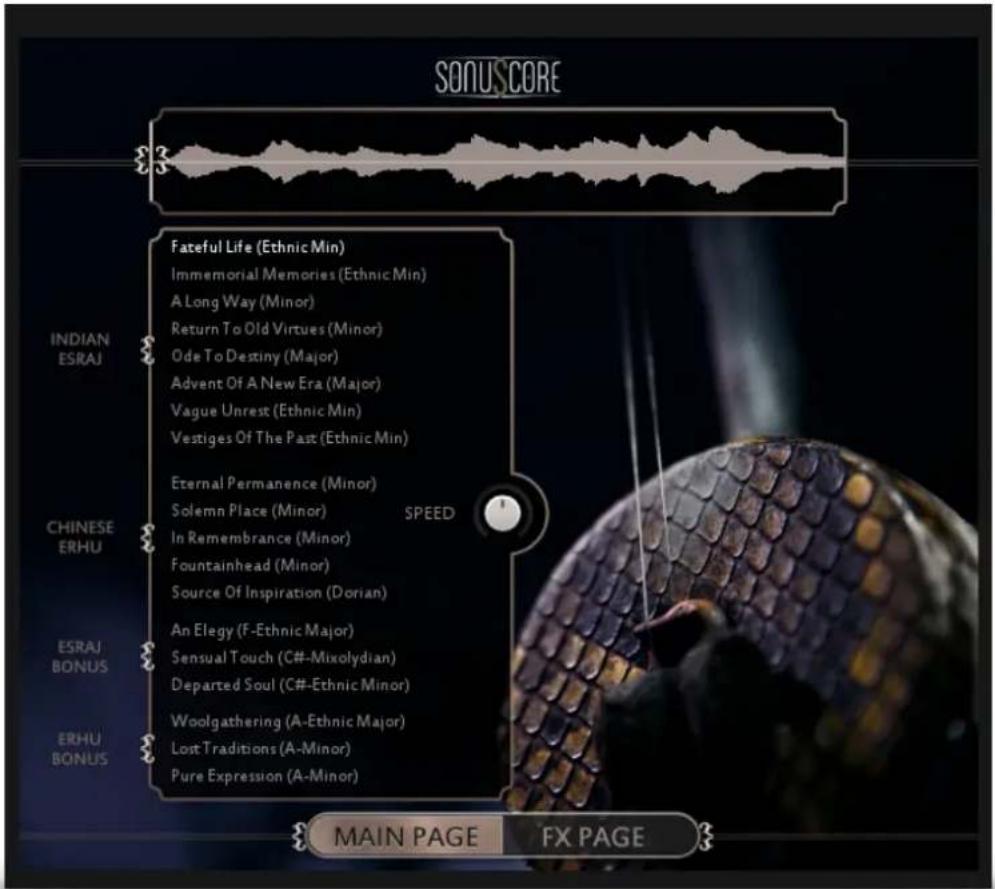
On the main page you can select a theme and access all the basic functions you need to get started.
SONUSCORE
3.1 THEME SELECTION BAR

On the left side of the main page are nineteen themes that you can choose from Simply click on the button on the left side of each title to activate a theme. Whenever you load a new theme, the corresponding keyswitch appears on the keyboard (starting at C5). The last loaded theme is automatically the currently chosen theme and its keyswitch is triggered. When unloading a theme, the connected keyswitch disappears and the first active theme keyswitch from C5 upwards is triggered.
3.2 PHRASE SYSTEM
Each theme consists of five complete phrases. You can play the opening, middle and endings of each phrase and combine them freely to create new phrases.
As an addition we created short ending notes that will take you back to the root at any time.
3.3 KEYSWITCHES
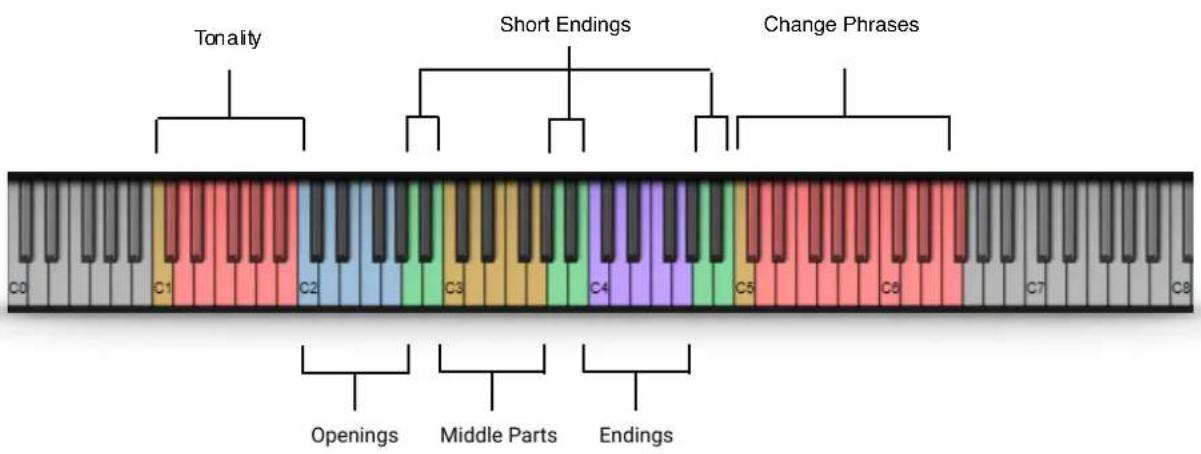
You can use the highlighted keys to play the phrases and combine them freely.
SONUSCORE
3.4 PHRASE PROGRESS BAR / SAMPLE START OFFSET

The Phrase Progress Bar shows the waveform of the current phrase and the playback position the phrase is in.
You can drag the little sample start icon on the left to a different starting position within the phrase. That can be very interesting as some of the phrases are very long.

Use "Alt-Click" to reset the sample start offset in all phrases of the selected theme. "Alt-Shift-Click" will reset the offset in all phrases of all themes.
3.5 PAGE SELECTION

On the bottom of the GUI you can find the Main and FX page buttons. Use those to navigate between the two pages.
3.6 PLAYBACK SPEED

The speed knob allows you to change the playback speed of the phrases. It goes from a minimum of 75% up to 125% of the original speed.
SONUSCORE
3.7 FX PAGE

On the FX page you can access the advanced functions of the EQ, DELAY and REVERB settings.
SONUSCORE
3.7.1 EQ

EQ ON/OFF: Toggles the equalizer on and off.
LOW: Adjusts the gain of the low frequency band of the equalizer.
LOW/MID: Adjusts the gain of the low-mid frequency band of the equalizer.
HIGH/MID: Adjusts the gain of the high-mid frequency band of the equalizer.
HIGH: Adjusts the gain of the high frequency band of the equalizer.
3.7.2 DELAY

DELAY ON/OFF: Toggles the equalizer on and off.
UNIT: Selects the UNIT of the TIME parameter in note values.
TIME: Selects the TIME after which the delayed signal will repeat. The selected
TIME will be multiplied with the chosen unit. 2 (TIME) x 1/8 (UNIT) => The delayed signal will occur on every second eighth note
FEEDBACK: Adjusts the FEEDBACK amount of the DELAY effect. Basically this parameter controls how many times a note will be audible via the DELAY.
MIX: Adjusts the MIX level of the DELAY effect.
3.7.3 REVERB

REVERB ON/OFF: Toggles the REVERB on and off.
IR MENU: Choose one of five impulse responses.
PREDELAY: Adjusts the PREDELAY of the REVERB effect in ms. This parameter is helpful for simulating distance.
MIX: Adjusts the MIX level of the REVERB.
SONUSCORE
- LEGATO AND SUSTAIN INSTRUMENTS

When opening the „Erhu Legato“ or „Esraj Sustain“ you have all the controls you need right there in the GUI.
4.1 FX
4.1.1 EQ

EQ ON/OFF: Toggles the equalizer on and off.
LOW: Adjusts the gain of the low frequency band of the equalizer.
LMF: Adjusts the gain of the low-mid frequency band of the equalizer.
HMF: Adjusts the gain of the high-mid frequency band of the equalizer.
HIGH: Adjusts the gain of the high frequency band of the equalizer.
SONUSCORE
4.1.2 DELAY

DELAY ON/OFF: Toggles the equalizer on and off.
UNIT: Selects the UNIT of the TIME parameter in note values.
TIME: Selects the TIME after which the delayed signal will repeat. The selected
TIME will be multiplied with the chosen unit. 2 (TIME) x 1/8 (UNIT) => The delayed signal will occur on every second eighth note
FEEDBACK: Adjusts the FEEDBACK amount of the DELAY effect. Basically this parameter controls how many times a note will be audible via the DELAY.
MIX: Adjusts the MIX level of the DELAY effect.
4.1.3 REVERB

REVERB ON/OFF: Toggles the REVERB on and off.
IR MENU: Choose one of four impulse responses. You can select two large and two small halls.
PREDELAY: Adjusts the PREDELAY of the REVERB effect in ms. This parameter is helpful for simulating distance.
MIX: Adjusts the MIX level of the REVERB.
SONUSCORE
5. CREDITS
Product Concept and Design: SONUSCORE: Tilman Sillescu, Pierre Langer, Christian Wirtz, Stefan Kemler, Matthias Wolf
Project Lead: Christian Wirtz
Erhu performed by: Fuyi Yang
Esraj performed by: Elena Kubicková
Recording: Yuan Zhang, Christian Wirtz
HALion Scripting: Jonas Meyer, Stefan Kemler
Sample Editing: André Molkenthin, Matthias Meeh, Christian Wirtz
Mix: Christian Wirtz
User Interface Design: Jannic Böhme, Felix Möbius, Stefan Kemler
Artwork: Felix Möbius
Videos: Felix Möbius
Marketing: Andreas Hammann, Benedikt Huster, Florian Tauchert, Felix Möbius
Additional Content: Matthias Wolf, Tilman Sillescu, Steffen Brinkmann, Christian Wirtz, Simon Schrenk, Andreas Hammann, André Molkenthin, Matthias Meeh
Recorded at „The Recording Studio of China Record (Shanghai) Co., Ltd.“ &
„TomTom Studio“ in Budapest, Hungary.
- SONUSCORE
- TABLE OF CONTENTS
- INTRODUCTION
- DOWNLOAD & INSTALLATION
- PLEASE FOLLOW THESE STEPS TO SET UP THE LIBRARY
- DOWNLOAD
- REGISTRATION
- 3.1 THEME SELECTION BAR
- 3.2 PHRASE SYSTEM
- 3.3 KEYSWITCHES
- 3.4 PHRASE PROGRESS BAR / SAMPLE START OFFSET
- 3.5 PAGE SELECTION
- 3.6 PLAYBACK SPEED
- 3.7.1 EQ
- 3.7.2 DELAY
- 3.7.3 REVERB
- 4.1 FX
- 4.1.2 DELAY
- 4.1.3 REVERB
- CREDITS
Brand : STEINBERG
Model : Esraj & Erhu Ethnic String Phrases
Category : Bibliothèque d'échantillons