
WLD1 - Humidifier Wood's - Free user manual and instructions
Find the device manual for free WLD1 Wood's in PDF.


| Product Type | Dehumidifier (Laundry Drying) |
| Brand | Wood's |
| Model | WLD1 |
| Dimensions (L x W x H) | 403 × 664 × 650 mm |
| Weight | 43 kg |
| Power Supply | 220–240 V, 50 Hz, 10 A |
| Power Consumption (at 20°C, 70% RH) | 500 W |
| Energy Consumption (at 20°C, 70% RH) | 14.5 kWh/24h |
| Dehumidifying Capacity (20°C, 70% RH) | 32 L/24h |
| Dehumidifying Capacity (30°C, 80% RH) | 48 L/24h |
| Airflow | 500–800 m³/h |
| Working Area | >10 m² |
| Refrigerant | R290 (Propane), 200 g charge |
| IP Code | IPX1 |
| Operating Temperature Range | 2°C to 35°C |
| Humidity Setting Range | 35–75% RH (in 1% steps) |
| Fan Speed Settings | 40%, 60%, 80%, 100% (Normal and Normal+Fan modes) |
| Operating Modes | Normal, Normal+Fan, Extra Dry |
| Special Features | Automatic defrost down to 2°C, automatic restart with memory function, adjustable air outlet, wall-mountable |
| Filtration | Efficient air filter with cleanable prefilter; SMF filter change required annually |
| Warranty | 2 years standard, extendable to 6 years with registration and annual SMF filter change |
| Maintenance | Clean external parts with damp soft cloth and neutral detergent; do not use solvents or abrasive cleaners |
| Safety | Contains flammable refrigerant R290; do not pierce or burn; keep ventilation clear; installation in room >10 m² |
| Accessories Included | Garden hose nozzle, wall mounting bracket, control panel cover |
Frequently Asked Questions - WLD1 Wood's
User questions about WLD1 Wood's
0 question about this device. Answer the ones you know or ask your own.
Ask a new question about this device
Download the instructions for your Humidifier in PDF format for free! Find your manual WLD1 - Wood's and take your electronic device back in hand. On this page are published all the documents necessary for the use of your device. WLD1 by Wood's.
USER MANUAL WLD1 Wood's


Safety Instructions
FLAMMABLE MATERIAL.
This appliance contains R290/Propane, a flammable refrigerant.

Refer to the operator's manual.

Read the technical manual.

Read the operator's manual.
SAFETY INFORMATION
Before installing and using the appliance, carefully read the supplied instructions. The manufacturer is not responsible if incorrect installation and use cause injuries and damages. Always keep the instructions with the appliance for future reference.
CHILDREN AND VULNERABLE PEOPLE
This appliance is intended for use in household and similar applications such as staff kitchen areas in shops, offices and other working environments; farm houses; by clients in hotels, motels and other residential type environments; bed and breakfast type environments; and for use in catering and similar non-retail applications. It is not intended for use by persons (including children) with reduced physical, sensory or mental capabilities, or lack of experience and knowledge, unless they have been given supervision or instruction concerning use of the appliance by a person responsible for their safety. Children should be supervised to ensure that they do not play with the appliance. Keep ventilation openings clear of obstruction.
Other than those recommended by the manufacturer, do not use mechanical devices or other means to accelerate the defrosting process. The appliance shall not be stored in a room where ignition sources are operating continuously (open flames, working gas appliance, operation electric heater, etc.). Do not pierce or burn. Be aware that refrigerants may not have an odour. Do not use water spray and steam to clean the appliance. Clean the appliance with a moist, soft cloth. Only use neutral detergents. Do not use abrasive products, abrasive cleaning pads, solvents or metal objects. If the power cord is damaged, it must be replaced by the manufacturer, its authorized Service Centre or similarly qualified persons to avoid a hazard.
SAFETY INSTRUCTIONS
WARNING
Only a qualified person can install this appliance.
Remove all packaging material. Do not install or use a damaged appliance. The appliance shall be installed, operated and stored in a room with a floor area larger than 10 m². Strictly follow the installation instructions.
a qualified electrician. Means for disconnection must be incorporated in the fixed wiring in accordance with the wiring rules.
Contact the authorized Service Centre or an electrician to change the electrical components. Connect the plug to the power source only at the end of the installation. Make sure that there is access to the plug after the installation. Do not pull the power cable to disconnect the appliance. Always unplug the power cable from the plug only.
USE
WARNING
Risk of injury, burns, electrical shock or fire.
Do not change the specification of this appliance. Be careful not to cause damage to the refrigerant circuit which contains propane (R290), a highly flammable gas. If damage occurs to the refrigerant circuit, make sure that there are no flames and sources of ignition in the room. Ventilate the room. Do not put flammable products or wet items with flammable products near or on the appliance.
DISPOSAL
WARNING
Risk of injury.
Operating Instructions
GB
WOOD'S DEHUMIDIFIER WLD1
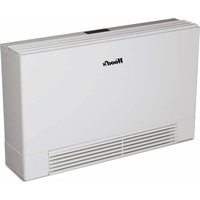
The Wood's WLD1 is a powerful and sturdy dehumidifier intended to be used for drying laundry in drying rooms and similar environments.
Features:
• Automatic defrost for use in lower temperatures, down to 2°C. • Adjustable controls to direct the air out. • Automatic restart with memory function after a power cut. • Easy to use controls. • Efficient air filters. • The prefilter can easily be cleaned.
PRODUCT OVERVIEW
See pages 2–3 for image product overview.

DEHUMIDIFIER WLD1
- Garden hose nozzle
- Control panel cover
- Wall mounting bracket

BACK SIDE WLD1
- Main switch
- Hose connection

AIR FILTER - PREFILTER
can be controlled by an external timer.
All models are equipped with a mains switch on the back of the product, refer image "B".
FUNCTION KEYS AND OPERATING MODES (REFER IMAGE "F")
- Fan speed: The fan speed in "Normal" and "Normal + Fan" modes may be set to 40%, 60%, 80% or 100% of maximum speed. Switching between the speeds takes place with a few seconds' delay. In "Extra dry" mode, the fan speed can't be changed.
- Setting the desired humidity: Only active in program modes "Normal" and "Normal + Fan". A desired humidity can be set between 35-75% in steps of 1 percentage point. The set value is first displayed fixed and then flashing before the actual value reappears.
- Mode selection: Selection of the operating program; refer to points 4-6.
- Normal mode: Used to set the target value for humidity and fan speed manually. When the set target value is reached, the compressor and fan shut off and restarts if the humidity rises above the target value.
automatically when the ambient temperature rises above 2°C.
The symbol is lit as long as the temperature is 2°C or lower.
- Too high ambient temperature: If the ambient temperature exceeds 35°C, the dehumidification process shuts off and resumes automatically when the ambient temperature falls below 35°C. The symbol is lit as long as the temperature is 35°C or higher.
- Room temperature: Displays the detected ambient temperature.
- Fan speed: Shows the fan speed in 4 steps. 1 bar is 40% speed, 2 bars 60%, 3 bars 80% and 4 bars are maximum speed.
INSTALLATION AND WALL MOUNTING (REFER IMAGE "G")
- If the dehumidifier is transported, leave it standing for 4 hours before use. It is very important for the oil to flow back into the compressor, as the dehumidifier otherwise may take severe damage.
- The dehumidifier must always be secured to the wall. Make sure the wall that the dehumidifier is being fixed to is strong enough to support its weight. • The dehumidifier should not be placed near radiators or other
Operating Instructions
CONTROL PANEL COVER (REFER IMAGE "E")
The dehumidifier is supplied with a display cover, so the settings cannot be changed. To mount the cover:
- Open the door.
- Loosen the screws of the display cover (2 pcs).
- Remove the display cover.
- Reassembly is in reverse order.
THE HYGROSTAT
The dehumidifier will only run when the ambient humidity exceeds the set value, except when using "Extra dry" mode. When the set humidity is reached, the operation will automatically shut off and will resume in the same manner when the humidity rises.
MEMORY FUNCTION AND AUTOMATIC RESTART AFTER POWER FAILURE
In the event of a power failure, the unit will automatically restart when the power returns and continues to operate according to your latest settings.
AUTOMATIC DEFROST
The unit will defrost automatically when needed. When the unit is in defrost mode, the compressor shuts off, showing a symbol on the display.
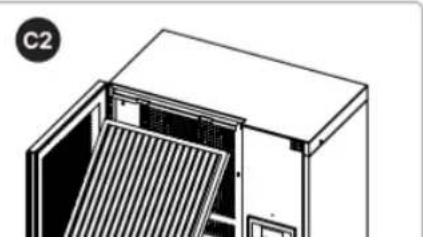
At least one SMF filter change per year, refer to image "C2". To follow the warranty program, register your dehumidifier at warranty-woods.com
CLEANING AND MAINTENANCE
WARNING! Before performing any maintenance work on the drying room dehumidifier, the machine must be disconnected from the electrical supply. This is done by turning off the main (operation) switch. All maintenance on the electrical system must be performed by qualified electricians. All maintenance on the cooling system must be performed by qualified cooling technicians.
Use a soft, moist cloth to clean the external parts of the units. Avoid using solvents or strong cleaners, as this might damage the surface of the dehumidifier. It is important to check the air filters regularly and clean or replace them when needed.
RESETTING OF OVER PRESSURE PROTECTION
If the dehumidification process stops working, it may be due to the overpressure protection being triggered. It is located behind the front cover and is reset as follows:
- Turn off power by removing the plug from the wall socket, or by turning off the main (operation) switch.
- Look for the cause of the protection being tripped and address the fault.
IF THE DEHUMIDIFIER REQUIRES SERVICE
If the dehumidifier requires servicing, firstly contact the retailer. For all warranty claims, proof of purchase is required.
GUARANTEES
Two years guarantee against faults in manufacturing. Please note that the guarantee is only valid upon a purchase receipt's presentation.
REGISTER THE PRODUCT FOR EXTENDED WARRANTY
Standard 2 years can be extended to 6 years if you register the product at warranty-woods.com and change the SMF filter at least once a year.
SAVE YOUR RECEIPTS!
Receipts will be required for any warranty claim during the period.
Operating Instructions
GB
| TECHNICAL DATA | WLD1 |
| Working Area | >10 m2 |
| Airflow | 500-800 m3/h |
| Dehumidifying at 20°C and 70% r.h. | 32 L/24h |
| Dehumidifying at 30°C and 80% r.h. | 48 L/24h |
| Power at 20°C and 70% r.h. | 500 W |
| Energy consumption at 20°C and 70% r.h. | 14,5 kWh/24 h |
| Refrigerant | R290 |
| Charge | 200 g |
| Voltage | 220~240V |
| Frequency | 50 Hz |
| Fuse | 10A |
| IP Code | IPX1 |
| Dimensions in mm (L x W x H) | 403 × 664 × 650 |
| Weight | 43 kg |
| Technical changes and improvements may occur. All values are approximate and may vary depending on external circumstances such as temperature, ventilation and humidity. | |

| PROBLEM | REMEDY |
| The dehumidifier does not start | • Ensure that the dehumidifier is connected to the power socket and that the fuse has not blown.• Ensure that the main switch on the back of the product is ON• Check that the actual humidity value exceeds the set value.• Check that the temperature is above 2°C or below 35°C. |
Safety Instructions
FLAMMABLE SUBSTANCE.
Register and find the latest updated user manual, usage advice, updated brochures, troubleshooting, and service information at woods.se
CUSTOMER CARE AND SERVICE
Always use original spare parts. When contacting our authorized service centre, ensure that you have the following data available: Model number, receipt, and serial number.


- SAFETY INSTRUCTIONS
- SAFETY INFORMATION
- CHILDREN AND VULNERABLE PEOPLE
- WARNING
- USE
- DISPOSAL
- OPERATING INSTRUCTIONS
- WOOD'S DEHUMIDIFIER WLD
- FEATURES
- PRODUCT OVERVIEW
- DEHUMIDIFIER WLD
- BACK SIDE WLD
- AIR FILTER - PREFILTER
- FUNCTION KEYS AND OPERATING MODES (REFER IMAGE "F")
- INSTALLATION AND WALL MOUNTING (REFER IMAGE "G")
- CONTROL PANEL COVER (REFER IMAGE "E")
- THE HYGROSTAT
- MEMORY FUNCTION AND AUTOMATIC RESTART AFTER POWER FAILURE
- AUTOMATIC DEFROST
- CLEANING AND MAINTENANCE
- RESETTING OF OVER PRESSURE PROTECTION
- IF THE DEHUMIDIFIER REQUIRES SERVICE
- GUARANTEES
- REGISTER THE PRODUCT FOR EXTENDED WARRANTY
- SAVE YOUR RECEIPTS
- CUSTOMER CARE AND SERVICE
Brand : Wood's
Model : WLD1
Category : Humidifier