
SG7520 - Security Camera Lorex - Free user manual and instructions
Find the device manual for free SG7520 Lorex in PDF.


| Product Type | Security Camera |
| Brand | Lorex |
| Model | SG7520 |
| Resolution | 1080p (1920 x 1080) Full HD |
| Night Vision | Up to 100 ft (30 m) with IR LEDs |
| Field of View | 90° wide angle |
| Weatherproof Rating | IP66 (suitable for outdoor use) |
| Power Supply | DC 12V / PoE (Power over Ethernet) |
| Dimensions (W x H x D) | 2.8 x 2.4 x 6.1 in (70 x 60 x 155 mm) |
| Weight | Approx. 10.6 oz (300 g) |
| Mounting Type | Wall or ceiling mount (bracket included) |
| Video Compression | H.264 / H.265 |
| Motion Detection | Yes, with customizable zones |
| Audio | Built-in microphone (two-way audio capable) |
| Storage | Compatible with Lorex NVR or microSD card (up to 128 GB) |
| Connection | Ethernet (RJ-45) for PoE or Wi-Fi (optional) |
| Operating Temperature | -4°F to 122°F (-20°C to 50°C) |
| Removable Parts | Mounting bracket, screws, and power adapter |
| Maintenance | Clean lens with a soft, dry cloth |
| Security Features | Password protection, encrypted video transmission |
Frequently Asked Questions - SG7520 Lorex
User questions about SG7520 Lorex
0 question about this device. Answer the ones you know or ask your own.
Ask a new question about this device
Download the instructions for your Security Camera in PDF format for free! Find your manual SG7520 - Lorex and take your electronic device back in hand. On this page are published all the documents necessary for the use of your device. SG7520 by Lorex.
USER MANUAL SG7520 Lorex
- Camera Specifications
| Image Device 1/4" Interline CCD | |
| Effective Pixels NTSC:512Hx492V(252K)PAL:512Hx582V(298K) | |
| Scanning System | 2:1 interlaceNTSC: 525 LinesPAL: 625 Lines |
| Resolution | Horizontal 420 TV lines |
| Shutter Speed | NTSC: 1/60 ~ 1/100,000PAL: 1/50 ~ 1/100,000 |
| S/N Ratio | More than 48dB (AGC off) |
| Sync. System | Internal |
| Min. Illumination | 0.1 LUX @F1.2 (no LED)0 LUX (with LED) |
| White Balance | AWB |
| Video Output | 1.0 Vp-p (75 ohms) |
| Lens | Fixed Lens (3.6mm) |
| Power Supply | DC 12V ± 10% |
| Power Consumption | 100mA (LED OFF)160mA (LED ON) |
| Operating Temp | 14°F ~ 122°F(-10° ~ 50°C) |
| Operating Humidity | 90% HM Max. |
Dimensions:

It's all on the web
Product Information Specification Sheets
User Manuals Software Upgrades
Quick Start Guides Firmware Upgrades

VISIT
www.lorexcctv.com
LOREX Technology Inc.
Copyright © 2007 LOREX Technology Inc. As our products are subject to continuous improvement,
LOREX and its subsidiaries reserve the right to modify product design, specifications and prices, without notice and without incurring any obligation. E&OE
HOME & BUSINESS SECURITY
COLOR DAY/NIGHT
CCD BULLET CAMERA
WITH AUDIO
Model: SG7520 Series
SG7520 (NTSC)
SG7520P (PAL),
Refer to Spec Sheet for specific UPC
and Packaging Configurations.
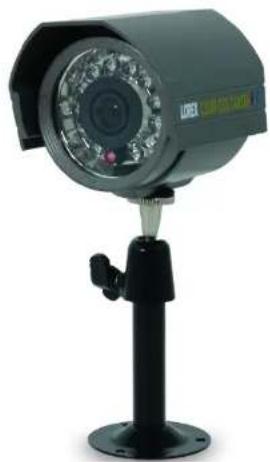
natural_image
Exterior view of a black surveillance camera mounted on a stand (no visible text or symbols)Quick Set-up Guide

LOREX®
1. Package Contents 2. Installing the Camera 3. Camera Diagram
1 x 1/4" CCD Color Day/Night Camera
1x Camera Stand
1 x 100' (30m) DIN Extension Cable
Features:
- 1/4" advanced CCD image sensor provides superior image quality.
- Excellent low light sensitivity with 12 infrared LED illuminators*.
• Professional Grade Weatherproof** camera.
• 100 ft. (30m) cable included.
• Color video by day, automatically switches to B&W at night.
* Night Vision Range up to 30ft. (10m) in ideal conditions. ** IP64, Not intended for direct exposure to rain, snow or water.
Note:
Test the cameras prior to selecting a permanent mounting location by temporarily connecting the Cameras and Cables to the Observation System or DVR.
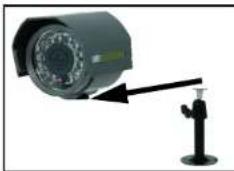
- Attach the camera to the supplied stand. Mount the camera stand to the desired mounting surface
natural_image
Camera surveillance camera mounted on a stand (no visible text or symbols)- Aim the camera. Remove the protective film from the lens.

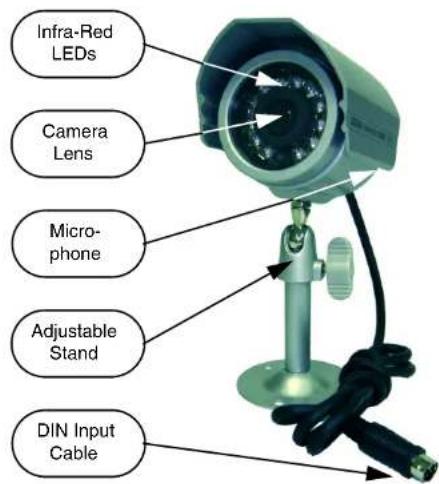
- Connect the 100ft Extension cable to the camera: Connect the other end of the 100ft Extension Cable to the Observation System or DVR.

natural_image
Wireless surveillance camera connected to a cable and a display unit (no visible text or symbols)NOTE: Confirm that the arrows on the DIN Extension cable are aligned with the Camera Cable and Observation system ports when connecting the cable. If the pins in the DIN Cable are bent, the Camera will NOT function

Cameras with 6 Pin DIN connections draw power from the Observation System or DVR.
Additional power adapters are not needed for these cameras.

System Connection Diagram:

Brand : Lorex
Model : SG7520
Category : Security Camera