
Punch P560 - Loudspeaker Rockford Fosgate - Free user manual and instructions
Find the device manual for free Punch P560 Rockford Fosgate in PDF.


| Product Type | Car Audio Speaker |
| Brand | Rockford Fosgate |
| Model | Punch P560 |
| Speaker Size | 6.5 inches |
| Impedance | 4 Ohms |
| Power Handling (RMS) | 60 Watts |
| Power Handling (Peak) | 120 Watts |
| Sensitivity | 88 dB |
| Frequency Response | 40 Hz - 22 kHz |
| Mounting Depth | 2.5 inches |
| Mounting Diameter | 5.75 inches |
| Voice Coil | 1 inch |
| Magnet Material | Ferrite |
| Cone Material | Polypropylene |
| Tweeter Type | Silk Dome |
| Woofer Surround | Rubber |
| Grille Included | No |
| Recommended Amplifier Power | 30-120 Watts RMS |
| Dimensions (Diameter x Depth) | 6.5 in x 2.5 in |
| Weight | 1.5 lbs |
| Care Instructions | Wipe with dry cloth; avoid moisture and solvents. |
| Safety Notes | Disconnect battery before installation; use proper mounting hardware. |
| Repairability | Consult authorized service center for repairs. |
Frequently Asked Questions - Punch P560 Rockford Fosgate
User questions about Punch P560 Rockford Fosgate
0 question about this device. Answer the ones you know or ask your own.
Ask a new question about this device
Download the instructions for your Loudspeaker in PDF format for free! Find your manual Punch P560 - Rockford Fosgate and take your electronic device back in hand. On this page are published all the documents necessary for the use of your device. Punch P560 by Rockford Fosgate.
USER MANUAL Punch P560 Rockford Fosgate
Quick Start Guide I P560
Product Overview


Control Console Overview
-
Input selection: Use this button to switch between your audio source.(Optical, Line in, PCin, AUX in, Bluetooth)
-
Effect: Use this button to switch between 2.1 output or 5.1 output.
-
Bass: Press this button to adjust bass channel; when the BASS LED is on, you can adjust bass volume by rotating the knob.
-
Power: Master power on/off
-
Mute: Mute the entire system
-
Volume / level adjustment knob: Adjust master volume
-
IR remote senso
-
Input selection indicator 9. Speaker output indicator
-
Speaker output indicator
-
Reading indicator LED will be seen
-
Decode indicator: LED will be on when
-
Sound effect indicator: Either 2.1
-
Sound effect indicator: Either 2.1 output mode or 5.1 output mode
-
Bass indicator: When LED is
-
Bass Inductor, When LED is on you can adjust bass level.
-
Headphone output
-
AUX input jack

Remote Control Overview
-
Input selection: Use this button to switch between your audio source. (Optical, Line in, PC in, AUX in, Bluetooth)
-
Effect: Use this button to switch between 2.1 output or 5.1 output.
-
Play: During Bluetooth connection, press this button to play or pause. Press and hold for 5 seconds to enter Bluetooth pairing mode.
-
Master volume: Up/Down
-
Mute the entire system
-
Master Power: On/Off


Quick Start Guide I P560
Turning The Power On/Off

natural_image
Diagram of a computer tower with an electrical outlet and connection point (no text or symbols)2

3

1. Connect the AC power cord to the wall socket
2. To turn the speaker on, press the POWER button on control console. Press once again to turn it off
You can also turn the speaker on/off by pressing the power button on the remote control
Using The Speaker With Your Devices

1. Choosing your source, press the INPUT button on control console to select input source

2. You can also select the input source by pressing the INPUT button on the remote control
Choosing Your Source
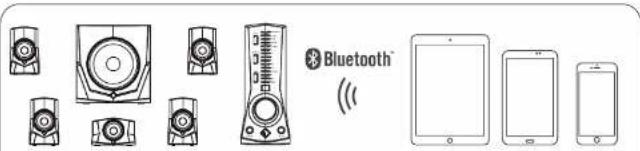
- Bluetooth Input Connection

- PC Sound Card Input Connection
- RCA Line In Input Connection
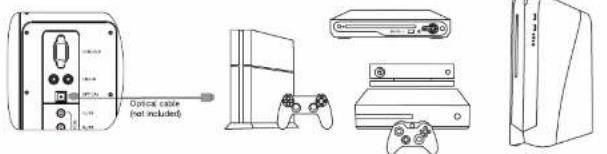
- Optical Input Connection

- Aux In Input Connection / Headphone Connection
Brand : Rockford Fosgate
Model : Punch P560
Category : Loudspeaker