
U65W-01 - Mobile Device Charger ASUS - Free user manual and instructions
Find the device manual for free U65W-01 ASUS in PDF.


| Product Type | AC Adapter / Power Charger |
| Brand | ASUS |
| Model | U65W-01 |
| Input Voltage | 13V⎓1.5A |
| Output Voltage & Current | 19V⎓3.42A (65W) |
| Number of Connector Tips | 3 interchangeable tips |
| Connector Tip Sizes | Black: ∅4.0 x 1.2mm; Blue: ∅4.5 x 0.6mm; White: ∅5.5 x 2.5mm |
| Power Cord Included | Yes |
| Usage Environment | Indoor use only |
| Safety Features | Overcurrent protection, short circuit protection |
| Compatible Devices | ASUS laptops and other devices with matching tip and voltage |
| Color | Black |
| Material | Plastic casing, copper connectors |
| LED Indicator | Not specified |
| Weight | Approx. 200 g |
| Dimensions | Approx. 100 x 45 x 30 mm |
| Warranty | Standard ASUS warranty |
Frequently Asked Questions - U65W-01 ASUS
User questions about U65W-01 ASUS
0 question about this device. Answer the ones you know or ask your own.
Ask a new question about this device
Download the instructions for your Mobile Device Charger in PDF format for free! Find your manual U65W-01 - ASUS and take your electronic device back in hand. On this page are published all the documents necessary for the use of your device. U65W-01 by ASUS.
USER MANUAL U65W-01 ASUS
| Item No. Name |
| 1 65N adaptor |
| 2 Power cord |
| 3 3 connector lios |
B
| Product name | FXC Adapter |
| Model name | 6W 01 |
| Input | 13V/1.5A |
| Output | 73.42A |
| Plug size | ∅4.0 x ∅1.2 x 0.8mm (Black)∅4.5 x ∅0.6 x 10mm (Blue)∅5.5 x ∅2.5 x 11mm (White) |
C

-
Connect the power cord to the adapter.
-
Choose the correct connector tip and connect it to the adapter cable and then plug it into the device. Refer to the table above for details of the connector tip type.
-
Plug the power plug to the socket.
NOTE: For indoor use only.
D
Connector Tips
-
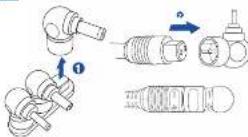
Pull up the connector tip upward from the holder. Avoid twisting the plug and holder to avoid damaging the connector pins.
-
Taking note of the marks "1" and "2", insert the adapter cable into the connector tip.
NOTE: Insert the connector tip firmly into the output plug.
m = 311
-
ПОДКУЛЯ КРОЭТКЕ
-
The following section is not possible to be obtained
ПРИМЕЧАНИЕ: Только
PH=PEK
2.17.12.13
D Наконечники
an on de adaptembet.
on be arousal Fandake
- Stop to stop the hot
sloccantar
TOMATO: 11
Description and information contained in the context of the time to date and time of the event.
m = 311
D Aansluitpunten
(五) 2017年1月1日
m = 311
The image is too blurry to recognize any text content.
어덕터 게이문을 거넥터
단에 집입하십시오.
한고,지네티티오
문리 풀러그이 놓가사
삼업하십시오.
(二)本次股东大会的召集和召开程序
[Non-Text]
[Non-Text]
[Non-Text]
[Non-Text]
[Non-Text]
[Non-Text]
[Non-Text]
[Non-Text]
[Non-Text]
[Non-Text]
[Non-Text]
[Non-Text]
[Non-Text]
[Non-Text]
(No text)
[Non-Text]
[Non-Text]
The Ground Truth image displays a single, solid horizontal line. According to Rule 2 (UNDERSCORE & LINE RULES), this is a stylistic or background line, not a placeholder underscore. Therefore, the OCR result must ignore it and output nothing or only meaningful text. The provided OCR content is "____", which consists of four underscores. This is an incorrect interpretation of the line as a placeholder, violating the rule that stylistic lines must be ignored. The OCR has hallucinated placeholder underscores where none should exist in the GT. Hence, the OCR result is inconsistent with the Ground Truth.
[Non-Text]
[Non-Text]
[Non-Text]
[Non-Text]
[Non-Text]
[Non-Text]
[Non-Text]
[Non-Text]
[Non-Text]
[Non-Text]
[Non-Text]
The Cloud product, a derivative
antiviral the virus, the case
radio radiotherapy, in which case the
2.1 100% be required to be available
REACH
Cannis reais (the FAU) (see https://doi.org/
Davator, autotomition and lamicting
2.5701648192481271815634.03
with the unseated solution in
varprodus a.75.25 PERCHN to a.
https://www.ess.com/longplan@863H.html
CAUTION: RIMI INVALEURANCE
in market price. This product is
been delivered to enable your own
o gabbardvocing to vinted
the course, what's in line
Joth, productised
Astron Sipper (1954)
[Unreadable]
www.163.com.cn
or dispositive electris
2013
ASUS Recycling/Takeback
Services
25.15
come from our commitment to the
standardized
We do not need to get
hear to respeciab, rep c a r
The Ground Truth image displays a single, solid horizontal line. According to Rule 2 (UNDERSCORE & LINE RULES), this is a stylistic or background line, not a placeholder underscore. Therefore, the OCR result must ignore it. The provided OCR content is "____", which consists of four underscores. This is an incorrect interpretation of the line as a placeholder, violating the rule that stylistic lines must be ignored. The OCR has hallucinated underscores where none should exist based on the GT's visual context. Hence, the OCR result is inconsistent with the Ground Truth.
Brand : ASUS
Model : U65W-01
Category : Mobile Device Charger