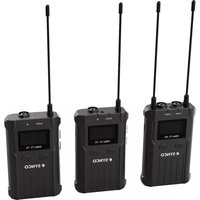
WMic-T3 - Microphone Synco - Free user manual and instructions
Find the device manual for free WMic-T3 Synco in PDF.


| Product Type | Wireless Lavalier Microphone System |
| Model | Synco WMic-T3 |
| Transmitter Dimensions | Approx. 60 x 25 x 15 mm |
| Receiver Dimensions | Approx. 70 x 30 x 20 mm |
| Transmitter Weight | Approx. 30 g |
| Receiver Weight | Approx. 40 g |
| Power Supply | Built-in rechargeable lithium-ion batteries |
| Charging Input | USB-C (5V/1A) |
| Battery Life | Up to 6 hours |
| Frequency Range | 2.4 GHz ISM band |
| Operating Range | Up to 50 meters (line of sight) |
| Microphone Polar Pattern | Omnidirectional |
| Frequency Response | 20 Hz – 20 kHz |
| Audio Output | 3.5 mm TRS jack (receiver) |
| Latency | < 8 ms |
| Charging Time | Approx. 2 hours |
| Display | LED status indicators |
| Materials | Plastic housing |
| Compatible Devices | Cameras, smartphones, audio recorders with 3.5mm input |
| Operating Temperature | 0°C to 40°C |
| Storage Temperature | -20°C to 60°C |
| Cleaning Instructions | Wipe with a soft, dry cloth |
| Safety Precautions | Do not expose to water or extreme heat |
| Spare Parts Availability | Contact Synco or authorized dealers |
| Repairability | Battery replacement possible; other repairs by professionals |
Frequently Asked Questions - WMic-T3 Synco
User questions about WMic-T3 Synco
0 question about this device. Answer the ones you know or ask your own.
Ask a new question about this device
Download the instructions for your Microphone in PDF format for free! Find your manual WMic-T3 - Synco and take your electronic device back in hand. On this page are published all the documents necessary for the use of your device. WMic-T3 by Synco.
USER MANUAL WMic-T3 Synco
Guangzhou Zhiying Technology Co., Ltd
Block 15th, No.200 Fangqun Avenue East, L'wan District, Guangzhou, China. 510000
support@syncoaudio.com
www.syncoaudio.com
https://www.facebook.com/syncomicrophones
WMic-T3 Microphone >>> User Manual
I thank you for choosing SYNCO WMic-T3,
Please read this manual carefully before use and follow all instructions mentioned herein.
Contents
Package List....1
● Main Features....2
● Notice for Using SYNCO WMic-T3 Microphone....3
Components and Instruction....4
① Transmitter and Receiver
② Function Button Instruction
③ Indicator Light Instruction
④ Screen Display
- Specifications....9
- Warranty....11
Package List
(Package includes the following items)

Transmitter (TX) x2
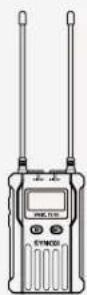
Receiver (RX) x1

3.5mm TRS Camera Cable x1

3.5mm-6.3mm Adapter x1
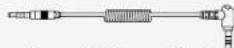
3.5mm TRRS Phone Cable x1

Cold Shoexl

Type C Charging Cable x3

Carry Bag x1
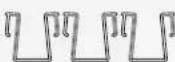
Belt Clip x3

Lavalier Mic x2

User Manual x1
1 www.syncoaudio.com www.syncoaudio.com 2
Main Features
● Total 100 channels for your choices
- 75Hz / 150Hz low-cut filter for noise reduction
- Suitable for different scenarios
- Reset function to restore the initial settings
- Mono / Stereo output
- 180m working distance in the line-of-sight area, 100m in obstacle area
● Dual channel receiver can work with two transmitters
● All metal housing for excellent shielding performance
Notice for Using SYNCO WMic-T3 Microphone
- The transmitters and receiver should keep a distance of more than 20cm with each other while using. Otherwise, the wireless signal receiving part of the receiver will perform a protective act on, turning off the wireless signal reception, and the audio may be interrupted. This is a normal phenomenon;
- When using auto IR sync, please keep the product within 30cm, otherwise the signal may be too weak and the sync will fail;
- In the case of stereo/mono mode switch, please preset the mode before using to avoid the transient interference caused by switching during usage;
- The antennas will affect the working distance. Please protect the antenna and avoid any man-made damage.
- When using this product in a short distance, it is recommended to set R-strength at 'LOW' to reduce the power consumption;
- Please keep this product in dry environment,
- Do not expose the device in rain or humid environment, otherwise there will be a danger of short circuit;
Components and Instruction
- Structure

Transmitter (TX)
① Antenna
② IR Frequency Matching
③ IR Indicator
④ Audio Indicator
⑤ LCD Screen
⑥ Power Button (MUTE)
⑦ MIC/LINE IN input
⑧ Type-C Port
⑨ Forced Shutdown
⑩ "SET" Menu Button
⑪ 1/4" Mounting Hole
⑫ Function Selection Button
⑬ Function Selection Button ▽
⑭ Bell Clip
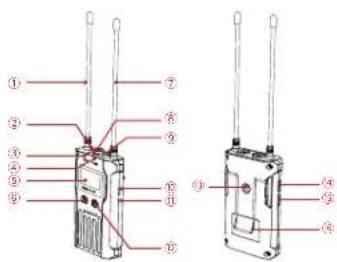
Receiver (RX) 2. Function Button Instruction
① Antenna
② IR Frequency Matching
③ Group A Working Status Indicator
④ Group B Working Status Indicator
⑤ LCD Screen
⑥ Power Button
⑦ Antenna
⑧ 3.5mm Audio Monitoring Socket
⑤ 3.5mm Audio Output Socket
⑩ Type C Port
⑪ Forced Shutdown
⑫ "SET" Menu Button
⑬ 1/4" Mounting Hole
⑭ Function Selection Button △
(15) Function Selection Button ∨
⑯ Bell Clip
| Transmitter /Receiver | SET Function Menu SET | Long Press | Enter the function adjustment menu |
| Short Press | 1. Confirm the selected function2. Exit the function adjustment menu | ||
| △ Button △ | Short Press | Function Adjustment (△) | |
| ▽ Button ▽ | Short Press | Function Adjustment (▽) |
- Indicator Light Instruction
| Transmitter | AUDIO | Green Light Keeps On Normal recording status | |
| Red Light Keeps On | Muting mode | ||
| IR | Red Light Flicker | IR matching | |
| Receiver | AIR/RF | Green Light Keeps On | Normal working status after the channel matches |
| B IR/RF | Green Light Flicker | Channel doesn't match | |
- Screen Display

Receiver

Specifications
Transmitter (TX) Receiver (RX)
| Channels | 100 |
| Group A Wireless Frequency | UI/F 512-537MHz |
| Group B Wireless Frequency | UI/F 564-589MHz |
| Antenna | 1/4 Wavelength Wire Antenna |
| Transmitting Power | 10mW/30mW |
| Stray Radiation | <-60dBc |
| Sound Delay | <20ms |
| Low-cut Filter | 75Hz/150Hz |
| Audio Output | Mono/Stereo |
| Screen | LCD Display |
| Audio Distortion | <0.5%@1KHz |
| Working Distance | 180m in line-of-sight area, about 100m in barrier area |
| Power | Type=C Charging≤3.5H, DC5V@≥1000mA |
| Battery | Built-in Li-ion Battery, 3.7V@1800mA/H |
| Working Time | 10 Hours |
| Material | Aluminum Alloy |
| Compatibility | For Camera/Camcorder/Smartphone |
| Dimension | 94×58×20.3mm |
| Operating Temperature | 0°C~50°C |
| Storage Temperature | 20°C~60°C |
| Channels | 100 |
| Group A Wireless Frequency | UHT 512~537MHz |
| Group B Wireless Frequency | UHT 564~589MHz |
| Signal / Noise | ≥85dB |
| Sensitivity | -95dBm |
| Antenna | 1/4 Wavelength Wire Antenna |
| Sound Delay | <20ms |
| Headphone Output Power | 100mW@320 |
| Audio Output | Mono/Stereo |
| Volume | 0-15 Level |
| Screen | LCD Display |
| Audio Distortion | <0.5%@1kHz |
| Working Distance | 180m in line-of-sight area, about 100m in barrier area |
| Power | Type-C Charging≤3.5H, DESV@≥1000mA |
| Battery | Built-in Li-ion Battery, 3.7V@1800mA/II |
| Working Time | 10 Hours |
| Material | Aluminum Alloy |
| Compatibility | For Camera/Cam corder/Smartphone |
| Dimension | 94×58×20.3mm |
| Operating Temperature | 0°C~50°C |
| Storage Temperature | -20°C~60°C |
WARRANTY
Warranty Period
Thank you for purchasing SYNCO products.
-
Customers are entitled to free replacement or repair service in case of quality defect(s) found in the product under normal use within 30 days upon receipt of the product.
-
Original SYNCO products are entitled to 12-month limited warranty service. The warranty period begins on the date of purchase of brand new, unused products by the first end user.
Within the warranty period, if product defect or failure is attributable to material defection or technological problem, the defective product or defective part will be repaired or replaced without charge (service and materials fee).
Warranty Exclusions and Limitations
● Faults resulted from inappropriate use of a product without following its operation specification
• Artificial damage, e.g. crash, squeeze, scratch, or soaking
- Modifications to a product by its user or a third party without prior written consent of SYNCO, e.g. replacement of element or circuit, label alteration
- The code on product is inconsistent with that of warranty certificate, or the code on the product or warranty certificate is altered or torn off
- All consumable accessory attached to a product, like cable, wind muff, battery
● Faults as a result of force majeure, such as fire, flood, lightning, etc.
Warranty Claim Procedure
- If failure or any problem occurs to your product after purchase, please contact a local agent for assistance, or you can always contact SYNCO's customer service through email at support@syncoaudio.com.
- Please retain your sales receipt and warranty certificate as proof of purchase. If any of these documents is missing, only sales return or chargeable service will be provided.
- If the SYNCO product is out of the warranty coverage, the service and the parts cost will be charged.
| WARRANTY CERTIFICATE | |||
| Please register your warranty. Meanwhile, you are welcomed to contact us via Email: support@syncoaudio.com | |||
| USER INFORMATION | Customer Name: | ||
| Phone Number: | |||
| Email: | |||
| Address: | |||
| SALES INFORMATION | Sales Date: | ||
| Model: | |||
| Product Code: | |||
| Dealer: | |||
| REPAIR RECORD | Service Date: | ||
| Technician: | |||
| Issue: | |||
| RESULT | Solved | Unsolved | Returned(Replaced) |
- GUANGZHOU ZHIYING TECHNOLOGY CO., LTD
- CONTENTS
- PACKAGE LIST
- (PACKAGE INCLUDES THE FOLLOWING ITEMS)
- MAIN FEATURES
- NOTICE FOR USING SYNCO WMIC-T3 MICROPHONE
- COMPONENTS AND INSTRUCTION
- TRANSMITTER (TX)
- RECEIVER (RX) 2. FUNCTION BUTTON INSTRUCTION
- WARRANTY
- WARRANTY PERIOD
- WARRANTY EXCLUSIONS AND LIMITATIONS
- WARRANTY CLAIM PROCEDURE
Brand : Synco
Model : WMic-T3
Category : Microphone