
40E320BF - Television TESLA - Free user manual and instructions
Find the device manual for free 40E320BF TESLA in PDF.


| Product Type | LED Television |
| Brand | TESLA |
| Model | 40E320BF |
| Screen Size | 40 inches (101.6 cm) |
| Power Consumption | 90 W |
| Power Supply | AC mains, class II double insulated |
| Standby Power | Not specified |
| Remote Control | Infrared, 2 x AAA batteries (included) |
| Audio Technology | Dolby Audio |
| Connectivity | HDMI, RF, USB (0.5A), CI slot (if present) |
| Wall Mount Screw Size | M6 (for 40" model) |
| Operating Temperature | Up to 45°C |
| Maximum Altitude | 2000 m |
| Accessories Included | User manual, remote control, power cord, AAA batteries (x2), stand |
| Safety Features | Ventilation, no heat sources, polarized plug, child safety warnings |
| Cleaning Instructions | Use only a dry cloth |
| Recommended Screwdriver | PH2 for stand installation |
Frequently Asked Questions - 40E320BF TESLA
User questions about 40E320BF TESLA
0 question about this device. Answer the ones you know or ask your own.
Ask a new question about this device
Download the instructions for your Television in PDF format for free! Find your manual 40E320BF - TESLA and take your electronic device back in hand. On this page are published all the documents necessary for the use of your device. 40E320BF by TESLA.
USER MANUAL 40E320BF TESLA
Please read these instructions before operating your set and retain them for future reference.
UPUTSTVO ZA UPOTREBU
Prije upotrebe uređaja pročitati ova uputstva i zadržati ih radi kasnijih referenci.
Manufactured under license from Dolby Laboratories. Dolby, Dolby Audio, and the double-D symbol are trademarks of Dolby Laboratories Licensing Corporation.
HDMI®
HIGH-DEFINITION MULTIMEDIA INTERFACE
The terms HDMI and HDMI High-Definition Multimedia Interface, and the HDMI logo are trademarks or registered trademarks of HDMI Licensing LLC in the United States and other countries.
SAFETY INFORMATION

The exclamation point within an equilateral triangle is intended to alert the user to the presence of important operating in the literature accompanying the appliance.

Warning
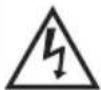
The lightning flash with arrowhead symbol within an equilateral triangle, is intended to alert the user to the presence of uninsulated dangerous voltage within the products enclosure that may be of sufficient magnitude to constitute a risk of electric shock to persons.
CAUTION
RISK OF ELECTRIC SHOCK DO NOT OPEN
High voltages are used in the operation of this product to reduce the risk of electric shock, do not remove cover of the cabinet, refer servicing to qualified service personal.
If the TV any changes or coarse adjustment, electric shocks to be hurt, do not attempt to open a machine-maintenance, customer contact centres needed overhaul.
IMPORTANT SAFETY PRECAUTIONS
-
Read these instructions. 2. Keep these instructions. 3. Heed all warnings. 4. Follow all instructions. 5. Do not use this apparatus near water. 6. Clean only with dry cloth.
-
Do not block any ventilation openings. Install in accordance with the manufacturer's instructions.
-
Do not install near any heat sources such as radiators, heat registers, stoves, or other apparatus (including amplifiers) that produce heat.
-
Do not defeat the safety purpose of the polarized or grounding-type plug. A polarized plug as two blades with one wider than the other. A grounding type plug has two blades and a third grounding prong. The wide blade or the third prong are provided for your safety, If the provided plug does not fit into your outlet, consult an electrician for replacement of the obsolete outlet.
-
Protect the power cord from being walked on or pinched particularly at Plugs, convenience receptacles, and the point where they exit from the apparatus.
-
Only use attachments /accessories specified by the manufacturer.
-
Use only with the cart, stand, tripod, bracket, or table specified by the manufacturer, or sold with the apparatus. When a cart or rack is used, use caution when moving the cart/apparatus combination to avoid injury from tip-over.
-
Unplug this apparatus during lightning storms or when unused for long periods of time. Caution:
-
To reduce the risk of fire or electric shock, do not expose this apparatus to rain or moisture.
-
The mains plug is used as disconnect device, the disconnect device shall remain readily operable.
-
The socket-out shall be installed near the equipment and shall be easily accessible.
-
This product should never be placed in a built-in installation such as a bookcase or rack unless proper ventilation is provided or the manufactures instructions have been adhered to.
-
The apparatus shall not be exposed to dripping or splashing and that no objects filled with liquid, such as vases, shall be placed on the apparatus.
-
Do not place any sources of danger on the apparatus (e.g. liquid filled objects, lighted candles).
-
Wall or Ceiling Mounting - The appliance should be mounted to a wall or ceiling only as recommended by the manufacturer.
-
Never place the TV, remote control or batteries near naked flames or other heat sources, including direct sunlight. To prevent the spread of fire, keep candles or other flames away from the TV, remote control and batteries at all times.
-
The USB terminal should be loaded with 0.5 A under normal operation. These servicing instructions are for use by qualified service personnel only. To reduce the risk of electric shock do not perform any servicing other than that contained in the operating instructions, unless you are qualified to do so.
-
The battery shall not be exposed to excessive heat such as sunshine, fire or the like.
-
This equipment is a Class II or double insulated electrical appliance. It has been designed in such a way that it does not require a safety connection to electrical earth
-
The maximum using environment temperature is 45 degrees. The Maximum using altitude is 2000 meters

1
natural_image
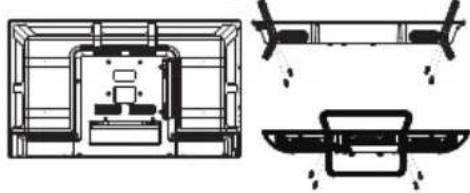
Technical line drawing of a mechanical assembly with internal components and two views (no text or symbols)Insert the stand into the bottom of the LED TV body and tighten the screws.
2

natural_image
Technical line drawing of a mechanical or electrical component with no visible text, numbers, or symbols.Insert the aerial cable into the RF socket.
3
natural_image
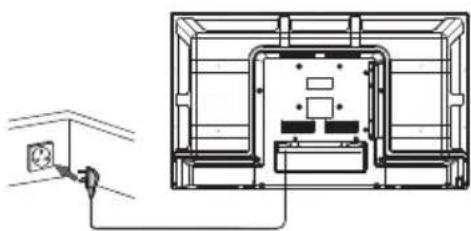
Architectural floor plan showing wall-mounted electrical outlet and electrical wiring (no text or labels)Connect the power cord into a suitable wall socket and switch on.
4
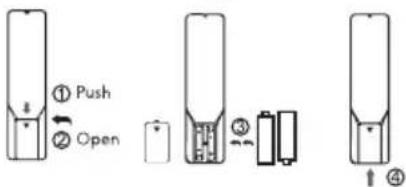
- Open the battery compartment cover on the back side.
- Insert two 1.5V batteries of AAA type with correct polarity.
- Close the battery compartment cover on the back side.
TV Buttons And Terminal Interface
TV Buttons


Display/Hide Key Icon: When there is no button icon popping up, press the key, they key icon will pop up like the picture shows above, the key icon will automatically turn off after 5 seconds of inactivity.
Icon selection: Short pres the button, move the loop to the right, select the icon. Icon function selection: Long press the key to achieve the fuction of the selected icon.
Icon Description:
: Power off Icon: Corresponding to the "POWER 'bottom of remote."
: Menu Icon: Corresponding to the "MENU" button of remote.
: Source Icon: Corresponding to the "SOURCE" button of remote.
: CH+ Icon: Corresponding to the "CH+" button of remote.
: CH- Icon: Corresponding to the "CH-" button of remote.
: Volume+ Icon: Corresponding to the "Volume+" button of remote.
Volume- Icon: Corresponding to the "Volume-" button of remote.
First Time Installation
- TV will enter First Time Installation (or press MENU on remote, select SETUP>First Time Installation)
- Follow the on-screen steps to setup language, country and channel scan.

Specifications
| Screen Size | Power Consumption |
| 40" | 90W |
Main accessories
User's manual x1
Remote controller x1
Power cord x1
AAA Batteries x2
REMOTE CONTROLLER
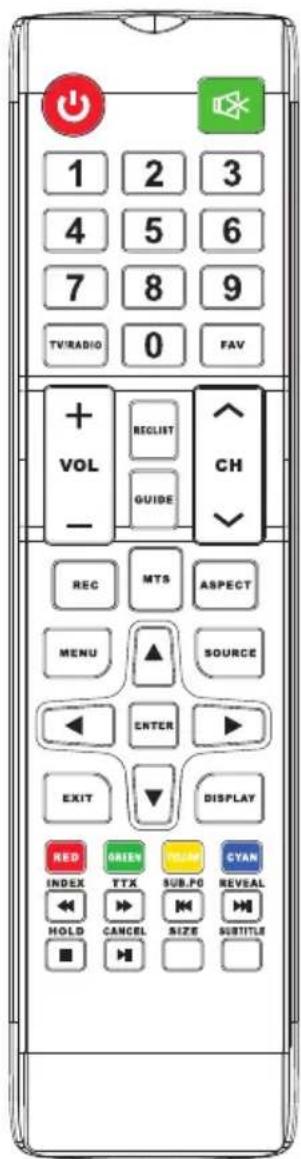
POWER
Set your TV to power on or standby mode.
MUTE
Press to mute the sound. Press again or press VOL+ to unmute.
NUMBER BUTTONS
Press 0-9 to select a TV channel directly when you are watching TV. The channel change after 2 seconds. Applicable for entering page number in teletext mode and so on.
MTS: Press to search the NICAM different picture settings.
MENU
Allows you to navigate the on-screen menus.
SOURCE
Open the main menu, press to list the sources.
THUMBSTICK (▲/▼/◄/►/ENTER)
Allows you to navigate the on-screen menus and adjust the system settings.
DISPLAY
Press to display the source and channel's information.
EXIT
Exit from the menu or sub-menu and cancel the function in progress (if applicable).
TV/RADIO: When watching channel, allows you to switch between TV and Radio modes.
GUIDE: Launches the EPG (Electronic Program Guide).
◀: Fast reverse in PVR or Media Player mode.
▶: play on PVR or Media Player mode.
CANCEL: When a page is selected in the mode of text, it may take some time before it becomes available, pressing the CANCEL key will return to the TV mode. When the required page is found, the page number will appear at the top of the TV picture, press the CANCEL key to return to the mode of text for you to browse this page.
◀: Previous chapter in PVR or Media Player mode.
INDEX: Request the Index page in Teletext mode.
■: Exit the playing function in PVR or Media Player mode.
SIZE: Change the size of display in Teletext mode.
REVEAL: Reveal or Hide the hidden words.
COLOR BUTTONS: Teletex switch of the analog parts, the items selection in the menu of the digital parts and the practice of the MHEG-5 in the DVB menu.
CH+/CH-: Press to scan through channel FAV : Press to open the favorite list.
ASPECT: Select picture scale.
▶: Fast forward in PVR or Media Player mode.
SUB. PG: Press to access sub page.
▶▶: Next chapter in PVR or Media Playe mode.
SUBTITLE: To show and set the language of current DTV.
HOLD: HOLD On or Off for current pager display.
TTX : Switch the teletext on and off.
REC LIST: Show the recorded list.
REC: Record begin in PVR mode.
Battery Installation
Remove the battery compartment lid on the rear of the remote control by sliding the lid down, then off. Put two AAA batteries inside the battery compartment with their + and - ends aligned as indicated. Do not mix old and new batteries or different types of batteries. Slide the lid until you hear it click into place.
Using the Remote Control
Unless stated, otherwise, the remote control can operate all the features of the TV. Always point the remote control directly at the remote sensor in front of the TV.
Note: Picture for reference purposes only.
BEZBJEDNOSNE INFORMACIJE

- Znak uzvika u jednakostraničnom trouglu služi da upozori korisnika da u materijalu uz uređaj postoje važna uputstva za rukovanje.
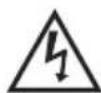
Upozorenje Simbol munje sa strjelicom u jednakostraničnom trouglu služi da upozori korisnika na neizolovani opasni napon u okviru proizvoda, potencijalno dovoljne jačine da predstavlja rizik od strujnog udara.
CAUTION
RISK OF ELECTRIC SHOCK DO NOT OPEN
Za rad ovog proizvoda koriste se visoki naponi. Da biste smanjili rizik od strujnog udara ne uklanjajte poklopac ormarića, a servis neka obavlja kvalifikovano osoblje.
Ako grubo rukujete televizorom može doći do strujnog udara. Ne pokušavajte da otvorite uređaj. Ako je potrebna popravka obratite se korisničkom centru.
VAŽNE BEZBJEDNOSNE MJEREPREDOSTROŽNOSTI
- Pročitajte ova uputstva. 2. Sačuvajte ova uputstva 3. Poštujte sva upozorenja 4. Pratite sva uputstva.
- Ne koristite uređaj u blizini vode. 6. Čistite ga samo suvom krpom.
- Ne blokirajte otvore za ventilaciju. Montirajte uređaj prema uputstvima proizvođača.
- Ne postavljajte uređaj blizu izvora toplote poput radijatora, grijalica, šporeta ili drugih uređaja (uključujući pojačala) koji proizvode toplotu.
-
Nemojte da anulirate bezbjednosnu namjenu polarizovanog ili uzemljenog utikača. Polarizovani utikač ima dvije viljuške pri čemu je jedna šira od druge. Uzemljeni utikač ima dvije viljuške i treći krak za uzemljenje. Široka viljuška ili treći krak služe za vašu bezbjednost. Ako se utikač koji ste dobili ne uklapa s vašom utičnicom, obratite se električaru da biste zamijenili zastarjelu utičnicu.
-
Zaštitite strujni kabl od gaženja ili priklještenja posebno u djelu oko utikača, utičnica i na mjestu gdje izlazi iz uređaja.
-
Koristite samo dodatnu opremu koju je naveo proizvođač.
-
Koristite samo sa kolicima, stalkom, nogarama, držačem ili stolom koje je naveo proizvođač.
-
Isključite uređaj iz struje tokom oluja sa grmljavinom ili ako ga ne koristite duže vrijeme.

Oprez:
- Da biste smanjili rizik od vatre ili strujnog udara, ne izlažite uređaj kiši ili vlazi.
- Utikač se koristi kao uređaj za isključivanje iz struje i mora da bude omogućeno lako rukovanje tim uređajem.
- Utičnica treba da bude postavljena blizu uređaja i treba da bude lako dostupna.
- Ovaj uređaj ne smije da se postavlja u ugrađeni namještaj poput police ili postolja ako ne postoji odgovarajuća ventilacija ili ako to nije u skladu sa uputstvima proizvođača.
- Uređaj se ne smije izlagati kapanju ili prskanju vode i predmeti koji sadrže vodu poput vaza ne smiju da ste postavljaju na uređaj.
- Ne postavljajte bilo kakve potencijalno opasne predmete na uređaj (npr. predmete napunjene tečnošću, upaljene svijeće).
-
Montiranje na zid ili na plafon - uređaj smije da se montira na zid ili na plafon samo u skladu sa uputstvima proizvođača.
-
Nikada ne postavljajte TV, daljinski upravljač ili baterije blizu otvorenog plamena ili drugih izvora toplote, uključujući direktnu sunčevu svjetlost. Da biste spriječili širenje požara, nikad ne držite svijeće i druge izvore plamena blizu TV-a, daljinskog upravljača i baterija.
-
USB terminal tokom normalnog rada treba da ima opterećenje od 0,5 A. Ova uputstva za servisiranje su samo za kvalifikovano osoblje servisa. Da biste smanjili rizik od strujnog udara, ne obavljajte nikakvo servisiranje osim onog navedenog u uputstvima za rukovanje, osim ukoliko niste za to kvalifikovani.
-
Baterije ne smiju da se izlažu prekomjernoj toploti kao što je sunčeva svjetlost, vatra ili slično.
-
- Ovo je oprema Klase II ili dvostruko izolovani električni uređaj. Napravljen je tako da mu nije potrebna bezbednosna veza sa električnim uzemljenjem.
-
Maksimalna temperatura za korišćenje je 45 stepeni. Maksimalna nadmorska visina za korišćenje je 2000 metara.
1

natural_image
Architectural line drawing of a room layout with internal compartments and structural elements (no text or symbols)Postavite stalak na dno LED televizora i pričvrstite šrafove.
2

natural_image
Technical line drawing of an electrical enclosure with grounding and antenna (no text or symbols)natural_image
Architectural cross-section diagram of a room with internal partitions and structural elements (no text or labels)Specifikacije
| Veličina ekrana | Potrošnja struje |
| 40" | 90W |
Glavna dodatna oprema
Uputstvo x1
Daljinski upravljač x1
Strujni kabl x1
AAA baterije x2
DALJINSKI UPRAVLJAČ
UKLJUČIVANJE/ISKLJUČIVANJE
natural_image
Two technical line drawings of a mechanical or structural component, possibly a frame or support structure, with no visible text or symbols.natural_image
Technical line drawing of an electrical enclosure with grounding and antenna (no text or symbols)natural_image
Architectural cross-section diagram of a room with furniture layout (no text or labels)Спецификации
natural_image
Two technical line drawings of a mechanical or structural component, possibly a beam or support structure, with no visible text or symbols.natural_image
Technical line drawing of a mechanical or electrical component with no visible text, numbers, or symbols.natural_image
Architectural floor plan showing room layouts and structural elements (no text or labels)Προδιαγραφές
Manolopoulos service:
29 Agorakritou Street, 104 40, Athens +30 210 82.13.542 info@manolopoulos-service.com www.manolopoulos-service.gr/
SIGURNOSNE INFORMACIJE
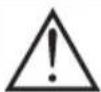
Znak uzvika u jednakostraničnom trokutu služi da upozori korisnika da u materijalu uz napravu postoje važne upute za rukovanje.
- Upozorenje
Simbol munje sa strjelicom u jednakostraničnom trokutu služi da upozori korisnika na neizolirani opasni napon u okviru proizvoda, potencijalno dovoljne jačine da predstavlja rizik od strujnog udara.
CAUTION
RISK OF ELECTRIC SHOCK DO NOT OPEN
Za rad ovog proizvoda koriste se visoki naponi. Da biste smanjili rizik od strujnog udara ne uklanjajte poklopac ormarića, a servis neka obavlja kvalificirano osoblje.
natural_image
Two technical line drawings of a mechanical or architectural component, possibly a beam or support structure, with no visible text or symbols.Postavite stalak na dno LED televizora i pričvrstite vijke.
2

natural_image
Technical line drawing of a mechanical or electrical enclosure with internal components and a sensor connected to the right (no text or symbols)natural_image
Technical line drawing of a mechanical or electrical component assembly (no text or symbols)Priključite strujni kabel u odgovarajuću utičnicu na zidu i uključite.
4
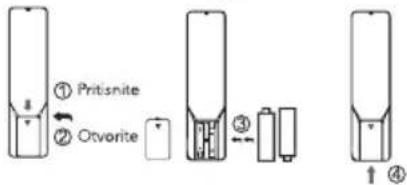
- Skinite poklopac odjeljka za baterije sa stražnje strane.
- Stavite dvije baterije od 1,5 V tipa AAA okrenute na odgovarajući način.
- Vratite poklopac odjeljka za baterije na zadnjoj strani.
Specifikacije
| Veličina zaslona | Potrošnja struje |
| 40" | 90W |
Glavna dodatna oprema
Upute x1
Daljinski upravljač x1
Strujni kabel x1
AAA baterije x2
DALJINSKI UPRAVLJAČ
UKLJUČIVANJE/ISKLJUČIVANJE
Müszaki adatok
natural_image
Technical line drawing of a mechanical component with two views (top and side), no text or symbols present.natural_image
Technical line drawing of a mechanical or electrical component with no visible text, numbers, or symbols.natural_image
Architectural cross-section diagram of a room with furniture and structural elements (no text or labels)Спецификации
natural_image
Two technical line drawings of a mechanical component, top and side, with no visible text or symbols.natural_image
Technical line drawing of a mechanical or electrical component with no visible text, numbers, or symbols.Introduceti cablul antenei in mufa RF.
3

natural_image
Architectural cross-section diagram of a room or facility layout (no text or labels visible)Specifications
natural_image
Technical line drawing of a mechanical component with two views (top and side), no text or symbols present.Postavite stojalo na spodnji del televizorja LED in pritrdite vijake.
2

natural_image
Technical line drawing of an electrical enclosure with grounding and antenna (no text or symbols)natural_image
Architectural cross-section diagram of a room with furniture layout (no text or labels)Priključite napajalni kabel v ustrezno zidno vtičnico in vklopite napravo.
4

- Odstranite pokrov prostora za baterije iz hrbtne strani.
- Vstavite dve 1,5 V AAA bateriji na pravilen način.
- Vrnite pokrov prostora za baterije iz hrbtne strani.
Specifikacije
| Velikost zaslona | Poraba elektrike |
| 40" | 90W |
Glavni dodatki
Navodila x1
Daljinski upravljalnik x1
Napajalni kabel x1
AAA baterije x2
DALJINSKI UPRAVLJALNIK
VKLAPLJANJE ALI IZKLAPLJANJE TELEVIZORJA
natural_image
Two technical line drawings of a mechanical component, one with a beam and the other with a bracket (no text or symbols)Postavite stalak na dno LED televizora i pričvrstite šrafove.
2

natural_image
Technical line drawing of a mechanical or electrical component with no visible text, numbers, or symbols.natural_image
Architectural cross-section diagram of a room with furniture layout (no text or labels)Specifikacije
| Veličina ekrana | Potrošnja struje |
| 40" | 90W |
Glavna dodatna oprema
Uputstvo x1
Daljinski upravljač x1
Strujni kabl x1
AAA baterije x2
DALJINSKI UPRAVLJAČ
UKLJUČIVANJE/ISKLJUČIVANJE
To make it more convenient for base installation and to avoid any risk of scratches and damage, we advise you using the type of PH2 screwdriver.
PH00PH0PH1PH2

Note:
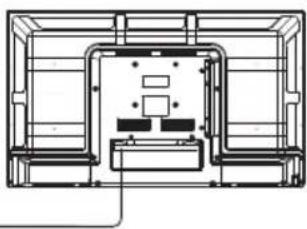
If the model has a CI card slot on its top, a silicone plug for the CI card slot can be found in the accessory bag (for models without CI card slot, there is no such silicone plug), please insert the silicone plug into the slot when the CI card is not in use.

natural_image
Diagram showing front and side views of a computer monitor with ports and a red arrow indicating a location (no text or symbols present)Note: Picture for reference purposes only.
WARNING
Never place a television set in an unstable location. A television set may fall, causing serious personal injury or death. Many injuries, particularly to children, can be avoided by taking simple precautions such as:
- Using cabinets or stands recommended by the manufacturer of the television set.
- Only using furniture that can safely support the television set.
- Ensuring the television set is not overhanging the edge of the supporting furniture.
- Not placing the television set on tall furniture (for example, cupboards or bookcases). without anchoring both the furniture and the television set to a suitable support.
- Not placing the television set on cloth or other materials that may be located between the television set and supporting furniture,
- Educating children about the dangers of climbing on furniture to reach the television set or its controls.
If your existing television set is being retained and relocated, the same considerations as above should be applied.
Wall-mounted screw:22-24inch M4, 28-70inch M6, 75inch M8
Note: don't hang at an angle to avoid the risk of falling off.

- UPUTSTVO ZA UPOTREBU
- SAFETY INFORMATION
- CAUTION
- RISK OF ELECTRIC SHOCK DO NOT OPEN
- IMPORTANT SAFETY PRECAUTIONS
- TV Buttons And Terminal Interface
- TV Buttons
- First Time Installation
- Main accessories
- REMOTE CONTROLLER
- POWER
- MUTE
- NUMBER BUTTONS
- MENU
- SOURCE
- THUMBSTICK (▲/▼/◄/►/ENTER)
- DISPLAY
- EXIT
- Battery Installation
- Using the Remote Control
- BEZBJEDNOSNE INFORMACIJE
- VAŽNE BEZBJEDNOSNE MJEREPREDOSTROŽNOSTI
- Oprez:
- Glavna dodatna oprema
- DALJINSKI UPRAVLJAČ
- UKLJUČIVANJE/ISKLJUČIVANJE
- Спецификации
- Manolopoulos service:
- SIGURNOSNE INFORMACIJE
- Specifikacije
- Glavni dodatki
- DALJINSKI UPRAVLJALNIK
- VKLAPLJANJE ALI IZKLAPLJANJE TELEVIZORJA
- Note:
- WARNING
Brand : TESLA
Model : 40E320BF
Category : Television