
95-7817HG - Car kit Metra - Free user manual and instructions
Find the device manual for free 95-7817HG Metra in PDF.


| Product Type | Vehicle Dash Installation Kit |
| Brand | Metra |
| Model | 95-7817HG |
| Compatible Vehicles | Select Honda and Acura models (specific years vary) |
| Material | High-grade ABS plastic |
| Color | Matte black/textured finish |
| Dimensions (approx.) | 7 x 4.5 x 1.5 inches (17.8 x 11.4 x 3.8 cm) |
| Weight | 0.3 lbs (0.14 kg) |
| Main Functions | Enables installation of aftermarket single-DIN or double-DIN stereo |
| Includes | Mounting brackets, trim ring, screws, and wiring harness adapter |
| Power Supply | Not applicable (passive installation kit) |
| Maintenance and Cleaning | Wipe with a damp cloth; do not use harsh chemicals |
| Safety | Ensure vehicle battery is disconnected during installation |
| Spare Parts and Repairability | Contact Metra customer service for replacement parts |
| Warranty | 1-year limited warranty against defects |
Frequently Asked Questions - 95-7817HG Metra
User questions about 95-7817HG Metra
0 question about this device. Answer the ones you know or ask your own.
Ask a new question about this device
Download the instructions for your Car kit in PDF format for free! Find your manual 95-7817HG - Metra and take your electronic device back in hand. On this page are published all the documents necessary for the use of your device. 95-7817HG by Metra.
USER MANUAL 95-7817HG Metra
Honda CR-V LX trim 2017-up*
*Visit MetraOnline.com for up-to-date vehicle specific applications.
KIT FEATURES
• ISO DDIN radio provision
• Painted high-gloss black and silver
KIT COMPONENTS
• A) Radio trim panel • B) Radio brackets • C) (4) #8 x 3/8" Phillips screws • D) (4) White panel clips • E) (2) Black metal panel clips
A
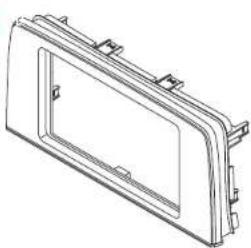

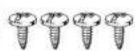
The image is too blurry to recognize any text content.

E

TABLE OF CONTENTS
Dash Disassembly 2
Kit Preparation 2
Kit Assembly 3
WIRING & ANTENNA CONNECTIONS(sold separately)
Wiring Harness: 70-1731
Antenna Adapter: 40-HD11
Steering wheel control retention: ASWC-1
TOOLS REQUIRED
- Panel removal tool • Phillips screwdriver
CAUTION! All accessories, switches, climate controls panels, and especially air bag indicator lights must be connected before cycling the ignition. Also, do not remove the factory radio with the key in the on position, or while the vehicle is running.
DASH DISASSEMBLY KIT PREPA
- Unclip and remove the climate control panel. (Figure A)
- Remove (2) Phillips screws securing the radio, then unclip, unplug, and remove the radio. (Figure B)
Continue to Kit Preparation
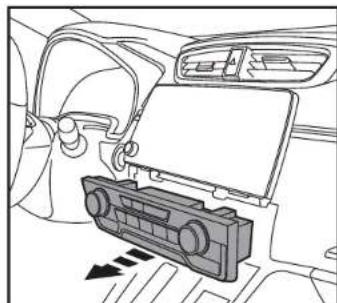
(Figure A) (Figure A)
ATION
- Attach th(4) white plastic panel clips, and (2) black metal clips to the radio trim panel. (Figure A)
Continue to Kit Assembly
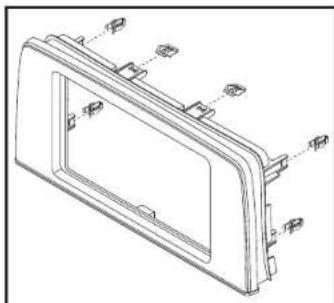

(Figure B)
KIT ASSEMBLY
ISO DDIN radio provision
-
Attach the radio brackets to the radio trim panel using the (4) #8 x 3/8" Phillips screws provided. (Figure A)
-
Slide the radio into the bracket/panel assembly from the back, and secure it using the screws supplied with the radio. (Figure B)
-
Locate the factory wiring harness and antenna connector in the dash and complete all necessary connections to the radio. Metra recommends using the proper mating adapter from Metra and/or Axxess. Test the radio for proper operation.
-
Secure the completed assembly into the dash using the factory screws.
-
Reassemble the dash in the reverse order of disassembly.

(Figure A) (Figure B)

IMPORTANT
If you are having difficulties with the installation of this product, please call our Tech Support line at 1-800-253-TECH. Before doing so, look over the instructions a second time, and make sure the installation was performed exactly as the instructions are stated. Please have the vehicle apart and ready to perform troubleshooting steps before calling.

KNOWLEDGE IS POWER
Enhance your installation and fabrication skills by enrolling in the most recognized and respected
unshilling in the most recognized and resp mobile electronics school in our industry.
Log onto www.installerinstitute.com or call
800-354-6782 for more information and take steps
toward a better tomorrow.

Metra recommends MECP certified technicians
Brand : Metra
Model : 95-7817HG
Category : Car kit