
R10370-10 - Wristwatch Clas Ohlson - Free user manual and instructions
Find the device manual for free R10370-10 Clas Ohlson in PDF.


| Product Type | Watch |
| Brand | Clas Ohlson |
| Model | R10370-10 |
| Case Diameter | Approx. 40 mm |
| Case Thickness | Approx. 10 mm |
| Weight | Approx. 50 g |
| Battery Type | CR2032 |
| Display Type | Digital LCD |
| Water Resistance | 30 m (3 ATM) |
| Functions | Time, Date, Alarm, Stopwatch, Backlight |
| Strap Material | Resin |
| Clasp Type | Buckle |
| Case Material | Plastic |
| Lens Material | Acrylic |
| Operating Temperature | -10°C to 50°C |
| Battery Life | Approx. 2 years |
| Care Instructions | Wipe with a dry cloth. Avoid chemicals. |
| Safety Warnings | Not for diving. Keep away from magnets. |
| Spare Parts Availability | Battery replacement available |
| Reparability | Battery replacement by specialist |
| Manual Included | Yes (digital download) |
Frequently Asked Questions - R10370-10 Clas Ohlson
User questions about R10370-10 Clas Ohlson
0 question about this device. Answer the ones you know or ask your own.
Ask a new question about this device
Download the instructions for your Wristwatch in PDF format for free! Find your manual R10370-10 - Clas Ohlson and take your electronic device back in hand. On this page are published all the documents necessary for the use of your device. R10370-10 by Clas Ohlson.
USER MANUAL R10370-10 Clas Ohlson
Please read the entire instruction manual before using the product and save it for future reference. We reserve the right for any errors in text or images and any necessary changes made to technical data. If you have any questions regarding technical problems please contact Customer Services.
Operation
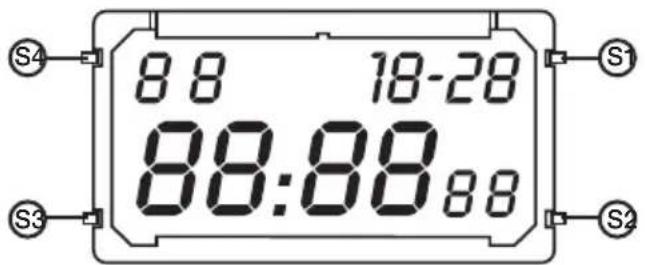
Press S3 to select a mode. The following modes are available:

Time AL (alarm)
ST (stopwatch)
Time

-
Day
-
Hours
-
Month/ date
-
Minutes
-
Seconds
Setting the time
- Advance to the time setup using S3 (the seconds flash).
- Press S1 to change the hours and then S2 to progress to the minutes. Continue in the same way to set the seconds, day, month and date.
- Confirm and return to time display by pressing S3.
Setting the alarm
- Advance to AL (alarm) using S3.
- Press S2 and the hours will begin to flash. Change the hours using S1.
- Press S2 again and the minutes will begin to flash. Change the minutes using S1.
- Press S1 to activate the ALARM and/or CHIME (hourly chime). To deactivate, press S1 again so that neither ALARM nor CHIME is displayed.
- Push any button to turn off the alarm when it sounds.
Stopwatch
- Advance to ST (stopwatch) using S3.
- Press S1 to start or stop the stopwatch.
- Press S2 to reset the stopwatch.
Care and maintenance
Wipe the product using a dry cloth when necessary. Never use solvents or abrasive cleaning agents.
Disposal
Follow local ordinances when disposing of this product. If you are unsure of how to dispose of this product, please contact your local authority.
Specifications
Battery CR2025 (Clas Ohlson article number 32-2235)
Brand : Clas Ohlson
Model : R10370-10
Category : Wristwatch