
Echelon DCV64DL - Security Camera Digimerge - Free user manual and instructions
Find the device manual for free Echelon DCV64DL Digimerge in PDF.


| Product Type | Security Camera |
| Model | Echelon DCV64DL |
| Brand | Digimerge |
| Resolution | 1080p Full HD (1920x1080) |
| Video Format | Analog HD (HD-TVI/AHD/CVBS) |
| Lens | 3.6mm fixed lens |
| Night Vision | IR LEDs up to 30m |
| Weather Rating | IP66 (outdoor) |
| Mount Type | Wall or ceiling mount |
| Power Supply | DC 12V / 500mA |
| Power Consumption | 6W (max) |
| Dimensions (WxHxD) | 70 x 70 x 150 mm |
| Weight | 0.4 kg |
| Operating Temperature | -10°C to 50°C |
| Storage Temperature | -20°C to 60°C |
| Humidity | Up to 90% (non-condensing) |
| Features | Motion detection, auto gain control, white balance, backlight compensation |
| Connector | BNC video output, power pigtail |
| Cleaning | Wipe lens with dry microfibre cloth; use mild soap for housing |
| Maintenance | Check connections and clean lens periodically |
| Safety | Disconnect power before installation; use only supplied adapter |
| Spare Parts | Mounting kit, power adapter, BNC extension cables |
| Repairability | Not user-serviceable; contact qualified technician |
Frequently Asked Questions - Echelon DCV64DL Digimerge
User questions about Echelon DCV64DL Digimerge
0 question about this device. Answer the ones you know or ask your own.
Ask a new question about this device
Download the instructions for your Security Camera in PDF format for free! Find your manual Echelon DCV64DL - Digimerge and take your electronic device back in hand. On this page are published all the documents necessary for the use of your device. Echelon DCV64DL by Digimerge.
USER MANUAL Echelon DCV64DL Digimerge
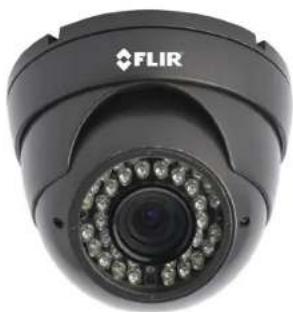
1 x Weatherproof IR Dome Camera with Varifocal Lens

4 x Mounting Screws

1 x Flat-head Screwdriver
WARNING - A REGULATED UL / CSA APPROVED 12V DC / 24V AC power supply is REQUIRED for use with this camera. Use of a non-regulated, non-conforming power supply can damage this product and voids the warranty.
Features
• 1/3" Sony EX-View II 960H with Effio DSP/700+ TVL
• Superior Low Light Sensitivity
• Advanced Digital Noise Reduction
• Smart IR Night Vision (100ft/31m)*
• 2.8–10.5mm Varifocal Auto Iris Lens
• External Zoom/Focus Adjustment
• IP66 Weatherproof Rating**
• 3-Axis Design for Wall/Ceiling Mounting
• Vandal Resistant
• 12V DC/24V AC Operation
* IR Illumination range under ideal conditions. Objects at or beyond this range may be partially or completely obscured, depending on the camera application
** Not recommended for submersion in water
Safety Precautions
- Use an appropriate low voltage power cable to prevent fire or electrical shock.
• Make sure to install the camera in an area that can support the camera weight. - There are no user serviceable parts inside the camera. Please do not disassemble the camera.
- Do not clean the lens cover with an abrasive cleaning material. Please use a soft cloth to clean the lens cover.
Specification Sheets

User Manuals

Quick Start Guides


Video Tutorials & DemosLatest N


Ultra Resolution, Outstanding Value Cameras

Ultra Resolution Cameras with Advanced Features

Fully Connected DVR's
VISIT
www.digimerge.com
Digimerge Technologies Inc.
Copyright © 2013
As our products are subject to continuous improvement, Digimerge reserves the right to modify product design, specifications and prices, without notice and without incurring any obligation. E&OE

MODEL: DCV64DL
QUICK START GUIDE
English Version 2.0
natural_image
Close-up of a black FLIR security camera with visible lens and control buttons (no text or symbols on body)
FLIR
DIG!MERGE
www.digimerge.com
Installing the Camera
ATTENTION - Test the camera prior to selecting a permanent mounting location by temporarily connecting the camera(s) and cables to the DVR.
- Rotate the camera base counter clockwise to separate it from the ball camera and dome cover.
- Mount the camera base to the wall or ceiling using the included screws.

natural_image
Mechanical assembly diagram showing a circular component connected to three screws (no text or symbols present)- Feed the BNC/power termination cable through the camera base. Connect video and power cable as described in the next section, 'Setting up the Camera'.
- Position the dome cover over the camera and screw it clockwise half way onto the camera base.
- Move the ball camera to the desired position, and while holding the ball camera firmly in place, screw the dome cover the rest of the way to secure it to the camera base. Holding the camera prevents it from moving while installing the dome cover.

Setting up the Camera
- Connect the BNC connector of the camera to the video cable.
- Connect power source to the power terminal block.
NOTE: Make sure to follow correct polarity as marked on the power connector. For AC power, connect multiple cameras using consistent wiring polarity to prevent video rolling.

- Use a screwdriver to adjust the ZOOM and FOCUS control screws as required.

natural_image
Close-up of a FLIR security camera with visible lens and control buttons (FOCUS, ZOOM) on the side (no text or symbols on the device itself)Camera Specifications
Image Sensor 1/3" Sony EX-View™ II 960H
Video Format NTSC
Effective Pixels H: 976 V: 494
Horizontal Resolution 700+ TVL
Scan System 2:1 Interlace
Sync System Internal
S / N Ratio >52dB (AGC Off)
Iris Auto Iris
AES Shutter Speed 1/60 - 1/100,000 sec.
Min. Illumination 0.03 LUX @ F1.2 (IR Off)
0 LUX (IR LEDs ON)
Video Output Composite 1.0Vpp @ 75ohm
Lens Focal Length / Type 2.8–10.5mm F1.6 / Varifocal AI
FOV (Diagonal) 38–104"
Termination Video: BNC Female
IR Range / Qty. 100ft / 31m; 35 LED's
Power Requirement
12V DC ± 10% / 24V AC ± 10%
Power Consumption
12V: 650mA max / 24V: 325mA max
Operating Temp. Range
-4^-122^/-20^-50^
Environmental Rating IP66
Dimensions (LxWxH)
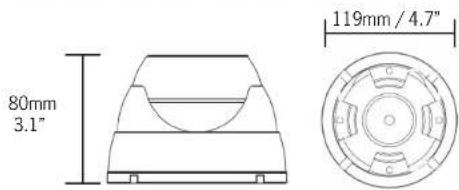
4.8"×4.8"×4.1"
Weight (including stand)
119mm x 119mm x 80mm
1.4lbs/0.6kg
Dimensions
Brand : Digimerge
Model : Echelon DCV64DL
Category : Security Camera