
N784-001-ST - Media player Tripp Lite - Free user manual and instructions
Find the device manual for free N784-001-ST Tripp Lite in PDF.


| Product Type | Media Player |
| Brand | Tripp Lite |
| Model | N784-001-ST |
| Dimensions (W x D x H) | 4.5 x 3.5 x 1.0 inches |
| Weight | 0.5 lbs |
| Power Source | USB (5V DC) |
| Media Input | USB 2.0, SD Card Slot |
| Supported Video Formats | MP4, AVI, MKV, MOV, WMV |
| Supported Audio Formats | MP3, WMA, WAV, FLAC, AAC |
| Supported Image Formats | JPEG, BMP, PNG, GIF |
| Video Output | HDMI, Composite AV |
| Maximum Video Resolution | 1080p Full HD |
| Audio Output | HDMI, Stereo RCA, 3.5mm Jack |
| File System Compatibility | FAT32, NTFS |
| Remote Control | Included (IR) |
| Maintenance | Clean with a soft, dry cloth |
| Safety | Keep away from moisture and extreme temperatures |
| Spare Parts and Repairability | Contact Tripp Lite support for service options |
Frequently Asked Questions - N784-001-ST Tripp Lite
User questions about N784-001-ST Tripp Lite
0 question about this device. Answer the ones you know or ask your own.
Ask a new question about this device
Download the instructions for your Media player in PDF format for free! Find your manual N784-001-ST - Tripp Lite and take your electronic device back in hand. On this page are published all the documents necessary for the use of your device. N784-001-ST by Tripp Lite.
USER MANUAL N784-001-ST Tripp Lite
Warranty Registration Register online today for a chance to win a FREE Tripp Lite product! www.triplite.com/warranty
Owner's Manual
Media Converters
Models: N784-001-SC & N784-001-ST
Overview 2
Package Checklist 2
Model Description 2
Wiring the Power Inputs 3
Communication Connection 4
Dip Switch Setting 4
Link Fault pass-Through 5
LED Description 6
Cable Connection Parameter 6
Specifications 7

Tripp Lite World Headquarters
1111 W. 35th Street, Chicago IL 60609 USA
(773) 869-1234, www.tripplite.com
Note: Follow these instructions and operating procedures to ensure correct performance and to prevent damage to this unit or to its connected devices.
Overview
The N784 Series Media Converter is a standalone physical layer device that converts between 10/100BaseT(X) and 100BaseFX segments of the same network. The converter supports Link Fault Pass-through (LFP) for easy tracing of network link failures, and the LFP function enhances the integrity and conformity of twisted pair (TP)-Fiber linking to make the network easier to maintain. The converter is powered by an external power adapter or USB port on the hosting device (e.g., PC).
Package Checklist
• Media Converter
• AC-DC Power Adapter (100-240V)
- Owner's Manual
Model Description
N784-001-SC 10/100BaseT(X) to 100BaseFX media converter; multi mode, SC type fiber connection
N784-001-ST 10/100BaseT(X) to 100BaseFX media converter; multi mode, ST type fiber connection
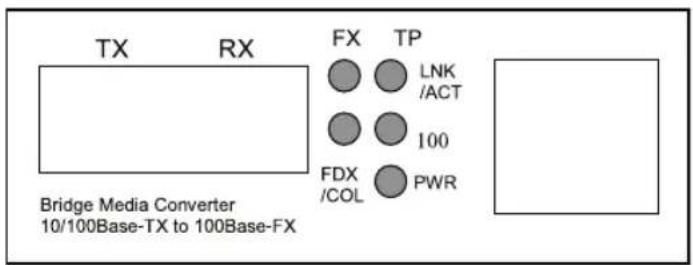
Panel Layout
- Front Panel View
- Side Panel View

Model Description (continued)
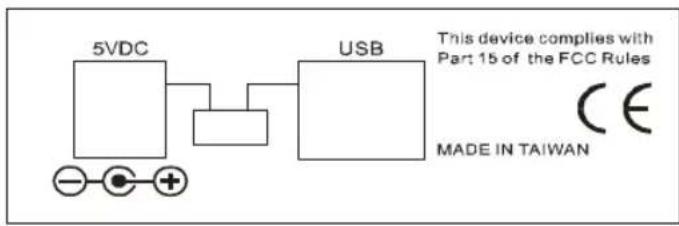
- Rear Panel View
flowchart
graph LR
    A["5VDC"] --> B["USB"]
    C["-"] --> D["+"]
    E["+"] --> F["+"]
    G["CE"] --> H["Made in Taiwan"]
Wiring the Power Inputs
Using the Converter with the AC-DC Power Adapter
- Use DIP switch settings to enable power through the AC-DC Power Adapter (refer to DIP switch settings section)
- Verify that the AC-DC adapter conforms to your country's AC power requirements and then insert the power plug.
- Connect the Converter to the network.
Note: Wear a grounding device to safeguard against damage due to electrostatic charge.
Using the Converter with power Over USB
- Use DIP switch settings to enable power from the USB port (refer to DIP switch settings section).
Note: Please ensure that the DIP switch is positioned on the USB side of the slider. - Install the USB cable. Plug type A connector in the PC's USB port and the type B connector in the Converter's USB port (see Fig. 1).
- Connect the Converter to the network.

WARNING
Make sure that the PC's power is turned on. Otherwise the Converter will not receive power.

flowchart
graph TD
    A["Computer"] -->|USB A Type Jack| B["USB Cable"]
    B -->|USB B Type Jack| C["RF"]
    C -->|Fiber Optic| D["Fiber Network"]
    D -->|Cat. 5 Cable| E["RJ-45 Jack"]
    E -->|10/100 Ethernet Switch/NIC| F["100FX Fiber Network"]
Fig. 1: Media Converter with USB power source (Type B-to-Type A Plug) and FX/TP connection
Communication Connection
The Media Converter has one 10/100BaseT(X) Ethernet port, and one 100BaseFX (SC or ST type connector) fiber port.
10/100BaseT(X) Ethernet Port Connection
The Converter supports auto MDI/MDI-X. Below are the pinouts for both MDI (NIC-type) ports and MDI-X (HUB/Switch-type) ports. Also shown are the cable wiring diagrams for straight-through and cross-over Ethernet cables.
- RJ45 (8-pin) to RJ45 (8-pin) Straight-Through Cable Wiring (Tripp Lite N105, N001, N002 and N201 Series Cables)

- RJ45 (8-pin) to RJ45 (8-pin) Cross-Over Cable Wiring (Tripp Lite N010 and N210 Series Cables)

Dip Switch Setting
Power Input Setting
- Power source from AC-DC • Power over USB enabled Power Adapter enabled

DIP Switch
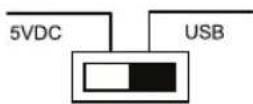
DIP Switch
Communication Setting

Dip Switch Setting (continued)
| DIP Switch Dip | Function | |
| FX FDX | FX at full duplex (default) | |
| HDX FX | at half duplex | |
| LFP Enable Link | Fault Pass-Through (default) | |
| LFP DIS | Disable Link Fault Pass-Through | |
| TP FDX | TP at full duplex (default) | |
| HDX TP | at half duplex when TP at Force | |
| 100 TP | at 100M (default) | |
| 10 TP at 10M when TP at Force | ||
| AUTO TP | at auto-negotiation (default) | |
| FORCE | Force TP at 10M or at half duplex | |
Note: • You must set DIP Switch 1 to "FORCE" when DIP Switches 2 and 3 are set to "10" and "HDX", respectively
- For N784-001-SC, DIP Switch 5 must be set to "HDX"
• After resetting the DIP Switches, you must reboot the Converter to activate the new settings.
Link Fault Pass-Through
Note: The Link Fault Pass-Through (LFP) function is enabled using the DIP switch. Disable the LFP function by setting the DIP switch to the LFP DIS position.
This media converter supports Link Fault Pass-Through (LFP) for TX/FX converter applications.
Link status on one port is propagated to the other port to notify remote nodes. If the TP port is unplugged, the converter stops transmitting over the fiber port, causing the remote fiber link node to fail. The LED will show link failure on both the TP and fiber ports. If the fiber link fails, the converter restarts auto-negotiation on the TP port, but stays in the link failure state. This causes the remote TP node link to fail. The LED also shows the link failure on both the TP and fiber ports. The figures below show normal status when the link succeeds, and the error status when TP Cable A, Fiber Cable B, or Fiber Cable C fails to connect.
• Normal status via a pair of LFPs

flowchart
graph LR
    A["10/100 Switch"] -->|TP| B["LFP"]
    B -->|B| C["LFP"]
    C -->|A| D["10/100 Switch"]
    D -->|TP| E["Remote Station"]
    F["Fiber Cable"] --> B
    G["●"] --> A
    H["●"] --> B
    I["●"] --> C
    J["●"] --> D
- Status if TP Cable A is broken
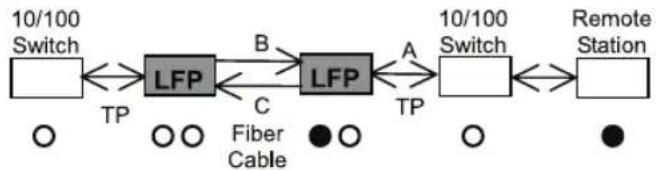
flowchart
graph LR
    A["10/100 Switch"] -->|TP| B["LFP"]
    B -->|B| C["LFP"]
    C -->|A| D["10/100 Switch"]
    D -->|TP| E["Remote Station"]
    F["Fiber Cable"] -->|○ ○| B
    G["● ○"] -->|○ ○| C
    H["●"] -->|○ ○| D
- Status if Fiber Cable B or C is broken

flowchart
graph LR
    A["10/100 Switch"] -->|TP| B["LFP"]
    B -->|B| C["LFP"]
    C -->|A| D["10/100 Switch"]
    D -->|TP| E["Remote Station"]
    F["Fiber Cable"] -->|C| B
    G["○○"] --> B
    H["○○"] --> C
    I["●"] --> E
Note: ● indicates LNK/ACT LED Lit ○ indicates LNK/ACT LED Off
Link Fault Pass-Through (continued)

WARNING
The LFP (Link Fault Pass-Through) function works only when two converters working as a pair have LFP capability.
Furthermore, both LFP converters should be supplied by the same manufacturer/vendor. If you are using an odd number of converters, or models that don't support LFP, then the LFP function will not work.
LED Description
| LED Color Function | |
| FX LNK/ACT Green Lit | when FX port is linkingBlinks when FX port is transmitting data |
| FX FDX/COL Amber Lit | when full-duplex mode is activeOff when half-duplex is activeBlinks when a collision occurs |
| TP LNK/ACT Green Lit | when TP port is linkingBlinks when FX port is transmitting data |
| TP 100 Green Lit when | TP port is transmitting data at 100 MbpsOff when TP port is transmitting data at 10 Mbps |
| PWR Green Lit when +5V | power is supplying |
Cable Connection Parameter
- TP Cable Limitations: Cat. 5 and up to 100m
- Converter Fiber Cable Limitations: Multi mode 2 km
Specifications
• Standards: IEEE802.3u 10/100Base-TX, 100Base-FX
- Flow Control: IEEE802.3x compliant for full-duplex back pressure flow control for half-duplex
• Fiber Cable: 50/125, 62.5/125 or 100/140 μm multi-mode
• Wavelength: 1310 nm
• Power Requirement: 1A@+5VDC from AC-DC Adapter, 0.5@+5VDC from USB port
• Ambient Temperature: 0° to 50°C
• Humidity: 5% to 90%
• Dimensions: 26.2 (H) x 70.3 (W) x 94 (D) mm
• Complies with FCC Part 15 Class A and CE Mark
FCC Radio/TV Interference Notice
Note: This equipment has been tested and found to comply with the limits for a Class A digital device, pursuant to Part 15 of the FCC Rules. These limits are designed to provide reasonable protection against harmful interference when the equipment is operated in a commercial environment. This equipment generates, uses and can radiate radio frequency energy and, if not installed and used in accordance with the instruction manual, may cause harmful interference to radio communications. Operation of this equipment in a residential area is likely to cause harmful interference in which case the user will be required to correct the interference at his own expense. The user must use shielded cables and connectors with this product. Any changes or modifications to this product not expressly approved by the party responsible for compliance could void the user's authority to operate the equipment.
1-Year Limited Warranty
TRIPP LITE warrants its products to be free from defects in materials and workmanship for a period of one (1) year from the date of initial purchase. TRIPP LITE's obligation under this warranty is limited to repairing or replacing (at its sole option) any such defective products. To obtain service under this warranty, you must obtain a Returned Material Authorization (RMA) number from TRIPP LITE or an authorized TRIPP LITE service center. Products must be returned to TRIPP LITE or an authorized TRIPP LITE service center with transportation charges prepaid and must be accompanied by a brief description of the problem encountered and proof of date and place of purchase. This warranty does not apply to equipment, which has been damaged by accident, negligence or misapplication or has been altered or modified in any way.
EXCEPT AS PROVIDED HEREIN, TRIPP LITE MAKES NO WARRANTIES, EXPRESS OR IMPLIED, INCLUDING WARRANTIES OF MERCHANTABILITY AND FITNESS FOR A PARTICULAR PURPOSE. Some states do not permit limitation or exclusion of implied warranties; therefore, the aforesaid limitation(s) or exclusion(s) may not apply to the purchaser.
EXCEPT AS PROVIDED ABOVE, IN NO EVENT WILL TRIPP LITE BE LIABLE FOR DIRECT, INDIRECT, SPECIAL, INCIDENTAL OR CONSEQUENTIAL DAMAGES ARISING OUT OF THE USE OF THIS PRODUCT, EVEN IF ADVISED OF THE POSSIBILITY OF SUCH DAMAGE. Specifically, TRIPP LITE is not liable for any costs, such as lost profits or revenue, loss of equipment, loss of use of equipment, loss of software, loss of data, costs of substitutes, claims by third parties, or otherwise.
Warranty Registration
Visit www.triplite.com/warranty today to register the warranty for your new Tripp Lite product. You'll be automatically entered into a drawing for a chance to win a FREE Tripp Lite product!*
* No purchase necessary. Void where prohibited. Some restrictions apply. See website for details. This product is designed and engineered in the USA.

Tripp Lite World Headquarters 1111 W. 35th Street, Chicago IL 60609 USA (773) 869-1234, www.tripplite.com
Copyright © 2006 Tripp Lite. All rights reserved. All trademarks are the property of their respective owners.
The policy of Tripp Lite is one of continuous improvement. Specifications are subject to change without notice.
200605219 93-2565

- Owner's Manual
- Media Converters
- Overview
- Package Checklist
- Model Description
- Panel Layout
- Model Description (continued)
- Wiring the Power Inputs
- Using the Converter with the AC-DC Power Adapter
- Using the Converter with power Over USB
- WARNING
- Communication Connection
- 10/100BaseT(X) Ethernet Port Connection
- Dip Switch Setting
- Power Input Setting
- Communication Setting
- Dip Switch Setting (continued)
- Link Fault Pass-Through
- Link Fault Pass-Through (continued)
- LED Description
- Cable Connection Parameter
- Specifications
- FCC Radio/TV Interference Notice
- 1-Year Limited Warranty
- Warranty Registration
Brand : Tripp Lite
Model : N784-001-ST
Category : Media player