
6590 - Smartphone NOKIA - Free user manual and instructions
Find the device manual for free 6590 NOKIA in PDF.


| Product Type | Mobile Phone |
| Brand | Nokia |
| Model | 6590 |
| Dimensions | 109 x 46 x 20 mm |
| Weight | 95 g |
| Battery | BL-5C Li-Ion 850 mAh |
| Display | Monochrome LCD, 96 x 65 pixels |
| Storage | Phonebook 500 contacts, SMS memory 150 messages |
| Network | GSM 900 / 1800 / 1900 |
| Connectivity | Infrared (IrDA) |
| Main Functions | SMS, MMS, WAP Browser, Calculator, Calendar, Alarm, Games (Snake II, Space Impact) |
| Talk Time | Up to 4 hours |
| Standby Time | Up to 10 days |
| Safety | PIN code, Keylock |
| Cleaning | Wipe with dry cloth; keep away from moisture |
| Accessories | Battery, charger, hands-free headset |
| Repairability | Battery and SIM card accessible; spare parts available online |
| General | Manufactured by Nokia; supports downloadable ringtones |
Frequently Asked Questions - 6590 NOKIA
User questions about 6590 NOKIA
0 question about this device. Answer the ones you know or ask your own.
Ask a new question about this device
Download the instructions for your Smartphone in PDF format for free! Find your manual 6590 - NOKIA and take your electronic device back in hand. On this page are published all the documents necessary for the use of your device. 6590 by NOKIA.
USER MANUAL 6590 NOKIA
user guide

natural_image
Illustration of a human forearm with five fingers extended (no text or symbols)The wireless phone described in this guide is approved for use in TDMA and AMPS networks.
LEGAL INFORMATION
Part No. 9355907, Issue No. 1a
Copyright ©2003 Nokia. All rights reserved.
Nokia, Nokia Connecting People, Nokia 6560, Triple Pop, Bounce, Backgammon, Chess Puzzle and the Nokia Original Enhancements logos are trademarks or registered trademarks of Nokia Corporation. Other company and product names mentioned herein may be trademarks or trade names of their respective owners.
Printed in Canada 01/2004
US Patent Nos 5818437; 5953541; 6011554 and other pending patents associated with this product's hardware and software T9 text input software Copyright ©1999-2002. Tegic Communications, Inc. All rights reserved.

Includes RSA BSAFE cryptographic or security protocol software from RSA Security.

Java is a trademark of Sun Microsystems, Inc.
The information in this user guide was written for the Nokia 6560 product. Nokia operates a policy of ongoing development. Nokia reserves the right to make changes to any of the products described in this document without prior notice.
UNDER NO CIRCUMSTANCES SHALL NOKIA BE RESPONSIBLE FOR ANY LOSS OF DATA OR INCOME OR ANY SPECIAL, INCIDENTAL, AND CONSEQUENTIAL OR INDIRECT DAMAGES HOWSOEVER CAUSED. THE CONTENTS OF THIS DOCUMENT ARE PROVIDED "AS IS." EXCEPT AS REQUIRED BY APPLICABLE LAW, NO WARRANTIES OF ANY KIND, EITHER EXPRESS OR IMPLIED, INCLUDING, BUT NOT LIMITED TO, THE IMPLIED WARRANTIES OF MERCHANTABILITY AND FITNESS FOR A PARTICULAR PURPOSE, ARE MADE IN RELATION TO THE ACCURACY AND RELIABILITY OR CONTENTS OF THIS DOCUMENT. NOKIA RESERVES THE RIGHT TO REVISE THIS DOCUMENT OR WITHDRAW IT AT ANY TIME WITHOUT PRIOR NOTICE.
EXPORT CONTROLS
This device contains commodities, technology, or software exported from the United States in accordance with the Export Administration regulations. Diversion contrary to U.S. or Canadian law is prohibited.
FCC/INDUSTRY CANADA NOTICE
Your device may cause TV or radio interference (for example, when using a telephone in close proximity to receiving equipment). The FCC or Industry Canada can require you to stop using your telephone if such interference cannot be eliminated. If you require assistance, contact your local service facility. This device complies with part 15 of the FCC rules. Operation is subject to the condition that this device does not cause harmful interference.
Contents
1 For your safety ....1
About your device....2
Network Services....2
Shared Memory ....3
Patent numbers....3
2 Welcome ....4
Get the most out of this guide ....4
Quick guide to functions....5
Menu....6
Contacts (Phone book) 6
Contact Nokia ....7
Contact your service provider....8
3 Review the basics....9
The antenna....9
The battery 9
Important battery information ....11
Xpress-on™ covers....11
Remove the back cover....11
Remove the front cover....12
The keypad 12
Replace the front cover....12
Replace the back cover....13
Switch on your phone 13
The start screen....13
4 Phone setup....15
Volume 15
Headset....15
Display contrast....16
Equalizer....16
Learn the keys 16
Make and answer calls 17
The speaker phone 17
Phone symbols 18
The selection keys 19
In-phone help.... 19
Phone menus 19
5 Text entry 21
Entering letters and numbers.... 21
ABC and 123 methods.... 21
Predictive text 24
6 The phone book 28
View contacts.... 28
Save names and numbers 28
Save a text entry with a name 29
Retrieve information 29
Menus 29
Change contacts view 30
Edit a name or number 30
Erase stored names and numbers 30
Delete the entire phone book 31
Add a second number to a name 31
Create caller groups. 32
Check memory status 33
7 Call history 34
Check missed, received, or dialed calls. 34
Clear call lists 35
Call timers 35
Turn on a current call timer 36
Clear call timers 36
8 Advanced calling features ....37
Set in-call options....37
Call waiting....37
Make a conference call....38
Voice privacy....39
Call forwarding 39
Automatic redial....40
Calling card ....40
Voice tags....42
Voice recorder ....43
Voice commands....44
Caller ID 45
Select a phone number....46
Set touch tones ....47
9 Voice mail ....49
Check messages....49
Set up mailbox....49
Set greetings....49
Listen to messages....50
10 Personalize rings and tones .....51
Profiles ....51
Select a different profile ....51
Customize a profile....51
Set a timed profile....54
11 Personalize phone settings ....55
Set the language ....55
Set and display the clock 55
Network updated clock....56
Welcome note....57
Start-up tone....57
1-touch dialing ....57
Right selection key settings....58
Display settings 59
Tone settings 60
Enhancement settings 60
Restore the factory settings 60
Accessibility solutions 61
12 Phone security 63
Keyguard (Lock keypad).... 63
Change your security code 64
Phone lock 64
Restrict calls.... 66
13 Personal digital assistant....68
Calendar 68
To-do list.... 69
The calculator.... 69
Convert currency 70
Business cards 71
Stopwatch 71
14 Prepaid services....73
Manage prepaid service.... 73
Save your access numbers. 73
Add money to your account 74
Check your prepaid balance 74
15 Network services 75
Search for a network 75
Roaming 76
16 Text messages 77
Folders....77
Write and send a message 77
Options 78
Resend a message 78
Receive a message 79
Read a message....79
Save a message....80
Customize settings ....80
Memory full....80
Delete messages ....80
Reply to a message....81
Forward a message....81
E-mail messages 81
Templates....82
Picture messages....83
Chat 84
17 Special features .....86
Gallery 86
Applications....87
Ringing tones....89
Alarm clock 89
18 Connectivity .....91
Infrared....91
19 Internet service .....93
Set up for browsing 93
Sign on to the Internet 94
Browsing methods....94
Browser options (Services Menu) 94
Edit a data entry field 95
Bookmarks....95
Examples of wireless Internet sites .....96
20 Games....97
21 Enhancements....98
22 Reference Information....99
Battery information 99
Care and Maintenance 100
Additional safety information.... 101
Battery 106
Technical Information 107
23 Nokia One-Year Limited Warranty 108
Appendix A 113
Appendix B 117
Index 123
1 For your safety
Read these simple guidelines. Not following them may be dangerous or illegal. Read the complete user guide for further information.

SWITCH ON SAFELY
Do not switch the phone on when wireless phone use is prohibited or when it may cause interference or danger.

ROAD SAFETY COMES FIRST
Obey all local laws. Always keep your hands free to operate the vehicle while driving. Your first consideration while driving should be road safety.

INTERFERENCE
All wireless phones may be susceptible to interference, which could affect performance.

SWITCH OFF IN HOSPITALS
Follow any restrictions. Switch the phone off near medical equipment.

SWITCH OFF IN AIRCRAFT
Follow any restrictions. Wireless devices can cause interference in aircraft.

SWITCH OFF WHEN REFUELING
Don't use the phone at a refueling point. Don't use near fuel or chemicals.

SWITCH OFF NEAR BLASTING
Follow any restrictions. Don't use the phone where blasting is in progress.

USE SENSIBLY
Use only in the normal position as explained in the product documentation. Don't touch the antenna unnecessarily.

QUALIFIED SERVICE
Only qualified personnel may install or repair this product.

ENHANCEMENTS AND BATTERIES
Use only approved enhancements and batteries. Do not connect incompatible products.

WATER-RESISTANCE
Your phone is not water-resistant. Keep it dry

BACK-UP COPIES
Remember to make back-up copies or keep a written record of all important information stored in your phone.

CONNECTING TO OTHER DEVICES
When connecting to any other device, read its user guide for detailed safety instructions. Do not connect incompatible products.

EMERGENCY CALLS
Ensure the phone is switched on and in service. Press the End key as many times as needed to clear the display and return to the start screen. Enter the emergency number, then press the Talk key. Give your location. Do not end the call until given permission to do so.
• ABOUT YOUR DEVICE
The wireless device described in this guide is approved for use on the TDMA and AMPS networks. Contact your service provider for more information about networks.
When using the features in this device, obey all laws and respect privacy and legitimate rights of others.

Warning: To use any features in this device, other than the alarm clock, the phone must be switched on. Do not switch the device on when wireless phone use may cause interference or danger.
• NETWORK SERVICES
To use the phone you must have service from a wireless service provider. Many of the features in this device depend on features in the wireless network to function. These Network Services may not be available on all networks or you may have to make specific arrangements with your service provider before you can utilize Network Services. Your service provider may need to give you additional instructions for their use and explain what charges will apply. Some networks may have limitations that affect how you can use Network Services. For instance, some networks may not support all language-dependent characters and services.
Your service provider may have requested that certain features be disabled or not activated in your device. If so, they will not appear on your device menu. Contact your service provider for more information.
- SHARED MEMORY
The following features in this device may share memory: Contacts, calendar, to-do list, gallery, games, and Java™ applications. Use of one or more of these features may reduce the memory available for the remaining features sharing memory. For example, saving many Java™ applications may use all of the available memory. Your phone may display a message that the memory is full when you try to use a shared memory feature. In this case, delete some of the information or entries stored in the shared memory features before continuing. Some of the features, such as contacts, calendar, and to-do list may have a certain amount of memory specially allotted to them in addition to the memory shared with other features.
• PATENT NUMBERS
Nokia products may be covered by the following U.S. Patents:
5241583 5479476 5692032 5794142
5835858 5842141 5845219 5870683
5892475 5920826 6026161 6043760
6049796 6094587 6115617 6151507
6185295 6188909 6292668 6347218
6487397 6594472
2 W e l c o m e
Congratulations on your purchase of the Nokia 6560 mobile phone.
Nokia recommends that you read this chapter before you use your new phone. You will find useful information about:
• How to use this guide
• How to understand Network Services
• How to contact Nokia

• GET THE MOST OUT OF THIS GUIDE
The tips that follow can help you use this guide efficiently as you learn to use your phone.
Understand the terms
- Press means to briefly press then release a key. For example, Press 0 means press the zero key.
- Press Menu means to press the key that is below the word Menu on the phone screen.
- Press and hold means to press and hold a key for 2–3 seconds (depending on the feature you are using), and release the key.
- Use the Left selection and Right selection keys to choose an option in a menu.
- Highlighted means that an option you see on the screen is enclosed in a dark bar. Choices you make with the two selection keys act on the highlighted option.
• QUICK GUIDE TO FUNCTIONS
| Make a call | Enter the phone number, press the Talk key. |
| Answer a call | Press the Talk key or Answer. |
| Answer with call waiting | Press the Talk key. |
| End a call | Press the End key. |
| Ignore a call | Press the End key or Silence. |
| Redial | Press the Talk key twice. |
| Adjust call volume During a call, scroll right or left to adjust call volume. | |
| Use the in-call menu | In a call, select Options. |
| Use 1-touch dialing | Press and hold one of keys 2–9. |
| Save a name and number | Enter a number, select Options > Save, enter a name, and press OK. |
| Retrieve a name/number | Select Contacts > Find. |
| Retrieve a name/number during a call | Select Options > Contacts > Find, and enter the first letter of the name. |
| Check voice mail | Press and hold 1 or call your voice mailbox number. |
| Send a text message | Press and hold the left arrow on the Scroll key. Write the message, select Options > Send, enter the recipient's number, and press OK. |
| Send an E-mail message | Select Menu > Messages > Create SMS e-mail. Enter the recipient's address, press OK, enter the subject, press OK, write the message, press Options, select Send e-mail, enter the Gateway number (if needed), and press OK. |
| Read new message | Press Show. |
| Reply to a message | Select Options > Reply > Via text message, choose a reply option, write the reply, and select Options > Send > OK. |
| Reply to an E-mail message | Select Options > Reply > Via e-mail, choose a reply option, and follow instructions for sending an e-mail message. |
| Send a business card | Retrieve a name from the phone book, select Details > Options > Send bus. card > Via text message or Via infrared, enter the recipient's number, and press OK. |
- MENU
1 MESSAGES
Create message
Create SMS e-mail
Chat
Inbox
Sent items
Archive
Templates
Delete messages
Voice messages
Message settings
2 CALL LOG
Missed calls
Received calls
Dialed numbers
Delete recent call lists
Call timers
3 P R O F I L E S
Normal
Silent
Meeting
Outdoor
Pager
4 SETTINGS
Right selection key settings
Tone settings
Time and date settings
Call settings
Phone settings
Display settings
Enhancement settings
Network services
Security settings
Restore factory settings
5 ALARM CLOCK
6 V O I C E
Voice recorder
Voice tags
Voice commands
7 G A L L E R Y
8 OR GANIZER
Calendar
To-do list
9 G A M E S
10 APPLICATIONS
11 EXTRAS
Calculator
Stopwatch
12 INFRARED
13 SERVICES
14 PREPAID
- CONTACTS (PHONE BOOK)
1 Find
2 Add contact
3 Edit name
4 Delete
5 Add number
6 Settings
7 1-touch dialing
8 Voice tags
9 Caller groups
Look for updates
Nokia updates this user guide to reflect changes or corrections. The latest version may be available at the Nokia site on the World Wide Web:
www.nokia.com/us
Also, an interactive user guide is available at:
www.nokiahowto.com
Sign up with a service provider
Before you can take advantage of any of the network services, you must sign up with a wireless service provider. Your service provider will make available descriptions of its services and instructions for using them.
Note differences among service providers
Wireless service providers may differ in their support of features. Some may not support all languages available in your phone. Before you sign up, make sure a wireless provider supports the features that you need.
- CONTACT NOKIA
When you need help, the Nokia Customer Care department can provide information about Nokia products. However, you may wish to check through your user guide before calling the customer care center, as it is a comprehensive guide to using your phone.
Whether you are calling about your phone or an enhancement, have the equipment with you when you call. For example, if you are calling about a headset, please have it nearby.
Have the right information available
We recommend that you have the following information available before you contact the Nokia Customer Care department:
• The phone model number
• Electronic serial number (ESN), located on the phone label.
- Your ZIP code
| Nokia Customer Care Center, USA Customer Care Centre, Canada | |
| Nokia Mobile Phones7725 Woodland Center Blvd., Suite #150Tampa, Florida 33614Tel: 1-888-NOKIA-2U(1-888-665-4228)Fax: 1-813-249-9619TTY/TDD users only:1-800-24-NOKIA(1-800-246-6542) | Nokia Products Ltd.601 Westney Rd. SouthAjax, Ontario L1S 4N7Tel: 1-888-22-NOKIA(1-888-226-6542)Fax: 1-905-427-1070 |
The phone label
The label is on the back of your phone (under the battery). It contains important information about your phone, including the model and serial numbers.
Please do not remove or deface the label.
- CONTACT YOUR SERVICE PROVIDER
Some service providers program a one-key customer support number into the phone. This number can be useful if you are having trouble dialing a number, especially when you are traveling outside your home area.
This one-key feature might not be available on your system. Contact your service provider for availability.
3 Review the basics
• THE ANTENNA
Your device has an internal antenna. As with any other radio transmitting device, do not touch the antenna unnecessarily when the device is switched on. Contact with the antenna affects call quality and may cause the phone to operate at a higher power level than otherwise needed. Avoiding contact with the antenna area when operating the phone optimizes the antenna performance and the battery life.

natural_image
Illustration of a hand holding a smartphone with a blue prohibition symbol (no text or symbols present)Hold the phone as you would any other telephone with the antenna pointed up and over your shoulder.

Warning: If the phone becomes too hot during a call, the call is automatically terminated. You will not be able to make or receive calls until the phone cools.
- THE BATTERY
Installing
If your dealer has already installed the battery, please see "Charging" on page 10.
1 Place the battery in the compartment with the label side facing up and the golden contact area aligned with the contact pins.
2 Press the top end of the battery into place.

To learn how to remove and replace the covers, see "Xpress-on™ covers" on page 11.
Charging
Follow these guidelines to optimize battery performance.
1 With your phone turned off, connect the charger plug to the bottom of the phone. Connect the charger to an ac wall outlet. The battery indicator bar appears on the right-hand side of the screen and starts to scroll from bottom to top. It will remain constant when the phone is fully charged.
2 Disconnect the charger from the phone and ac outlet when the battery is fully charged.
After the indicator bar stops scrolling,
you can leave the charger connected and the battery will accept a "trickle charge" to maintain a fully charged battery. See "Reference Information" on page 99 for more information on batteries.

natural_image
Diagram showing a cable being inserted into an electronic device with a color scale bar (no text or symbols)
Note: Charge the new battery for three hours before using. Use the battery until it is fully discharged. You should do this for a total of three charging cycles. After the first charge, you can make and receive calls during the charging cycle, but the calls interrupt the charge. When a call ends, the charge will resume. The charging time depends on the charger you use.
Removing
Before removing the battery, make sure the phone has been turned off for at least 10 seconds.
1 Place your index finger in the grove at the top of the battery, and lift out of phone.
2 Take out the battery.
To learn how to remove and replace the covers, see Xpress-on covers on page 11.

natural_image
Illustration of a mobile phone with a blue arrow indicating the right-hand side (no text or symbols present)
Warning: Use only your hands to remove the battery. Do not puncture, burn, or use any
objects that may damage the phone or the battery. Please recycle the battery or dispose of properly according to local regulations.
• IMPORTANT BATTERY INFORMATION
- Recharge your battery only with a charger approved by Nokia.
- You can switch the phone on and use it for calls while the battery is charging.
- If the battery is totally empty, it may take a few seconds for the battery indicator to appear on the screen.
- If you are still connected to the charger and you switch the phone on when charging is complete, the screen momentarily shows Battery full.
- After fully charging and discharging your new battery three times, you no longer need to fully discharge the BLD-3 battery before recharging.
- Charging time depends on the charger used. See "Battery" on page 106 for charging, talk, and standby times.
- If the battery is completely empty, you may need to recharge it for a few minutes before you can make or receive calls.
• XPRESS-ON™ COVERS
Xpress-on™ covers are available in several fashion colors. Extra covers may be purchased from your authorized Nokia dealer.
• Always store and use the device with the covers attached.
- Before removing the cover, always switch off the power and disconnect the charger and any other device. Avoid touching electronic components while changing the covers.
- REMOVE THE BACK COVER
1 Hold the phone upside down with the back cover facing you.
2 Push the release button down.
3 Pull the back cover away from the phone.

natural_image
Illustration of two hands holding a smartphone with blue arrows indicating the fold change (no text or symbols present)- REMOVE THE FRONT COVER
1 Remove the back cover.
2 Once the back cover has been removed, firmly hold the phone with one hand and grasp the top corners of the front cover with the other hand.
3 Lift the front cover off the phone starting with the top.

natural_image
Line drawing of a Nokia mobile phone with visible keypad and buttons, showing internal components and control panel (no text or symbols)• THE KEYPAD
Remove the keypad from the old front cover and place it into the new front cover as shown.

natural_image
Diagram of a car interior showing a battery pack and plastic casing with an arrow indicating a component (no text or symbols present)- REPLACE THE FRONT COVER
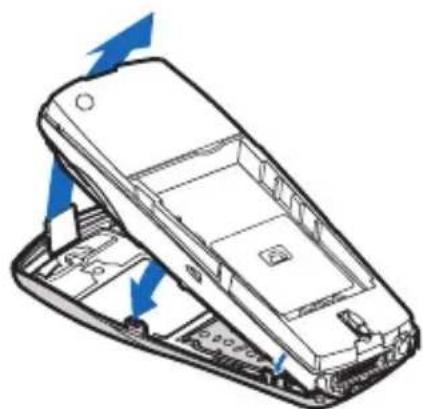
1 Hold the phone face down.
2 Insert the tabs at the bottom of the front cover into the matching holes at the bottom of the phone.
3 Gently push the tabs at the middle of the front cover into the matching holes in the middle of the phone.
4 Slowly push the tab at the top of the front cover through the slot at the top of the phone.
natural_image
Diagram of a mobile phone showing internal components and blue directional arrows indicating movement (no text or symbols)- REPLACE THE BACK COVER
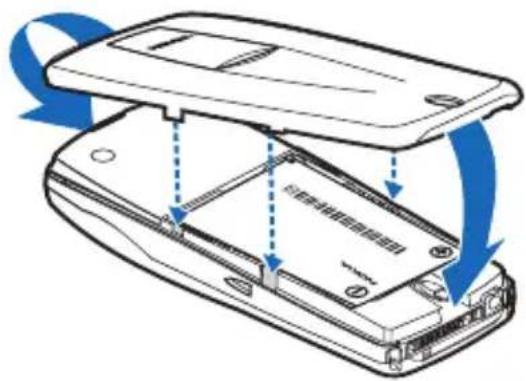
1 Insert the tab at the top of the back cover into the slot at the top of the phone.
2 Lower the cover onto the back of the phone until the bottom locks into place.
• SWITCH ON YOUR PHONE
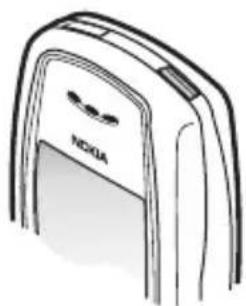
Once the battery is charged, you can switch on your phone. Press and hold the gray power key (located on the top of the phone) for two seconds.

Warning: Do not switch on the phone when wireless phone use is prohibited or when it may cause interference or danger.
natural_image
Line drawing of a Nokia mobile phone with a logo on the cover (no text or symbols beyond branding)• THE START SCREEN
When you switch on your phone, a welcome note appears, and then you see the start screen. In this guide, most instructions will begin with how to access a feature from Menu or Contacts, which are located on the start screen.
You can easily return to the start screen from any activity by pressing the End key. The phone erases any text or information you may have entered, and returns to its home screen when you press the End key. However, if you were writing a new text message, the message remains available.

ABOUT THE START SCREEN
| HOME | Your service provider's name may appear here. |
 | Signal strength. A higher bar on the left side of the start screen indicates a stronger signal. If you do not see any bars, you are out of the range of service. |
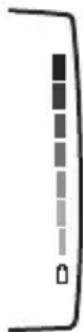 | Shows the battery charge level. The higher the bar, the higher the power level in the battery. |
| Menu The top | level of menu choices on your phone.Press the Left selection key to enter the menus. |
| Contacts The | entry point for the phone book. Press the right selection key to enter the Contacts feature. |
| D | Indicates that you are connected to a digital network. This graphic is located in the top left corner of the start screen. |
4 Phone setup
• VOLUME
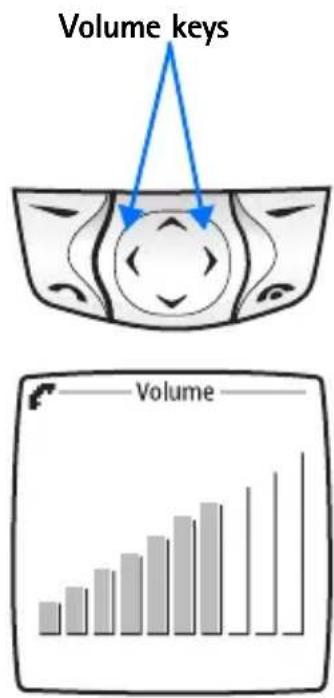
During a call, you can change the volume level on your phone, making incoming voice sounds louder or softer. The volume keys are the same as the left and right scroll keys. Press the right arrow to increase volume or the left arrow to decrease volume. A bar chart appears on the phone screen, showing the current volume level.
Before adjusting the volume, you may need to clear digits from the display. Once you start entering digits, such as a bank account number, the scroll keys function as a cursor.
You can adjust the volume when you are in a call at the start screen, or when you are listening to tones. If you are in a call, and have activated other phone menus or functions, you have to return to the start screen to adjust the volume.
HEADSET
A headset may be purchased with your phone or separately as an enhancement. Using a headset provides convenient handsfree communications.
To connect the headset, plug the headset jack into the Pop-Port™ connector on the bottom of your phone.
With the headset connected, you can make, answer, and end calls as usual. To view available Nokia headsets for your phone, visit www.nokia.com/us.

natural_image
Diagram showing a cable connector being inserted into a device, with no visible text or symbols.• DISPLAY CONTRAST
You can change the contrast on your display, making it brighter or darker.
1 Press Menu, then select Settings > Display settings > Display brightness.
2 Press the right arrow to increase the contrast, or the left arrow to decrease it.
3 Select OK to confirm your changes.

bar
Brightness | Category | Brightness | |---|---| | OK | 10 | | OK | 12 | | OK | 14 | | OK | 16 | | OK | 18 | | OK | 20 | | OK | 22 | | OK | 24 | | OK | 26 | | OK | 28 | | OK | 30 | | Back | 50 | | Back | 55 | | Back | 60 | | Back | 65 | | Back | 70 | | Back | 75 | | Back | 80 | | Back | 85 | | Back | 90 | | Back | 95 |• EQUALIZER
Like a stereo, you can customize the audio properties of your phone using the equalizer. Choose from a list of presets or create a custom set of your own.
1 Press Menu, then select Settings > Call settings > Equalizer.
2 Choose one of the following options from the Equalizer menu:
Normal—Selects the default setting for the equalizer.
Bright—Emphasizes high frequencies.
Dark—Emphasizes low frequencies.
Loudness—Emphasizes both high and low frequencies, but not middle frequencies.
Set—Allows you to define three different sets of sound settings that you can activate, deactivate, edit, or rename.
- LEARN THE KEYS
The following is a list of keys and their functions. Refer to the diagram at the front of the book for the location of the keys.
Power button—Press and hold to switch the phone on or off. Press briefly to access the list of profiles.
Talk key—Press 📋 to make a call to the name or number shown on the screen or to answer a call. Press the Talk key once at the start screen to view a list of numbers you have recently dialed. Scroll to review the list and press the Talk key to call a number shown in the list. The Talk key is green.
End key—Press 📄 to end a call or to silence the ring from an incoming call. Also, press to return to the start screen. The End key is red.
Number keys—Use keys 2–9 to enter numbers and letters. Use the 0 key if you want to insert a blank space while entering text.
1 key—At the start screen, press and hold 1 key to call your voice mailbox. This feature requires one-time setup in your phone.
* key—When writing a message, press * to enter special characters, such as punctuation marks.
Selection keys—Press to choose the option shown by the word above the key (for example, Menu).
Four-way Scroll key—Press the up, down, right, and left arrows to scroll through a menu list of options, change the volume during a call, move the cursor when entering text, and to move when playing games.
• MAKE AND ANSWER CALLS
Use this quick guide to make and answer calls.
Switch the phone on (or off)—Press and hold the Power key for 2 seconds.
Make a call—Enter a phone number, including 1 plus the area code if needed, and press the Talk key.
Answer a call—When your phone rings, press the Talk key.
End a call—Press End.
Avoid unintentional calls—Press Menu >*. Activates the Keyguard feature.
You cannot accidentally make a call.
Turn Keyguard off—Press Unlock > *.
• THE SPEAKER PHONE
Your phone has a speaker phone that you can use during a call. Do not hold the phone to your ear while the speaker phone is activated.
• To activate the speaker phone, press the Right selection key.
• To deactivate the speaker phone during a call, press Handset.
- The speaker phone is deactivated automatically when a call (or a call attempt) ends or when certain enhancements are connected.

Note: When you select the New call option from the in-call menu, the speaker phone does not automatically deactivate.
- PHONE SYMBOLS
The following is a collection of the various symbols you may see on your phone.
| Symbol What it means | |
| [ATT] | You have an active call. |
 | The phone is waiting for you to enter numbers or text. |
| [AD00] | You have turned off call alert tones and text message alert tones, and set your ringing tone to Silent. |
 | You have activated Keyguard to help prevent any accidental key presses. |
 | You have one or more voice messages waiting. |
| [D380] | You have one or more unread text messages waiting. |
| [4T20] | You have attempted to send the message. |
| D | Digital service is available. |
 | Letters you enter will be uppercase (capital letters). Press # to switch to lowercase. |
| [4770] | Letters you enter will be lowercase. Press # to switch to uppercase. |
| [06W8] | Letters you enter will be in sentence case. |
 | Characters you enter will be numbers. |
| [0W8Z] | You are using predictive text. Available when entering information into your calendar, to-do list, or writing text messages. |
| [KSXA] | You are using predictive text. Characters you enter will be uppercase letters. |
| [206Y] | You are using predictive text. Characters you enter will be lowercase letters (c, e, m, etc.). |
| [0DC7] | You can enter only symbols, such as punctuation marks. Appears when you press and hold * while entering or editing text. |
| [C40Z] | The alarm clock is set. |
• THE SELECTION KEYS
Note the two selection keys beneath the screen. The function of each key is determined by the word shown above them on the screen.

flowchart
graph LR
    A["Left selection key"] --> B((Central icon))
    B --> C["Right selection key"]
For example, press the Left selection key when the word Menu appears above it to show the first of many menus. Scroll through the menus with the scroll keys.
Press the Right selection key when Contacts appears above it to open the phone book menu. The Right selection key can be personalized. See "Right selection key settings" on page 58 for more information.
• IN-PHONE HELP
Your phone provides brief descriptions of all menu options in an in-phone help system. To activate the help text, select Menu > Settings > Phone settings > Help text activation.
1 Scroll to a menu or submenu option.
2 Wait about 15 seconds and a short message appears, describing the option and what it does.
3 Scroll up and down to read the longer descriptions.
- PHONE MENUS
Phone features are grouped according to function and are accessed through the main menus of your phone. Each main menu contains submenus and lists from which you can select or view items and customize phone features. You can access these menus and submenus by using the scroll method or by using a shortcut.

Note: Some features may not be available, depending on your network. For more information, contact your service provider.
Scroll method
1 At the start screen, select Menu.
2 Scroll through the main menus one at a time using the up and down arrows on the four-way Scroll key.
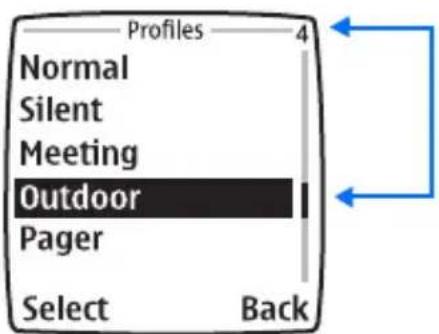
As you scroll through the menus, the menu number appears in the upper right corner of the display. In addition, the name of the menu appears at the top of the display.

3 When the desired menu is highlighted, press the Left selection key.
4 If the menu contains submenus, use the scroll keys to highlight the desired menu, and press the Left selection key.
Select Back (press the Right selection key) to return to the previous menu or submenu.
Press the End key to return to the start screen from any main menu.
Navigate the menu
The convention for locating features in your phone is illustrated in the following sentence:
From the menu, select Settings > Call settings > Automatic redial.
To locate Automatic redial you will first enter the menu from the start screen by pressing the left selection key. You will then scroll to Settings and press Select. You will continue to scroll and select each subsequent word listed in bold text.
Shortcuts
You can go directly to almost any menu or submenu, as well as activate most features by using a shortcut.
Select Menu, and within a few seconds, press the key or keys associated with the menu function you would like to view or activate. The shortcut numbers are located on the display in the upper right corner of each menu.
For example, to select the Meeting profile, select Menu 3-3-1 (Menu > Profiles > Meeting > Select) from the start screen. After a brief pause, the Meeting profile is activated.
5 Text entry
This section gives detailed instructions for entering names, numbers, messages, and other information into your phone.
- "The phone book" on page 28 tells you how to use and manage names and numbers.
- "Text messages" on page 77 tells you how to send, receive, and manage mobile messages.
• ENTERING LETTERS AND NUMBERS
Depending on the kind of information you are entering (names, numbers, or text), you can enter information into your phone in three ways:
| Method Icon Description Function | |||
| ABC All uppercase letters Entering text. You can switch the case by pressing the # key. | |||
| 123 Numbers Entering numbers. You can switch to number mode if you press and hold the # key. | |||
| Predictive text | abc | Predicts text as you write | Writing messages and notes. |
• ABC AND 123 METHODS
You can enter any combination of numbers and letters into phone book entries, Web addresses, and more using the ABC and 123 methods. When writing messages and notes, predictive text is available. See "Predictive text" on page 24 for more information.
The phone shows the current method with an icon in the upper left corner of the screen.
Letters
When you are in a name box in the phone book, use the phone keypad to enter letters:
1 Find the key with the letter you want to enter.
2 Press the key repeatedly until the letter appears on the screen.
For example, press 2 three times to enter the letter C.
3 Wait for the blinking cursor to reappear before you enter another letter, unless the letter is on a different key.
Example: To enter the name Albert:
Press Displayed text
| 2 for A | A | |||||
| 5 5 5 for l | A | l | ||||
| 2 2 for b | A | l | b | |||
| 3 3 for e | A | l | b | e | ||
| 7 7 7 for r | A | l | b | e | r | |
| 8 for t | A | l | b | e | r | t |

Note: The default case in Abc is sentence case. Only the first letter of each sentence is capitalized.
Numbers
When you are entering text, press and hold # until you see the 123 icon on the screen. To enter numbers, simply press the numbers you want.
Punctuation and other characters
Depending on the language selected for your phone, the following characters may be available:
| Key Characters Key Characters | ||
| 1 Punctuation and 17 PQRS7 | ||
| 2 ABC28 TUV8 | ||
| 3 DEF3 | 9 | WXYZ9 |
| 4 GH140 Space,0 | ||
| 5 JKL5 | * | Press and hold for punctuation and symbols. |
| 6 MNO6 | # | Changes letter case. |

Note: Some networks may not support all language-dependent characters and/or services.
SPACES AND PUNCTUATION
- Press 0 to enter a space between words.
- Press 1 briefly while in Abc to enter a period.
- Press *to show special characters. A screen appears with the available special characters.
Use the scroll keys to select a character, and press Insert.
ERASE MISTAKES
If you make a mistake:
- Press Clear to erase one character to the left.
• To erase all text, select Options > Clear text, or press and hold Clear.
CHANGE LETTER CASE
- To change cases (upper, lower, predictive, sentence), press #.
The icon switches to , to indicate lowercase letters.
- Press and hold a key until the number of that key appears on the screen, or press and hold # to switch to numbers.
Special characters
Your phone has specials characters, symbols, and punctuation that are available when writing text. Here is a sample:

IN ABC
1 Press and hold the * key to access available symbols.
2 Use the arrow keys to move to the character you want, and select Insert.
IN 123
The * key inserts special characters when you are prompted to enter a phone number.
* This character sends command strings to the network. Contact your service provider for details.
p This character creates a pause that occurs when the phone dials a number. Numbers entered to the right of this special character are automatically sent as touch tones after a 2.5-second pause.
w This character causes the phone to wait for you to press Send.

- PREDICTIVE TEXT
When you are writing text messages on your phone, you can use the predictive text method of entering information. With predictive text, you need to press each number key only once for each letter. The phone predicts, or guesses, what you are writing.

For example: To write "Nokia" with the English dictionary selected:
Press Displayed text
| 6 | o | ||
| 6 | o | n | |
| 5 | o | n | l |
| 4 | o | n | l |
| 2 | N | o | k |
The maximum number of characters available is 160. The character counter appears in the top right corner of the screen and counts down for each character you add.
Keys for predictive text
| Key Purpose | |
| 2-9 Use for text entry. Press each key only once for each letter. | |
| * Press to view the next matching word if the underlined word is not the word you intended. Press and hold this key for a list of symbols. | |
| Spell If the dictionary sees a word it does not recognize, you see Spell above the Left selection key. Select Spell, enter the word, and press Save. | |
| 0 Press once to accept a word and add a space. | |
| # | Press and hold to enter a number. You see the icon on the screen. Press and hold # again to write text letters. Press once quickly to switch the character case. indicates all uppercase, indicates lowercase, and |
| Clear | Press once to delete the character to the left of the cursor. |
Turn on text input
1 Select Menu > Messages > Create message.
2 Select Options > Predictive text.
3 Scroll to the dictionary you want (for example, English).
4 Press Select.
T9 prediction on appears. (T9 is the technical name for predictive text input.) This means you can use the predictive text method to enter text. When writing a text message, the predictive text icon appears. Predictive text can be turned on and off when you press the # key. You may need to press the # key more than once.

Note: When you turn on predictive text, it is also active when adding notes to the calendar and to-do list.
Turn off text input
1 Select Menu > Messages > Create message.
2 Select Options > Predictive text.
3 Scroll to Prediction off and press Select.
Tips for text
CHECK A WORD
When you have finished writing, make sure the underlined word is the word you intended to write.
If the word is correct:
- Insert a punctuation mark, if needed.
- Press 0 to confirm the change and enter a space.
- Start writing the next word.
If the word is not correct:
- Press * repeatedly until the word you want appears, and then press 0 to confirm it.
OR
- Select Options > Matches. Scroll to the correct word and press Use.
- Start writing the next word.
When you enter a period to end a sentence, the phone switches to so that the first letter in the next word will be uppercase (a capital letter).
ADD A WORD TO THE DICTIONARY
If Options changes to Spell, the word you intended to write is not in the dictionary. You can add the word to the dictionary.
1 Select Spell and enter the word using standard text entry.
2 Select Save to save the word.
INSERT NUMBERS
1 To add a number to the message, press and hold # until appears on the screen.
2 Enter the numbers you want, and then press and hold # to return to the method.
You can also press and hold any number key while writing a message.
INSERT SYMBOLS
1 To put a symbol in the message, select Options > Insert symbol, or press * and scroll to the symbol you want.
2 Select the symbol you want and press Insert.
WRITE COMPOUND WORDS
1 Write the first word and scroll right to accept it.
2 Write the second word.
6 The phone book
Your phone includes a phone book that can store up to 500 contact names with up to five phone numbers per contact. The phone book can also store up to four text entries per contact, such as notes or addresses.
- An entry in the phone book can consist of a number only or a name and a number.
- You cannot enter the same name twice. If you try to save a name that is already in the phone book, the phone asks if you want to add the number to an existing contact.

• VIEW CONTACTS
There are several ways to view the contacts in your phone book:
- At the start screen, use the up and down arrows on the Scroll key to view your contacts.
- Select Contacts > Find, and enter the first letter of the name. If more than one name appears, scroll to the name you want.
- SAVE NAMES AND NUMBERS
You have several options for saving names and numbers.
Quickly save a number
1 Enter the phone number using the keypad.
2 Press and hold Options.
Quickly save a name and number
1 Enter the phone number using the keypad.
2 Select Options > Save.
3 Enter a name and press OK.
4 Press Done to return to the start screen.
Save an entry using the Contacts menu
1 Select Contacts > Add contact.
2 Enter a name and press OK.
3 Enter a number and press OK > Done to return to the start screen.
- SAVE A TEXT ENTRY WITH A NAME
Once you have added a contact to your phone book, you can add up to four text entries, such as an e-mail address, a mailing address, or a note to that contact.

Note: Text entries can only be added to existing contacts. For instance, you cannot enter an e-mail address until you have selected a name to add the address to.
1 Find the name or number to which you want to add text.
2 Select Details > Options > Add detail > E-mail address, Street address, or Note.
3 Add your text, and press OK.
4 Press the End key to return to the start screen.
• RETRIEVE INFORMATION
You can retrieve numbers from the phone book several different ways.
Retrieve numbers
1 At the start screen, select Contacts > Find.
2 Enter the desired name.
3 When the name appears, press the Talk key to call the number.
Retrieve information with shortcuts
You may want to use some of these shortcuts or alternate methods for retrieving a contact.
- Press Contacts, enter the first letter of the name, scroll to the name, and press Details.
- At the start screen, press the up or down Scroll key to immediately enter your list of names, scroll to the name you want, and press Details.
- Press the Talk key to access a list of your last dialed calls, scroll to the one you want to dial, and press the Talk key again.
- MENUS
The phone book has several options from which you can choose. These options appear when you press Contacts. Use the scroll keys to move to the menu you want to use.
Find—Search for a specific entry.
Add contact—Add a new contact to your phone book.
Edit name—Edit an existing contact.
Delete—Delete names and numbers one by one or all at once.
Add number—Add a number to an existing contact.
Settings—Check the phone book memory status and change the scrolling view.
1-touch dialing—Assign up to eight keys for speed dialing.
Voice tags—Allows you to playback, change, or delete your voice tags.
Caller groups—The caller groups feature enables you to identify callers by the ringing tone or graphic that you have assigned to their group. A group can be as small as one person or as large as your entire phone book. You can define the ringing tone and graphic for up to five predefined groups in your phone book.
- CHANGE CONTACTS VIEW
You can view your phone book in two different ways:
Name list—Shows all the names that are stored in your phone book. Four names appear on the screen at a time.
Name and number—Shows individual names and numbers. Only one name and its corresponding phone number appears on the screen at a time.
In all views, you can use the Scroll key to move up and down through the list of names.
To change contacts view:
1 Select Contacts > Settings > Contacts view.
2 Scroll to the view you want and press Select.
• EDIT A NAME OR NUMBER
You can edit a name, a number, or both.
1 Retrieve the name or number you wish to edit.
2 Select Details > Options > Edit number or Edit name.
3 Edit the name or number and press OK.
• ERASE STORED NAMES AND NUMBERS
Erasing stored names and numbers removes them from your phone.
Once you delete an item, you can restore it only by reentering it.
Delete a number from a contact
1 Retrieve the contact you want to edit.
2 Select Details > Options > Delete number.
3 When the message Delete? appears, press OK.
Delete the contact
1 Select Contacts > Delete > One by one.
2 Scroll to the entry you want to erase and press Delete.
3 When the message Delete all details? appears, press OK.
- DELETE THE ENTIRE PHONE BOOK
These steps delete all contacts in your phone book.
1 Select Contacts > Delete > Select > Delete all.
2 When you see the message Are you sure?, press OK.
3 Enter your security code, and press OK.
- ADD A SECOND NUMBER TO A NAME
There are several ways to add a number to an existing name in the phone book. Once you choose to add a number, you can select one of the following number type locations in which to store the second number: General, Mobile, Home, Work, or Fax.

From the phone book
1 Select Contacts > Add number.
2 Scroll to the name to which you want to add the number, and press Add.
3 Select General, Mobile, Home, Work, or Fax.
4 Enter the number and press OK.
From the start screen
1 Enter the phone number using the keypad.
2 Select Options > Add to contact.
3 Scroll to the name to which you want to add the number and press Add.
4 Scroll to the desired number type and press Select.
By retrieving the name
1 Retrieve the name to which you would like to add a second number.
2 Select Details > Options > Add number.
3 Scroll to the desired number type, and press Select.
4 Enter the number, and press OK.
Change the number type
Once you have saved a name with two numbers, you can change the number type for either of the phone numbers. (For example, you can change the type if you saved a number as General and you want to change it to Home.)
1 Retrieve the name from the phone book.
2 Press Details, and scroll to the number you want to change.
3 Select Options > Change type.
4 Scroll to the number type you would like and press Select.
Specify a primary number
If any contacts in your phone book have multiple numbers, specify the number that you dial most often (for that name) as the primary number. By assigning the most-used number as primary, you are telling the phone to dial that number when you select the name for dialing—a great time saver when you dial names with two numbers.
1 Retrieve the name for which you want to select a primary number.
2 Press Details, and scroll to the number you want to set as the primary number.
3 Select Options > As primary number.
Primary number set appears on the screen.
- CREATE CALLER GROUPS
Your phone allows you to create caller groups for listings with similar attributes in your phone book. The five available default caller groups are Family, VIP, Friends, Business, and Other. Each group has attributes that can be defined by the user: Group name, Group tone, and Group logo.
ADD A NAME AND PHONE NUMBER
1 Once you have retrieved the desired name and number from the phone book, select Details > Options > Caller groups.
2 Scroll to the desired caller group (for example, Family), and press Select.
SET A RINGING TONE AND GRAPHIC
1 Select Contacts > Caller groups.
2 Scroll to one of the caller groups and press Select.
3 Scroll to one of the following functions and press Select.
Rename group—Enter the new name for the caller group and press OK.
Group ringing tone—Scroll to the desired tone and press OK. Default is the tone selected for the currently selected profile.
Group logo—Scroll to On, Off, or View, and press Select.
Group members—Press Select to view group members. To add or remove a member, select Options > Add name or Remove name.
- CHECK MEMORY STATUS
You can learn what percentage of phone memory is free and what percentage has been used.
Select Contacts > Settings > Memory status.
7 Call history
Your phone provides a call log that registers information about calls you make and receive.
The call log keeps track of:
- Missed calls
- Received calls
- Dialed numbers
- Time spent on calls
natural_image
Illustration of a vintage rotary telephone with directional arrows (no text or symbols)- CHECK MISSED, RECEIVED, OR DIALED CALLS
1 From the start screen, select Menu > Call log.
2 Scroll up or down to select Missed calls, Received calls, Dialed numbers, Delete recent call lists, or Call timers.
For missed, received, and dialed numbers, a phone number (or the name associated with a number in the phone book) appears.
3 Scroll up or down to the number or name you want, and press Options.
4 For missed, received, and dialed names or numbers, select from the options in the following list:
Call time—Shows the date and time when the call was connected, if you have set the phone clock.
Send message—Allows you to write and send a text message to numbers listed in the call log.
View number—Shows a number when the contact name appears in the call list.
Edit number—Allows you to edit the number shown on the screen and select from a list of options, which includes adding the number to a contact.
Save—Saves the number in your phone book.
Add to contact—Allows you to add the number to an existing contact.
Delete—Removes the number from the call log.
Call—Allows you to call the number that just called your phone.
To dial any number that appears on the phone screen, press the Talk key.
MISSED CALLS
Your phone stores the numbers of calls you have missed. When you miss a call, missed call(s) appears, along with the number of calls missed.
You are notified of missed calls only if your phone was turned on in the original service area of your service provider.

Note: If you chose the Forward if not answered option in Call Forwarding, your phone treats these forwarded calls as missed calls. See "Call forwarding" on page 39.
DIALED CALLS, RECEIVED CALLS
Your phone stores the numbers of the last several calls you have dialed or received.
- CLEAR CALL LISTS
Your phone uses call lists to track numbers for incoming, outgoing, and missed calls. You can delete some or all of the numbers that appear in the call log. You can delete dialed numbers, received call numbers, or missed call numbers.
1 From the menu, select Call log > Delete recent call lists.
2 Scroll to the option you would like to clear and press Select.

Warning: You cannot undo this operation.
- CALL TIMERS
Your phone uses call timers to track the amount of time you spend on each call. You can review phone use by checking the call timers.
1 From the menu, select Call log > Call timers.
2 Scroll up or down through the options described in the following list:
Duration of last call—Shows the time used for the last call made.
Duration of dialed calls—Shows the time used for all outgoing calls since you reset the timers.
Duration of received calls—Shows the time used for all received calls since you reset the timers.
Duration of all calls—Shows the time used for all calls that have been made and received since you reset the timers.
Clear timers—Clears (erases) all call timers for the currently selected phone number. Your phone includes separate timers for each number used, with the exception of the life timer.

Warning: This action cannot be undone. If you use this feature to log the amount of time spent on calls, you may want to record the information in the call timers before you clear them.

Note: The actual invoice for calls and services from your service provider may vary, depending on network features, rounding off for billing, taxes, and so forth.

Note: Some timers may be reset during service or software upgrades.
• TURN ON A CURRENT CALL TIMER
You can set your phone to show the elapsed time during a call.
1 From the menu, select Settings > Call settings > Show call time on display > On.
Now the timer is active during each call you make or receive. The time appears on the phone screen.
2 After a call has ended, press any key on your phone to clear the current call time from the screen.
- CLEAR CALL TIMERS
1 From the menu, select Call log > Call timers > Clear timers.
2 Enter your security code and press OK.
8 Advanced calling features
This chapter describes advanced calling features such as conference calling, using call waiting, and using credit cards for calls. Not all the features described here are available in all wireless network systems.
- SET IN-CALL OPTIONS
Your phone allows you to use a number of features during a call. These features are known as in-call options. To access an option during a call, press Options, and choose one of the following options:

Note: Many in-call options are network service features. To use these options, you may need to contact your service provider.
Loudspeaker—Activates the speaker phone.
Lock keypad—Activates Keyguard.
Record—Record sounds with your phone and listen to them later.
Equalizer—Customizes the audio properties of your phone.
New call—Creates a new call while in a call.
Touch tones—Manually enter a touch tone string (series of tones) or search for a string in your phone.
End all calls—Ends all active calls.
Contacts—Use the phone book. Once you open the phone book, pressing the End key will not close the phone book, but it will end the current call.
Menu—Takes you to the main menus.
Mute—Mutes the phone microphone. If the microphone has already been muted, Unmute appears instead of Mute. Press OK to choose either of these options.

Note: The above options can affect the microphones of any enhancements connected to the phone.
- CALL WAITING
If you have call waiting, your phone beeps during a call to let you know that someone else is calling you. Depending on your caller ID setup, the phone might also show the number of the incoming call. Once call waiting has been activated, Call waiting appears as a menu option.

Note: Call waiting is a network dependent feature. In some networks the call waiting code must be activated manually. Contact your service provider for availability and full details.
Store the feature code
1 From the menu, select Settings > Network services > Network feature setting.
2 Enter the feature code your service provider gave you and press OK.
3 Select Call waiting > Activate.
Activate
Select Settings > Network services > Call waiting > Activate.
Manage calls
Call waiting works with both local and long distance calls.
• To answer an incoming call, press the Talk key.
• To switch from one call to another, press the Talk key.
• To end both calls, press the End key.
• MAKE A CONFERENCE CALL
While in a call, you can call another number and add a third party to the call.

Note: Conference calling is a network dependent feature. Contact your service provider for availability and details.
Add a third party
1 While in a call, select Options > New call, enter the phone number, and press Call.
2 When the third party answers, press the Talk key to connect all calls.
Disconnect third party
While all three parties are connected, press the Talk key to disconnect the third caller while keeping the second party's call active.
Disconnect second party
To disconnect the second party and remain connected to the third party, have the second party terminate the call on his/her end.
End a conference call
To end all calls, press the End key.
Number look-up during a call
If you do not remember a number that you need to call while in another call, and you know that this number is in your phone book, you can retrieve the number without having to end the current call.
1 During the call, select Options > Contacts > Find.
2 Enter a name and press Find, or scroll through the phone book.
3 Press Details.
- VOICE PRIVACY
The voice privacy feature protects the privacy of your current phone conversation from other callers placing phone calls on your same network.

Note: Voice privacy is a network dependent feature. Contact your service provider for more information.
1 From the menu, select Settings > Network services > Voice privacy.
2 Select On to activate, or Off to deactivate.
During a call, voice privacy becomes active and notifies you with a beep. A notification message also appears on the screen. If you turn this feature on and voice privacy becomes inactive, your phone beeps and displays the message Voice privacy not active.

Note: Use caution when sending confidential information if voice privacy is not active.
- CALL FORWARDING
With call forwarding, you can send incoming calls to another phone number. Before you can use call forwarding, you must first store the feature codes. Once call forwarding has been activated, Call forwarding appears as a menu option.

Note: Call forwarding is a network dependent feature. Some networks require that call forwarding be activated manually. Contact your service provider for availability and full details.
Call forwarding feature codes
Your network requires separate codes for activating and cancelling the various types of call forwarding. You must contact your service provider to obtain the necessary feature codes for these network services.
Once you store these feature codes in your phone, they are sent automatically to the network when you select one of the call forwarding options.
Your phone can store the following types of feature codes:
Forward all calls—Forward all incoming calls to the number you specify.
Forward if busy—Forward incoming calls when you are in a call.
Forward if not answered—Forward incoming calls when you are unable to answer.
Forward if out of reach—Forward incoming calls when the phone is out of the network or switched off.
Cancel all call forwarding—Cancel all active call forwarding options.
Store the feature code
1 From the menu, select Settings > Network services > Network feature setting.
2 Enter the feature code and press OK > Call forwarding.
3 Select the call forwarding option you want, then select Activate.
Activate or cancel
1 From the menu, select Settings > Network services > Call forwarding.
2 Select the desired call forwarding option.
3 Select Activate.
4 If you are activating call forwarding, enter the number to which you want your calls forwarded (or press Find to recall a number from the phone book); then select OK.
• AUTOMATIC REDIAL
When the wireless network is busy or unavailable, Automatic redial instructs your phone to retry the call. However, this feature does not automatically retry a number when the number you are calling is busy.
From the menus, select Settings > Call settings > Automatic redial > On.
If the network is busy, your phone makes three additional call attempts. If you want to stop the automatic redial process before the last attempt, press the End key.
- CALLING CARD
You can use a calling card when you dial long distance. First you must store your calling card information in the phone. Your phone can store information for a maximum of four calling cards.
Save calling card information
PART 1
1 Select Settings > Call settings > Calling card.
Enter your security code at the prompt.
2 Scroll to card A, B, C, or D and select Options > Edit > OK > Dialing sequence.
3 Scroll through the list of dialing sequences until you find the one that matches your calling card, and press Select.
PART 2
The order of the following steps may vary, depending on which dialing sequence your card uses.
4 When prompted for the calling card access number, enter the number and press OK. This number is usually the 1-800 number that is listed on the calling card.
5 At the prompt, enter the calling card number (and PIN number if required), and press OK.
6 Press OK again when the Save changes? message appears.
7 Select Card name and enter the card name using your phone keypad.
8 Press OK.
Choose a calling card
If you have more than one calling card, you must choose one before making a call.
1 From the menu, select Settings > Call settings > Calling card. Enter your security code at the prompt.
2 Scroll to the desired card and select Options > Select > OK.
The message Card ready for use appears.
Make a call
1 Enter the phone number, including any prefix (such as 0 or 1) that your calling card might require when you make a calling card call.
See your calling card for instructions.
2 Press and hold the Talk key until your phone displays Card call and Wait for tone; then press OK.
3 When you hear the tone from your calling card service, press OK.
After the tone, your phone displays Again, press OK after tone.
4 Press OK.

Note: This procedure might not apply to all the calling card options that are programmed into your phone. Check your calling card for more information, or contact your local or long distance company.
- VOICE TAGS
You can dial up to 10 of your stored phone book numbers using the voice dialing feature. Before you can place a call using voice dialing, you must first assign a voice tag to the number.
Assign a voice tag to a phone number
1 At the start screen, scroll to the name to which you want to give a voice tag.
2 Select Details > Options > Add voice tag > Start.
You hear several beeps, and Please speak now appears.
3 Speak clearly into the microphone, or press Quit to cancel the recording. The phone automatically stops recording and then saves and replays the voice tag.
VOICE TAG ERRORS
If recording is not successful, you may see an error message. Press OK to try again.
Before using voice tags, note that:
- Voice tags are not language-dependent. They are dependent on the speaker's voice.
- You must say the name exactly as you said it when you recorded it.
- Voice tags are sensitive to background noise. Record voice tags and use them in a quiet environment.
- Very short names are not accepted. Use long names and avoid similar names for different numbers.

Note: Using voice tags may be difficult in a noisy environment or during an emergency, so you should not rely solely upon voice dialing in all circumstances.
DIAL A NUMBER USING VOICE DIALING
1 Press and hold the Right selection key.
When you hear several beeps and Please speak now appears, release the button.
If you have the optional headset attached, press and hold the headset button; when the phone beeps and Please speak now appears, release the button.
2 Pronounce the voice tag clearly into the microphone.
When the phone finds the voice tag, the phone automatically dials the number.
If the phone does not locate a number, you hear an error tone and No match found appears. To start voice dialing again, press and hold the Right selection key (or the headset button) immediately after the error tone.
Play back a voice tag
1 Select Contacts > Voice tags.
2 Scroll to the name with the voice tag you want to hear.
3 Select Options > Playback.
Change a voice tag
1 Select Contacts > Voice tags.
2 Scroll to the name with the voice tag you want to change.
3 Select Options > Change > Start.
The phone repeats your voice tag, and Voice tag changed appears.
Erase a voice tag
1 Select Contacts > Voice tags.
2 Scroll to the name with the voice tag you want to delete.
3 Select Options > Delete > OK.
• VOICE RECORDER
This feature allows you to record speech or sounds with your phone. You can record information such as phone numbers and personal memos, but the voice recorder can also record an active phone conversation. The total available time is 180 seconds if no memos have been stored. The maximum length of a recording depends on how much memory remains available. The length of time remaining for a current recording will be displayed on the phone screen.
Record speech or sound
1 From the menu, select Voice > Voice recorder > Record.
After the recorder start tone is heard, the phone begins recording.
2 When you finish recording, select Stop.
3 Enter the title you wish to assign to the recording and press OK.
Record while in a call
1 While in a call, select Options > Record.
After the recorder start tone is heard, the recorder begins recording the phone conversation. Also, the recorder recording tone will play every 5 seconds to remind the other person on the call that the conversation is being recorded.
2 When recording is done, select Stop.
Recording saved appears, and the recording is saved in the Recordings list.
View recording list and play recordings
1 View your saved recordings by selecting Voice > Voice recorder > Recordings list.
2 Scroll to the recording you would like to play, and select Options > Playback.
3 End the playback by selecting Stop.
Delete a recording
From the Recording list menu, select the recording you would like to delete, and select Options > Delete.
Edit a recording title
1 Go to the Recordings list, and scroll to a recording.
2 Select Options > Edit title.
3 Edit the title as needed and press OK.
Set the voice memo alarm
1 Go to the Recordings list, and scroll to a recording.
2 Select Options > Add alarm.
3 Enter the alarm date and time, and press OK.
When the alarm sounds, select Stop > Options > Play or Play via IHF to hear the recording.

Note: The recorder cannot be used when a data call or GPRS connection is active.
• VOICE COMMANDS
The voice command feature allows hands-free operation of certain phone features. You can add a voice command to select a profile, or activate a feature. Voice commands work similar to voice dialing. Before using voice commands, you must first associate a voice tag to the phone function. You can set as many as five voice commands.
View available functions
From the menu, select Voice > Voice commands to scroll through the list of profiles and features:
Profiles—Normal, Silent, Meeting, Outdoor, Pager
Voice mailbox—Check your voice messages.
Infrared—Activates the IR port.
Voice recorder—Record personal memos or active calls.
Call log—Set up a voice command to take you to your call log.
Add a voice tag for the command
1 Select Voice > Voice commands.
2 Scroll to the phone function you wish to tag, and press Select.
3 Select Options > Add command > Start.
Speak the voice tag clearly into the microphone, or press Quit to cancel the recording.
The phone replays then saves the recorded tag. The icon appears next to commands which have voice tags assigned.
Activate a voice command
After you have associated a voice tag with a phone function, you can issue a command by speaking the voice tag. There are two ways to activate a voice command:
1 If you have the optional headset attached, press and hold the headset button. OR
Press and hold the Right selection key.
2 When Please speak now appears, pronounce the voice tag clearly into the microphone.
When the phone finds the tag, Found appears, and the command is issued.
Voice command tag options
After you have associated a voice tag to a command, you can choose one of the following options:
- Listen to the tag (playback)
- Change the tag
- Delete the tag
- CALLER ID
With each call you place, you can determine whether your telephone number appears to the person you are calling.
In most service areas, when you call others, your name is presented to their caller ID (if they subscribe). With Send my caller identity, you can block the display of your number when you make a call.

Note: This feature is available only when supported by the wireless network and may not function if you are roaming. This feature works on a call-by-call basis. You must enable this feature each time you want to block the sending of your own number to the recipient's caller ID.
Store the feature code
Before you can use Send my caller identity, you must store the feature code for activating this feature. Once the code is stored in your phone, it is sent automatically to the network when you select this option from your phone menu.
1 From the menu, select Settings > Network services > Network feature setting.
2 Enter the feature code from your service provider and select OK.
3 Select Send my caller identity > Yes.
Show or hide your number
From the menu, select Settings > Network services > Send my caller identity > Yes or No.
- SELECT A PHONE NUMBER
Your service provider programs your phone number and system information into your phone memory when your phone is first activated. Your phone can hold up to three numbers. This means that your phone can be activated in three different service areas. Each service area would assign a different phone number or account to your phone.
You must select a phone number for your home system. Only one phone number can be active at a time. If you travel outside your home system, you can choose another number. One phone number is usually enough if your service provider has service or roaming agreements for each area in which you wish to use your phone. Contact your service provider for details.
You need at least one active number to make calls. You cannot change from one phone number to another during a call.

Note: Phone number selection is a network dependent feature. Some networks may not support more than one number. Contact your service provider for availability and full details.
Select the phone number
1 From the menu, select Menu > Settings > Network services > Own number selection.
2 Scroll to the phone number you want to use and press Select.
- SET TOUCH TONES
Touch tones (or DTMF tones) are sounds that are produced when you press the keys on your phone keypad. You can use touch tones for many automated over-the-phone services such as checking bank balances and airline schedules and using your voice mailbox. Touch tones can be sent only when a call is active.

Warning: If you send touch tones while in the analog mode, be careful not to send confidential information.
Set manual touch tones
1 From the menu, select Settings > Phone settings > Touch tones > Manual touch tones.
2 Select one of the following options, and then press Select:
Continuous—The tone sounds as long as you press and hold the key.
Fixed—Sets the length of touch tones to Short.
Off—Turns off the tones. No tones are sent when you press a key.
Set length
You can set the length of each touch tone when you are in analog mode.
From the menu, select Settings > Phone settings > Touch tones > Touch tone length > Short or Long.
Store strings
You can store touch tone strings the same way that you store names and numbers in your phone book. You can store an entire sequence of digits and send it as touch tones for frequently used strings of numbers.
WITH PHONE NUMBERS
1 Enter the phone number that you want associated with a touch tone.
2 Press * as many times as needed to enter a w or p.
w (wait): When you dial this phone number, your phone first dials the number, and then waits (because of the w character) for you to press Send. When you press Send, the phone sends your touch tone.
p (pause): If you include a p character instead of a w, your phone pauses for 2.5 seconds and then automatically sends the touch tone.
3 Enter the touch tone string.
4 Store the number as you normally would.
SEND A STRING
1 From the menu, select Settings > Phone settings > Touch tones > Manual touch tones.
2 Make sure that the setting is not set to Off; if it is set to off, scroll to one of the other options and press Select.
3 During your call, select Options > Touch tones.
4 Enter the touch tone string or retrieve the string from the phone book, and press Tones.
9 Voice mail
Voice mail provides a way for callers who miss you to leave a message that you can retrieve later. To use voice mail, you must sign up for the feature with your wireless service provider.

natural_image
Stacked paper sheets with a small photo of a person inside, no visible text or symbols- CHECK MESSAGES
Your phone notifies you when you receive a voice message (see "Set the message alert tone" on page 53). The message New voice message appears on the phone screen, along with the 🔒 icon.
If you have received more than one voice mail message, depending on your wireless network, your phone may show the number of messages that you have received.

Note: To use voice mail, you need to learn the various greetings, passwords, and prompts of the voice mail system. Your service provider can provide instructions.
- SET UP MAILBOX
As part of your network's voice mail feature, your service provider gives you a voice mailbox phone number. Save this number in your phone to make retrieving your voice messages quick and convenient.
1 From the menu, select Messages > Voice messages > Voice mailbox number.
2 Enter your voice mailbox phone number, and press OK.
Your voice mailbox number can be up to 32 digits long and is used until changed. Therefore, if your phone number changes, you may need to change your voice mailbox number along with it.
- SET GREETINGS
Voice greetings may vary in different wireless systems. If you need information about how to record your greeting, contact your service provider.
• LISTEN TO MESSAGES
The method for listening to your voice messages varies, depending on your service provider. Call your service provider if you have any questions.
- When your phone alerts you to new voice messages, press Listen and follow the instructions given on the phone.
To listen later, press Exit.
- To listen to your voice messages at any time, press and hold the 1 key. OR
From the menu, select Messages > Voice messages > Listen to voice messages. Follow the prompts to review your messages.
10 Personalize rings and tones
- PROFILES
A profile is a group of settings you can use to customize the way your phone works. You can set your own preferences for these items:
- Ringing options
- Ringing tone
- Ringing volume
- Vibrating alert
- Message alert tone
- Keypad tones
- Warning tones
- Alert for
• Profile name (except for Normal)
Your phone comes with five profiles, and each can be customized:
- Normal (default setting)
- Silent
- Meeting
- Outdoor
- Pager

natural_image
Illustration of a drum and flute with musical notes (no text or symbols)- SELECT A DIFFERENT PROFILE
1 Quickly tap the power key or select Menu > Profiles.
2 Select the profile you want to use.
Profile names are highlighted as you scroll through them.
- CUSTOMIZE A PROFILE
1 Select Menu > Profiles.
2 Select the desired profile in the list:
Select—Activates the currently highlighted profile.
Customize—Enables you to customize a profile by changing the current settings. Press Select to view a list of options.
Timed—Allows you to set a time length for the expiration of a profile setting.

Note: When you change a setting in the current profile, it affects only that profile. Normal settings do not change.
Set ring options
You can choose the type of ring your phone uses to notify you of an incoming call. This setting does not affect any incoming text message alert tones.
1 Select Menu > Profiles.
2 Select the desired profile for which you want to set the ringing options.
3 Select Customize > Ringing options.
4 Select one of the ringing options:
Ring—The phone rings normally.
Ascending—Ringing volume increases (gets louder) if the phone is not answered.
Ring once—The phone rings once to indicate an incoming call.
Beep once—The phone beeps once to indicate an incoming call.
Silent—The phone makes no sound.
Set the ringing tone
The ringing tone is the sound your phone makes when you receive a call. You can set the ringing tone to a specific sound or tune to personalize the rings.

Note: If you have already chosen a ringing option of either Silent or Beep once, the ringing tones are already turned off.
1 Select Menu > Profiles.
2 Select the profile for which you want to set the ringing tones.
3 Select Customize > Ringing tone.
4 Scroll through the options; when you hear the tone you want, press Select.
Set the ring volume
You can set the default ringing volume for incoming voice calls and message alert tones.
1 Select Menu > Profiles.
2 Select the profile for which you want to set the ringing volume.
3 Select Customize > Ringing volume.
4 Scroll through the options; when you hear the volume level you want, press Select.

Note: As you scroll through the ringing options, pause to hear a sample of the tone. Although the ringing sample for level 4 and level 5 are the same, ringing level 5 will produce very loud ringing.
Set a vibrating alert
You can have your phone vibrate to indicate an incoming call.
1 Select Menu > Profiles.
2 Select the profile for which you want to set the vibrating alert, and press Select.
3 Select Customize > Vibrating alert > On.
The phone does not vibrate when connected to any charging device.
Set the message alert tone
You can set your phone to use a certain tone to indicate an incoming text message.
1 Select Menu > Profiles.
2 Select the profile for which you want to set the message alert tone.
3 Select Customize > Message alert tone.
4 Scroll through your choices, and select the tone you want.
The phone plays samples of each choice as you scroll to it.
Set keypad tones
Keypad tones set the volume of the tone you hear when you press your phone keys.
1 Select Menu > Profiles.
2 Select the profile for which you want to set the keypad tones.
3 Select Customize > Keypad tones.
4 Scroll to one of the levels and press Select.
If you choose Off, no keypad tones are heard.
If you chose the Silent profile, the keypad tones are turned off.
Set warning tones
You can set warning tones and the tones used for the games in your phone. Warning tones include the sounds your phone makes during error conditions, during confirmations, when a battery is low, and when you need to recharge the battery.
1 Select Menu > Profiles.
2 Select the profile for which you want to set the warning tones.
3 Select Customize > Warning tones > On.
If you do not want to use warning tones, you can select Off.

Note: Game sounds can only be set under the Games menu.
AUDIBLE ALERT
You can choose to have your phone sound an audible alert only when a member of a selected caller group is calling. For more details, see "Create caller groups" on page 32.
RENAME A PROFILE
You can rename any of the profiles except Normal. You may want to use your own name for one of the profiles. If you do this, and whenever that profile is selected, your name appears on the start screen.
1 Select Menu > Profiles.
2 Select the desired profile.
3 Select Customize > Profile name.
4 Enter the new name and press OK.
- SET A TIMED PROFILE
Timed profiles can be used to prevent missed calls. For example, suppose you attend an event that requires your phone be set to Silent before the event starts, but you forget to return it to Normal until long after the event. During this time, you may have missed several calls because the ringing tone was silent. A timed profile can prevent this by automatically returning your phone to the default profile at a time you specify.

Note: Timed profiles can be set up to 24 hours.
1 At the start screen, select Menu > Profiles.
2 Select the profile you wish to activate and set for timed expiration.
3 Select Timed.
4 Enter the time (hh:mm) and press OK
5 Select am or pm.
The profile you have set for expiration is now active and appears in the start screen along with the icon.
11 Personalize phone settings
You can change certain settings so that your phone suits your own needs and lifestyle. Changes you can make include changing the language on the screen, showing or hiding the clock, and setting up 1-touch dialing.
- SET THE LANGUAGE
You can set your phone to use a certain language.
Your possible choices are English, Spanish, Canadian French, Brazilian Portuguese, Russian, Hebrew, and traditional Chinese. These choices vary in different regions. All these languages may not be available in your phone.
1 From the menu, select Settings > Phone settings > Phone language.
2 Select the language you want to use.
- SET AND DISPLAY THE CLOCK
Your phone has an internal clock that you can set to appear on the phone screen. The clock is connected to an alarm clock. See "Alarm clock" on page 89 for details.
Set the clock
1 From the menu, select Settings > Time and date settings > Clock > Set the time.
2 Enter the time ( hh:mm) and press OK.

For example, to set your clock to 9:30 a.m., enter 09:30. If you set the time format for 24-hour time, enter the number the same way: 09:30 for 9:30 a.m., or 21:30 for 9:30 p.m.
• If you set the time format to am/pm, select am or pm.
- If you set the time format to 24-hour, the time is set as soon as you press OK after adjusting the time.
Show or hide the clock
1 From the menu, select Settings > Time and date settings > Clock > Show clock.
2 Select Hide clock if you do not want to display it.
Select the am/pm or 24-hour format
You can change the way your clock shows the time, whether in am/pm (12-hour) or 24-hour format.
From the menu, select Settings > Time and date settings > Clock > Time format > 24-hour or 12-hour.
Set the date
1 At the start screen, select Menu > Settings > Time and date settings > Date > Set the date.
2 Enter the date and press OK.
Show or hide the date
You have the option of displaying (or not displaying) the date on the start screen.
At the start screen, select Menu > Settings > Time and date settings > Date > Show date or Hide date.
You will only see one of these options, depending on which one is currently selected.
Change the date format
1 At the start screen, select Menu > Settings > Time and date settings > Date > Date format or Date separator.
2 Select the format of your choice.
A message appears in the display confirming your selection.
• NETWORK UPDATED CLOCK
You can set the phone clock to be updated by the network, if supported by your network service.
Turn on update
From the menu, select Settings > Time and date settings > Auto-update of date &t time > On or Confirm first.
If you choose Confirm first, you will receive a confirmation message before the clock is updated. Select OK to accept the update, or Exit to reject it.
Turn off update
From the menu, select Settings > Time and date settings > Auto-update of date &t time > Off.
• WELCOME NOTE
You can set your phone to show a brief welcome note each time you switch on your phone. The maximum length of this note is 44 characters.
1 From the menu, select Settings > Phone settings > Welcome note.
2 Enter the text of the welcome note.
3 Select Options > Save.
If you ever want to delete the welcome note, select Delete in this step.
- START-UP TONE
You can set your phone to play a brief start-up tone when you switch it on. From the menu, select Settings > Phone settings > Start-up tone > On or Off.
• 1-TOUCH DIALING
You must store names and numbers in your phone book before you can use speed dialing (1-touch dialing).
To set up speed dialing, assign a name from the phone book to a 1-touch dial location, using keys 2-9. When you press and hold the key, the phone automatically dials the associated number.
The 1 key is used exclusively to dial your voice mailbox. See "Voice mail" on page 49 for more information.
The 2 key may be used as a customer support number to dial your service provider. See "Contact your service provider" on page 8 for details. You can overwrite this feature and assign a 1-touch dial location to the 2 key.
Set up
1 Select Contacts > 1-touch dialing.
2 Scroll to the first number that includes the message (empty) and press Assign.
3 Press Find or scroll to the name and number to which you want to assign this key and press Select.
Speed dialing
To call a number using speed dialing, press and hold the appropriate key for a few seconds.
The phone dials the number.
Edit numbers
After you have assigned a speed dialing number to a key, you can change key and number associations at any time.
1 Select Contacts > 1-touch dialing.
2 Scroll to the key you want to change and select Options > Change.
3 Enter the new number or retrieve a number from the phone book.
4 When you have entered the number, press OK.
OR
If you have found a number in the phone book, press Select.
If the name you selected has more than one number, scroll to the number you want and press Select.

Note: When 1-touch dialing is activated, calls may still be possible to the official emergency number programmed into your phone.
Delete numbers
You can delete speed dialing key assignments at any time.
1 Select Contacts > 1-touch dialing.
2 Scroll to the key with the number you want to delete.
3 Select Options > Delete > OK.
• RIGHT SELECTION KEY SETTINGS
You can change the function of the Right selection key so that your most frequently used functions can be quickly accessed from the start screen. This list of functions is called the Go to menu.
Choose functions
1 From the menu, select Settings > Right selection key settings > Select options.
2 Highlight the desired functions from the list of available functions, and press Mark (Unmark to remove a marked function from the list).
A mark appears in the box next to the selected function indicating that you have selected the function.
3 Continue to Mark (select) or Unmark (remove) as many functions as you wish.
4 Select Done when you have finished creating your quick list of functions.
5 When Save changes? appears in the display, select Yes.
On the start screen, Go to is now the Right selection key option. Select Go to display a list of the functions you selected.
Organize functions
1 From the menus, select Settings > Right selection key settings > Organize.
2 Highlight the function you wish to rearrange, and select Move.
3 Select Move up, Move down, Move to top, or Move to bottom from the list of choices.
The list of Right selection key functions is displayed in the new order.
4 Select Done > Yes to save the changes.
• DISPLAY SETTINGS
Wallpaper
You can set your phone to display a background picture (wallpaper) on the start screen. Some preselected pictures are saved in the Gallery menu.
You can also download pictures from xHTML pages, or transfer them and save them in the gallery. Your phone supports JPEG, GIF, BMP, PNG, and WBMP formats.
SELECT WALLPAPER
1 From the menu, select Settings > Display settings > Wallpaper > Select wallpaper.
2 Highlight Graphics and press Open.
3 Scroll through the image gallery.
4 When you arrive at the image of your choice, select Options > Set as wallpaper.
ACTIVATE OR DEACTIVATE
From the menu, select Settings > Display settings > Wallpaper > On or Off.
Color schemes
You can change the color of some display components in your phone, such as indicators and signal bars.
1 From the menu, press Settings > Display settings > Color Schemes.
2 Scroll to the color scheme of your choice and press Select.
Screen saver
The screen saver is activated when no function of the phone is used after a preset period of time. Press any key to deactivate the screen saver. The screen saver is also deactivated when the phone is out of the network coverage area.
You can set your phone to display a screen saver after a preset time or after a custom time (up to 60 minutes) of your choosing.
1 From the menu, select Settings > Display settings > Screen saver timeout > 2 minutes or 5 minutes.
2 If you want to set a custom time (up to 60 minutes), select Other, enter the custom time, and press OK.
Display brightness
You can change the brightness of your phone display. See "Display contrast" on page 16 for more information.
- TONE SETTINGS
You can adjust the ringing volume, keypad tones, and more for the currently active profile. From the menu, select Menu > Settings > Tone settings. The options are described in detail under "Customize a profile" on page 51.
• ENHANCEMENT SETTINGS
The Enhancement settings menu and submenus are shown only if the phone is or has been connected to a compatible enhancement, such as the headset, car kit, mobile inductive Loopset, or TTY/TDD device.
1 At the start screen, select Menu > Settings > Enhancement settings > Headset, Handsfree, Loopset, or TTY/TDD.
2 Scroll to the option of your choice and press Select to enter the option submenu and modify its settings. The following options are available:
Default profile—Choose the profile you wish to be automatically activated. See "Profiles" on page 51 for more information.
Automatic answer—Calls are answered automatically after one ring. Select On or Off.
Lights—Choose to keep the phone lights always on, or to shut off automatically after several seconds. Select On or Automatic.

Note: Lights are only available with Handsfree.
- RESTORE THE FACTORY SETTINGS
You can change the default (factory) settings for your phone. You can return them to the original settings when needed.

Note: The phone does not reset the memory, timers, call log, language selection, and security code. However, any profiles you have modified are reset when you restore your settings.
1 From the menu, select Settings >Restore factory settings.
2 Enter your security code and press OK.
See "Phone security" on page 63 for more details about the security code.
- ACCESSIBILITY SOLUTIONS
Nokia is committed to making mobile phones easy to use for all individuals, including those with disabilities. Nokia maintains a site on the World Wide Web that is dedicated to accessibility solutions. For more information about phone features, enhancements, and other Nokia products designed with your needs in mind, visit www.nokiaaccessibility.com.
LPS-4 Mobile Inductive Loopset
The LPS-4 Loopset is a Nokia enhancement designed to make the phone more accessible to hearing-aid users.
The Nokia Loopset gives hearing-impaired wireless customers clear access to digital telephony for the first time. With the Loopset, people who use a T-coil equipped hearing aid can make and receive calls without noise interference.
The LPS-4 Loopset uses inductive technology to transmit sound to a hearing aid equipped with a T-coil. With inductive technology, the sound from the phone is amplified more efficiently and background noise is eliminated.
The Loopset is easy to use. You wear the Loopset around your neck, connect it to your phone, and speak directly toward the microphone.
For detailed instructions on using the Loopset, refer to the booklet that comes with the LPS-4.

Note: The Loopset can be purchased separately as an enhancement.
TTY/TDD capable
This feature makes the phone more user friendly for hearing-impaired users. This is a network-dependent feature. Contact your service provider to ensure that it supports this feature.
To send and receive messages using a TTY or TDD device, you will need the following equipment (in addition to your phone):
- A TTY/TDD device that is "cellular ready" or "cellular compatible"
- A connector cable, usually supplied with the TTY/TDD device
- The Nokia HDA-10 phone adapter, which can be purchased as an enhancement.
Connect the TTY/TDD device
1 Connect the cable to the TTY machine.
2 Connect the cable to the adapter.
3 Connect the adapter to the phone.
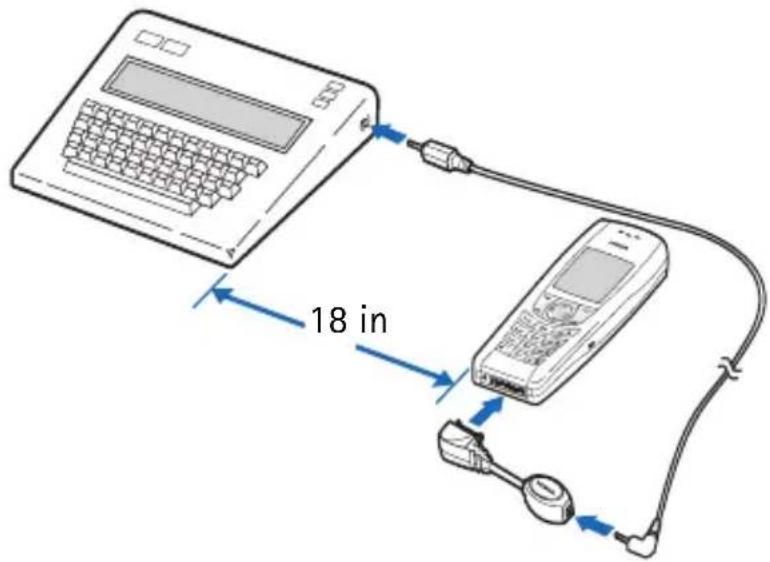
Make a call
1 From the menu, select Settings > Enhancement settings > TTY/TDD > Use TTY > Yes.
2 Dial the number on the phone, and press the Talk key.
3 When the receiving party answers, you can begin typing text on the TTY/TDD.
Receive a call
1 Ensure that the TTY/TDD and phone are powered on and are connected, and ensure TTY/TDD setting in under Enhancement settings is set to Yes.
2 Once contacted by the other party, type responses on the TTY/TDD.
End a call
Press the End key to end your call.
12 Phone security
Your phone is equipped with a versatile security system that is intended to prevent unauthorized use of the phone.
You cannot activate or use certain phone features until you enter your security code.
- The default (preset) security code is 12345.
- Nokia highly recommends that you immediately change this code. Then, write down and store the new code in a safe place, away from your phone.
- When you enter the security code, an * appears on the screen each time you press a key. The * prevents others from seeing your code.
- If you enter the wrong security code five times in a row, your phone will not accept any entries for the next five minutes. However, if you realize that you have entered the code incorrectly before pressing OK, you can use Clear to delete the code, digit by digit, beginning with the last digit.
Your phone is equipped with helpful security features:
- Avoid making accidental calls.
- Prevent unauthorized use of your phone.
- Restrict outgoing or incoming calls.
- Avoid erasing your phone book directory.
Keyguard disables your keypad to prevent accidental key presses.
When the Keyguard is on, calls still may be possible to the official emergency number programmed into your phone. Enter the emergency number and press the Talk key. The number is displayed only after you have keyed in its last digit.
Manual Keyguard
• To lock the keys, press Menu >*.
• To unlock the keys, press Unlock >*.
If the phone rings with Keyguard on, press the Talk key or Answer to answer the call. Keyguard reactivates once the call has ended.
To activate the lights with Keyguard on, press the Power key.
Automatic Keyguard
You can set your phone to automatically lock the keys.
1 From the menu, select Settings > Phone settings > Automatic keyguard > On.
Set delay appears, with the time displayed in mm:ss format.
2 Enter the amount of time you want the phone to wait before turning Keyguard on, and press OK.
For example, to enter five minutes, press 0, 5, 0, 0, and OK.
The shortest time you can enter is 10 seconds, and the longest time you can enter is 60 minutes.
You will still press Menu >* to unlock the keys manually and use all the features of your phone. When you are finished, Keyguard automatically activates at the time you set.
• CHANGE YOUR SECURITY CODE
Nokia highly recommends that you immediately change your security code so that others who know the default code cannot enter the correct code.
1 From the menu, select Settings > Security settings > Access codes > Change security code.
2 Enter the default security code (1 2 3 4 5) and press OK.
3 At the prompt, Enter new security code, enter your new security code and press OK.
4 At the prompt, Verify new security code, enter your new security code again and press OK.
Security code changed appears.
If you have changed your security code and do not remember the new code, contact your service provider. Once you have changed your security code, the default setting is no longer valid.
- PHONE LOCK
This feature protects your phone from unauthorized outgoing calls or unauthorized access to information stored in the phone. When phone lock is activated, Phone locked is displayed in the start screen when you turn the phone on.
When you press Menu or Contacts, you are prompted to enter the lock code. Once the lock code has been accepted, the phone functions normally.
Call not allowed is displayed if you attempt to place a call while the phone is locked.

Note: When the phone is locked, calls still may be possible to the official emergency number programmed into your phone.
Lock code
In addition to a security code, your phone also has a lock code. You will need the lock code to activate and deactivate the phone lock feature or to change your lock code.
The default lock code is 1234. If you enter an incorrect lock code five times in a row, your phone will prompt you for the security code (see "Change your security code" on page 64).
Change your lock code
1 From the menu, select Settings > Security settings > Access codes > Change lock code.
2 Enter the current (or default) lock code and press OK.
3 Enter the new lock code and press OK.
4 Reenter the new lock code for verification, and press OK.

Note: When you change your lock code, make sure you store it in a safe place, away from your phone. Avoid entering access codes similar to emergency numbers to prevent accidental emergency calls.
Activate and deactivate
1 From the menu, select Settings > Security settings > Access codes > Phone lock.
2 Enter the lock code, and press OK.
3 Select On power-up, On, or Off.
4 If you selected On power-up, turn the phone off and back on to complete the phone lock activation.
Answer a call with phone lock on
Press the Talk key or Answer.
Allowed number when phone locked
When phone lock is on, the only outgoing calls that can be made are to the following numbers:
- The emergency number programmed into your phone (for example, 911)
• The number stored in the Allowed no. when phone locked location
Store the allowed phone number
1 From the menu, select Settings > Security settings > Access codes > Allowed no. when phone locked.
2 Enter the lock code and press OK.
3 Press Assign and enter the phone number, or press Find and recall the number from the phone book.
4 Press OK.
Call the allowed phone number
With the phone locked, at the start screen, press the Scroll key up or down to display the number, and press the Talk key to place the call.
- RESTRICT CALLS
You can restrict incoming and outgoing calls. To restrict outgoing calls, you create a list of restrictions and apply the appropriate restriction.
Before you define restrictions for outgoing calls, two restriction options are available: Select and Add restriction. The maximum number of call restrictions you can define is 10.

Note: When calls are restricted, calls still may be possible to the official emergency number programmed into your phone. Enter the emergency number and press the Talk key.
Add a number to the call restriction list
You can create a list of restrictions for both outgoing and incoming calls.
1 From the menu, select Settings > Security settings > Call restrictions.
2 Enter your security code, and press OK.
3 Select Restrict outgoing calls or Restrict incoming calls > Add restriction.
4 Enter the number you want to restrict, or retrieve the number from the phone book, and press OK.
If the name selected has more than one number assigned, scroll to the number you want and press Select > OK.
Contact name appears.
5 Enter a name for the restriction, if needed, and press OK.
If you press OK without entering a name, the number will be used. After you have used the Add restriction option to add at least one restriction, the options become available:
Select—Allows you to select call restrictions from the outgoing calls list.
Add restriction—Allows you to add a call restriction.
Edit—Allows you to edit an existing call restriction.
Erase—Erases an existing call restriction.
Restrict outgoing calls
1 From the menu, select Settings > Security settings > Call restrictions.
2 When Security code appears, enter your security code, and press OK.
3 Select Restrict outgoing calls > Select.
4 Scroll through your list of restrictions and mark the ones you want to restrict.
5 Select Done > Yes to save the changes. When you or someone else attempts to place a call to a number you have restricted, Call not allowed appears, and the call is cancelled.
If you have not added any numbers for call restrictions, your only option will be All calls.
Restrict incoming calls
1 From the menu, select Settings > Security settings > Call restrictions.
2 Enter your security code, and press OK.
3 Select Restrict incoming calls > Add Restriction to choose from your list of call restrictions.
4 Scroll through your list of restrictions and mark the ones you want to restrict.
5 Select Done > Yes to save the changes.
If you have not added any restrictions, your only option will be All calls.
Turn off call restrictions
1 From the menu, select Settings > Security settings > Call restrictions.
2 Enter your security code, and select OK > Restrict outgoing calls or Restrict incoming calls.
3 Scroll to Select and press Select to choose from your list of call restrictions. If you have not added any restrictions, your only option will be All calls.
4 Scroll to the number you want to deactivate and press Unmark > Done > Yes. The restriction is turned off.
13 Personal digital assistant
Your phone features a personal digital assistant which includes a calendar, to-do list, a calculator, currency converter, and a stopwatch. Each of these features can help you organize your everyday life.
- CALENDAR
The calendar keeps track of notes, calls, meetings, and birthdays. It can also sound an alarm when it is time for you to make a call, go to a meeting, or wake up.
To get to the calendar feature, select Organizer > Calendar, or press and hold the right arrow on the Scroll key when at the start screen.

Note: Your phone must be on to use this function. Do not switch on the phone when wireless phone use is prohibited or when it may cause interference or danger.
Options in day view
VIEW DAY
This option allows you to view notes added to a specific day.
MAKE A NOTE
You can use predictive text when writing a note. If it is not already active, choose it from the Options menu. For more information, see "Turn on text input" on page 25.
1 To make a note for a specific date, select the date and Options > Make a note > Meeting, Call, Birthday, Memo, or Reminder.
2 The maximum length of a calendar note is 256 characters.
3 Press Options > Save to save your note.
4 Follow the prompts for the type of note you have selected. Press Options and select an item from the list, or press OK where appropriate, to complete your note:
Meeting—Enter a subject, location, and start time.
Call—Enter the phone number, name, time, and alarm option.
Birthday—Enter the person's name, year of birth, and alarm option.
The note displays the person's age.
Memo—Enter a subject, end date, and alarm option.
Reminder—Enter the reminder, and alarm option
GO TO DATE
To go to a specific date, enter the date and press OK. The month appears and the date you entered is highlighted.
SETTINGS
- The Settings option allows you to set the date, time, date format, date separator, time format and the week starts format for the calendar.
- The Auto Delete option allows you to set the phone to automatically delete old notes after a certain period of time. However, repeat notes such as birthday or anniversary notes will not be deleted.
GO TO TO-DO LIST
This option allows you to go to the to-do list from the calendar, where you can save a task to a specified day.
SEND NOTE
Send a note directly from your calendar to another phone.
While viewing the note, select Options > Send note > Via infrared, Via calendar, or Via text message.
If you select Via infrared, the phone begins sending the note immediately.
If you select Via calendar or Via text message, enter the phone number, and press OK.
• TO-DO LIST
Use this feature to create a to-do list and prioritize to-do items.
ADDING A TASK
1 From the menu, select Organizer > To-do list > Options > Add.
2 Enter the subject of the To-do list and select Options > Save.
3 Select the desired priority (High, Medium, or Low).
You can change the priority later when viewing the note by selecting Options > Edit priority.
VIEW TASKS
Once in the To-do list, scroll to an item and select Options > View to view its details.
From the Options menu, you can view, add, delete, or edit a task. You can also edit the priority of a task, save a task to your calendar, turn predictive text (Dictionary) on/off, or send your task as text, using SMS or infrared.
• THE CALCULATOR
The calculator adds, subtracts, multiplies, divides, and calculates exchange rates.
1 From the menu, select Extras > Calculator.
2 Enter the first number.
Press the Clear key to erase any mistakes.
3 Based on the type of calculation that you need, use one of the following functions:
Function Action
Enter a decimal Press # (.)
Add Press * (+)
Subtract Press * twice (-)
Multiply Press * three times (*)
Divide Press * four times (/)
Square the number Select Options > Square.
Take the square root Select Options > Square root.
Change the sign Select Options > Change sign.
4 Enter the second number.
5 Repeat steps 3 and 4 as many times as necessary.
6 Select Options > Equals.

Note: This calculator has limited accuracy and is designed for simple calculations.
• CONVERT CURRENCY
You can use the calculator to first set the exchange rate and then to calculate the exchange value.
Set the exchange rate
1 From the menu, select Extras > Calculator > Options > Exchange rate > Foreign units in home units or Home units in foreign units.
The exchange rate box opens, with the number 0.
2 Enter the appropriate number and press OK.
To enter a decimal point, press #.
3 Press OK.
Calculate currency using the exchange rate
1 From the menu, select Extras > Calculator.
2 Enter the number of units you want to convert.
3 Select Options > To home or To foreign > Select.
To home converts foreign units of currency to home units using the exchange rate you entered.
To foreign converts home units of currency to foreign units using the exchange rate you entered.

Note: When you change base currency, you must enter the new rates because all previously set exchange rates are reset to 0.
• BUSINESS CARDS
Your phone can send or receive electronic business cards. A business card may consist of a name, phone number, and text entry. You can save received business cards in your phone book.
Send a business card
1 Find the name in your phone book.
2 Select Details > Options > Send bus. card > Via text message or Via infrared.
3 Enter the phone number or recall it from the phone book, and press OK.
View a received card
When you receive a business card, the phone shows Business card received.

Note: If you press Exit at any time before you save the business card, Discard business card? appears. Choose OK or Back.
1 When your phone shows Business card received, press Show.
2 Scroll through the available information.
Save a viewed card
While viewing the business card, select Save > OK.
Delete a viewed card
While viewing the business card, select Exit > OK.
- STOPWATCH
You can use your stopwatch feature to measure time in hours, minutes and seconds with your phone. This measured time can be saved, viewed, or erased.

Note: Using the stopwatch or allowing it to run in the background when using other features increases the demand on battery power and reduces the battery life.
Measure split time
1 From the menu, select Extras > Stopwatch > Split timing > Start.
2 Take an intermediate time by pressing Split.
The clock continues to run and the split time appears below the running time. If you split the time more than once, the new measured time appears at the beginning of the list, and all times are numbered in descending order.
Measure lap time
The lap time function allows you to measure the amount of time it takes to complete a cycle or lap.
1 From the menu, select Extras > Stopwatch > Lap timing > Start.
The running time appears on the display.
2 Take a lap time by pressing Lap. Pressing Lap will stop the running time and cause it to restart from zero. Each lap time will appear below the running time.
The newest measured time will appear at the top of the list of lap times. You can scroll to review previous times.
Save the time
1 While the clock is running, select Stop > Options > Save.
2 Enter a title for the measurement, and press OK.
If a title is not entered, the time measurement will be used as a title.
Other options
You can choose the following options when using the stopwatch:
Split timing—Allows you to record and split a time sequence
Lap timing—Allows you to record multiple lap times
Continue—Shows up when the stopwatch was interrupted without pressing Stop.
Show last time—Allows you to view the last measured time.
View times—Allows you to browse the saved times.
Delete times—Allows you to delete the saved times. You can delete the saved times one by one or all at once.
If you receive a call when using the stopwatch, the clock continues to run in the background. After ending the call, you can return to the stopwatch menu by taking the following action:
From the menu, select Extras > Stopwatch > Continue.
14 Prepaid services
With prepaid service, you buy wireless network services in advance. Your phone works the same way it did before with some additional features.
Prepaid service may not be available from your wireless service provider.
Contact the service provider for details.

Note: When no more charging units or currency units are left, calls may only be possible to the official emergency number programmed into the phone.
• MANAGE PREPAID SERVICE
After you sign up with your service provider for prepaid service, you need to activate the Prepaid menu. This menu appears on your screen only if you have activated the service.
ACTIVATE PREPAID
To activate prepaid services, enter the following sequence:
* # 7 7 6 6 #
DEACTIVATE PREPAID
To deactivate prepaid services, enter the following sequence:
* # 7 7 6 3 3 #
USE THE MENU
1 To use the Prepaid menu, select Menu > Prepaid.
2 Scroll through the prepaid options.
• SAVE YOUR ACCESS NUMBERS
You can check your prepaid balance and add money when the balance runs low. To do that, you first need to save the correct access numbers in your phone. Contact your service provider for the access numbers.
1 From the menu, select Prepaid > Save access phone numbers > Replenish phone number.
2 Enter the access number from your service provider, and press OK.
3 Scroll to Balance phone number, enter the balance number from your service provider, and press OK.
Saved appears to confirm each entry.
- ADD MONEY TO YOUR ACCOUNT
To add money, you must first have saved the correct access number in your phone. (See the previous section for instructions.)
1 From the menu, select Prepaid > Add money to account.
2 At Card number, enter your prepaid card number, and press OK.
3 When you see Listen for prompt then press OK, press OK.
When the addition to your account is complete, a voice message gives you the new balance.
4 When you see Wait for prompt, then press End, press the End key.
- CHECK YOUR PREPAID BALANCE
You can check the balance remaining in your prepaid account, free of charge. Contact your service provider for the toll-free access number used to check the balance. To check the balance, select Prepaid > Check account balance. The phone calls your service provider, and a voice message tells you your balance.
15 Network services
You can subscribe to various network services whose availability depends on your service provider. Your phone supports the network services listed here. These services are not available from all providers or in all areas.
- Voice privacy
- Call waiting
- Call forwarding
- Send my caller identity
Feature code—When you subscribe to any of these services, your service provider gives you a feature code that activates each service. Deactivation codes are used to deactivate each service. After you store the appropriate code, your phone sends the code to the network to verify that you are using the correct feature code.
Menus for network features—Menus for the services described here appear on your phone only after you have stored the appropriate feature code. You can use these menus to activate and deactivate the network services.
Voice privacy—The voice privacy feature does not require you to store a feature code before using it.
More than one number?—If your phone has more than one phone number assigned to it, stored feature codes apply only to the primary phone number.
- SEARCH FOR A NETWORK
Your phone may not show the options described here. For information, contact your service provider.
From the menu, select Settings > Network services > System selection.
You can choose from the following network options:
Automatic—Your phone automatically searches for available networks and chooses the appropriate one. Every time you turn on your phone, it resets to Automatic.
Manual—The phone searches for networks and then shows a list of the ones that are available. If an available network is found, the word Available appears on the screen followed by the name of the network. To choose the network listed, press OK.
New search—Your phone begins a new search for both private and residential systems. When it finds the best system available, the phone shows the system name.
If the phone does not find another system, the question Perform an extended search? will appear. Press OK if you wish to continue searching.

Note: If you have two phone numbers, you can use the Manual and New search options only with your primary phone number.
- ROAMING
Using your phone outside its home area is roaming. Calls made or received while you are roaming may cost more than calls made in your home area. Check with your service provider for details.
- When roaming, the phone may show the word ROAM on the screen, depending on how roaming works with your phone.
- When not roaming, the phone shows the word HOME or the name of your service provider.
- When you are roaming in some systems outside your home area, the system in which you are traveling (the host system) may not recognize your phone. You may not be able to place a call.
16 Text messages
You can use your phone to send and receive short text messages and e-mail if your service provider offers the message feature and if you subscribe to the service. Both services are network dependent features, so you must consult your service provider.
Message recipients: The phone to which you send a text message must support text messages. It may not be possible to send an SMS text message to someone's phone who has an account with a different service provider or a phone with a different protocol, but you can send and receive e-mail messages.
Message length: The maximum length of a text message is 160 characters. Your phone has space for several text messages, depending on the length of each message. The maximum length of a text message depends on the capabilities of the network from which the message originated.
When writing text messages, use predictive text for fast text entry. For details, see "Predictive text" on page 24.
• FOLDERS
Your phone has four folders for managing text messages.
Inbox—The inbox stores messages you receive. Messages remain in the inbox until you delete them or save them in the archive folder.
Sent items—The sent items folder stores messages you have written, sent, edited and forwarded. The sent icon appears next to the message .
Archive—The archive folder stores messages you want to save.
Templates—The templates folder stores message templates you edit and create. A template is like a form letter—a message you can use many times.
• WRITE AND SEND A MESSAGE
1 From the menu, select Messages > Create message, or press and hold the left arrow on the Scroll key when at the start screen.
2 Enter a message of up to 160 characters.
A counter in the upper right corner of the screen shows the number of characters remaining.
3 When you have finished writing, select Options > Send.
4 Enter or retrieve the recipient's phone number, and press OK.
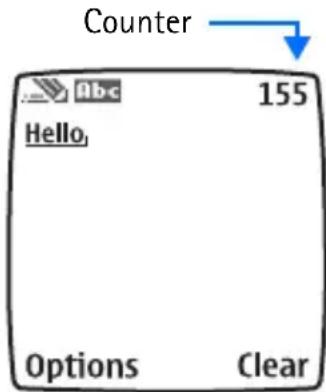
If you need to exit while writing the message, press the End key at any time. Later, return to the write message screen to finish writing the message. If you turn off the phone without saving the message, the message will be lost.

Note: When sending messages, your device may display the words Message Sent. This is an indication that the message has been sent by your device to the message center number programmed into your device. This is not an indication that the message has been received at the intended destination. For more details about messaging services, check with your service provider.
- OPTIONS
Send—Sends the message.
Settings—Allows you to choose options for the message:
Callback no., Read receipt, and Urgent. (Depending on your service provider, Read receipt may not be available.)
Save—Saves the message.
Clear text—Clears the message screen.
Exit editor—Takes you back to the Write message screen.
Insert contact—Lets you insert a name from the phone book.
Insert number—Lets you insert a number from the phone book.
Use template—Lets you insert a template.
Insert picture—Lets you attach a picture to a text message.
Insert word—Lets you insert a word that is not stored in the dictionary.
Insert symbol—Lets you insert a symbol from the symbols list.
Predictive text—Activates or deactivates predictive text.
- RESEND A MESSAGE
You can resend a message from the sent items folder.
1 Select the message you want to resend.
2 Select Options > Send.
3 Enter or find the number to which you want to send the message, and press OK.
- RECEIVE A MESSAGE
When you receive a text message, the phone plays a message alert tone, and the text message icon appears, along with one of the following messages:
Message received—You have an unread message or page. If you have more than one message or page, the appropriate number is listed before this message.
New emergency message—An emergency message or page was sent by someone using the service provider. Emergency messages are sent only in situations where life or property are in immediate danger. Emergency messages are listed first and override all other messages.
Urgent—The message has a high priority. These messages are indicated by an exclamation point (!).
- READ A MESSAGE
1 Press Show.
If only one message has been received, the message is displayed. If more than one message has been received, this action takes you to the Inbox, where the new message is highlighted.
2 Press Select to read the message.
3 Press Options for a list of choices:
Delete—Deletes the current message.
Reply—Provides a screen where you can write a reply.
Chat—Allows you to start a chat session.
Use number—Calls the person who sent you the text message,
if their phone number is included in the message. You can also press the Talk key while the message is open to dial the number.
If more than one number is on the screen, the numbers appear in a list. Scroll to the phone number you want to call and press the Talk key.
Forward—Forwards the message to another person. That person must have the appropriate message service.
Edit—Allows you to edit the message.
Save—Saves the message in the archive folder.
Rename—Allows you to rename the message.
4 Press Select when the option you want is highlighted.
In your inbox, text messages are shown in the order in which they were received unless one is an emergency message. An emergency message overrides any other message and appears first.
- SAVE A MESSAGE
When you send or receive a text message, you can save it in the archive folder. Messages can be saved from the inbox and the sent items folders.
1 Highlight the message you wish to save and press Select.
2 Select Options > Save.
- CUSTOMIZE SETTINGS
From the menu, select Messages > Message settings > Sending profile or Font size.
Sending profile—Select Sending profile to view and access the features you can change in order to customize the default style of the messages you send from your phone.
Font size—Choose between small and large fonts to customize your view of messages which you will read or edit.
- MEMORY FULL
When the message memory is full, one or more messages of the lowest priority are automatically deleted. If memory is still full after deleting messages, your phone shows No space: message waiting. The 📋 icon blinks. Clear the notification by pressing OK.
You may need to manually delete messages from your folders to create space to receive new messages.
- DELETE MESSAGES
You can delete a message individually or delete the contents of an entire folder at once. You also have the option of erasing all read messages from all folders at the same time.
Delete a message
1 While reading a message, press Options.
2 Scroll to Delete, and press Select.
Your phone asks you to confirm that you want to delete the message.
3 Press OK.
Delete messages from folders
1 From the menu, select Messages > Delete messages > All read, Inbox, Sent items, or Archive.
2 Enter your security code and press OK.
All messages in that folder will be deleted. If you choose All read, every message you have read will be deleted simultaneously from the inbox, sent items and archive folders.
- REPLY TO A MESSAGE
1 After reading a message, select Options > Reply > Via text message or Via e-mail.
2 Edit your reply.
3 Select Options > Send.
The phone shows the return number.
4 Edit the number if needed, and press OK.
• FORWARD A MESSAGE
1 While reading a message in the Inbox, select Options > Forward > Via text message or Via e-mail.
2 Select Options or edit the message and select Options > Send.
3 Enter or retrieve the recipient's phone number, and press OK.

Note: When sending messages using SMS, your phone may display Message Sent. This is an indication that the message has been sent by your phone to the message center number programmed into your phone. This is not an indication that the message has been received at the intended destination. For more details about SMS services, check with your service provider.
• E-MAIL MESSAGES
You can use your phone to send and receive e-mail messages. The e-mail feature is not available from all service providers.
Send a message
1 Select Menu > Messages > Create SMS e-mail.
2 Enter the e-mail address, or press Find.
3 If you press Find, scroll to the name you want and press OK.
The address appears in the recipient address box.
4 Press OK.
5 Enter a subject and press OK.
6 When the message screen appears, enter your message.
The maximum number of characters for message length varies; check with your service provider for details.
7 When you have finished the message, select Options > Send e-mail.
A status message tells you the mail is being sent.

Note: If your phone asks for an e-mail gateway number, contact your service provider.
Reply to or forward a message
1 From the menu, select Menu > Messages > Inbox. Select the message you received and press Select.
2 Select Options > Reply or Forward > Via e-mail.
3 Choose a reply option and press Select.
The E-mail address box appears with the sender's e-mail address.
4 Press OK.
5 Enter a subject and press OK.
6 When the message screen appears, enter your message.
The maximum number of characters for message length varies; check with your service provider for details.
7 When you have finished the message, select Options > Send e-mail.

Note: A status message tells you the mail is being sent. If your phone asks for an e-mail gateway number, contact your service provider.
Receive an e-mail message
To receive e-mail messages, you need the special e-mail address provided by your wireless service provider. You can give this address to people who need to reach you by e-mail. They can then send e-mail messages to you from their computers or other e-mail devices.
Messages sent to you by e-mail arrive as regular text messages.
You can use all the options described earlier to save, reply to, or forward a message.
See your service provider to get the e-mail address for your phone and for more information on using e-mail on the service.
- TEMPLATES
You can view and edit the preset messages, or templates, that are available for writing a message. Templates can be used when you write, reply to, or edit a message.
1 From the menu, select Messages > Templates.
2 Select the template you want and press Select.
3 Press Options to view the menu list:
Send—Sends the template as a text message.
Edit—Allows you to edit the template before sending.
Rename—Allows you to rename the template.
Use number—Lets you use any number included in the message.
Insert a template when writing a new message:
1 From the menu, select Messages > Create message > Options > Use template.
2 Scroll to the template you want and press Select.
3 Continue as you would when sending a new text message. If you wish to exit without using a template, either choose the clear screen option or press the End key.

Note: You can also insert a template when replying to or editing a message.
• PICTURE MESSAGES
You can send picture messages with your phone. There are several images included in your phone and space for five additional pictures.

Note: This function can be used only if it is supported by your network operator or service provider. Only phones that offer picture message features can receive and display picture messages.
Send
1 From the menu, select Messages > Create message, write your text message, and select Options > Insert picture.
2 Scroll to the picture you want to send, press View.
3 Select Insert > Options.
OR
To choose a different picture, press Back, scroll to another picture, and press View.
4 Select Preview to see the message and picture, or select Send.
5 Enter the phone number to which you want to send the picture message and press OK.

Note: The phone number you choose must be able to receive picture messages.
Receive
1 When your phone displays Message received, press Show.
2 If the picture has a text message with it, scroll up or down to see the entire message.
Options
Delete—Deletes the picture you select.
Reply—Lets you reply as a text message or e-mail.
Chat—Starts a chat session with the person who sent the message.
Use number—Lets you use any phone number included in the message.
Forward—Sends the message to a friend.
Edit text—Edits the message if needed.
Save—Saves the message to your archive.
Rename—Creates a new name for the message.
- CHAT
You can have a direct conversation with another person using the chat feature. Chat has distinct advantages over text messaging, such as faster send and reply, as well as direct, uninterrupted communication with your chat partner. To use chat you must subscribe to text messaging, which is network dependent. Contact your service provider for more information.
Start a session
1 From the menu, select Messages > Chat.
2 Enter the other party's phone number or retrieve it from the phone book and press OK.
3 At My chat name, enter a name for the chat session (up to five characters) and press OK.
4 Write your chat message, select Options > Send.
The reply from the other party is shown above your original message.
5 Press OK to clear the screen and reply to the message.
6 To view the previous message or edit your chat name, select Options > Chat history or Chat name.

Note: You can start a chat session when replying to a regular text message. After reading the message, select Options > Chat.
Use predictive text
When you are in a chat session, you can use the phone dictionary to help speed up text entry.
1 From the menu, select Messages > Chat > Options > Predictive text.
2 Select the language you want.
Chat history
You can view messages sent and received during the active chat session.
From the message screen, select Options > Chat history.
Change chat name
1 From the message screen, select Options > Chat name.
2 Enter a new nickname.
End chat session
From the message screen select Options > Quit.

Warning: Once you exit your chat session, the messages are deleted automatically. There is no way to save the chat history.
17 Special features
This section describes several special features, including Java applications, transmission of business cards, downloading ringing tones and graphics from the Internet, and setting the alarm clock.
• GALLERY
You can save pictures and ringing tones to folders in the gallery, or create folders of your own and save them there. You can download images and tones via WAP.

Note: This feature uses shared memory. Please see "Shared Memory" on page 3 for more information.
Open the gallery
From the menu, select Menu > Gallery. After a brief pause, the following submenus appear in the display:
View folders—Explore the folders in the gallery menu. See "Folders" in the following section for more info.
Add folder—Add a folder of your own.
Delete folder—Delete a folder you have created.
Rename folder—Rename a folder you have created.
Gallery downloads—Use the graphic and tone downloads in your phone. The phone tries to connect to the Internet using your WAP browser and the currently active set of gallery downloads. If the connection fails, you may need to activate another set or change the current settings. See "Set up for browsing" on page 93.
Folders
1 At the start screen, select Gallery > View Folders.
2 Scroll to a folder, such as Graphics or Tones, and press Open.
3 Scroll through the list of graphics or tones and press Options.
4 Press select to activate one of the following options or enter its submenu:
Open—Open the selected file.
Rename—Rename the selected file.
Set as wallpaper or Set as ring tone—Set the graphic as wallpaper. In the Tones folder, this option is Set as ring tone; the tone is applied to the profile in use.
Details—View details of the file, such as the name, time and date the file was created.
Sort—Sort the files according to name, date, format, or size.

Note: Copyright protections may prevent some images, ringing tones, and other content from being copied, modified, transferred or forwarded.
- APPLICATIONS
With the Applications menu you can manage the Java applications installed on your phone. Your phone includes some Java applications specially designed for this phone. Various service providers offer other applications using WAP services. Check with your service provider for more information.
1 From the menu, select Applications > Select application.
2 Scroll to an application, and select Options > Open.
If the selection is a single application it launches. Otherwise, a list of applications in the selected application set appears.
3 To launch a single application within the set, scroll to the desired application, and select Options > Open.
Options
Open—Starts the application.
Delete—Delete the application or application set from your phone.
Web access—Provides options for restricting network access:
- Ask first (ask for net access)
- Allowed (allow net access)
- Not allowed (refuse net access)
Service settings—Choose application or default settings.
Update version—Check if a new version of the application is available for download.
Details—Shows additional information about the application.
Downloads
You can download new Java applications in different ways.
1 From the menu, select Applications > App. downloads.
2 Scroll to the appropriate bookmark that contains the application you wish to download, and press Select to connect to the WAP page.
See "Internet service" on page 93 for information on browsing WAP pages.
OR
Select More bookmarks to access the list of any bookmarks saved in your Services menu.

Note: This feature is network-dependent. Contact your wireless provider for more information.
A cache is a memory location that is used to store data temporarily. If you have tried to access or have accessed confidential information requiring passwords, empty the cache after each use. The information or services you have accessed are stored in the cache. To empty the cache, select Services > Clear the cache.
Your device may have some bookmarks loaded for sites not affiliated with Nokia. Nokia does not warrant or endorse these sites. If you choose to access them, you should take the same precautions for security or content as you would with any Internet site.
The security icon does not indicate that the data transmission between the gateway and the content server (or place where the requested resource is stored) is secure. The service provider secures the data transmission between the gateway and the content server.
Only install software from sources that offer adequate protection against harmful software.
Game downloads
1 From the menu, select Games > Game downloads.
2 Scroll to the appropriate bookmark that contains the application you wish to download and press Select to connect to the WAP page.
See "Internet service" on page 93 for information on browsing WAP pages. OR
Select More bookmarks to access the list of any bookmarks saved in your Services menu.

Note: This feature is network-dependent. Contact your wireless provider for more information.
If the connection fails, enter the Services menu and activate another set of service settings. See "Options available during connection" on page 94 for more information on browser settings.
Memory
From the menu, select Applications > Memory to view the amount of memory available.
• RINGING TONES
You can download additional ringing tones to the gallery. Ringing tones can be ringing sounds or short tunes. For details about this network service, contact your wireless service provider, who can also point you to Web sites that offer these tones.
Receive a tone
If you have this service and your phone receives a downloaded ringing tone, your phone shows Ringing tone received.
Select Options > Playback, Save tone, or Discard.
It may not be possible to play the tone until the call is disconnected.
Save a tone
1 From the options menu, select Save tone.
2 Enter a name for the tone, and press OK.
3 Find a folder location for the tone, and press Select.
Play tones
1 Locate a tone from one of your folders.
2 Select Options > Open.
3 To end the tone, press Stop.
Discard tones
You can discard a downloaded ringing tone before you save it by selecting Back > OK.
OR
To discard a downloaded tone from a folder, select Options > Delete > Yes.
- ALARM CLOCK
The alarm clock is based on the time settings in the phone clock. You can set the alarm clock to ring at any time, even if your phone is turned off.
- The alarm clock sounds one quiet beep, and several quick, quiet beeps.
These beeps continue and increase in volume until answered. - If you have selected the Silent or Beep once ringing tone, the alarm clock quietly beeps once. The best profile to use with the alarm clock is Normal or Outdoor, unless these profiles have been modified from their original settings.

Note: If the alarm time is reached while the device is switched off, the device switches itself on and starts sounding the alarm tone. If you press Stop, the device asks whether you want to activate the device for calls. Press No to switch off the device or Yes to make and receive calls. Do not press Yes when wireless phone use may cause interference or danger.
Set the alarm
1 From the menu, select Alarm clock.
2 Enter the time for the alarm and press OK.
Use the hh:mm format (03:40, for example). The alarm clock replaces any existing numbers with the new time.
3 Select am or pm > OK.
The am and pm options appear only if you have chosen the am/pm format for the clock.
Alarm on appears, and the alarm clock icon appears on the start screen.
Turn off the alarm
When the alarm clock sounds:
- Press Stop to turn it off.
- Press Snooze to set the alarm to go off again in 10 minutes. Snoozing appears on the screen. If you wish to cancel the snooze, press Stop.
If you let the alarm ring for 1 minute or more without pressing a key, it stops sounding, waits 10 minutes, and then sounds again. This continues until you press Stop.
Deactivate the alarm
From the menu, select Alarm clock > Off.
18 Connectivity
The Infrared port on your phone allows you to use your phone to connect to other IR-equipped phones. With this feature you can transfer business cards and calendar notes.

Note: You can also use your phone to connect to any IR-equipped PC. For more information on connectivity, refer to the PC Connectivity Guide. The PC Connectivity Guide and all related software can be downloaded from the U.S. Mobile Phone products section of www.nokia.com/us. Check for periodic updates on connectivity options.
INFRARED
You can set up the phone to receive data through its IR port. To use an IR connection, transmission and reception must be to or from an infrared compatible phone or device. You can send or receive data to or from a compatible phone or data device (such as a computer) using the IR port of your phone.

Important: Do not point the IR (infrared) beam at anyone's eye or allow it to interfere with other IR devices. This device is a class 1 laser product.
SEND AND RECEIVE DATA
Ensure that the IR ports of the sending and receiving devices are pointing at each other and that there are no obstructions between the devices. The preferable distance between the two devices in an infrared connection is from 3 inches to 3 feet.
From the start screen, select Menu > Infrared to activate IR in your phone.
Activate IR in the receiving device as well.
If data transfer is not started within two minutes after the activation of the IR port, the connection is cancelled and has to be started again.

CONNECTION INDICATOR
- When is shown continuously, the IR connection is activated and your phone is ready to send or receive data using its IR port.
- When blinks, your phone is trying to connect to the other device or a connection has been lost.
Data communication applications
For information on using a data communication application, refer to the documentation provided with the application.
Start using the data communications application on the computer.

Note: Making or answering phone calls during a computer connection is not recommended as it might disrupt the operation.
For better performance during data calls, place the phone on a stationary surface. Do not move the phone by holding it in your hand.
19 Internet service
Your phone has a built-in browser you may use to connect to selected services on the Internet. You may view weather reports, check news or flight times, view financial information, and much more.
You may also save the address of an Internet site as a bookmark, much the same way you bookmark a Web page on your personal computer.

natural_image
Illustration of a satellite orbiting Earth (no text or symbols)
Note: To use the browser, you may need to subscribe to additional services. Also, your service provider may need to configure your phone for browsing after you have subscribed. This is a network dependent feature. Contact your service provider for more information.
Service provider's role
Because wireless Internet content is designed to be viewed from your phone, your wireless service provider now becomes your wireless Internet service provider as well. It is likely that your service provider has created a home page and set up your browser to go to this page when you connect to the Internet. Once at your service provider's home page, you will find links to a number of other sites that offer wireless access.
The information or services you have accessed are stored in the cache of your phone. A cache is a memory location that is used to store data temporarily. If you have tried to access or have accessed confidential information requiring passwords, empty the cache after each use. To empty the cache, select Services > Clear the cache.
Your device may have some bookmarks loaded for sites not affiliated with Nokia. Nokia does not warrant or endorse these sites. If you choose to access them, you should take the same precautions for security or content as you would with any Internet site.

Note: The security icon does not indicate that the data transmission between the gateway and the content server (or place where the requested resource is stored) is secure. The service provider secures the data transmission between the gateway and the content server.
Only install software from sources that offer adequate protection against harmful software.
- SET UP FOR BROWSING
You should not need to do anything to set up your phone for browsing. Your service provider usually modifies the appropriate settings when you subscribe to the feature. Contact your service provider if you have problems using the browser.
• SIGN ON TO THE INTERNET
Use the Services menu to connect to the Internet, if you have a wireless internet service provider.
1 From the menu, select Services > Home, or press and hold the 0 key.
The word Home may be replaced with the name of the internet setting. If an error message appears, the phone may not be set up for browsing. Contact your service provider to make sure that your phone is configured properly.
2 To sign off the internet, press the End key, or select Options > Quit.
The connection may drop automatically after a period of inactivity.
• BROWSING METHODS
The browser uses that same key and text functionality as other phone features. Use the four-way Scroll key to scroll through options and links. To quickly activate a link, press the Talk key.
• BROWSER OPTIONS (SERVICES MENU)
The services menu gives you several options both before you browse and while you are browsing. Options will change depending on your activity.
Options available without connection
Some service providers may have customized the options on the services menu. Contact your service provider for more information about the options they provide:
Home—Starts the browser and takes you to your service provider's home page.
Bookmarks—Shows a list of all saved bookmarks
Settings—Provides options for changing connection settings, appearance settings, and security settings.
Go to address—Accepts an address you enter.
Clear the cache—Empties the browser's temporary memory and frees up space.
Options available during connection
While you are connected to the Internet, the phone browser may provide some of the additional options described in the following list:
Home—Takes you back to the service provider's home page. The word Home may be replaced with the name of the internet setting.
Bookmarks—Shows a list of all saved bookmarks.
Open link—Activates the link you selected.
Back—The previous screen appears.
Add bookmark—Adds a web site address for quick reference.
Go to address—Accepts an address you enter.
Appearance settings—Allows you to choose page appearance.
Cookie settings—Gives you the option to allow or decline cookies.
Reload—Refreshes the page.
Clear the cache—Empties the browser's temporary memory.
Security info—Shows security items such as owner, server, issuer, etc.
Quit—Exits the current session and returns to the start screen.
Developers of wireless Internet sites may add options to the browser menu that are specific to their Web sites. These options are often links to other areas within the site. As in any other menu, scroll to the link you want and press Select.
• EDIT A DATA ENTRY FIELD
When you need to enter information, follow these steps:
1 Scroll to highlight the data entry field, select Options > Edit.
2 Use the keypad to enter the text in the data entry field (for example, Miami), and select Options > OK.
3 Scroll to the link you want (for example, Get forecast?), and select Options > Open link.
- BOOKMARKS
You can save addresses for your favorite sites as bookmarks. A bookmark helps you find a site again, just as a slip of paper in a book helps you find a page.
- If a wireless Internet site has a title, it will appear in the bookmark list (for example, Yahoo! News, ebay on WAP, Mapquest).
- If the site has no title, the site address will appear in the list of bookmarks (for example, http://www.yahoo.com/news.wml).
SAVE AN ADDRESS
1 Navigate to the site you want to bookmark and press Options.
2 Select Add Bookmark.
ENTER A BOOKMARK MANUALLY
1 From the menu, select Services > Bookmarks > Options > New bookmark.
2 Enter the site address (for example, my.yahoo.com) and press OK. You do not need to enter http://. They are added automatically.
3 Enter a name for the new bookmark and press OK.
RETURN TO A BOOKMARKED SITE
1 From the menu, select Services > Bookmarks.
2 Scroll to the bookmark you want, and select Options > Go to.
If you are not currently browsing, the phone will connect to the Internet.

Note: Only install software from sources that offer adequate protection against viruses and other harmful software.
• EXAMPLES OF WIRELESS INTERNET SITES
The following illustrations show elements you may find on a wireless Internet site. These are examples only.
1)

1) Header line. Shows the current Internet site.
2) Active link. Appears as a highlighted word.
3) Inactive link. Appears as an underlined word.
Scroll up or down through the list of links.
2)
![Main menu Welcome! Please choose from the following: Info [Timetables] News Options 6) Back](/content/2026/05/1085738/images/3638e358083dee1072344a8c7d99b439e0a0b11dc6a76fa1b48fd9642a94fa84.jpg)
4) Selection list. Brackets [ ] appear when you have the option to enter information.
5) Options. Select Options to go to the site menu and/or browser page.
6) Back. Select Back to return to the previous page.
4)

7) Data entry field. Brackets [] that enclose dots indicate when you need to enter information. In this example, you can enter your zip code to receive the local weather forecast.
7)
20 Games
Not only can you use your phone for communication, but also for some serious fun.
You can choose from any of the four games listed below.
Backgammon
Triple Pop
Bounce
Chess Puzzle
Start a new game
1 Select Games > Select game.
2 Scroll to the desired game, and select Options > Open.
Use the option Instructions to learn how to play the game. With the option Level you can choose the difficulty level of the game.
Settings
Go to game settings by selecting Games > Settings. Here you can customize a game by activating or deactivating game sounds, game lights and shakes.
Downloads
The Nokia 6560 phone has the capability to download Java games from the Internet. This is a network dependent feature. Please check with your service provider for details.
Please visit Nokia games services on the Internet for more hints and tips:
http://www.nokia.com/us.
Memory
From the menus, select Games > Memory to view the amount of memory available.
21 Enhancements
Check the model number of any charger before use with this device. This device is intended for use when supplied with power from ACP-7, ACP-8, and ACP-12.


Warning: Use only batteries, chargers and enhancements approved by Nokia for use with this particular model. The use of any other types may invalidate any approval or warranty, and may be dangerous. For availability of approved enhancements, please check with your dealer.
Your device and its enhancements may contain small parts. Keep them out of reach of small children.
A few practical rules about accessories and enhancements:
- Keep all accessories and enhancements out of the reach of small children.
- When you disconnect the power cord of any accessory or enhancement, grasp and pull the plug, not the cord.
- Check regularly that enhancements installed in a vehicle are mounted and are operating properly.
• Installation of any complex car enhancements must be made by qualified personnel only.
Power
• Standard 780-mAh Li-Ion Battery (BLD-3)
• Standard Travel Charger (ACP-7)
• Rapid Travel Charger (ACP-8)
• Travel Charger (ACP-12)
- Battery Charging Stand (DDC-1)
Audio
- Earbud Headset (HS-5)
- Boom Headset (HDB-4)
• Retractable Headset (HS-10)
• FM Radio Headset (HS-2R) - Accessibility Loopset (LPS-4)
• Phone Adapter (HDA-10)
Car
- Car Kit (CARK-143)
- Mobile Holder (MBC-15S)
- Mobile Charger (LCH-12)
• Headrest Handsfree (BHF-1)
Covers and carrying
• Xpress-on Color Covers
- Carry Cases
22 Reference Information
• BATTERY INFORMATION
Charging and discharging
Your device is powered by a rechargeable battery. The full performance of a new battery is achieved only after two or three complete charge and discharge cycles. The battery can be charged and discharged hundreds of times but it will eventually wear out. When the talk and standby times are noticeably shorter than normal, buy a new battery. Use only Nokia approved batteries, and recharge your battery only with Nokia approved chargers designated for this device.
Unplug the charger from the electrical plug and the device when not in use. Do not leave the battery connected to a charger. Overcharging may shorten its lifetime. If left unused, a fully charged battery will lose its charge over time. Temperature extremes can affect the ability of your battery to charge.
Use the battery only for its intended purpose. Never use any charger or battery that is damaged.
Do not short-circuit the battery. Accidental short-circuiting can occur when a metallic object such as a coin, clip, or pen causes direct connection of the positive (+) and negative (-) terminals of the battery. (These look like metal strips on the battery.) This might happen, for example, when you carry a spare battery in your pocket or purse. Short-circuiting the terminals may damage the battery or the connecting object.
Leaving the battery in hot or cold places, such as in a closed car in summer or winter conditions, will reduce the capacity and lifetime of the battery. Always try to keep the battery between 59°F and 77°F (15°C and 25°C). A device with a hot or cold battery may not work temporarily, even when the battery is fully charged. Battery performance is particularly limited in temperatures well below freezing.
Do not dispose of batteries in a fire! Dispose of batteries according to local regulations. Please recycle when possible. Do not dispose as household waste.
• CARE AND MAINTENANCE
Your device is a product of superior design and craftsmanship and should be treated with care. The suggestions below will help you protect your warranty coverage and enjoy your device for many years.
- Keep the device dry. Precipitation, humidity, and all types of liquids or moisture can contain minerals that will corrode electronic circuits. If your device does get wet, remove the battery and allow the device to dry completely before replacing it.
- Do not use or store the device in dusty, dirty areas. Its moving parts and electronic components can be damaged.
- Do not store the device in hot areas. High temperatures can shorten the life of electronic devices, damage batteries, and warp or melt certain plastics.
- Do not store the device in cold areas. When the device returns to its normal temperature, moisture can form inside the device and damage electronic circuit boards.
- Do not attempt to open the device other than as instructed in this guide.
- Do not drop, knock, or shake the device. Rough handling can break internal circuit boards and fine mechanics.
- Do not use harsh chemicals, cleaning solvents, or strong detergents to clean the device.
- Do not paint the device. Paint can clog the moving parts and prevent proper operation.
- Use only the supplied or an approved replacement antenna. Unauthorized antennas, modifications, or attachments could damage the device and may violate regulations governing radio devices.
All of the above suggestions apply equally to your device, battery, charger, or any enhancement. If any device is not working properly, take it to the nearest authorized service facility for service.
• ADDITIONAL SAFETY INFORMATION
Operating environment
Remember to follow any special regulations in force in any area and always switch off your device when its use is prohibited or when it may cause interference or danger. Use the device only in its normal operating positions. To maintain compliance with radio frequency exposure guidelines only use accessories approved by Nokia for use with this device. When the device is on and being worn on the body, always use an approved carrying case.
Medical devices
Operation of any radio transmitting equipment, including wireless phones, may interfere with the functionality of inadequately protected medical devices. Consult a physician or the manufacturer of the medical device to determine if they are adequately shielded from external RF energy or if you have any questions. Switch off your phone in health care facilities when any regulations posted in these areas instruct you to do so. Hospitals or health care facilities may be using equipment that could be sensitive to external RF energy.
PACEMAKERS
Pacemaker manufacturers recommend that a minimum separation of 6 in. (15.3 cm) be maintained between a wireless phone and a pacemaker to avoid potential interference with the pacemaker. These recommendations are consistent with the independent research by and recommendations of Wireless Technology Research. To minimize the potential for interference, persons with pacemakers should
- Always keep the device more than 6 in. (15.3 cm) from their pacemaker when the device is switched on
- Not carry the device in a breast pocket
- Hold the device to the ear opposite the pacemaker
If you have any reason to suspect that interference is taking place, switch off your device immediately.
HEARING AID
Some digital wireless devices may interfere with some hearing aids. If interference occurs, consult your service provider.
Vehicles
RF signals may affect improperly installed or inadequately shielded electronic systems in motor vehicles such as electronic fuel injection systems, electronic antiskid (antilock) braking systems, electronic speed control systems, air bag systems. For more information, check with the manufacturer or its representative of your vehicle or any equipment that has been added.
Only qualified personnel should service the device, or install the device in a vehicle. Faulty installation or service may be dangerous and may invalidate any warranty that may apply to the device. Check regularly that all wireless device equipment in your vehicle is mounted and operating properly. Do not store or carry flammable liquids, gases, or explosive materials in the same compartment as the device, its parts, or enhancements. For vehicles equipped with an air bag, remember that an air bags inflate with great force. Do not place objects, including installed or portable wireless equipment in the area over the air bag or in the air bag deployment area. If in-vehicle wireless equipment is improperly installed and the air bag inflates, serious injury could result.
Potentially explosive environments
Switch off your device when in any area with a potentially explosive atmosphere and obey all signs and instructions. Potentially explosive atmospheres include areas where you would normally be advised to turn off your vehicle engine. Sparks in such areas could cause an explosion or fire resulting in bodily injury or even death. Switch off the device at refuelling points such as near gas pumps at service stations. Observe restrictions on the use of radio equipment in fuel depots, storage, and distribution areas, chemical plants or where blasting operations are in progress. Areas with a potentially explosive atmosphere are often but not always clearly marked. They include below deck on boats, chemical transfer or storage facilities, vehicles using liquefied petroleum gas (such as propane or butane), and areas where the air contains chemicals or particles such as grain, dust or metal powders.
FCC regulations prohibit using your wireless device while in the air. The use of wireless telephones in an aircraft may be dangerous to the operation of the aircraft, disrupt the wireless telephone network, and may be illegal.
Failure to observe these instructions may lead to suspension or denial of telephone services to the offender, legal action, or both.
EMERGENCY CALLS

Important: Wireless phones, including this phone, operate using radio signals, wireless networks, landline networks, and user-programmed functions. Because of this, connections in all conditions cannot be guaranteed. You should never rely solely on any wireless phone for essential communications like medical emergencies.
To make an emergency call:
1 If the phone is not on, switch it on. Check for adequate signal strength.
2 Press End key as many times as needed to clear the display and ready the phone for calls.
3 Key in the official emergency number for your present location. Emergency numbers vary by location.
4 Press the Talk key.
If certain features are in use, you may first need to turn those features off before you can make an emergency call. Consult this guide or your service provider. When making an emergency call, give all the necessary information as accurately as possible. Your wireless phone may be the only means of communication at the scene of an accident. Do not end the call until given permission to do so.
CERTIFICATION INFORMATION (SAR)
THIS MODEL PHONE MEETS THE GOVERNMENT'S REQUIREMENTS FOR EXPOSURE TO RADIO WAVES.
Your wireless phone is a radio transmitter and receiver. It is designed and manufactured not to exceed the emission limits for exposure to radio frequency (RF) energy set by the Federal Communications Commission of the U.S. Government. These limits are part of comprehensive guidelines and establish permitted levels of RF energy for the general population. The guidelines are based on standards that were developed by independent scientific organizations through periodic and thorough evaluation of scientific studies. The standards include a substantial safety margin designed to assure the safety of all persons, regardless of age and health.
The exposure standard for wireless mobile phones employs a unit of measurement known as the Specific Absorption Rate, or SAR. The SAR limit set by the FCC is 1.6W/kg.* Tests for SAR are conducted using standard operating positions accepted by the FCC with the phone transmitting at its highest certified power level in all tested frequency bands. Although the SAR is determined at the highest certified power level, the actual SAR level of the phone while operating can be well below the maximum value. This is because the phone is designed to operate at multiple power levels so as to use only the power required to reach the network. In general, the closer you are to a wireless base station antenna, the lower the power output. Before a phone model is available for sale to the public, it must be tested and certified to the FCC that it does not exceed the limit established by the government-adopted requirement for safe exposure. The tests are performed in positions and locations (for example, at the ear and worn on the body) as required by the FCC for each model.
The highest SAR value for this model phone as reported to the FCC when tested for use at the ear is 1.14 W/kg, and when worn on the body, as described in this user guide, is 1.02 W/kg. (Body-worn measurements differ among phone models, depending upon available enhancements and FCC requirements).
While there may be differences between the SAR levels of various phones and at various positions, they all meet the government requirement. The FCC has granted an Equipment Authorization for this model phone with all reported SAR levels evaluated as in compliance with the FCC RF exposure guidelines. SAR information on this model phone is on file with the FCC and can be found under the Display Grant section of http://www.fcc.gov/oet/fccid after searching on FCC ID GMLRH-25.
For body worn operation, this phone has been tested and meets the FCC RF exposure guidelines for use with a carry case, belt clip, or holder that contains no metal and that positions the handset a minimum of 5/8-inch (1.5 cm) from the body. Use of other carry cases, belt clips, or holders may not ensure compliance with FCC RF exposure guidelines. If you do not use a body-worn accessory and are not holding the phone at the ear, position the handset a minimum of 5/8-inch (1.5 cm) from your body when the phone is switched on.
*In the United States and Canada, the SAR limit for mobile phones used by the public is 1.6 watts/kilogram (W/kg) averaged over one gram of tissue. The standard incorporates a substantial margin of safety to give additional protection for the public and to account for any variations in measurements. SAR values may vary depending on national reporting requirements and the network band. For SAR information in other regions please look under product information at www.nokia.com.
• BATTERY
This section provides information about the phone battery. Be aware that the information in this section is subject to change. Consult your service provider for more information.

Note: The charging times listed in the next section are approximate.
Charging times
The following table shows battery charging times for the specified charger:
| Battery Option ACP-7 Charger ACP-12 Charger | ||
| BLD-3 Li-Ion 780 mAh 2 h, | 45 min 1 h, 35 min | |
Standby and talk times
The times shown in the following table are estimates only and represent a range for either standby or talk times (not a combination of both).

Warning: Battery talk and standby times are estimates only and depend on signal strength, network conditions, features used, battery age and condition (including the effect of charging habits), temperatures to which battery is exposed, use in digital mode, and many other factors. Please note that the amount of time a phone is used for calls will affect its standby time. Likewise, the amount of time that the phone is turned on and in standby mode will affect its talk time.
The following table shows talk-time and standby times in both digital and analog networks:
| Battery option | Digital talk time | Analog talk-time | Standby time | |
| Digital Analog | ||||
| BLD-3 Li-Ion780 mAh | up to 4 hours | up to115 min | up to11 days | up to47 hours |
• TECHNICAL INFORMATION
| Weight 88.36 g (3.11 oz) with BLD-3 780-mAhLi-Ion Battery | |
| Size 105.8 x 44 x 19.1 mm | (hxwxd) |
| Frequency range Lowband | 824.04–848.97 MHz (TX)869.04–893.97 MHz (RX)Highband 1850.04–1909.92 MHz (TX)1930.08–1989.96 MHz (RX) |
| Transmitter output power Up to 600 mW | |
| Battery voltage (Nominal) 3.7 V | |
| Operating temperature | -4°F to +104°F (-20°C to +40°C) |
| Number of channels 832 lowband1997 highband | |
| Phone numbers | 3 |
| Memory locations | Up to 500 contacts, with multiple phone numbers and text entries per contact. |
23 Nokia One-Year Limited Warranty
Nokia Inc. ("Nokia") warrants that this cellular phone ("Product") is free from defects in material and workmanship that result in Product failure during normal usage, according to the following terms and conditions:
1 The limited warranty for the Product extends for ONE (1) year beginning on the date of the purchase of the Product. This one year period is extended by each whole day that the Product is out of your possession for repair under this warranty.
2 The limited warranty extends only to the original purchaser ("Consumer") of the Product and is not assignable or transferable to any subsequent purchaser/end-user.
3 The limited warranty extends only to Consumers who purchase the Product in the United States of America.
4 During the limited warranty period, Nokia will repair, or replace, at Nokia's sole option, any defective parts, or any parts that will not properly operate for their intended use with new or refurbished replacement items if such repair or replacement is needed because of product malfunction or failure during normal usage. No charge will be made to the Consumer for any such parts. Nokia will also pay for the labor charges incurred by Nokia in repairing or replacing the defective parts. The limited warranty does not cover defects in appearance, cosmetic, decorative or structural items, including framing, and any non-operative parts. Nokia's limit of liability under the limited warranty shall be the actual cash value of the Product at the time the Consumer returns the Product for repair, determined by the price paid by the Consumer for the Product less a reasonable amount for usage. Nokia shall not be liable for any other losses or damages. These remedies are the Consumer's exclusive remedies for breach of warranty.
5 Upon request from Nokia, the Consumer must prove the date of the original purchase of the Product by a dated bill of sale or dated itemized receipt.
6 The Consumer shall bear the cost of shipping the Product to Nokia in Melbourne, Florida. Nokia shall bear the cost of shipping the Product back to the Consumer after the completion of service under this limited warranty.
7 The Consumer shall have no coverage or benefits under this limited warranty if any of the following conditions are applicable:
a) The Product has been subjected to abnormal use, abnormal conditions, improper storage, exposure to moisture or dampness, unauthorized modifications, unauthorized connections, unauthorized repair, misuse, neglect, abuse, accident, alteration, improper installation, or other acts which are not the fault of Nokia, including damage caused by shipping.
b) The Product has been damaged from external causes such as collision with an object, or from fire, flooding, sand, dirt, windstorm, lightning, earthquake or damage from exposure to weather conditions, an Act of God, or battery leakage, theft, blown fuse, or improper use of any electrical source, damage caused by computer or internet viruses, bugs, worms, Trojan Horses, cancelbots or damage caused by the connection to other products not recommended for interconnection by Nokia.
c) Nokia was not advised in writing by the Consumer of the alleged defect or malfunction of the Product within fourteen (14) days after the expiration of the applicable limited warranty period.
d) The Product serial number plate or the accessory data code has been removed, defaced or altered.
e) The defect or damage was caused by the defective function of the cellular system or by inadequate signal reception by the external antenna, or viruses or other software problems introduced into the Product.
8 Nokia does not warrant uninterrupted or error-free operation of the Product. If a problem develops during the limited warranty period, the Consumer shall take the following step-by-step procedure:
a) The Consumer shall return the Product to the place of purchase for repair or replacement processing.
b) If "a" is not convenient because of distance (more than 50 miles) or for other good cause, the Consumer shall ship the Product prepaid and insured to:
Nokia Inc., Attn: Repair Department
795 West Nasa Blvd.
Melbourne, FL 32901
c) The Consumer shall include a return address, daytime phone number and/or fax number, complete description of the problem, proof of purchase and service agreement (if applicable). Expenses related to removing the Product from an installation are not covered under this limited warranty.
d) The Consumer will be billed for any parts or labor charges not covered by this limited warranty. The Consumer will be responsible for any expenses related to reinstallation of the Product.
e) Nokia will repair the Product under the limited warranty within 30 days after receipt of the Product. If Nokia cannot perform repairs covered under this limited warranty within 30 days, or after a reasonable number of attempts to repair the same defect, Nokia at its option, will provide a replacement Product or refund the purchase price of the Product less a reasonable amount for usage. In some states the Consumer may have the right to a loaner if the repair of the Product takes more than ten (10) days. Please contact the Customer Service Center at Nokia at the telephone number listed at the end of this warranty if you need a loaner and the repair of the Product has taken or is estimated to take more than ten (10) days.
f) If the Product is returned during the limited warranty period, but the problem with the Product is not covered under the terms and conditions of this limited warranty, the Consumer will be notified and given an estimate of the charges the Consumer must pay to have the Product repaired, with all shipping charges billed to the Consumer. If the estimate is refused, the Product will be returned freight collect. If the Product is returned after the expiration of the limited warranty period, Nokia's normal service policies shall apply and the Consumer will be responsible for all shipping charges.
9 You (the Consumer) understand that the product may consist of refurbished equipment that contains used components, some of which have been reprocessed. The used components comply with Product performance and reliability specifications.
10 ANY IMPLIED WARRANTY OF MERCHANTABILITY, OR FITNESS FOR A PARTICULAR PURPOSE OR USE, SHALL BE LIMITED TO THE DURATION OF THE FOREGOING LIMITED WRITTEN WARRANTY. OTHERWISE, THE FOREGOING LIMITED WARRANTY IS THE CONSUMER'S SOLE AND EXCLUSIVE REMEDY AND IS IN LIEU OF ALL OTHER WARRANTIES, EXPRESS OR IMPLIED. NOKIA SHALL NOT BE LIABLE FOR SPECIAL, INCIDENTAL, PUNITIVE OR CONSEQUENTIAL DAMAGES, INCLUDING BUT NOT LIMITED TO LOSS OF ANTICIPATED BENEFITS OR PROFITS, LOSS OF SAVINGS OR REVENUE, LOSS OF DATA, PUNITIVE DAMAGES, LOSS OF USE OF THE PRODUCT OR ANY ASSOCIATED EQUIPMENT, COST OF CAPITAL, COST OF ANY SUBSTITUTE EQUIPMENT OR FACILITIES, DOWNTIME, THE CLAIMS OF ANY THIRD PARTIES, INCLUDING CUSTOMERS, AND INJURY TO PROPERTY, RESULTING FROM THE PURCHASE OR USE OF THE PRODUCT OR ARISING FROM BREACH OF THE WARRANTY, BREACH OF CONTRACT, NEGLIGENCE, STRICT TORT, OR ANY OTHER LEGAL OR EQUITABLE THEORY, EVEN IF NOKIA KNEW OF THE LIKELIHOOD OF SUCH DAMAGES. NOKIA SHALL NOT BE LIABLE FOR DELAY IN RENDERING SERVICE UNDER THE LIMITED WARRANTY, OR LOSS OF USE DURING THE PERIOD THAT THE PRODUCT IS BEING REPAIRED.
11 Some states do not allow limitation of how long an implied warranty lasts, so the one year warranty limitation may not apply to you (the Consumer). Some states do not allow the exclusion or limitation of incidental and consequential damages, so certain of the above limitations or exclusions may not apply to you (the Consumer). This limited warranty gives the Consumer specific legal rights and the Consumer may also have other rights which vary from state to state.
12 Nokia neither assumes nor authorizes any authorized service center or any other person or entity to assume for it any other obligation or liability beyond that which is expressly provided for in this limited warranty including the provider or seller of any extended warranty or service agreement.
13 This is the entire warranty between Nokia and the Consumer, and supersedes all prior and contemporaneous agreements or understandings, oral or written, relating to the Product, and no representation, promise or condition not contained herein shall modify these terms.
14 This limited warranty allocates the risk of failure of the Product between the Consumer and Nokia. The allocation is recognized by the Consumer and is reflected in the purchase price.
15 Any action or lawsuit for breach of warranty must be commenced within eighteen (18) months following purchase of the Product.
16 Questions concerning this limited warranty may be directed to: Nokia Inc.
Attn: Customer Service
7725 Woodland Center Blvd., Ste. 150
Tampa, FL 33614
Telephone: 1-888-NOKIA-2U (1-888-665-4228)
Facsimile: (813) 287-6612
TTY/TDD Users Only: 1-800-24-NOKIA (1-800-246-6542)
17 The limited warranty period for Nokia supplied attachments and accessories is specifically defined within their own warranty cards and packaging.
NOTES
Appendix A Message from the CTIA (Cellular Telecommunications & Internet Association) to all users of mobile phones.
© 2001 Cellular Telecommunications & Internet Association. All Rights Reserved.1250 Connecticut Avenue, NW Suite 800, Washington, DC 20036. Phone: (202) 785-0081
Safety is the most important call you will ever make.
A Guide to Safe and Responsible Wireless Phone Use
Tens of millions of people in the U.S. today take advantage of the unique combination of convenience, safety and value delivered by the wireless telephone.
Quite simply, the wireless phone gives people the powerful ability to communicate by voice--almost anywhere, anytime--with the boss, with a client, with the kids, with emergency personnel or even with the police. Each year, Americans make billions of calls from their wireless phones, and the numbers are rapidly growing.
But an important responsibility accompanies those benefits, one that every wireless phone user must uphold. When driving a car, driving is your first responsibility.
A wireless phone can be an invaluable tool, but good judgment must be exercised at all times while driving a motor vehicle--whether on the phone or not.
The basic lessons are ones we all learned as teenagers. Driving requires alertness, caution and courtesy. It requires a heavy dose of basic common sense---keep your head up, keep your eyes on the road, check your mirrors frequently and watch out for other drivers. It requires obeying all traffic signs and signals and staying within the speed limit. It means using seatbelts and requiring other passengers to do the same.
But with wireless phone use, driving safely means a little more. This brochure is a call to wireless phone users everywhere to make safety their first priority when behind the wheel of a car. Wireless telecommunications is keeping us in touch, simplifying our lives, protecting us in emergencies and providing opportunities to help others in need.
When it comes to the use of wireless phones, safety is your most important call.
Wireless Phone "Safety Tips"
Below are safety tips to follow while driving and using a wireless phone which should be easy to remember.
1 Get to know your wireless phone and its features such as speed dial and redial. Carefully read your instruction manual and learn to take advantage of valuable features most phones offer, including automatic redial and memory. Also, work to memorize the phone keypad so you can use the speed dial function without taking your attention off the road.
2 When available, use a hands free device. A number of hands free wireless phone enhancements are readily available today. Whether you choose an installed mounted device for your wireless phone or a speaker phone accessory, take advantage of these devices if available to you.
3 Position your wireless phone within easy reach. Make sure you place your wireless phone within easy reach and where you can grab it without removing your eyes from the road. If you get an incoming call at an inconvenient time, if possible, let your voice mail answer it for you.
4 Suspend conversations during hazardous driving conditions or situations. Let the person you are speaking with know you are driving; if necessary, suspend the call in heavy traffic or hazardous weather conditions. Rain, sleet, snow and ice can be hazardous, but so is heavy traffic. As a driver, your first responsibility is to pay attention to the road.
5 Do not take notes or look up phone numbers while driving. If you are reading an address book or business card, or writing a "to do" list while driving a car, you are not watching where you are going. It's common sense. Don't get caught in a dangerous situation because you are reading or writing and not paying attention to the road or nearby vehicles.
6 Dial sensibly and assess the traffic; if possible, place calls when you are not moving or before pulling into traffic. Try to plan your calls before you begin your trip or attempt to coincide your calls with times you may be stopped at a stop sign, red light or otherwise stationary. But if you need to dial while driving, follow this simple tip--dial only a few numbers, check the road and your mirrors, then continue.
7 Do not engage in stressful or emotional conversations that may be distracting. Stressful or emotional conversations and driving do not mix--they are distracting and even dangerous when you are behind the wheel of a car. Make people you are talking with aware you are driving and if necessary, suspend conversations which have the potential to divert your attention from the road.
8 Use your wireless phone to call for help. Your wireless phone is one of the greatest tools you can own to protect yourself and your family in dangerous situations--with your phone at your side, help is only three numbers away. Dial 9-1-1 or other local emergency number in the case of fire, traffic accident, road hazard or medical emergency. Remember, it is a free call on your wireless phone!
9 Use your wireless phone to help others in emergencies. Your wireless phone provides you a perfect opportunity to be a "Good Samaritan" in your community. If you see an auto accident, crime in progress or other serious emergency where lives are in danger, call 9-1-1 or other local emergency number, as you would want others to do for you.
10 Call roadside assistance or a special wireless non-emergency assistance number when necessary. Certain situations you encounter while driving may require attention, but are not urgent enough to merit a call for emergency services. But you still can use your wireless phone to lend a hand. If you see a broken-down vehicle posing no serious hazard, a broken traffic signal, a minor traffic accident where no one appears injured or a vehicle you know to be stolen, call roadside assistance or other special non-emergency wireless number.
Careless, distracted individuals and people driving irresponsibly represent a hazard to everyone on the road. Since 1984, the Cellular Telecommunications Industry Association and the wireless industry have conducted educational outreach to inform wireless phone users of their responsibilities as safe drivers and good citizens. As we approach a new century, more and more of us will take advantage of the benefits of wireless telephones. And, as we take to the roads, we all have a responsibility to drive safely.
The wireless industry reminds you to use your phone safely when driving.
For more information, please call 1-888-901-SAFE.
For updates: http://www.wow-com.com/consumer/issues/driving/
articles.cfm?ID=85
© 2001 Cellular Telecommunications & Internet Association.
All Rights Reserved.1250 Connecticut Avenue, NW Suite 800, Washington, DC 20036.
Phone: (202) 785-0081
Appendix B Message from the FDA (U.S. Food and Drug Administration) to all users of mobile phones.
July 18, 2001 ...... For updates: http://www.fda.gov/cdrh/phones
Consumer Update on Wireless Phones
U.S. Food and Drug Administration
1. Do wireless phones pose a health hazard?
The available scientific evidence does not show that any health problems are associated with using wireless phones. There is no proof, however, that wireless phones are absolutely safe. Wireless phones emit low levels of radiofrequency energy (RF) in the microwave range while being used. They also emit very low levels of RF when in the stand-by mode. Whereas high levels of RF can produce health effects (by heating tissue), exposure to low level RF that does not produce heating effects causes no known adverse health effects. Many studies of low level RF exposures have not found any biological effects. Some studies have suggested that some biological effects may occur, but such findings have not been confirmed by additional research. In some cases, other researchers have had difficulty in reproducing those studies, or in determining the reasons for inconsistent results.
2. What is FDA's role concerning the safety of wireless phones?
Under the law, FDA does not review the safety of radiation-emitting consumer products such as wireless phones before they can be sold, as it does with new drugs or medical devices. However, the agency has authority to take action if wireless phones are shown to emit radiofrequency energy (RF) at a level that is hazardous to the user. In such a case, FDA could require the manufacturers of wireless phones to notify users of the health hazard and to repair, replace or recall the phones so that the hazard no longer exists.
Although the existing scientific data do not justify FDA regulatory actions, FDA has urged the wireless phone industry to take a number of steps, including the following:
- Support needed research into possible biological effects of RF of the type emitted by wireless phones;
- Design wireless phones in a way that minimizes any RF exposure to the user that is not necessary for device function; and
- Cooperate in providing users of wireless phones with the best possible information on possible effects of wireless phone use on human health.
FDA belongs to an interagency working group of the federal agencies that have responsibility for different aspects of RF safety to ensure coordinated efforts at the federal level. The following agencies belong to this working group:
• National Institute for Occupational Safety and Health
• Environmental Protection Agency
• Federal Communications Commission
• Occupational Safety and Health Administration
• National Telecommunications and Information Administration
The National Institutes of Health participates in some interagency working group activities, as well.
FDA shares regulatory responsibilities for wireless phones with the Federal Communications Commission (FCC). All phones that are sold in the United States must comply with FCC safety guidelines that limit RF exposure. FCC relies on FDA and other health agencies for safety questions about wireless phones. FCC also regulates the base stations that the wireless phone networks rely upon. While these base stations operate at higher power than do the wireless phones themselves, the RF exposures that people get from these base stations are typically thousands of times lower than those they can get from wireless phones. Base stations are thus not the subject of the safety questions discussed in this document.
3. What kinds of phones are the subject of this update?
The term wireless phone refers here to hand-held wireless phones with built-in antennas, often called cell mobile or PCS phones. These types of wireless phones can expose the user to measurable radiofrequency energy (RF) because of the short distance between the phone and the user's head. These RF exposures are limited by Federal Communications Commission safety guidelines that were developed with the advice of FDA and other federal health and safety agencies. When the phone is located at greater distances from the user, the exposure to RF is drastically lower because a person's RF exposure decreases rapidly with increasing distance from the source. The so-called cordless phones; which have a base unit connected to the telephone wiring in a house, typically operate at far lower power levels, and thus produce RF exposures far below the FCC safety limits.
4. What are the results of the research done already?
The research done thus far has produced conflicting results, and many studies have suffered from flaws in their research methods. Animal experiments investigating the effects of radiofrequency energy (RF) exposures characteristic of wireless phones have yielded conflicting results that often cannot be repeated in other laboratories. A few animal studies, however, have suggested that low levels of RF could accelerate the development of cancer in laboratory animals. However, many of the studies that showed increased tumor development used animals that had been genetically engineered or treated with cancer-causing chemicals so as to be pre-disposed to develop cancer in the absence of RF exposure. Other studies exposed the animals to RF for up to 22 hours per day. These conditions are not similar to the conditions under which people use wireless phones, so we don't know with certainty what the results of such studies mean for human health.
Three large epidemiology studies have been published since December 2000.
Between them, the studies investigated any possible association between the use of wireless phones and primary brain cancer, glioma, meningioma, or acoustic neuroma, tumors of the brain or salivary gland, leukemia, or other cancers.
None of the studies demonstrated the existence of any harmful health effects from wireless phone RF exposures. However, none of the studies can answer questions about long-term exposures, since the average period of phone use in these studies was around three years.
5. What research is needed to decide whether RF exposure from wireless phones poses a health risk?
A combination of laboratory studies and epidemiological studies of people actually using wireless phones would provide some of the data that are needed. Lifetime animal exposure studies could be completed in a few years. However, very large numbers of animals would be needed to provide reliable proof of a cancer promoting effect if one exists. Epidemiological studies can provide data that is directly applicable to human populations, but 10 or more years follow-up may be needed to provide answers about some health effects, such as cancer. This is because the interval between the time of exposure to a cancer-causing agent and the time tumors develop - if they do - may be many, many years. The interpretation of epidemiological studies is hampered by difficulties in measuring actual RF exposure during day-to-day use of wireless phones. Many factors affect this measurement, such as the angle at which the phone is held, or which model of phone is used.
6. What is FDA doing to find out more about the possible health effects of wireless phone RF?
FDA is working with the U.S. National Toxicology Program and with groups of investigators around the world to ensure that high priority animal studies are conducted to address important questions about the effects of exposure to radiofrequency energy (RF).
FDA has been a leading participant in the World Health Organization International Electromagnetic Fields (EMF) Project since its inception in 1996. An influential result of this work has been the development of a detailed agenda of research needs that has driven the establishment of new research programs around the world. The Project has also helped develop a series of public information documents on EMF issues.
FDA and the Cellular Telecommunications & Internet Association (CTIA) have a formal Cooperative Research and Development Agreement (CRADA) to do research on wireless phone safety. FDA provides the scientific oversight, obtaining input from experts in government, industry, and academic organizations. CTIA-funded research is conducted through contracts to independent investigators. The initial research will include both laboratory studies and studies of wireless phone users. The CRADA will also include a broad assessment of additional research needs in the context of the latest research developments around the world.
7. How can I find out how much radiofrequency energy exposure I can get by using my wireless phone?
All phones sold in the United States must comply with Federal Communications Commission (FCC) guidelines that limit radiofrequency energy (RF) exposures. FCC established these guidelines in consultation with FDA and the other federal health and safety agencies. The FCC limit for RF exposure from wireless telephones is set at a Specific Absorption Rate (SAR) of 1.6 watts per kilogram (1.6 W/kg). The FCC limit is consistent with the safety standards developed by the Institute of Electrical and Electronic Engineering (IEEE) and the National Council on Radiation Protection and Measurement. The exposure limit takes into consideration the body's ability to remove heat from the tissues that absorb energy from the wireless phone and is set well below levels known to have effects.
Manufacturers of wireless phones must report the RF exposure level for each model of phone to the FCC. The FCC website (http://www.fcc.gov/oet/rfsafety) gives directions for locating the FCC identification number on your phone so you can find your phone's RF exposure level in the online listing.
8. What has FDA done to measure the radiofrequency energy coming from wireless phones?
The Institute of Electrical and Electronic Engineers (IEEE) is developing a technical standard for measuring the radiofrequency energy (RF) exposure from wireless phones and other wireless handsets with the participation and leadership of FDA scientists and engineers. The standard, Recommended Practice for Determining the Spatial-Peak Specific Absorption Rate (SAR) in the Human Body Due to Wireless Communications Devices: Experimental Techniques, sets forth the first consistent test methodology for measuring the rate at which RF is deposited in the heads of wireless phone users. The test method uses a tissue-simulating model of the human head. Standardized SAR test methodology is expected to greatly improve the consistency of measurements made at different laboratories on the same phone. SAR is the measurement of the amount of energy absorbed in tissue, either by the whole body or a small part of the body. It is measured in watts/kg (or milliwatts/g) of matter. This measurement is used to determine whether a wireless phone complies with safety guidelines.
9. What steps can I take to reduce my exposure to radiofrequency energy from my wireless phone?
If there is a risk from these products--and at this point we do not know that there is--it is probably very small. But if you are concerned about avoiding even potential risks, you can take a few simple steps to minimize your exposure to radiofrequency energy (RF). Since time is a key factor in how much exposure a person receives, reducing the amount of time spent using a wireless phone will reduce RF exposure. If you must conduct extended conversations by wireless phone every day, you could place more distance between your body and the source of the RF, since the exposure level drops off dramatically with distance. For example, you could use a headset and carry the wireless phone away from your body or use a wireless phone connected to a remote antenna.
Again, the scientific data do not demonstrate that wireless phones are harmful. But if you are concerned about the RF exposure from these products, you can use measures like those described above to reduce your RF exposure from wireless phone use.
10. What about children using wireless phones?
The scientific evidence does not show a danger to users of wireless phones, including children and teenagers. If you want to take steps to lower exposure to radiofrequency energy (RF), the measures described above would apply to children and teenagers using wireless phones. Reducing the time of wireless phone use and increasing the distance between the user and the RF source will reduce RF exposure. Some groups sponsored by other national governments have advised that children be discouraged from using wireless phones at all. For example, the government in
the United Kingdom distributed leaflets containing such a recommendation in December 2000. They noted that no evidence exists that using a wireless phone causes brain tumors or other ill effects. Their recommendation to limit wireless phone use by children was strictly precautionary; it was not based on scientific evidence that any health hazard exists.
11. What about wireless phone interference with medical equipment?
Radiofrequency energy (RF) from wireless phones can interact with some electronic devices. For this reason, FDA helped develop a detailed test method to measure electromagnetic interference (EMI) of implanted cardiac pacemakers and defibrillators from wireless telephones. This test method is now part of a standard sponsored by the Association for the Advancement of Medical instrumentation (AAMI). The final draft, a joint effort by FDA, medical device manufacturers, and many other groups, was completed in late 2000. This standard will allow manufacturers to ensure that cardiac pacemakers and defibrillators are safe from wireless phone EMI. FDA has tested hearing aids for interference from handheld wireless phones and helped develop a voluntary standard sponsored by the Institute of Electrical and Electronic Engineers (IEEE). This standard specifies test methods and performance requirements for hearing aids and wireless phones so that no interference occurs when a person uses a compatible phone and a accompanied hearing aid at the same time. This standard was approved by the IEEE in 2000.
FDA continues to monitor the use of wireless phones for possible interactions with other medical devices. Should harmful interference be found to occur, FDA will conduct testing to assess the interference and work to resolve the problem
12. Where can I find additional information?
For additional information, please refer to the following resources:
• FDA web page on wireless phones
http://www.fda.gov/cdrh/phones/index.html
- Federal Communications Commission (FCC) RF Safety Program http://www.fcc.gov/oet/rfsafety
• International Commission on Non-Ionizing Radiation Protection http://www.icnirp.de
• World Health Organization (WHO) International EMF Project http://www.who.int/emf
• National Radiological Protection Board (UK)
http://www.nrpb.org.uk/
Index
A
activate
alarm clock 89
call forwarding 40
adjust the volume 15
alarm clock 89
antenna 9
applications 87
automatic redial 40
B
basic operation 15
battery
charging 10,99
indicator 10
installing 9
removal 10
voltage 107
bookmarks
entering manually 95
returning to 96
saving 95
using 95
browse
internet 93
phone menus 19
browser
options 94
set up 93
business cards 71
C
calculator 69
calendar 68
call
forwarding 39
history 34
lists 35
timers 36
waiting 37
caller
feature code 46
groups 32
ID 45
calling
card 40
features 37
calls
conference 38
make and answer 17
restricting 66
channels 107
characters, entering 23
charge
battery 10
times 106
chargers 98
chat 84
clock
network update 56
set the format 56
show 55
color schemes 59
conference calls 38
contact
Nokia 7
your service provider 8
contrast, adjusting 16
covers
removing 11
replacing 12
currency calculations 71
D
data entry, internet 95
date
change the format 56
show/hide 56
dialed calls 34
dictionary 26
digital talk times 106
display brightness 60
display settings 59
downloads
applications 87
ringing tones 89
E
edit a name or number 30
e-mail messages 81
enhancement settings 60
enhancements 98
enter
characters 23
numbers 22
punctuation 23
spaces 23
equalizer 16
erase
mistakes 23
names and numbers 30
text messages 80
ESN number 7
exchange rate 70
F
factory settings 60
folders
archive 77
delete messages 80
inbox 77
templates 77
text messages 77
frequency range 107
G
gallery 86
games 97
H
headset
connect 15
use 15
hearing impaired solutions 61
help text 19
home network 76
|
information
adding 21
recalling 29
internet, connecting to 94
IR 91
K
keyguard 63
keypad
avoid accidental key presses 63
lock 63
tones, setting 53
keys
selection 19
keys, learning 16
L
label 8
language setting 55
letter case, changing 23
letters, entering 22
loopset 61
loudspeaker 17
M
make and answer calls 17
memory
checking 33
full 80
locations 107
status 33
menu, phone 19
message alert tone 53
messages
checking 49
text 77
missed calls 34
mistakes, erasing 23
mobile inductive loopset 61
model number 7
N
names and numbers
add second number 31
delete 31
edit 30
save 28
network
search 75
service features 75
number
add to message 27
changing type 32
entering 22
selection 46
types 31
0
options, in a call 37
P
personalize phone settings 55
phone
dimensions 107
help 19
lock 64
memory full 80
menus 19
numbers 107
security, managing 63
size 107
symbols 18
weight 107
phone book
caller groups 32
menus 29
save an entry 28
save text entry 29
views 30
picture messages 84
play games 97
power on 13
power output 107
predictive text 24
tips for 26
turning off 25
prepaid 73
primary number 32
punctuation, entering 23
Q
quick save 28
R
received calls 34
redial 40
remove the battery 10
reply to a text message 81
restrict calls 66
ring volume 52
ringing tones
discarding 89
downloading 89
options 52
receiving 89
volume 52
S
screen saver 59
search for network 75
security
changing 64
default 63
features 63
selection keys 19
sending e-mail 81
serial number 7
service provider 8
differences 7
signing up 7
services menu 94
set the ring volume and tone 52
settings
personal shortcuts 58
personalizing 55
tone settings 60
shortcuts 58
spaces, entering 23
speaker phone 17
special
characters 24
features 86
speed dial 57
standby time 106
start screen 13
stopwatch 71
switch
between calls 38
on your phone 13
symbols displayed on your phone 18
symbols, inserting 27
T
talk time 106
technical information 107
templates 82
terms 4
text entry 29
text messages
as e-mail 81
communicating 77
erasing 80
forwarding 81
length 77
recipients 77
replying 81
To-do list 69
touch tones 47
transmit power 107
TTY 61
turn on your phone 13
U
updates to this guide 7
V
vibrating alert 53
view date 56
voice
mail 49
messages 50
voice commands 44
activate 45
add 45
voice tag
change 43
erase 43
play back 43
volume, adjusting 15
W
warning tones 53
web address 97
weight 107
X
Xpress-on covers 11
Index
NOTES
- LEGAL INFORMATION
- EXPORT CONTROLS
- FCC/INDUSTRY CANADA NOTICE
- Contents
- For your safety ....1
- Welcome ....4
- Review the basics....9
- Phone setup....15
- Text entry 21
- The phone book 28
- Call history 34
- Advanced calling features ....37
- Voice mail ....49
- Personalize rings and tones .....51
- Personalize phone settings ....55
- Phone security 63
- Personal digital assistant....68
- Prepaid services....73
- Network services 75
- Text messages 77
- Reference Information....99
- Nokia One-Year Limited Warranty 108
- For your safety
- SWITCH ON SAFELY
- ROAD SAFETY COMES FIRST
- INTERFERENCE
- SWITCH OFF IN HOSPITALS
- SWITCH OFF IN AIRCRAFT
- SWITCH OFF WHEN REFUELING
- SWITCH OFF NEAR BLASTING
- USE SENSIBLY
- QUALIFIED SERVICE
- ENHANCEMENTS AND BATTERIES
- WATER-RESISTANCE
- BACK-UP COPIES
- CONNECTING TO OTHER DEVICES
- EMERGENCY CALLS
- • ABOUT YOUR DEVICE
- • NETWORK SERVICES
- - SHARED MEMORY
- • PATENT NUMBERS
- W e l c o m e
- • GET THE MOST OUT OF THIS GUIDE
- Understand the terms
- • QUICK GUIDE TO FUNCTIONS
- - MENU
- MESSAGES
- CALL LOG
- P R O F I L E S
- SETTINGS
- ALARM CLOCK
- V O I C E
- G A L L E R Y
- OR GANIZER
- G A M E S
- APPLICATIONS
- EXTRAS
- INFRARED
- SERVICES
- PREPAID
- - CONTACTS (PHONE BOOK)
- Look for updates
- Sign up with a service provider
- Note differences among service providers
- - CONTACT NOKIA
- Have the right information available
- The phone label
- - CONTACT YOUR SERVICE PROVIDER
- Review the basics
- • THE ANTENNA
- - THE BATTERY
- Installing
- Charging
- Removing
- • IMPORTANT BATTERY INFORMATION
- • XPRESS-ON™ COVERS
- - REMOVE THE BACK COVER
- - REMOVE THE FRONT COVER
- • THE KEYPAD
- - REPLACE THE FRONT COVER
- - REPLACE THE BACK COVER
- • SWITCH ON YOUR PHONE
- • THE START SCREEN
- Phone setup
- • VOLUME
- HEADSET
- • DISPLAY CONTRAST
- • EQUALIZER
- - LEARN THE KEYS
- • MAKE AND ANSWER CALLS
- • THE SPEAKER PHONE
- - PHONE SYMBOLS
- • THE SELECTION KEYS
- • IN-PHONE HELP
- - PHONE MENUS
- Scroll method
- Navigate the menu
- Shortcuts
- Text entry
- • ENTERING LETTERS AND NUMBERS
- • ABC AND 123 METHODS
- Letters
- Numbers
- Punctuation and other characters
- SPACES AND PUNCTUATION
- ERASE MISTAKES
- CHANGE LETTER CASE
- Special characters
- IN ABC
- IN 123
- - PREDICTIVE TEXT
- Turn on text input
- Press Select.
- Turn off text input
- Tips for text
- CHECK A WORD
- ADD A WORD TO THE DICTIONARY
- INSERT NUMBERS
- INSERT SYMBOLS
- WRITE COMPOUND WORDS
- The phone book
- • VIEW CONTACTS
- - SAVE NAMES AND NUMBERS
- Quickly save a number
- Quickly save a name and number
- Save an entry using the Contacts menu
- - SAVE A TEXT ENTRY WITH A NAME
- • RETRIEVE INFORMATION
- Retrieve numbers
- Retrieve information with shortcuts
- - MENUS
- - CHANGE CONTACTS VIEW
- • EDIT A NAME OR NUMBER
- • ERASE STORED NAMES AND NUMBERS
- Delete a number from a contact
- Delete the contact
- - DELETE THE ENTIRE PHONE BOOK
- - ADD A SECOND NUMBER TO A NAME
- From the phone book
- From the start screen
- By retrieving the name
- Change the number type
- Specify a primary number
- - CREATE CALLER GROUPS
- ADD A NAME AND PHONE NUMBER
- SET A RINGING TONE AND GRAPHIC
- - CHECK MEMORY STATUS
- Call history
- - CHECK MISSED, RECEIVED, OR DIALED CALLS
- MISSED CALLS
- DIALED CALLS, RECEIVED CALLS
- - CLEAR CALL LISTS
- - CALL TIMERS
- • TURN ON A CURRENT CALL TIMER
- - CLEAR CALL TIMERS
- Advanced calling features
- - SET IN-CALL OPTIONS
- - CALL WAITING
- Store the feature code
- Activate
- Manage calls
- • MAKE A CONFERENCE CALL
- Add a third party
- Disconnect third party
- Disconnect second party
- End a conference call
- Number look-up during a call
- - VOICE PRIVACY
- - CALL FORWARDING
- Call forwarding feature codes
- Activate or cancel
- • AUTOMATIC REDIAL
- - CALLING CARD
- Save calling card information
- PART 1
- PART 2
- Choose a calling card
- Make a call
- - VOICE TAGS
- Assign a voice tag to a phone number
- VOICE TAG ERRORS
- DIAL A NUMBER USING VOICE DIALING
- Play back a voice tag
- Change a voice tag
- Erase a voice tag
- • VOICE RECORDER
- Record speech or sound
- Record while in a call
- View recording list and play recordings
- Delete a recording
- Edit a recording title
- Set the voice memo alarm
- • VOICE COMMANDS
- View available functions
- Add a voice tag for the command
- Activate a voice command
- Voice command tag options
- - CALLER ID
- Show or hide your number
- - SELECT A PHONE NUMBER
- Select the phone number
- - SET TOUCH TONES
- Set manual touch tones
- Set length
- Store strings
- WITH PHONE NUMBERS
- SEND A STRING
- Voice mail
- - CHECK MESSAGES
- - SET UP MAILBOX
- - SET GREETINGS
- • LISTEN TO MESSAGES
- Personalize rings and tones
- - PROFILES
- - SELECT A DIFFERENT PROFILE
- - CUSTOMIZE A PROFILE
- Set ring options
- Set the ringing tone
- Set the ring volume
- Set a vibrating alert
- Set the message alert tone
- Set keypad tones
- Set warning tones
- AUDIBLE ALERT
- RENAME A PROFILE
- - SET A TIMED PROFILE
- Personalize phone settings
- - SET THE LANGUAGE
- - SET AND DISPLAY THE CLOCK
- Set the clock
- Show or hide the clock
- Select the am/pm or 24-hour format
- Set the date
- Show or hide the date
- Change the date format
- • NETWORK UPDATED CLOCK
- Turn on update
- Turn off update
- • WELCOME NOTE
- - START-UP TONE
- • 1-TOUCH DIALING
- Set up
- Speed dialing
- Edit numbers
- Delete numbers
- • RIGHT SELECTION KEY SETTINGS
- Choose functions
- Organize functions
- • DISPLAY SETTINGS
- Wallpaper
- SELECT WALLPAPER
- ACTIVATE OR DEACTIVATE
- Color schemes
- Screen saver
- Display brightness
- - TONE SETTINGS
- • ENHANCEMENT SETTINGS
- - RESTORE THE FACTORY SETTINGS
- - ACCESSIBILITY SOLUTIONS
- LPS-4 Mobile Inductive Loopset
- TTY/TDD capable
- Connect the TTY/TDD device
- Receive a call
- End a call
- Phone security
- Manual Keyguard
- Automatic Keyguard
- • CHANGE YOUR SECURITY CODE
- - PHONE LOCK
- Lock code
- Change your lock code
- Activate and deactivate
- Answer a call with phone lock on
- Allowed number when phone locked
- Store the allowed phone number
- Call the allowed phone number
- - RESTRICT CALLS
- Add a number to the call restriction list
- Restrict outgoing calls
- Restrict incoming calls
- Turn off call restrictions
- Personal digital assistant
- - CALENDAR
- Options in day view
- VIEW DAY
- MAKE A NOTE
- GO TO DATE
- SETTINGS
- GO TO TO-DO LIST
- SEND NOTE
- • TO-DO LIST
- ADDING A TASK
- VIEW TASKS
- • THE CALCULATOR
- Function Action
- • CONVERT CURRENCY
- Set the exchange rate
- Calculate currency using the exchange rate
- • BUSINESS CARDS
- Send a business card
- View a received card
- Save a viewed card
- Delete a viewed card
- - STOPWATCH
- Measure split time
- Measure lap time
- Save the time
- Other options
- Prepaid services
- • MANAGE PREPAID SERVICE
- ACTIVATE PREPAID
- DEACTIVATE PREPAID
- USE THE MENU
- • SAVE YOUR ACCESS NUMBERS
- - ADD MONEY TO YOUR ACCOUNT
- - CHECK YOUR PREPAID BALANCE
- Network services
- - SEARCH FOR A NETWORK
- - ROAMING
- Text messages
- • FOLDERS
- • WRITE AND SEND A MESSAGE
- - OPTIONS
- - RESEND A MESSAGE
- - RECEIVE A MESSAGE
- - READ A MESSAGE
- Press Show.
- - SAVE A MESSAGE
- - CUSTOMIZE SETTINGS
- - MEMORY FULL
- - DELETE MESSAGES
- Delete a message
- Delete messages from folders
- - REPLY TO A MESSAGE
- • FORWARD A MESSAGE
- • E-MAIL MESSAGES
- Send a message
- Reply to or forward a message
- Receive an e-mail message
- - TEMPLATES
- • PICTURE MESSAGES
- Send
- Receive
- Options
- - CHAT
- Start a session
- Use predictive text
- Chat history
- Change chat name
- End chat session
- Special features
- • GALLERY
- Open the gallery
- Folders
- - APPLICATIONS
- Downloads
- Game downloads
- Memory
- • RINGING TONES
- Receive a tone
- Save a tone
- Play tones
- Discard tones
- - ALARM CLOCK
- Set the alarm
- Turn off the alarm
- Deactivate the alarm
- Connectivity
- INFRARED
- SEND AND RECEIVE DATA
- CONNECTION INDICATOR
- Data communication applications
- Internet service
- Service provider's role
- - SET UP FOR BROWSING
- • SIGN ON TO THE INTERNET
- • BROWSING METHODS
- • BROWSER OPTIONS (SERVICES MENU)
- Options available without connection
- Options available during connection
- • EDIT A DATA ENTRY FIELD
- - BOOKMARKS
- SAVE AN ADDRESS
- ENTER A BOOKMARK MANUALLY
- RETURN TO A BOOKMARKED SITE
- • EXAMPLES OF WIRELESS INTERNET SITES
- Games
- Start a new game
- Enhancements
- Power
- Audio
- Car
- Covers and carrying
- Reference Information
- • BATTERY INFORMATION
- Charging and discharging
- • CARE AND MAINTENANCE
- • ADDITIONAL SAFETY INFORMATION
- Operating environment
- Medical devices
- PACEMAKERS
- HEARING AID
- Vehicles
- Potentially explosive environments
- CERTIFICATION INFORMATION (SAR)
- • BATTERY
- Charging times
- Standby and talk times
- • TECHNICAL INFORMATION
- Nokia One-Year Limited Warranty
- Appendix A Message from the CTIA (Cellular Telecommunications & Internet Association) to all users of mobile phones.
- A Guide to Safe and Responsible Wireless Phone Use
- Wireless Phone "Safety Tips"
- Appendix B Message from the FDA (U.S. Food and Drug Administration) to all users of mobile phones.
- Consumer Update on Wireless Phones
- U.S. Food and Drug Administration
- Do wireless phones pose a health hazard?
- What is FDA's role concerning the safety of wireless phones?
- What kinds of phones are the subject of this update?
- What are the results of the research done already?
- What research is needed to decide whether RF exposure from wireless phones poses a health risk?
- What is FDA doing to find out more about the possible health effects of wireless phone RF?
- How can I find out how much radiofrequency energy exposure I can get by using my wireless phone?
- What has FDA done to measure the radiofrequency energy coming from wireless phones?
- What steps can I take to reduce my exposure to radiofrequency energy from my wireless phone?
- What about children using wireless phones?
- What about wireless phone interference with medical equipment?
- Where can I find additional information?
- Index
- A
- B
- C
- D
- E
- F
- G
- H
- |
- K
- L
- M
- N
- 0
- P
- Q
- R
- S
- T
- U
- V
- W
- X
Brand : NOKIA
Model : 6590
Category : Smartphone