
FR-500WR - Receiver MXL - Free user manual and instructions
Find the device manual for free FR-500WR MXL in PDF.


| Brand | MXL |
| Model | FR-500WR |
| Product Type | Receiver |
| Dimensions (approx.) | 17 x 3.5 x 12 inches (43 x 9 x 30 cm) |
| Weight (approx.) | 8.5 lbs (3.9 kg) |
| Power Supply | AC 120V 60Hz |
| Power Consumption | 150W max |
| Frequency Range | FM 87.5-108 MHz, AM 520-1710 kHz |
| Audio Output | Stereo RCA, 5.1 channel |
| Video Inputs | HDMI (2), Composite |
| Video Outputs | HDMI (1), Composite |
| Supported Audio Formats | MP3, WMA, AAC |
| Remote Control | Included, IR |
| Tuner | Digital FM/AM with RDS |
| USB Port | 1x USB 2.0 for media playback |
| Bluetooth | Yes, version 4.2 |
| Number of Zones | 2 |
| Speaker Impedance | 4-16 ohms |
| Cleaning Instructions | Wipe with dry, soft cloth. Do not use liquids. |
| Safety Precautions | Keep away from moisture and heat sources. Unplug during storms. |
| Spare Parts Availability | Contact MXL customer service or authorized dealers. |
| Warranty | 1 year limited |
Frequently Asked Questions - FR-500WR MXL
User questions about FR-500WR MXL
0 question about this device. Answer the ones you know or ask your own.
Ask a new question about this device
Download the instructions for your Receiver in PDF format for free! Find your manual FR-500WR - MXL and take your electronic device back in hand. On this page are published all the documents necessary for the use of your device. FR-500WR by MXL.
USER MANUAL FR-500WR MXL
MXL FR-500WT and FR-500WR are guaranteed against defects in material and workmanship for one year from the date of purchase. Should you encounter any problem with this unit, promptly contact the company you purchased it from for assistance. The original dated sales receipt will be necessary for any warranty claim. Do not send any unit directly to us without prior authorization from our service department. Warranty coverage is limited to repair or replacement (at our option) of the microphone, and does not cover incidental damages due to use of this unit, nor damage caused by accidental misuse of this product.
Garantie
MXL® is a registered trademark of Marshall Electronics Inc. ©2013 Marshall Electronics, Inc. All rights reserved.
Marshall Electronics
Phone: 310-333-0606 ■ 800-800-6608 ■ Fax: 310-333-0688 www.mxlmics.com ■ sales@mxlmics.com

WIRELESS
FR-500WK
Professional Portable Wireless Audio System Système audio sans fil portable professionnel
FR-500WT Wireless Transmitter / Émetteur audio sans fil

- Power/volume control dial
- Mic in
- Line in
- Channel Selector
- Built-in microphone
- Channel Group Selector
Caution: Turn off receiver/transmitter before replacing batteries.
- Turn power on and off by turning volume control dial located on top of unit. Adjust volume using the same dial.
-
Select a desired channel for the receiver/transmitter by turning the channel selector.
-
Select the desired group on the front of the receiver/transmitter using the included tool. A light indicates a different group has been selected. Note: The channel and group of the transmitter must match that of the receiver.
-
Connect the lavalier microphone to the transmitter by plugging it into the 3.5mm input jack located on the top of the TX unit.
-
Connect a headphone or recording device to the receiver by plugging it into the 3.5mm output jack located on top of the RX unit.
-
The receiver and transmitter can be worn using the built-in belt clip.
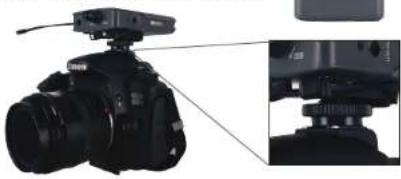
Hot shoe adapter installation
- Insert the hot shoe adapter into the belt clip as shown in image.
- Slide the square piece into the hot shoe mount on the camera.
- Tighten down the adapter.
- Insert the appropriate cable into the line out and into the camera's microphone jack.
For tech support, email techsupport@mxlmics.com or call (800) 800-6608 or +1 (310) 333-0606.
natural_image
Close-up of a DSLR camera with attached sensor and lens assembly (no visible text or symbols)Specifications
| Model | FR-500WT FR-500WR | |
| Frequency Range | 566.25 – 589.75 MHz | |
| Frequency Response | 40 Hz-18 kHz | |
| Operating Range | Up to 280 m | |
| Channels | 64 (4 groups of 16 channels) | |
| Controls | Power On/Off, Channel Selection, Volume Control, Group Selection, Boost | |
| Battery Each unit requires 2 AA (not included) | ||
| Battery Life 10 hours typical | ||
| Dimensions | 62mm(W) x 20mm(D) x 97mm(H) | |
| Features | Line in Line out1/8" mic in 1/8" audio outBuilt-in microphone Built-in speaker | |
Utilisation
Français
natural_image
Close-up of a DSLR camera with attached sensor array and zoomed-in detail view (no text or symbols visible)Specifications
Brand : MXL
Model : FR-500WR
Category : Receiver