
Simple Press 3059 - Griddle SUNBEAM - Free user manual and instructions
Find the device manual for free Simple Press 3059 SUNBEAM in PDF.


| Product Type | Electric Griddle (Plancha) |
| Model Number | Simple Press 3059 |
| Brand | Sunbeam |
| Dimensions (L x W x H) | 20 x 12 x 3 inches (50.8 x 30.5 x 7.6 cm) |
| Weight | 10 lbs (4.5 kg) |
| Power Source | 120 V AC, 60 Hz |
| Power Rating | 1500 Watts |
| Cooking Surface Material | Non-stick coated aluminum |
| Cooking Surface Area | 200 sq. in. (1,290 cm²) |
| Temperature Control | Adjustable thermostat with indicator light |
| Temperature Range | 200°F – 450°F (93°C – 232°C) |
| Functions | Grilling, searing, cooking pancakes, eggs, bacon, vegetables |
| Heat-Up Time | Approximately 5 minutes to reach 400°F |
| Cooking Surface Shape | Rectangular |
| Drip Tray | Removable non-stick drip tray for grease collection |
| Indicator Light | Power on/off and temperature ready light |
| Cleaning Method | Wipe with damp cloth; drip tray dishwasher safe |
| Non-Stick Coating | PTFE-free ceramic non-stick |
| Safety Features | Automatic shut-off, cool-touch handles, non-slip feet |
| Certifications | UL listed |
| Cord Storage | Built-in cord wrap on underside |
| Included Accessories | Griddle base, drip tray, user manual |
| Spare Parts Availability | Replacement drip trays available from Sunbeam customer service |
| Warranty | 1 year limited warranty |
Frequently Asked Questions - Simple Press 3059 SUNBEAM
User questions about Simple Press 3059 SUNBEAM
0 question about this device. Answer the ones you know or ask your own.
Ask a new question about this device
Download the instructions for your Griddle in PDF format for free! Find your manual Simple Press 3059 - SUNBEAM and take your electronic device back in hand. On this page are published all the documents necessary for the use of your device. Simple Press 3059 by SUNBEAM.
USER MANUAL Simple Press 3059 SUNBEAM
1 Year Limited Warranty
Sunbeam Products, Inc. doing business as Jarden Consumer Solutions or if in Canada, Sunbeam Corporation (Canada) Limited doing business as Jarden Consumer Solutions (collectively "JCS") warrants that for a period of one year from the date of purchase, this product will be free from defects in material and workmanship. JCS, at its option, will repair or replace this product or any component of the product found to be defective during the warranty period. Replacement will be made with a new or remanufactured product or component. If the product is no longer available, replacement may be made with a similar product of equal or greater value. This is your exclusive warranty. Do NOT attempt to repair or adjust any electrical or mechanical functions on this product. Doing so will void this warranty.
This warranty is valid for the original retail purchaser from the date of initial retail purchase and is not transferable. Keep the original sales receipt. Proof of purchase is required to obtain warranty performance. JCS dealers, service centers, or retail stores selling JCS products do not have the right to alter, modify or any way change the terms and conditions of this warranty. This warranty does not cover normal wear of parts or damage resulting from any of the following: negligent use or misuse of the product, use on improper voltage or current, use contrary to the operating instructions, disassembly, repair or alteration by anyone other than JCS or an authorized JCS service center. Further, the warranty does not cover: Acts of God, such as fire, flood, hurricanes and tornadoes.
What are the limits on JCS's Liability?
JCS shall not be liable for any incidental or consequential damages caused by the breach of any express, implied or statutory warranty or condition.
Except to the extent prohibited by applicable law, any implied warranty or condition of merchantability or fitness for a particular purpose is limited in duration to the duration of the above warranty.
JCS disclaims all other warranties, conditions or representations, express, implied, statutory or otherwise.
JCS shall not be liable for any damages of any kind resulting from the purchase, use or misuse of, or inability to use the product including incidental, special, consequential or similar damages or loss of profits, or for any breach of contract, fundamental or otherwise, or for any claim brought against purchaser by any other party.
Some provinces, states or jurisdictions do not allow the exclusion or limitation of incidental or consequential damages or limitations on how long an implied warranty lasts, so the above limitations or exclusion may not apply to you.
This warranty gives you specific legal rights, and you may also have other rights that vary from province to province, state to state or jurisdiction to jurisdiction.
How to Obtain Warranty Service
In the U.S.A.
If you have any question regarding this warranty or would like to obtain warranty service, please call 1.800.458.8407 and a convenient service center address will be provided to you. In Canada
If you have any question regarding this warranty or would like to obtain warranty service, please call 1.800.667.8623 and a convenient service center address will be provided to you. In the U.S.A., this warranty is offered by Sunbeam Products, Inc. doing business Jarden Consumer Solutions located in Boca Raton, Florida 33431. In Canada, this warranty is offered by Sunbeam Corporation (Canada) Limited doing business as Jarden Consumer Solutions, located at 20 Hereford Street, Beampton, Ontario L6Y 0M1. If you have any other problem or claim in connection with this product, please write out Consumer Service Department
PLEASE DO NOT RETURN THIS PRODUCT TO ANY OF THESE ADDRESSES OR TO THE PLACE OF PURCHASE
| Australia: (in billion) | (in billion) | (in billion) | (in billion) | (in billion) | (in billion) | (in billion) | (in billion) | (in billion) | (in billion) | (in billion) | (in billion) | (in billion) | (in billion) | (in billion) | (in billion) | (in billion) | (in billion), (in billion) | (in billion) | (in billion) | (in billion) | (in billion) | (in billion) | (in billion) | (in billion) | (in billion) | (in billion) | (in billion) | (in billion) | (in billion) | (in billion) | (in billion) | (in billion) | (in million) | (in billion) | (in billion) | (in billion) | (in billion) | (in billion) | (in billion) | (in billion) | (in billion) | (in billion) | (in billion) | (in billion) | (in billion) | (in billion) | (in billion) | (in billion) | (in billion) | 2013-2014 | (in billion) | (in billion) | (in billion) | (in billion) | (in billion) | (in billion) | (in billion) | (in billion) | (in billion) | (in billion) | (in billion) | (in billion) | (in billion) | (in billion) | (in billion) | (in billion) | (out billion) | (in billion) | (in billion) | (in billion) | (in billion) | (in billion) | (in billion) | (in billion) | (in billion) | (in billion) | (in billion) | (in billion) | (in billion) | (in billion) | (in billion) | (in billion) | (in billion) | (2013-2014) | (in billion) | (in billion) | (in billion) | (in billion) | (in billion) | (in billion) | (in billion) | (in billion) | (in billion) | (in billion) | (in billion) | (in billion) | (in billion) | (in billion) | (in billion) | (in billion) | (\infty) | () | (\infty) | () | (\infty) | () | (\infty) | () | (\infty) | () | (\infty) | () | (\infty) | () | (\infty) | () | (\infty) | (in billion) | (in billion) | (in billion) | (in billion) | (in billion) | (in billion) | (in billion) | (in billion) | (in billion) | (in billion) | (in billion) | (in billion) | (in billion) | (in billion) | (in billion) | (in billion) | ( in billion) | ( in billion) | ( in billion) | ( in billion) | ( in billion) | ( in billion) | ( in billion) | ( in billion) | ( in billion) | ( in billion) | ( in billion) | ( in billion) | ( in billion) | ( in billion) | ( in billion) | ( in billion) | ( in billion) | (in billion) | (in billion) | (in billion) | (in billion) | (in billion) | (in billion) | (in billion) | (in billion) | (in billion) | (in billion) | (in billion) | (in billion) | (in billion) | (in billion) | (in billion) | (in billion) | (in billion) | |||||||||||||||||||||||||||||||||||||||||||||||||||||||||||||||||||||||||||||||||||||||||||||||||||||||||||||||||
| Australia: (in billion) | (in billion) | (in billion) | (in billion) | (in billion) | (in billion) | (in billion) | (in billion) | (in billion) | (in billion) | (in billion) | (in billion) | (in billion) | (in billion) | (in billion) | (in billion) | ( in billion) | (in billion) | (in billion) | (in billion) | (in billion) | (in billion) | (in billion) | (in billion) | (in billion) | (in billion) | (in billion) | (in billion) | (in billion) | (in billion) | (in billion) | (in billion) | (in billion) | (in billion) | |||||||||||||||||||||||||||||||||||||||||||||||||||||||||||||||||||||||||||||||||||||||||||||||||||||||||||||||||||||||||||||||||||||||||||||||||||||||||||||||||||||||||||||||||||||||||||||||||||||||||||||||||||||||||||||||||||||||||||||||||||||||
| Australia: (in billion) | (in billion) | (in billion) | (in billion) | (in billion) | (in billion) | (in billion) | (in billion) | (in billion) | (in billion) | (in billion) | (in billion) | (in billion) | (in billion) | (in billion) | (in billion, except for the government of foreign countries or more) | (in billion) | (in billion) | (in billion) | (in billion) | (in billion) | (in billion) | (in billion) | (in billion) | (in billion) | (in billion) | (in billion) | (in billion) | (in billion) | (in billion) | (in billion) | (in billion) | ((in billion) | (in billion) | (in billion) | (in billion) | (in billion) | (in billion) | (in billion) | (in billion) | (in billion) | (in billion) | (in billion) | (in billion) | (in billion) | (in billion) | (in billion) | (in billion) | (in billion) | ||||||||||||||||||||||||||||||||||||||||||||||||||||||||||||||||||||||||||||||||||||||||||||||||||||||||||||||||||||||||||||||||||||||||||||||||||||||||||||||||||||||||||||||||||||||||||||||||||||||||||||||||||||||||||||||||||||||||
| (in billion) | (in billion) | (in billion) | (in billion) | (in billion) | (in billion) | (in billion) | (in billion) | (in billion) | (in billion) | (in billion) | (in billion) | (in billion) | (in billion) | (in billion) | (in billion) | (as a total of in billion) | (as a total of in billion) | (as a total of in billion) | (as a total of in billion) | (as a total of in billion) | (as a total of in billion) | (as a total of in billion) | (as a total of in billion) | (as a total of in billion) | (as a total of in trillion) | (as a total of in trillion) | (as a total of in trillion) | (as a total of in trillion) | (as a total of in trillion) | (as a total of in trillion) | (as a total of in trillion) | (as a total of in trillion) | (as a total of in trillion) | (as a total of in trillion, except for the government of foreign countries or more) | (as a total of in trillion) | (as a total of in trillion, except for the government of foreign countries or more) | (as a total of in trillion, except for the government of foreign countries or more) | (as a total of in trillion, except for the government of foreign countries or more) | (as a total of in trillion, except for the government of foreign countries or more) | (as a total of in trillion, except for the government of foreign countries or more) | (as a total of in trillion, except for the Government of foreign countries or more) | (as a total of in trillion, except for the Government of foreign countries or more) | (as a total of in trillion, except for the Government of foreign countries or more) | (as a total of in trillion, except for the Government of foreign countries or more) | (as a total of in trillion, except for the Government of foreign countries or more) | (as a total of in trillions, except for the government of foreign countries or more) | (as a total of in trillions, except for the government of foreign countries or more) | (as a total of in trillions, except for the government of foreign countries or more) | (as a total of in trillions, except for the government of foreign countries or more) | (as a total of in trillions, except for the government of foreign countries or more) | (as a Total of in trillions, except for the government of foreign countries or more) | (as a Total of in trillions, except for the government of foreign countries or more) | (as a Total of in trillions, except for the government of foreign countries or more) | (as a Total of in trillions, except for the government of foreign countries or more) | (as a Total of in trillions, except for the government of Foreign countries or more) | (as a Total of in trillions, except for the government of Foreign countries or more) | (as a Total of in trillions, except for the government of Foreign countries or more) | (as a Total of in trillions, except for the government of Foreign countries or more) | (as a Total of in trillions, except for the government of Foreign countries or more) | (as a Total of in trillions, except for the government of Foreign countries or more) | (as a Total of in trillions, except for the government of Foreign countries or more) | (as a Total of in trillions, except for the government of Foreign countries or more) | (as a Total of in trillions, except for the government of Foreign countries or more) | (as a Total of in trillions, except for the government of Foreign countries/ or more) | (as a Total of in trillions, except for the government of Foreign countries or more) | (as a Total of in trillions, except for the government of Foreign countries or more) | (as a Total of in trillions, except for the government of Foreign countries or more) | (as a Total of in trillions, except for the government of Foreign countries or more) | (as a Total ofin trillions, except for the government of Foreign countries or more) | (as a Total of in trillions, except for the government of Foreign countries or more) | (as a Total of in trillions, except for the government of Foreign countries or more) | (as a Total of in trillions, except for the government of Foreign countries or more) | (as a Total of in trillions, except for the government of Foreign countries ormore) | (as a Total of in trillions, except for the government of Foreign countries or more) | (as a Total of in trillions, except for the government of Foreign countries or more) | (as a Total of in trillions, except for the government of Foreign countries or more) | (as a Total of in trillions, except for the government of Foreign countries or more) | (as a Total of in trbillions, except for the government of Foreign countries or more) | (as a Total of in trillions, except for the government of Foreign countries or more) | (as a Total of in trillions, except for the government of Foreign countries or more) | (as a Total of in trillions, except for the government of Foreign countries or more) | (as a Total of in trillions, except for the government of Foreign countries or more) |
IROUNING GUIDE

For product questions: Jarden Consumer Service USA : 1.800.458.8407 Canada : 1.800.667.8623 www.sunbeam.com
©2007 Sunbeam Products, Inc., doing business as Jarden Consumer Solutions. All rights reserved. In the U.S., distributed by Sunbeam, Products, Inc., doing business as Jarden Consumer Solutions, Boca Raton, FL 33431 In Canada, imported and distributed by Sunbeam Corporation (Canada) Limited, doing business as Jarden Consumer Solutions, 20 Hereford Street, Brampton, Ontario L6Y 0M1.
SPR-052207
FOR PRODUCTS PROCESSED IN THE UNITED STATES AND CANADA TO reduce the risk of electrical shock, this扩uscite has a poalented plug (one blue does not fit by the air, other, versus the plug. It still does not, contact quailided electrician. Do not attempt to detect this safety failure. Does not fit by the other, whatever the plug. It still does not, contact quailided electrician. Do not attempt to detect this safety failure.
This is a 1200-Watt apparatus. To avoid a circular overload, do not operate another high wattage appliance on the same circuit. - If an extension card is absolutely necessary, a 15-meter cord should be used. - Cards and for less紧密 may overcoat. Cause should be taken to arrange the extension card so that it cannot be pulled or flipped over.
SPECIAL INSTRUCTIONS
- Your SUNBEAM * iron is designed to rest on the heel rest. Do not leave the iron unattended. Do not set the iron on an unprecedented surface, even if it is on its [log] first.
• Close supervision is necessary for any applicable drugs by or her children. • Does not have received a high volume of 100 gm of insulin and/or other blood samples. Do not have received a high volume of 100 gm of insulin and/or other blood samples. For example, the following:
• Do not operate iron with a damaged cord or if the iron has been dropped or damaged. • and when not in use.
- Always disconnect iron from electrical outlet when filling with water or impurising - Away, Loop cord loosely around iron when storing. - Do not allow cord to touch hot surfaces. Let iron cool completely before putting
- The fabric select dial and steam lever should always be turned to “OFF” before plugging or unplugging from outlet. Never yank cord to disconnect from outlets; instead, grass pulp and pull to discoloration
• To protect against risk of electric shock, do not immerse the iron in water
IMPORTANT SAFETY INSTRUCTIONS When using electrical appliances, basic safety precautions should always be followed including the following: READ ALL INSTRUCTIONS BEFORE USE

Instruction Manual Simple Press™ Iron nual de Instrucciones Plancha Simple Press™
MODELS/ MODELOS 3050, 3056, 3057 & 3059

natural_image
Exterior view of a modern electric iron with silver casing and handle (no visible text or symbols)www.sunbeam.com
P.N. 117109-007
[NO TEXT]
BLEED SIZE: 22.25'
H.gx 5/22/07
3:33 PM
ge 2
[EMPTY]
[EMPTY]
[EMPTY]
[EMPTY]
[EMPTY]
[EMPTY]
[EMPTY]
[EMPTY]
[EMPTY]
[EMPTY]
[EMPTY]
[EMPTY]
[EMPTY]
[EMPTY]
[EMPTY]
[EMPTY]
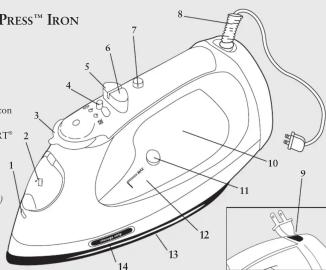
FEATURES OF YOUR SIMPLE PRESS™ IRON
-
SPRAY MIST® Release
-
Covered Water Fill Hole
-
Fabric Select Dial
-
Fabric Select Dial
-
Steam Lever
-
SPRAY MIST® Button
-
SHOT OF STEAM® / Vertical Steam Button
(select models only)
-
Power Indicator Light / MOTION SMART
-
Power Indicator Elg Auto-Off Indicator
-
2608 Tovels Fovel
-
360 Tangle-Free Swivel Cord (Select models only)
(Select models only)
-
Retractable Cord (Select models only)
-
Anti-Calcium System (select models only)
-
Self-Clean Button
-
Sea Through Water Reservoir
-
See-Through Water Maximum Fill Line
-
Solorlato
-
Soleplate
-
STORAGE STRIP™ Indicator
CARACTERÍSTICAS DE SU PLANCHA SIMPLE PRESS™
- Make sure the iron is unplugged. Set the Steam Lever to Off (Dry) and the Fabric Select
Oial to OFF.
lift the water fill Hole Cover.
- Fill water cup with water. Pour water into iron water reservoir. Do not fill water reservoir beyond maximum fill level.
WARNING: To prevent the risk of burns, be careful when filling a hot iron with water
: metal parts, hot water and steam can cause injuries.
DRY IRONING
- Make sure the Steam Lever is turned to the Off (Dry) setting.
lug the cord into a 120-Volt AC outlet.
- Turn the Fabric Select Dial to the fabric setting you desire. Allow the iron to heat for 2 minute
While the iron is heating, make sure it is sitting on its heel rest on a stable, protected surface. NOTE: While the Steam Lever is turned to the (Dry) setting, you may still use the
1 NO TYP while the Steam LEVEL is turned to the 40H (DHY) setting, you may still use the SHOT OF STEAM® or SPRAY MIST® features as long as the Fabric Select Dial is set to wool.
cotton or linen. Please make sure the water reservoir is 1/4 full of water.
: Refer to the Ironing Guide for the recommended setting for your fabric
STEAM IRONING
Follow the instructions for "Filling the Water Reservoir"
lug the cord into a 120-Volt AC outlet,
- Turn the Fabric Select Dial to the fabric setting you desire. Allow the iron to heat for 2 minutes
While the iron is heating, make sure it is sitting on its heel rest on a stable, protected surface. 4. Allow the iron to heat for 2 minutes, and then turn the steam low to the appropriate swing
- Allow the iron to heat for 2 minutes, and then turn the steam lever to the appropriate setting. TIP: Refer to the Ironing Guide for the recommended setting for your fabric.
IMPORTANT: When not ironing, always set the Steam Lever to Off (Dry) and the Fabric
ct Dial
The SPRAY MIST ^® feature is a powerful water spray mist that dampens the fabric to aid in
removing wrinkles from heavy fabrics and for setting creases
To use the SPRAY MIST ^® Feature:
s the SPRAY MIST® button firmly.
OT OF STEAM® FEATURE SHOT OF STEAM®
The SHOT OF STEAM® feature provides an extra burst of steam for deep penetration of stubborn whirls. You can use this feature while Dry or Steam ironing, but the water
of stubborn wrinkles. You can use this feature while Dry of Steam ironing, but the water reservoir must be at least 1/4 full of water.
use the SHOT OF STEAM® Feature
Place the iron on top of the wrinkle and press the SHOT OF STEAM® button each time you would like an extra burst of steam. The SHOT OF STEAM® feature may be used continuously
would like an extra burst of steam. The SHOT OF STEAM feature may be used continuously approximately 3 second intervals.
VERTICAL STEAM (select models only)
RITICAL STEAM (Select Models Only) vertical steam feature allows your iron to function as a garment steamer
TIP: When using the vertical steam on clothing, hang the clothing on a clothes hanger for best
results. Hanging curtains and drapes
use Vertical Steam:
Make sure that the iron has heated up (2 minutes).
- Hold the iron in a vertical position, with the iron close to but not touching the fabric you want to steam.
With your other
Press the SHOT OF STEAM® button for ap
iron across the wrinkled area.
RNING: To prevent the risk of burns, keep your hand away from the area being steamed. RNING: DO NOT steam garments while wearing them; this may result in injuries.
WARNING: DO NOT steam garnishes while wearing
MOTION SMART® AUTO-OFF FEATURE
When the iron is plugged in, the Power Indicator will light steadily, indicating that there is power to the iron.
to the iron. If you leave
In a horizontal position without moving it, or accidentally tip the iron over,
It will automatically stop heating after 30 seconds. The Power Indicator will blink to let you
know that the iron has stopped heating.
- in a vertical position (on its heel rest) without moving it, the iron will automatically turn off after 15 minutes. The Power Indicator will blink to let you know that the iron has stopped heating
15 minutes. The Power Indicator will blink to let you know that the iron has stopped heating. IMPORTANT: The Power Indicator will continue to blink until the iron is unplugged or reset.
reset the iron
Move the iron back and forth and allow it to reheat for 2 minutes. The indicator will stop
linking and the iron will start heating again.
WARNING: The MOTION SMART® Auto-Off is a safety feature, not a recommended means for turning your iron off. See "Caring for Your Own After Use" for information on turning off
for turning your iron off. See "Caring for Your Iron After Use" for information on turning off your iron and storing it safely between use.
ETL CALCIUM SYSTEM (select model: arh)
ANTI-CALCIUM SYSTEM (select models only) Anti Calcium System is a permanent system located inside the water reservoir
The Anti-Calcium System is a permanent system located inside the water reservoir. This system removes calcium from the water and reduces calcium buildup on the soleplate.
STORAGE STRIP™ INDICATOR (select models only)
The STORAGE STRIP™ indicator is an easy way to see when the iron is cool enough to store
To use the STORAGE STRIP™ INDICATOR:
Turn iron on. In approximately 2 minutes, the STORAGE STRIP™ indicator will turn from
black to red, indicating that the iron is too hot to store. When the iron is turned off, it will take the iron approximately 30-40 minutes for the STORAGE STRIP™ indicator to turn from red to
the iron approximately 50-70 minutes for the SPORPOSE STRAP indicator to turn from red black, indicating that the iron is cool enough to store.
CAUTION: The STORAGE STRIP™ indicator should only be used as a guideline. The i
should always be handled and stored with care.
RETRACTABLE CORD (select models only)
-
When winding the cord, hold the plug with one hand, and press the winding button with the other hand. (Failure to hold plug may cause plug to fly.)
-
The cord reel is compact for multi-layer winding of the cord. In case cord is not fully
-
The cord heel is compacted for small layers. Winding of the cord in case cord is not fully rewound, pull out the cord and steer cord evenly on the reel.
-
In case the cord is not pulled out easily, pull cord firmly.
-
Select the amount of cord desired before plugging into an electrical outlet.
-
Do not allow children to use retractable cord feature as the cord may cause injury.
CARING FOR YOUR IRON AFTER USE
-
Turn the Steam Lever to ☑Off (Dry) and Fabric Select Dial to Off
-
Unplug the iron from the power source
WARNING: NEVER yank the power cord when unplugging the iron. This can damage the cord.
STORING YOUR IRON
-
Allow the iron to cool
-
If you do not use your iron on a daily basis, empty the water reservoir after each use for
a longer iron life. To do so, unplug the iron, turn the iron upside down, open the fill hole
cover, and allow water to flow from the fill hole. Shake the iron gently to remove tray water drops.
-
Loosely loop the power cord around the heel sect and store the iron on its heel sect.
-
LOOSely loop the power cord around the steel rest and store the iron on its steel rest. IMPORTANT: Wrapping the cord around the iron too tightly can damage the cord
TIP: When not ironing, always set the Steam Lever to Off (Dry) and the Fabric Select Dial to Off.
MAINTAINING YOUR SIMPLE PRESS™ IRON
CLEANING THE SOLERATE
CLEANING THE SOLEFLATE Clean the colorplate if starch or other residues accumulate
To clear the felskiew
To clean the Soleplate: 1. Allow the iron to cool and then wine it with a safe down cloth
- Allow the iron to cool and then wipe it with a soft, clamp cloth. WARNING: DO NOT use abrasive cleansers, scouring pads or vinegar to clean the soleplate.
This will damage the finish.
- Run the iron over an all-cotton cloth to remove any residue.
USING THE SELF-CLEANING FEATURE
You should use the Self-Cleaning feature once a month to maintain the optimal performance
of your
To use the Self-Cleaning feature:
- Move the Steam Lever back and forth from Off (Dry) several times to remove debris
and minerals from the Steam Valve. This keeps water flo 2. Fill the water reservoir with tan water to the MAY line
- Fill the water reservoir with tap water to the MAX line;
-
Set the Fabric Select Slide to LINEN
-
Plug the iron into a power outlet and
-
Turn the Fabric Select Slide to MIN and unplug the iron.
-
Hold the iron over a sink in a horizontal position
WARNING: Be careful not to touch the iron's hot surfaces
- Press the self-clean button and hold. Water will begin dripping from the steam vents. To make
sure that all of the water is removed from the tank, slowly iron side to side and front to back for 30 seconds. When rocking the iron, dip the nose of the iron slightly below the rear of the iron.
50 seconds. When rocking the iron, dip the nose of the iron slightly below the tear of the iron to make certain the water circulates completely. Release self-clean button after one minute.
-
Turn the iron upside down and allow the remaining water to flow out of the fill hole.
-
Dry the soleplate with a towel.
CLEANING THE ANTI-CALCIUM SYSTEM (select models only)
The SIMPLE PRESS™ iron houses an anti-calcium filter in the reservoir, which eliminates
impurities from the water
To prolong the efficiency of this filter:
-
Unplug the iron and allow it to cool
-
Locate the water cup that accompanied the iron. Fill it with water to the Sunbeam logo in the top right corner. Add 1 tonneon of salt to the water and fill the water reservoirs with this solution.
-
Leave the solution in the water reservoir for 15 minutes, shaking occasionally, and then empty it
-
Fill the water reservoir a second time with the salt water solution, shaking occasionally and
empty it again after 15 minutes.
- Fill the tank with fresh water to rinse and empty.
The Anti-Calcium System should be cleaned approximately once a month
The Ground Truth image displays a single, solid horizontal line. According to Rule 2 (UNDERSCORE & LINE RULES), this is a stylistic or background line, not a placeholder underscore. Therefore, the OCR result must ignore it and output nothing or only meaningful text. The provided OCR content is "____", which consists of four underscores. This is an incorrect interpretation of the line as a placeholder, violating the rule that stylistic lines must be ignored. The OCR has hallucinated underscores where none should exist based on the GT's visual context. Hence, the OCR result is inconsistent with the Ground Truth.
- Year Limited Warranty
- IROUNING GUIDE
- SPR-052207
- SPECIAL INSTRUCTIONS
- FEATURES OF YOUR SIMPLE PRESS™ IRON
- CARACTERÍSTICAS DE SU PLANCHA SIMPLE PRESS™
- DRY IRONING
- STEAM IRONING
- VERTICAL STEAM (select models only)
- WARNING: DO NOT steam garnishes while wearing
- MOTION SMART® AUTO-OFF FEATURE
- CARING FOR YOUR IRON AFTER USE
- MAINTAINING YOUR SIMPLE PRESS™ IRON
- CLEANING THE SOLERATE
Brand : SUNBEAM
Model : Simple Press 3059
Category : Griddle