Flash - Smartphone BLU - Free user manual and instructions
Find the device manual for free Flash BLU in PDF.


Pick your language and provide your email: we'll send you a specifically translated version.
| Product Type | Smartphone |
| Brand | BLU |
| Model | Flash |
| Dimensions (approx) | 117 x 58 x 13 mm |
| Weight (approx) | 120 g |
| Display | 3.5-inch TFT LCD |
| Processor | 1 GHz single-core |
| RAM | 512 MB |
| Internal Storage | 4 GB |
| Expandable Storage | microSD (up to 32 GB) |
| Operating System | Android 4.0.4 Ice Cream Sandwich |
| Battery | 1500 mAh Li-Ion, removable |
| Standby Time (approx) | Up to 400 hours |
| Talk Time (approx) | Up to 10 hours |
| Rear Camera | 2 MP |
| Front Camera | VGA |
| Connectivity | GPRS, Wi-Fi 802.11 b/g/n, Bluetooth, microUSB |
| GPS | Yes (with A-GPS) |
| FM Radio | Yes (built-in antenna) |
| Audio Player | Yes (MP3, AAC, etc.) |
| SIM Card | Single SIM (standard) |
| First Charge | Charge for 24 hours before powering on |
Frequently Asked Questions - Flash BLU
How do I insert the SIM card and microSD card?
Power off the phone. Locate the SIM and microSD slots (usually under the back cover). Insert the SIM card with the gold contacts facing down. Insert the microSD card until it clicks. Replace the cover and power on.
How should I charge the phone for the first time?
Before first use, charge the battery for 24 hours using the provided charger and USB cable. This ensures optimal battery performance.
How can I transfer music files to the phone?
Connect the phone to a computer via USB. On the phone, select 'File Transfer' mode. Copy music files from the computer to the phone's internal storage or microSD card. Then use the Audio Player to play them.
How do I use the FM radio?
Plug in a wired headset (acts as antenna). Open the FM Radio app. Use the tuner to search for stations. The radio requires an external antenna for signal reception.
How do I enable GPS?
Go to Settings > Location and enable 'GPS' or 'Use GPS satellites'. For faster lock, enable 'Wi-Fi and mobile network location'. Then open a maps app to get your position.
How can I connect to the internet using GPRS?
Go to Settings > Wireless & Networks > Mobile Networks. Ensure 'Data enabled' is checked. Configure APN settings provided by your carrier. Then internet connectivity will work via GPRS.
How do I perform a factory reset?
Go to Settings > Backup & Reset > Factory Data Reset. Confirm and the phone will erase all data. Alternatively, press and hold Volume Up + Power button to enter recovery mode and choose wipe data/factory reset.
How can I save battery life?
Reduce screen brightness, turn off Wi-Fi/GPS when not in use, close background apps, and disable live wallpapers. Also, enable Power Saving mode if available.
How do I update the operating system?
Check for updates via Settings > About Phone > System Updates. If an update is available, download and install it. Make sure the phone has sufficient battery (above 50%) and is connected to Wi-Fi.
What should I do if the phone freezes or becomes unresponsive?
Press and hold the Power button for 10-15 seconds to force restart. If that fails, remove the battery for 30 seconds and reinsert it, then power on normally.
User questions about Flash BLU
0 question about this device. Answer the ones you know or ask your own.
Ask a new question about this device
No questions yet. Be the first to ask one.
Download the instructions for your Smartphone in PDF format for free! Find your manual Flash - BLU and take your electronic device back in hand. On this page are published all the documents necessary for the use of your device. Flash by BLU.
USER MANUAL Flash BLU
| BLUBOLD LIKE USF010 | 1 BEFORE POWERING ON CHARGE FOR 24HOURS/ANTES DE ENCENDER CARGUE POR 24HORAS | 3 GPS SETTING/CONFIGURACION GPSGPSRSPMS/SETTINGS/CONNECTORS/NETWORK | 5 AUDIO PLAYER/REPRODUCOR DE AUDIO | CONTINUE/CONTINUEAR |
 |  |  | 1 INSERT THE MICRO SD CARGINSERTE LATARE" S" S" S" S" S" S" S" S" S" S" S" S" S" S" S" S" S" S" S" S" S" S" S" S" S" S" S" S" S" S" S" S" S" S" S" S" S" S" S" S" S" S" S" S" S" S" S" S" S" S" | 3 COPY AND TRANSFER MUSIC FILES/COPLARY TRAVINGS AND TRANSFER SELECTION |
| 2 INSERT SM CARD/INSERTE LA TARJETA SM | 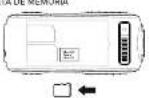 | |||
| 4 FM RADIO/RADIO FM | 2 CONNECT THE PHONE WITH THE COMPUTERVIA USB/CONNECTE EL TELEFOND CON LACOMPUTADORA V'A CABLE USB | 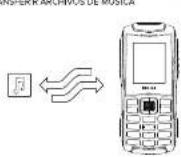 | ||
| FLASHQUICK START GUIDEGUÍA RÁPIDA | BUILT-IN ANTENNA/ANTENA INTEGRADA | 4 ENJOY THE AUDIO PLAYER/DISFRUTE DELREPRODUCOR DE AUDIO |
| BLÜBOLD LIKE USF010 |  2.INSRA O CARTÃO SIM: INSÉRIER LA CAITE SIMP1 2.INSRA O CARTÃO SIM: INSÉRIER LA CAITE SIMP1 | 3. CONFIGURACÃO GPRS/CONFIGURATION GPRSGPRSMENLY-CONFIGURACÕES-CONEXÃO-CONTA DAR  | 5. REPRODUTOR DE AUD-O/LECTEUR DE AUDIOINSRA O CARTÃO MICRO SIM/INSÉRER LACARTE MICRO SIM  | CONTINUAR/CONTINUER3. COPIAR E TRANSFERIR ARGUVOS DEMÚSICA/COPIER ET TRANSFERER DESF.O  4. APROVEITE O REPRODUTOR DE AUD/D/PROTER DU/LECTEUR DE AUDIO 4. APROVEITE O REPRODUTOR DE AUD/D/PROTER DU/LECTEUR DE AUDIO |
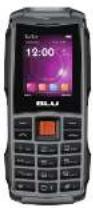 | ||||
| FLASHGUIA RÁPIDOGUIDE RAPIDE |
*90x58 mm
Manual assistant
Powered by Anthropic
Waiting for your message
Product information
Brand : BLU
Model : Flash
Category : Smartphone