
RKPNLHS2U - Computer Case StarTech.com - Free user manual and instructions
Find the device manual for free RKPNLHS2U StarTech.com in PDF.


| Product Type | Rackmount Computer Case |
| Model Number | RKPNLHS2U |
| Brand | StarTech.com |
| Form Factor | 2U Rackmount (3.5" height) |
| Motherboard Compatibility | ATX, Micro ATX |
| Drive Bays (Internal) | 5 x 3.5" SATA |
| Drive Bays (External) | 1 x 5.25" |
| Expansion Slots | 7 (full-height) |
| Power Supply Support | Standard ATX PS/2 (not included) |
| Cooling Fan Support | 2 x 80mm (rear, not included) |
| Front Panel I/O | 2 x USB 2.0, Power button, Reset button, LED indicators |
| Dimensions (W x D x H) | 482.6 x 350 x 88.9 mm (19 x 13.78 x 3.5 in) |
| Weight | 8.6 kg (19 lbs) |
| Material | Heavy-duty steel |
| Color | Black |
| Rack Depth | Short depth (350 mm / 13.78 in) |
| Security | Lockable front bezel (lock not included) |
| Maintenance | Tool-less drive trays; removable side panel |
| Cleaning | Wipe with dry cloth; do not use liquids |
| Safety | Ensure proper grounding; use rack mounting screws |
| Spare Parts | Power supply, fan modules, screw kit, drive trays (available separately) |
| Repairability | Modular design; easy access to internal components |
Frequently Asked Questions - RKPNLHS2U StarTech.com
User questions about RKPNLHS2U StarTech.com
0 question about this device. Answer the ones you know or ask your own.
Ask a new question about this device
Download the instructions for your Computer Case in PDF format for free! Find your manual RKPNLHS2U - StarTech.com and take your electronic device back in hand. On this page are published all the documents necessary for the use of your device. RKPNLHS2U by StarTech.com.
USER MANUAL RKPNLHS2U StarTech.com
Hinged Vented Server Rack Blanking Panel
RKPNLHV2U
RKPNLHV4U
RKPNLHV6U
• 1 x 2U Hinged Vented Rack Blanking Panel
• 2 x 5/8" #10-32 UNF Screws
• 2 x #10-32 UNF Cage Nuts
RKPNLHV4U
• 1 x 4U Hinged Vented Rack Blanking Panel
• 2 x 5/8" #10-32 UNF Screws
• 2 x #10-32 UNF Cage Nuts
RKPNLHV6U
• 1 x 6U Hinged Vented Rack Blanking Panel
• 4 x 5/8" #10-32 UNF Screws
• 4 x #10-32 UNF cage nuts
Product Overview
RKPNLHVxU
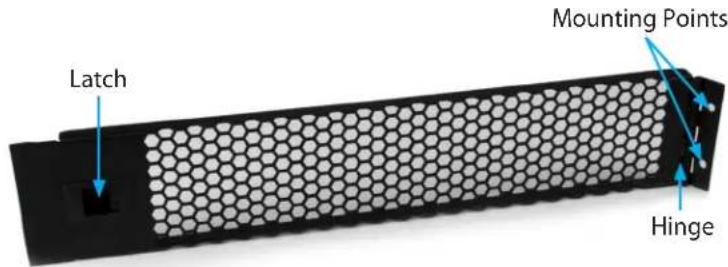
Installation
- Determine the 2U, 4U, or 6U space in your rack where the Blanking Panel will be mounted and on which side that you would like the hinge to be on.
- Insert the provided #10-32 UNF Cage Nuts into either the left or the right post of your rack.
- Align the Blanking Panel with the installed cage nuts and secure into place using the provided 5/8" #10-32 UNF Screws.
- To open the panel, slide the latch inward and pull the panel toward you.

natural_image
Diagram of a server rack with rows of circular components and a control panel (no text or symbols)Specifications
RKPNLHV2U
| U Height 2U | |
| Frame Type Steel | |
| Mounting Options Front Mount | |
| External Dimensions(WxDxH) | 18.98 x 0.59 x 3.47 in(482 x 15 x 88.1 mm) |
| Product Weight 0.75 lb (340 g) | |
*actual product may vary from photos
RKPNLHV4U
| U Height 4U | |
| Frame Type Steel | |
| Mounting Options Front Mount | |
| External Dimensions(WxDxH) | 18.98 x 0.59 x 69.7 in(482 x 15 x 177 mm) |
| Product Weight 1.23 lb (560 g) | |
RKPNLHV6U
| U Height 6U | |
| Frame Type Steel | |
| Mounting Options Front Mount | |
| External Dimensions(WxDxH) | 18.98 x 0.59 x 10.47 in(482 x 15 x 265.9) |
| Product Weight 2.38 lb (1080 g) | |
StarTech.com
Hard-to-find made easy®
Use of Trademarks, Registered Trademarks, and other Protected Names and Symbols
This manual may make reference to trademarks, registered trademarks, and other protected names and/or symbols of third-party companies not related in any way to StarTech.com. Where they occur these references are for illustrative purposes only and do not represent an endorsement of a product or service by StarTech.com, or an endorsement of the product(s) to which this manual applies by the third-party company in question. Regardless of any direct acknowledgement elsewhere in the body of this document, StarTech.com hereby acknowledges that all trademarks, registered trademarks, service marks, and other protected names and/or symbols contained in this manual and related documents are the property of their respective holders.
Technical Support
StarTech.com's lifetime technical support is an integral part of our commitment to provide industry-leading solutions. If you ever need help with your product, visit www.startech.com/support and access our comprehensive selection of online tools, documentation, and downloads.
For the latest drivers/software, please visit www.startech.com/downloads
Warranty Information
This product is backed by a two-year warranty.
In addition, StarTech.com warrants its products against defects in materials and workmanship for the periods noted, following the initial date of purchase. During this period, the products may be returned for repair, or replacement with equivalent products at our discretion. The warranty covers parts and labor costs only. StarTech.com does not warrant its products from defects or damages arising from misuse, abuse, alteration, or normal wear and tear.
Limitation of Liability
In no event shall the liability of StarTech.com Ltd. and StarTech.com USA LLP (or their officers, directors, employees or agents) for any damages (whether direct or indirect, special, punitive, incidental, consequential, or otherwise), loss of profits, loss of business, or any pecuniary loss, arising out of or related to the use of the product exceed the actual price paid for the product. Some states do not allow the exclusion or limitation of incidental or consequential damages. If such laws apply, the limitations or exclusions contained in this statement may not apply to you.

Brand : StarTech.com
Model : RKPNLHS2U
Category : Computer Case