TRUST ComfortFit - Headphones

ComfortFit - Headphones TRUST - Free user manual and instructions

Find the device manual for free ComfortFit TRUST in PDF.

📄 2 pages English EN Download 💬 AI Question 10 questions ⚙️ Specs
Notice TRUST ComfortFit - page 1
Pick your language and provide your email: we'll send you a specifically translated version.
Product Type Wired USB Headset
Brand Trust
Model ComfortFit
Connectivity USB-A
Cable Length Approx. 1.8 m
Driver Size 40 mm
Frequency Response 20 Hz – 20 kHz
Impedance 32 Ohm
Sensitivity 108 dB
Microphone Omnidirectional, adjustable
Controls In-line volume and mute control
Compatibility Windows, macOS, Chrome OS, Linux
Weight Approx. 100 g
Dimensions (L x W x H) 192 x 165 x 64 mm
Color Black and White
Cleaning Wipe with a dry, soft cloth. Do not use liquids or sprays.
Safety Avoid exposure to moisture and extreme temperatures. Do not disassemble.
Spare Parts & Reparability No user-serviceable parts. For support, visit www.trust.com.

Frequently Asked Questions - ComfortFit TRUST

How do I connect the Trust ComfortFit headset to my computer?
Plug the USB connector into an available USB port on your computer. The headset should be automatically recognized. If not, check your audio settings and select 'USB Audio Device' as the default playback/recording device.
Why is there no sound coming from the headset?
Ensure the USB cable is securely connected. Check that the volume control on the headset cable is not turned all the way down. Also, verify that the headset is selected as the default audio output device in your computer's sound settings.
How do I mute the microphone?
The headset has an in-line mute switch. Slide the switch to the mute position (often indicated by a red dot or microphone icon with a line through it) to disable the microphone. Slide it back to unmute.
Can I use this headset with a smartphone or tablet?
The Trust ComfortFit is designed for computers with a USB port. Most smartphones and tablets do not support USB audio headsets without an adapter. However, if your device supports USB OTG (On-The-Go), you may be able to use it with a USB OTG adapter.
How do I clean the headset?
Wipe the ear cups and headband with a soft, dry cloth. Do not use any liquids, alcohol, or cleaning agents, as they may damage the materials. Ensure the headset is unplugged while cleaning.
What should I do if the microphone is not working?
First, check that the mute switch is not turned on. Then, ensure the headset is set as the default recording device in your computer's sound settings. If the problem persists, test the headset on another computer to rule out hardware issues.
Does the headset have noise cancellation?
No, the Trust ComfortFit does not feature active noise cancellation. However, the over-ear design provides some passive noise isolation.
How long is the cable?
The cable length is approximately 1.8 meters (6 feet), providing enough length for comfortable use with a desktop or laptop.
Is the headset compatible with Xbox or PlayStation?
The Trust ComfortFit is designed for computers. It may work with PlayStation 4 or 5 via the USB port for chat audio, but full functionality (including game audio) may be limited. For Xbox, USB headsets are generally not supported.
What are the dimensions and weight of the headset?
The headset measures approximately 192 x 165 x 64 mm and weighs about 100 grams, making it lightweight and compact for extended wear.

User questions about ComfortFit TRUST

0 question about this device. Answer the ones you know or ask your own.

Ask a new question about this device

The email remains private: it is only used to notify you if someone responds to your question.

No questions yet. Be the first to ask one.

Download the instructions for your Headphones in PDF format for free! Find your manual ComfortFit - TRUST and take your electronic device back in hand. On this page are published all the documents necessary for the use of your device. ComfortFit by TRUST.

USER MANUAL ComfortFit TRUST

Frequently asked questions

www.trust.com/18831/faq

Trust
TRUST ComfortFit - 1

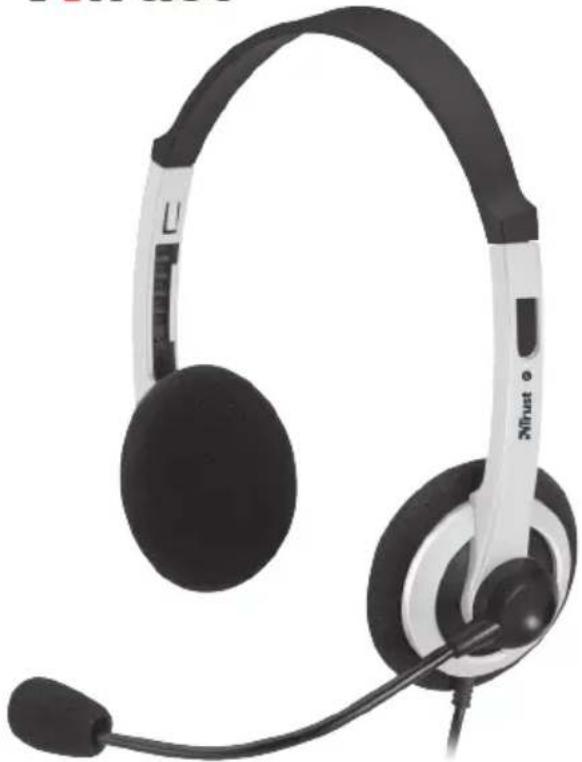
natural_image Black and white headset with earbuds and microphone, no visible text or symbols

Quick Installation Guide

USB Headset

© 02-09-2012 Trust International B.V. All rights reserved.

USB

2
A
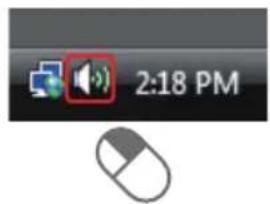
2:18 PM

B
Open Volume Mixer Playback Devices Recording Devices Sounds

C
Sound Playback Recording Sounds Cummunications Select a recording device below to modify its settings: Microphone USB Headphone Set Default Device 2x

D
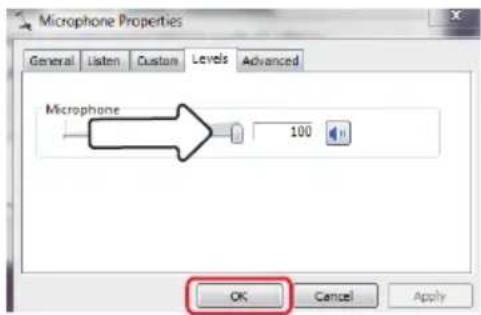
Microphone Properties General Listen Custom Levels Advanced Microphone 100 OK Cancel Apply

Manual assistant
Powered by Anthropic
Waiting for your message
Product information

Brand : TRUST

Model : ComfortFit

Category : Headphones