
HDDSi-2 - Warming Drawer APW Wyott - Free user manual and instructions
Find the device manual for free HDDSi-2 APW Wyott in PDF.


| Product Type | Warming Drawer |
| Brand | APW Wyott |
| Model | HDDSi-2 |
| Dimensions (W x D x H) | 27 x 17 x 8 inches |
| Weight | 50 lbs |
| Power Supply | 120V, 60Hz, 1500W |
| Temperature Range | 150°F – 200°F |
| Control Type | Digital touchpad |
| Drawer Capacity | Fits full-size hotel pans |
| Material | Stainless steel interior and exterior |
| Timer Function | Yes, up to 4 hours |
| Auto Shut-Off | Yes, after 12 hours of inactivity |
| Humidity Control | Not available |
| Thermostat | Adjustable with digital display |
| Safety Features | Overheat protection, child lock |
| Installation | Built-in or countertop |
| Cleaning | Wipe with damp cloth and mild soap; avoid abrasives |
| Spare Parts Availability | Contact APW Wyott customer service |
| Warranty | 1 year parts and labor |
| Certifications | ETL, NSF |
| Repairability | Modular design; replaceable heating element and control board |
| Usage | Commercial kitchen, front-of-house warming |
| Color/Finish | Stainless steel |
| Power Cord Length | 6 ft |
Frequently Asked Questions - HDDSi-2 APW Wyott
User questions about HDDSi-2 APW Wyott
0 question about this device. Answer the ones you know or ask your own.
Ask a new question about this device
Download the instructions for your Warming Drawer in PDF format for free! Find your manual HDDSi-2 - APW Wyott and take your electronic device back in hand. On this page are published all the documents necessary for the use of your device. HDDSi-2 by APW Wyott.
USER MANUAL HDDSi-2 APW Wyott
natural_image
Technical line drawing of a mechanical device with internal compartments and mounting feet (no text or symbols)Model: HDD // HDDS
HOLDING DRAWERS
INTENDED FOR OTHER THAN HOUSEHOLD USE
RETAIN THIS MANUAL FOR FUTURE REFERENCE UNIT MUST BE KEPT CLEAR OF COMBUSTIBLES AT ALL TIMES

FOR YOUR SAFETY: Do not store or use gasoline or other flammable vapors and liquids in the vicinity of this or any other appliance.


WARNING: Improper installation, adjustment, alteration, service or maintenance can cause property damage, injury or death. Read the Installation, Operating and Maintenance Instructions thoroughly before installing or servicing this equipment.

This equipment has been engineered to provide you with year-round dependable service when used according to the instructions in this manual and standard recommendations for their practices.


ANSI/NSF4
P/N 70505000 9/05
Toll Free: +1 (800) 527-2100
Website: www.apwwyott.com
E-mail: info@apwwyott.com
APW WYOTT
729 Third Avenue
Dallas, TX 75226
TABLE OF CONTENTS
| SECTION | ITEM | PAGE |
| 1 | Owner's Information...... | 3 |
| General Information...... | 3 | |
| General Operation Instructions...... | 3 | |
| Warranty Information...... | 3 | |
| 2 | Important Safety Information...... | 3 |
| 3 | Specifications...... | 3 |
| Electrical...... | 3 | |
| Dimensions...... | 4 | |
| 4 | Operation...... | 5 |
| Operating Instructions...... | 5 | |
| 5 | Cleaning...... | 5 |
| General Cleaning Instructions...... | 5 | |
| Daily Cleaning...... | 5 | |
| 6 | Troubleshooting...... | 5 |
| 7 | Wiring Diagram...... | 6 |
| 8 | Parts Lists & Exploded Views...... | 7 |
| HDD-B...... | 7 | |
| HDD-L or C...... | 8 | |
| HDDS-B...... | 9 | |
| HDDS-L or C...... | 10 | |
| 9 | Warranty...... | 11 |
1. OWNER'S INFORMATION
General Information:
- Always clean equipment thoroughly before first use. (See general cleaning instructions).
- Check rating label for your model designation and electrical rating.
- For best results, use stainless steel countertops.
- All dimensions in parenthesis in centimeters unless noted.
General Operation Instructions:
- All foodservice equipment should be operated by trained personnel.
- Do not allow your customers to come in contact with any surface labeled "CAUTION HOT".
- Where applicable: Never pour cold water into dry heated units.
- Where applicable: Do not cook, warm or hold food directly in liner pans (well pans). Always use steamtable pans/insets, etc.
- Never hold perishable food below 150°F (66°C).
Warranty Information:
Reliability Backed By APW Wyott's Warranty:
All APW Wyatt Holding Drawers are backed by a one year parts and labor warranty, including On-Site Service calls within 50 miles of authorized service technicians.
Service Information:
Service Hotline (800) 733-2203
2. SAFETY INFORMATION
APW Wyatt Holding Drawers are designed, built and sold for commercial use and should be operated by trained personnel only. Clearly post all CAUTIONS, WARNINGS and OPERATING INSTRUCTIONS near each unit to insure proper operation and to reduce the chance of personal injury and/or equipment damage.
Always disconnect power before servicing the Holding Drawer. Surfaces will remain hot after power has been turned off. Allow unit to cool before cleaning or servicing. Never clean the Holding Drawer by immersing it in water. The Holding Drawer is not protected against water jets; DO NOT CLEAN HOLDING DRAWER WITH A WATER JET. Always clean equipment before first use.
3. SPECIFICATIONS
Cordset Configuration:
120V: NEMA5-15P plug, 6 foot, 3 wire grounded cord. 208/240V: NEMA6-20P plug, 6 foot, 3 wire grounded cord.
5-15P

6-20P

If the supply cord is damaged, the manufacturer or an authorized service agent or a similarly qualified person must replace it to avoid a hazard or voiding the warranty.
| STANDARD HOLDING DRAWERS | ||||
| ELECTRIC | DIMENSIONS | SHIPPING WEIGHT | ||
| HDD-1 | 120V, 450W, 3.8 Amps208V, 450W, 2.1 Amps240V, 450W, 1.8 Amps | Base Unit | 10 3/8” H x 27 3/4” W x 20 11/16” D(264 mm x 705 mm x 525 mm) | 84 lbs.(38 kg) |
| Cutout | 10 3/4” H x 27 13/16” W(273 mm x 706 mm) | |||
| HDD-2 | 120V, 900W, 7.5 Amps208V, 900W, 4.3 Amps240V, 900W, 3.7 Amps | Base Unit | 19 3/4” H x 27 3/4” W x 20 11/16” D(502 mm x 705 mm x 525 mm) | 175 lbs.(79 kg) |
| Cutout | 20” H x 27 13/16” W(508 mm x 706 mm) | |||
| HDD-3 | 120V, 1350W, 11.3 Amps208V, 1350W, 6.5 Amps240V, 1350W, 5.6 Amps | Base Unit | 29 1/8” H x 27 3/4” W x 20 11/16” D(740 mm x 705 mm x 525 mm) | 254 lbs.(115 kg) |
| Cutout | 29 5/8” H x 27 13/16” W(752mm x 706 mm) | |||
| SLIMLINE HOLDING DRAWERS | ||||
| ELECTRIC | DIMENSIONS | SHIPPING WEIGHT | ||
| HDDS-1 | 120V, 450W, 3.8 Amps208V, 450W, 2.1 Amps240V, 450W, 1.8 Amps | Base Unit | 11 3/8" H x 20 15/16" W x 28 7/8" D(289 mm x 531 mm x 733 mm) | 84 lbs.(38 kg) |
| Cutout | 11 3/4" H x 20 1/2" W(298 mm x 521 mm) | |||
| HDDS-2 | 120V, 900W, 7.5 Amps208V, 900W, 4.3 Amps240V, 900W, 3.7 Amps | Base Unit | 21 1/4" H x 20 15/16" W x 28 7/8" D(545 mm x 531 mm x 733 mm) | 175 lbs.(79 kg) |
| Cutout | 21 5/8" H x 20 1/2" W(549 mm x 521 mm) | |||
| HDDS-3 | 120V, 1350W, 11.3 Amps208V, 1350W, 6.5 Amps240V, 1350W, 5.6 Amps | Base Unit | 31 1/8" H x 20 15/16" W x 28 7/8" D(794 mm x 531 mm x 733 mm) | 254 lbs.(115 kg) |
| Cutout | 31 1/8" H x 20 1/2" W(790mm x 521 mm) | |||
| WARNING: ELECTRICAL SHOCK HAZARD. FAILURE TO FOLLOW THE INSTRUCTIONS IN THIS MANUAL COULD RESULT IN SERIOUS INJURY OR DEATH. | |
| ! | Electrical Ground is required on this appliance.Do not modify the power supply cord plug. If it does not fit into the outlet, have the proper outlet installed by a qualified electricianDo not use an extension cord with this appliance.Check with a qualified electrician if you are unsure as to whether the appliance is properly grounded. |
4. OPERATION
- Initial heating of urinary generators smoke or fumes and must be added to a vehicle inlet area.
- Set thermostat control knob to desired setting and preheat each drawer for 30 minutes.
- Place food product directly in stainless steel drawer pans or use any combination of full or fractional pans up to 6" (152 mm) deep.
- Set front vent knob to desired position for maintaining food product moisture.
- Perforated pans may be used with damptowel or small amount of hot water in the drawer pan to prevent food "dry out".
CAUTION: Use no more than 1 quart (1 liter) for wet operation. - If too much moisture accumulates around drawer front or vent, reduce temperature setting or move vent knob to "dry" position.
| PRODUCT | TEMPERATURE SETTING | VENT |
| Rolls, Bread | 160°-180° F (71°-82° C) | Moist |
| Vegetables | 170°-180° F (77°-82° C) | Moist |
| Meats | 170°-180° F (77°-82° C) | Moist |
NOTE: Temperature and vent settings will require adjustment according to type and quantity of food, and number of times drawer is opened during operation.
5. CLEANING
General Cleaning Instructions:
- NEVER clean any electrical unit by immersing it in water. Turn off before surface cleaning.
- Always clean equipment thoroughly before first use. Clean unit daily. Except where noted on charts: Use warm, soapy water. Mild cleansers and PLASTIC scouring pads may be used to remove baked-on food and water scale.
- Turn off electrical units before cleaning or servicing. All service should be performed by an APW authorized service agency.
Daily Cleaning:
- Follow General Cleaning instructions (above).
- Remove any inset pans and drawer pans. Wash thoroughly in the sink or dishwasher.
- Remove drawers: Remove pans and pan inserts. Extend drawer and lift up on the front to clear the drawer stop. Lower drawer and pull straight out.
6. TROUBLESHOOTING GUIDE
Always ask and check the following:
- Is the unit connected to a live power source of the proper voltage?
- Check the circuit breaker.
- Is power switch "ON" and pilot light glowing?
- Check the rating label. Is the unit connected to the correct power source?
7. WIRING DIAGRAM

flowchart
graph TD
    A["Element"] --> B["Pilot Light"]
    B --> C["Thermostat"]
    C --> D["Element"]
    D --> E["Pilot Light"]
    E --> F["Thermostat"]
    F --> G["Element"]
    G --> H["Pilot Light"]
    H --> I["L2"]
    H --> J["L1"]
    style A fill:#f9f,stroke:#333
    style D fill:#f9f,stroke:#333
    style G fill:#f9f,stroke:#333
    style B fill:#ccf,stroke:#333
    style E fill:#ccf,stroke:#333
    style F fill:#ccf,stroke:#333
    style H fill:#ccf,stroke:#333
    style I fill:#ccf,stroke:#333
8. PARTS LISTS & EXPLODED VIEWS
HDD-B PARTS LIST
| ITEM | P/N | DESCRIPTION | ITEM | P/N | DESCRIPTION |
| 1 | N/A | Rating Label | 19 | 89167 | Drawer Vent Knob |
| 2 | 56505 | Thermostat Knob | 20 | 33154 | Drawer Handle Strip |
| 3 | 33976 | HDD1B Control Panel | 21 | 33018 | Drawer Pan |
| 33952 | HDD2B Control Panel | 22 | 33397 | Thermostat & Thermometer Bracket | |
| 33993 | HDD3B Control Panel | 23 | 33156 | Element Bracket | |
| 4 | 69120 | Thermostat | 24 | 54111 | 120V Heating Element |
| N/S | 60113 | Insulation | 54112 | 208V Heating Element | |
| N/S | 32490 | HDD1B Wire Set | 54113 | 240V Heating Element | |
| 32491 | HDD2B Wire Set | 25 | 33982 | HDD1B Front Plate | |
| 33359 | HDD3B Wire Set | 33963 | HDD2B Front Plate | ||
| 7 | 89145 | Terminal Block | 33999 | HDD3B Front Plate | |
| 8 | 32438 | HDD1B Body Assembly | 26 | 33908 | HDD3B Front Poly Panel |
| 32437 | HDD2B Body Assembly | 33909 | HDD2B Front Poly Panel | ||
| 32439 | HDD3B Body Assembly | 33910 | HDD1B Front Poly Panel | ||
| 9 | 33962 | Top Cover | 27 | 88851 | Press Stud |
| 10 | 33980 | HDD1B Side Outer Cover Right | 28 | 89026 | Cap Nut |
| 33960 | HDD2B Side Outer Cover Right | N/S | 33858 | Roller, Drawer Slide | |
| 33997 | HDD3B Side Outer Cover Right | N/S | 88961 | Green Ground Nut | |
| 11 | 33981 | HDD1B Side Outer Cover Left | N/S | 89071 | #10 Flat Washer |
| 33961 | HDD2B Side Outer Cover Left | N/S | 89076 | 1/4 Internal Star Washer | |
| 33998 | HDD3B Side Outer Cover Left | N/S | 89163 | 1/4-20 SS Jam Nut | |
| 12 | 88852 | Bushing, Bronze | N/S | 88909 | 8-18 X 1/2 Sheet Metal Screw |
| 13 | 33932 | Left Drawer Slide | N/S | 89140 | Cable Tie |
| 14 | 33933 | Right Drawer Slide | N/S | 88894 | 1/4-20 X 7/8 Press Stud |
| 15 | 56530 | Indicator Light | N/S | 89073 | 8 X 1/2 Screw |
| 16 | 69145 | Thermometer | N/S | 88892 | 1 / 4 - 2 0 X 1 F I a t Head SS |
| 17 | 33938 | Drawer Housing Assembly | N/S | 88893 | 1/4-20 Nylon Insert Locknut |
| 18 | 33944 | Drawer Face Assembly |
HDD-B EXPLODED VIEW

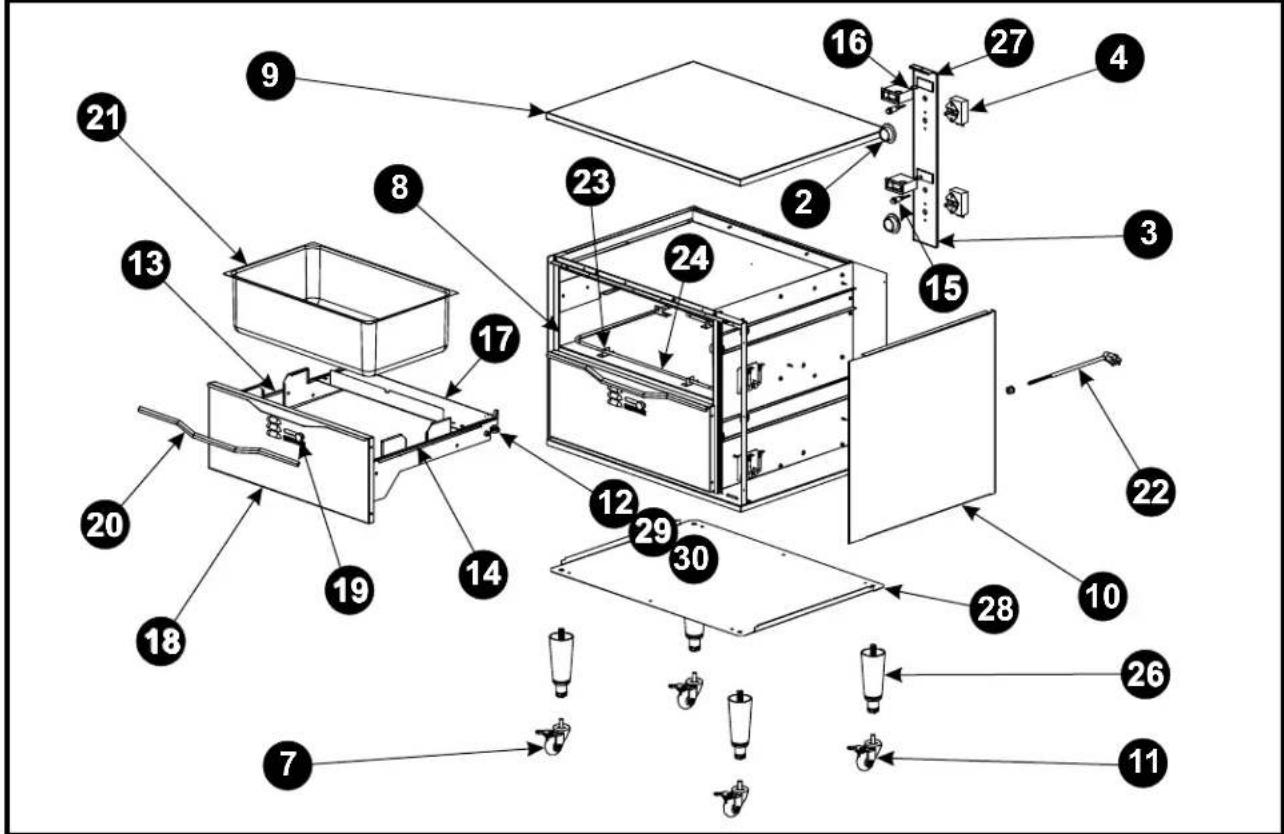
HDD-L or C PARTS LIST
| ITEM | P/N | DESCRIPTION | ITEM | P/N | DESCRIPTION |
| 1 | N/A | Rating Label | 20 | 32483 | Drawer Handle Strip |
| 2 | 56505 | Thermostat Knob | 21 | 33018 | Drawer Pan |
| 3 | 33976 | HDD1B Control Panel | 22 | 55970 | Cordset 16/3 SJTO |
| 33952 | HDD2B Control Panel | 23 | 32404 | Element Bracket | |
| 33993 | HDD3B Control Panel | 24 | 54111 | 120V Heating Element | |
| 4 | 69120 | Thermostat | 54112 | 208V Heating Element | |
| N/S | 60113 | Insulation | 54113 | 240V Heating Element | |
| N/S | 33357 | HDD1 Wire Set | N/S | 32402 | Element Bracket Large |
| 33358 | HDD2 Wire Set | 26 | 86295 | Legs 4" Black (Std) | |
| 33359 | HDD3 Wire Set | 27 | 33909 | HDD1B Front Poly Panel | |
| 7 | 33907 | Caster Swival Locking (Opt) | 33910 | HDD2B Front Poly Panel | |
| 8 | 32425 | HDD1 Body Assembly | 33908 | HDD3B Front Poly Panel | |
| 32403 | HDD2 Body Assembly | 28 | 33948 | Bottom Panel | |
| 32431 | HDD3 Body Assembly | 29 | 88851 | Press Stud | |
| 9 | 33936 | Top Cover | 30 | 89026 | Cap Nut |
| 10 | 33973 | HDD1 Side Outer Cover Panel | N/S | 33858 | Roller, Drawer Slide |
| 33934 | HDD2 Side Outer Cover Panel | N/S | 88961 | Green Ground Nut | |
| 33990 | HDD3 Side Outer Cover Panel | N/S | 89071 | #10 Flat Washer | |
| 11 | 33906 | Caster Fixed (Opt) | N/S | 89076 | 1/4 Internal Star Washer |
| 12 | 88852 | Bushing, Bronze | N/S | 89163 | 1/4-20 SS Jam Nut |
| 13 | 32406 | Left Drawer Slide | N/S | 88909 | 8-18 X 1/2 Sheet Metal Screw |
| 14 | 32411 | Right Drawer Slide | N/S | 89140 | Cable Tie |
| 15 | 56530 | Indicator Light | N/S | 88894 | 1/4-20 X 7/8 Press Stud |
| 16 | 69145 | Thermometer | N/S | 89073 | 8 X 1/2 Screw |
| 17 | 70502023 | Drawer Housing Assembly | N/S | 88892 | 1 / 4 - 2 0 X 1 F I a t Head SS |
| 18 | 70502030 | Drawer Face Assembly | N/S | 88893 | 1/4-20 Nylon Insert Locknut |
| 19 | 89167 | Drawer Vent Knob |
HDD-L or C EXPLODED VIEW
HDDS-B PARTS LIST
| ITEM | P/N | DESCRIPTION | ITEM | P/N | DESCRIPTION |
| 1 | N/A | Rating Label | 17 | 32456 | Drawer Housing Assembly |
| 2 | 56505 | Thermostat Knob | 18 | 33366 | Drawer Face Assembly |
| 3 | 33351 | HDDS1B Control Panel | 19 | 89167 | Drawer Vent Knob |
| 33387 | HDDS2B Control Panel | 20 | 32483 | Drawer Handle Strip | |
| 33331 | HDDS3B Control Panel | 21 | 33018 | Drawer Pan | |
| 4 | 69120 | Thermostat | 22 | 32404 | Element Bracket |
| N/S | 60113 | Insulation | N/S | 32402 | Element Bracket Large |
| N/S | 32490 | HDDS1B Wire Set | 24 | 54114 | 120V Heating Element |
| 32491 | HDDS2B Wire Set | 54115 | 208V Heating Element | ||
| 33359 | HDDS3B Wire Set | 54116 | 240V Heating Element | ||
| 7 | 89145 | Terminal Block | 25 | 58168 | HDDS1B Front Panel Poly |
| 8 | 32477 | HDDS1B Body Assembly | 58169 | HDDS2B Front Panel Poly | |
| 32474 | HDDS2B Body Assembly | 58170 | HDDS3B Front Panel Poly | ||
| 32480 | HDDS3B Body Assembly | 26 | 88851 | Press Stud | |
| 9 | 33301 | Top Cover | 27 | 89026 | Cap Nut |
| 10 | 33302 | HDDS1B Side Outer Cover Panel | N/S | 33858 | Roller, Drawer Slide |
| 33309 | HDDS2B Side Outer Cover Panel | N/S | 88961 | Green Ground Nut | |
| 33316 | HDDS3B Side Outer Cover Panel | N/S | 89071 | #10 Flat Washer | |
| 11 | 33304 | HDDS1B Front Plate | N/S | 89076 | 1/4 Internal Star Washer |
| 33311 | HDDS2B Front Plate | N/S | 89163 | 1/4-20 SS Jam Nut | |
| 33318 | HDDS3B Front Plate | N/S | 88909 | 8-18 X 1/2 Sheet Metal Screw | |
| 12 | 88852 | Bushing, Bronze | N/S | 89140 | Cable Tie |
| 13 | 32443 | Left Drawer Slide | N/S | 88894 | 1/4-20 X 7/8 Press Stud |
| 14 | 32448 | Right Drawer Slide | N/S | 89073 | 8 X 1/2 Screw |
| 15 | 56530 | Indicator Light | N/S | 88892 | 1/4-20 X 1 Flat Head SS |
| 16 | 69145 | Thermometer | N/S | 88893 | 1/4-20 Nylon Insert Locknut |
HDDS-B EXPLODED VIEW

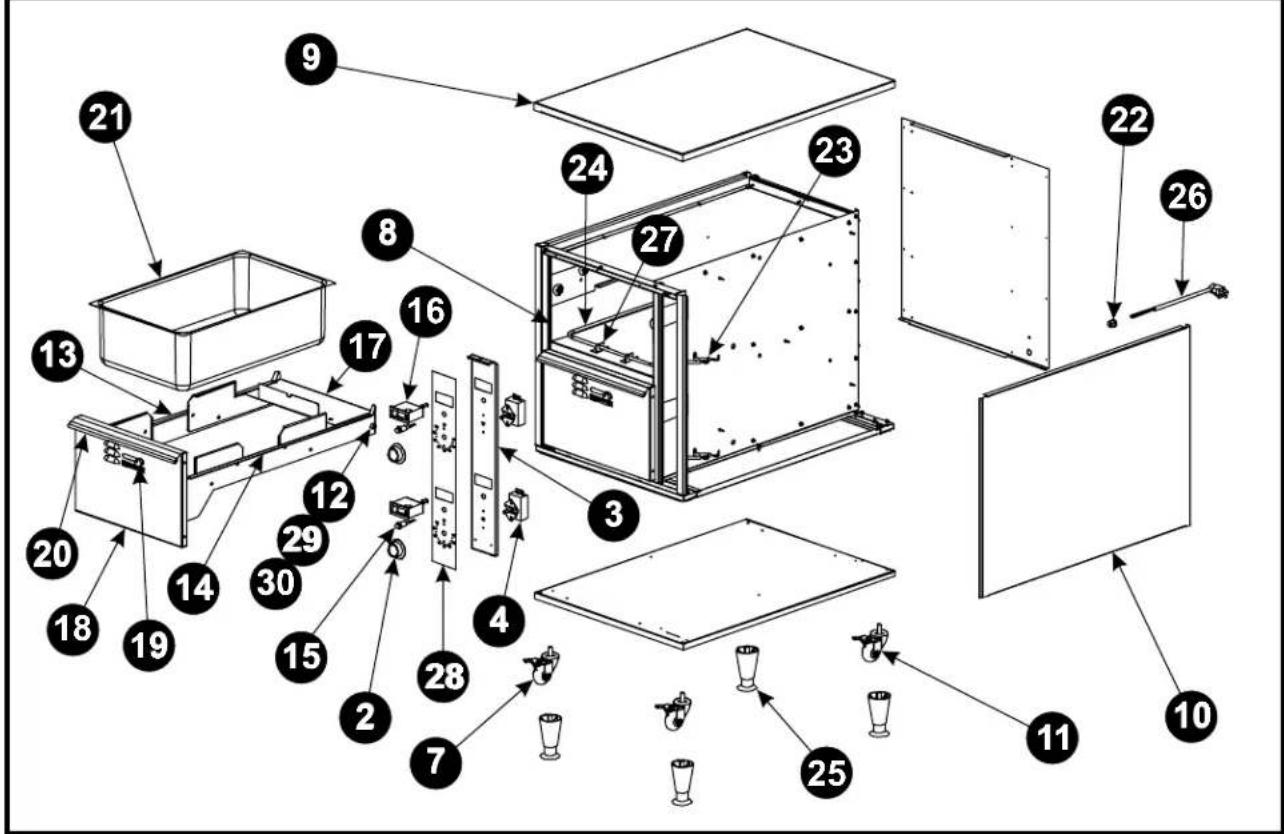
HDDS-L or C PARTS LIST
| ITEM | P/N | DESCRIPTION | ITEM | P/N | DESCRIPTION |
| 1 | N/A | Rating Label | |||
| 2 | 56505 | Thermostat Knob | 20 | 32483 | Drawer Handle Strip |
| 3 | 33351 | HDDS1 Control Panel | 21 | 33018 | Drawer Pan |
| 33387 | HDDS2 Control Panel | 22 | 89101 | Strain Relief, Bushing .625DD | |
| 33331 | HDDS3 Control Panel | 23 | 32402 | Element Bracket Large | |
| 4 | 69120 | Thermostat | 24 | 54114 | 120V Heating Element |
| N/S | 60113 | Insulation | 54115 | 208V Heating Element | |
| N/S | 33357 | HDDS1 Wire Set | 54116 | 240V Heating Element | |
| 33358 | HDDS2 Wire Set | 25 | 86295 | Legs 4" Black (Std) | |
| 33359 | HDDS3 Wire Set | 26 | 55970 | Cordset 16/3 SJTO | |
| 7 | 33907 | Caster Swivel Locking (Opt) | 85645 | Cordset 16/3 SJTO | |
| 8 | 32462 | HDDS1 Body Assembly | 27 | 32404 | Element Bracket |
| 32441 | HDDS2 Body Assembly | 28 | 58168 | HDDS1B Front Panel Poly | |
| 32468 | HDDS3 Body Assembly | 58169 | HDDS2B Front Panel Poly | ||
| 9 | 33360 | Top Cover | 58170 | HDDS3B Front Panel Poly | |
| 10 | 33352 | HDDS1 Side Outer Cover Panel | 29 | 88851 | Press Stud |
| 33392 | HDDS2 Side Outer Cover Panel | 30 | 89026 | Cap Nut | |
| 33332 | HDDS3 Side Outer Cover Panel | N/S | 33858 | Roller, Drawer Slide | |
| 11 | 33906 | Caster Fixed (Opt) | N/S | 88961 | Green Ground Nut |
| 12 | 88852 | Bushing, Bronze | N/S | 89071 | #10 Flat Washer |
| 13 | 32443 | Left Drawer Slide | N/S | 89076 | 1/4 Internal Star Washer |
| 14 | 32448 | Right Drawer Slide | N/S | 89163 | 1/4-20 SS Jam Nut |
| 15 | 56530 | Indicator Light | N/S | 88909 | 8-18 X 1/2 Sheet Metal Screw |
| 16 | 69145 | Thermometer | N/S | 89140 | Cable Tie |
| 17 | 32456 | Drawer Housing Assembly | N/S | 88894 | 1/4-20 MyT6 Press Stocknut |
| 18 | 33366 | Drawer Face Assembly | N/S | 89073 | 8 X 1/2 Screw |
| 19 | 89167 | Drawer Vent Knob | N/S | 88892 | 1/4-20 X 1 Flat Head SS |
HDDS-L or C EXPLODED VIEW
9. APW WYOTT EQUIPMENT LIMITED WARRANTY
APW Wyatt Foodservice Equipment Company warrants it's equipment against defects in materials and workmanship, subject to the following conditions:
This warranty applies to the original owner only and is not assignable.
Should any product fail to function in its intended manner under normal use within the limits defined in this warranty, at the option of APW Wyatt such product will be repaired or replaced by APW Wyatt or its Authorized Service Agency. APW Wyatt will only be responsible for charges incurred or service performed by its Authorized Service Agencies. The use of other than APW Wyatt Authorized Service Agencies will void this warranty and APW Wyatt will not be responsible for such work or any charges associated with same. The closest APW Wyatt Authorized Service Agent must be used.
This warranty covers products shipped into the 48 contiguous United States, Hawaii, metropolitan areas of Alaska and Canada. There will be no labor coverage for equipment located on any island not connected by roadway to the mainland.
Warranty coverage on products used outside the 48 contiguous United States, Hawaii, and metropolitan areas of Alaska and Canada may vary. Contact the international APW Wyatt distributor, dealer, or service agency for details.
Time Period
One year for parts and one year for labor, effective from the date of purchase by the original owner. The Authorized Service Agency may, at their option, require proof of purchase. Parts replaced under this warranty are warranted for the un-expired portion of the original product warranty only.
Exceptions
*Gas/Electric Cookline: Models GCB, GCRB, GF, GGM, GGT, CHP-H, EF, EG, EHP. Three (3) Year Warranty on all component parts, except switches and thermostats. (2 additional years on parts only. No labor on second or third year.)
*Broiler Briquettes, Rock Grates, CookingGrates, Burner Shields, Fireboxes: 90 Day Material Only. No Labor.
*Heat Strips: Models FD, FDL, FDD, FDDL. Two(2) Year Warranty on element only. No labor second year.
*Glass Windows, Doors, Seals, Rubber Seals, Light Bulbs: 90 Day Material Only. No Labor.
In all cases, parts covered by extended warranty will be shipped FOB the factory after the first year.
Portable Carry In Products
Equipment weighing over 70 pounds or permanently installed will be serviced on-site as per the terms of this warranty. Equipment weighing 70 pounds or under, and which is not permanently installed, i.e. with cord and plug, is considered portable and is subject to the following warranty handling limitations. If portable equipment fails to operate in its intended manner on the first day of connection, or use, at APW Wyatt's option or its Authorized Service Agency, it will be serviced on site or replaced.
From day two through the conclusion of this warranty period, portable units must be taken to or sent prepaid to the APW Wyatt Authorized Service Agency for in-warranty repairs. No mileage or travel charges are allowed on portable units after the first day of use. If the customer wants on-site service, they may receive same by paying the travel and mileage charges. Exceptions to this rule: (1) countertop warmers and cookers, which are covered under the Enhanced Warranty Program, and (2) toasters or rollergrills which have instore service.
Exclusions
The following conditions are not covered by warranty:
*Equipment failure relating to improper installation, improper utility connection or supply and problems due to ventilation.
*Equipment that has not been properly maintained, calibration of controls, adjustments, damage from improper cleaning and water damage to controls.
*Equipment that has not been used in an appropriate manner, or has been subject to misuse or misapplication, neglect, abuse, accident, alteration, negligence, damage during transit, delivery or installation, fire, flood, riot or act of god.
*Equipment that has the model number or serial number removed or altered.
If the equipment has been changed, altered, modified or repaired by other than an Authorized Service Agency during or after the warranty period, then the manufacturer shall not be liable for any damages to any person or to any property, which may result from the use of the equipment thereafter.
This warranty does not cover services performed at overtime or premium labor rates. Should service be required at times which normally involve overtime or premium labor rates, the owner shall be charged for the difference between normal service rates and such premium rates. APW Wyatt does not assume any liability for extended delays in replacing or repairing any items beyond its control.
In all cases, the use of other than APW Wyott Authorized OEM Replacement Parts will void this warranty.
This equipment is intended for commercial use only. Warranty is void if equipment is installed in other than commercial application.
Water Quality Requirements
Water supply intended for a unit that has in excess of 3.0 grains of hardness per gallon (GPG) must be treated or softened before being used. Water containing over 3.0 GPG will decrease the efficiency and reduce the operation life of the unit.
Note: Product failure caused by liming or sediment buildup is not covered under warranty.
"THE FOREGOING WARRANTY IS IN LIEU OF ANY AND ALL OTHER WARRANTIES EXPRESSED OR IMPLIED INCLUDING ANY IMPLIED WARRANTY OF MERCHANTABILITY OR FITNESS FOR PARTICULAR PURPOSES AND CONSTITUTES THE ENTIRE LIABILITY OF APW WYOTT. IN NO EVENT DOES THE LIMITED WARRANTY EXTEND BEYOND THE TERMS STATED HEREIN."
9/05
APW wyott
Toll Free: +1 (800) 527-2100
Website: www.apwwyott.com
E-mail: info@apwwyott.com
APW WYOTT
729 Third Avenue
Dallas, TX 75226

- HOLDING DRAWERS
- INTENDED FOR OTHER THAN HOUSEHOLD USE
- RETAIN THIS MANUAL FOR FUTURE REFERENCE UNIT MUST BE KEPT CLEAR OF COMBUSTIBLES AT ALL TIMES
- OWNER'S INFORMATION
- General Information:
- General Operation Instructions:
- Warranty Information:
- Reliability Backed By APW Wyott's Warranty:
- Service Information:
- SAFETY INFORMATION
- SPECIFICATIONS
- Cordset Configuration:
- OPERATION
- CLEANING
- General Cleaning Instructions:
- Daily Cleaning:
- TROUBLESHOOTING GUIDE
- Always ask and check the following:
- WIRING DIAGRAM
- PARTS LISTS & EXPLODED VIEWS
- APW WYOTT EQUIPMENT LIMITED WARRANTY
- Time Period
- Exceptions
- Portable Carry In Products
- Exclusions
- Water Quality Requirements
- APW wyott
Brand : APW Wyott
Model : HDDSi-2
Category : Warming Drawer